Panel: Error: Model 'panel.models.markup.HTML' does not exist.
System Info
Latest MASTER after release of Panel 9.5
My Pain
I'm working on some contributions to Panel. For example at https://github.com/holoviz/panel/pull/1157 and https://github.com/holoviz/panel/pull/1122.
- After having run
git pull holoviz masterto get the laster master from the holoviz github repo, - after upgrading bokeh to 2.01 (https://github.com/holoviz/panel/issues/1232)
- after running
panel build panel
panel serve no longer shows any thing in the browser.
If get error messages in the browser console like
console.trace() Error: "Model 'panel.models.markup.HTML' does not exist. This could be due to a widget or a custom model not being registered before first usage."
    Models http://localhost:5006/static/js/bokeh.js?v=a4e6427fa46908492038842d99d5a1aa:1303
    _instantiate_object http://localhost:5006/static/js/bokeh.js?v=a4e6427fa46908492038842d99d5a1aa:863
    _instantiate_references_json http://localhost:5006/static/js/bokeh.js?v=a4e6427fa46908492038842d99d5a1aa:879
    from_json http://localhost:5006/static/js/bokeh.js?v=a4e6427fa46908492038842d99d5a1aa:1110
    _repull_session_doc http://localhost:5006/static/js/bokeh.js?v=a4e6427fa46908492038842d99d5a1aa:36056
bokeh.js:36082:78
    _repull_session_doc http://localhost:5006/static/js/bokeh.js?v=a4e6427fa46908492038842d99d5a1aa:36082
[bokeh] Failed to repull session Error: Model 'panel.models.markup.HTML' does not exist. This could be due to a widget or a custom model not being registered before first usage. bokeh.js:36083:34
[bokeh] Failed to load Bokeh session NMQeF9cdOy3WO0iOFwl1BA0nnY1auiiYFn0gDi1bMtKy: Error: Model 'panel.models.markup.HTML' does not exist. This could be due to a widget or a custom model not being registered before first usage. bokeh.js:35924:30
Error rendering Bokeh items: Error: "Model 'panel.models.markup.HTML' does not exist. This could be due to a widget or a custom model not being registered before first usage."
    Models http://localhost:5006/static/js/bokeh.js?v=a4e6427fa46908492038842d99d5a1aa:1303
    _instantiate_object http://localhost:5006/static/js/bokeh.js?v=a4e6427fa46908492038842d99d5a1aa:863
    _instantiate_references_json http://localhost:5006/static/js/bokeh.js?v=a4e6427fa46908492038842d99d5a1aa:879
    from_json http://localhost:5006/static/js/bokeh.js?v=a4e6427fa46908492038842d99d5a1aa:1110
    _repull_session_doc http://localhost:5006/static/js/bokeh.js?v=a4e6427fa46908492038842d99d5a1aa:36056

Solution
I don't know how to solve this so instructions on how to solve this would be very appreciated.
And if I could even understand what the problem is so that I can solve similar problems on my own in the future it would be nice.
 MarcSkovMadsen
All 37 comments
The issue is that the way extensions (like panel.js) are bundled on bokeh server has changed in bokeh 2.0.1. That said I can't reproduce your issue so I don't have a good way to figure out what's going wrong on your system.
 philippjfr
on 6 Apr 2020
philippjfr
on 6 Apr 2020
Based on your screenshot it seems like something isn't allowing the bokeh and panel scripts to be loaded from the server. Were you working on master or on your branches?
philippjfr
on 6 Apr 2020
First I was working on my branches. Then I tried creating a new branch from the Holoviz Master branch. The same problem in all cases.
MarcSkovMadsen
on 6 Apr 2020
I'm having this issue with 0.9.5 conda-forge release and Bokeh 2.0.1, so it's not only master.
 michaelaye
on 7 Apr 2020
michaelaye
on 7 Apr 2020
Could you try the PyViz release instead?
On Tue, 7 Apr 2020, 03:45 K.-Michael Aye, notifications@github.com wrote:
I'm having this issue with 0.9.5 conda-forge release and Bokeh 2.0.1, so
it's not only master.—
You are receiving this because you commented.
Reply to this email directly, view it on GitHub
https://github.com/holoviz/panel/issues/1233#issuecomment-610126162, or
unsubscribe
https://github.com/notifications/unsubscribe-auth/AAL2TM2QBD744Z7IKEO56DLRLKAU7ANCNFSM4MBCPTRA
.
philippjfr
on 7 Apr 2020
doing that now. interestingly, going back to Bokeh 2.0.0 didn't solve the issue either.
michaelaye
on 7 Apr 2020
Can reproduce now, same issue as https://github.com/holoviz/panel/issues/1235.
philippjfr
on 7 Apr 2020
yep, getting pyviz's panel 0.9.5 did the trick! What gives?
michaelaye
on 7 Apr 2020
and with pyviz' panel 0.9.5 it also works when going back to Bokeh 2.0.1. thanks!
michaelaye
on 7 Apr 2020
So @philippjfr . How do I solve this in development?
(What do you mean by trying the pyviz release?)
MarcSkovMadsen
on 7 Apr 2020
I just upgraded Panel to .095 in my local version of awesome-panel.org via pip install panel -U. I see the error here as well.
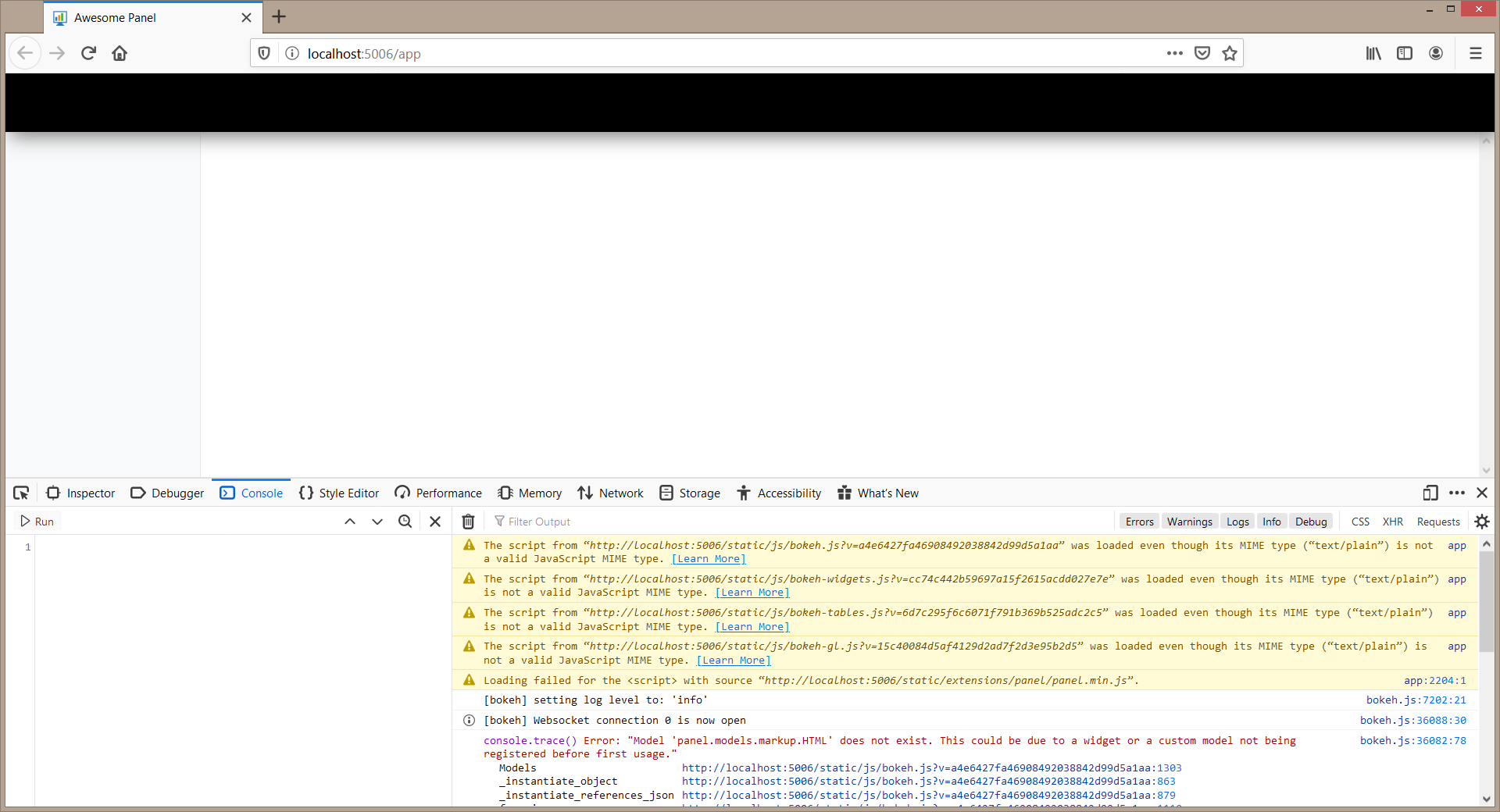
Additional Context
$ pip install panel -U
Collecting panel
  Using cached https://files.pythonhosted.org/packages/06/82/e44a39e480d58ae30abf40d2116d3f155bdac9a7aa4df59b5e60f43e009b/panel-0.9.5-py2
Collecting bokeh>=2.0.0 (from panel)
  Using cached https://files.pythonhosted.org/packages/45/83/20bd995c4d79f8947fb2c9b80fa729157300d252a63c412d0f5a4915ff07/bokeh-2.0.1.tar
Collecting pyviz-comms>=0.7.4 (from panel)
  Using cached https://files.pythonhosted.org/packages/d9/54/63c9354250320297b24afacdf3d381526a5a2f5430a2653c74ac72c49cc8/pyviz_comms-0.7
Requirement already satisfied, skipping upgrade: markdown in c:\repos\private\awesome-panel\.venv\lib\site-packages (from panel) (3.1.1)
Requirement already satisfied, skipping upgrade: pyct>=0.4.4 in c:\repos\private\awesome-panel\.venv\lib\site-packages (from panel) (0.4.
Collecting param>=1.9.3 (from panel)
  Using cached https://files.pythonhosted.org/packages/f8/47/d5e2b64b3edc260f3ec3001ab5a46291b75911f7f3e7aeeacd8d7823e13b/param-1.9.3-py2
Requirement already satisfied, skipping upgrade: tqdm in c:\repos\private\awesome-panel\.venv\lib\site-packages (from panel) (4.40.1)
Requirement already satisfied, skipping upgrade: PyYAML>=3.10 in c:\repos\private\awesome-panel\.venv\lib\site-packages (from bokeh>=2.0.
Requirement already satisfied, skipping upgrade: python-dateutil>=2.1 in c:\repos\private\awesome-panel\.venv\lib\site-packages (from bok
Requirement already satisfied, skipping upgrade: Jinja2>=2.7 in c:\repos\private\awesome-panel\.venv\lib\site-packages (from bokeh>=2.0.0
Requirement already satisfied, skipping upgrade: numpy>=1.11.3 in c:\repos\private\awesome-panel\.venv\lib\site-packages (from bokeh>=2.0
Requirement already satisfied, skipping upgrade: pillow>=4.0 in c:\repos\private\awesome-panel\.venv\lib\site-packages (from bokeh>=2.0.0
Requirement already satisfied, skipping upgrade: packaging>=16.8 in c:\repos\private\awesome-panel\.venv\lib\site-packages (from bokeh>=2
Requirement already satisfied, skipping upgrade: tornado>=5 in c:\repos\private\awesome-panel\.venv\lib\site-packages (from bokeh>=2.0.0-
Requirement already satisfied, skipping upgrade: typing_extensions>=3.7.4 in c:\repos\private\awesome-panel\.venv\lib\site-packages (from
Requirement already satisfied, skipping upgrade: setuptools>=36 in c:\repos\private\awesome-panel\.venv\lib\site-packages (from markdown-
Requirement already satisfied, skipping upgrade: six>=1.5 in c:\repos\private\awesome-panel\.venv\lib\site-packages (from python-dateutil
Requirement already satisfied, skipping upgrade: MarkupSafe>=0.23 in c:\repos\private\awesome-panel\.venv\lib\site-packages (from Jinja2>
Requirement already satisfied, skipping upgrade: pyparsing>=2.0.2 in c:\repos\private\awesome-panel\.venv\lib\site-packages (from packagi
Building wheels for collected packages: bokeh
  Building wheel for bokeh (setup.py) ... done
  Stored in directory: C:\Users\masma\AppData\Local\pip\Cache\wheels\de\64\d0\e7f70919e19f57a6efceb65cc4edaa0449e707bcdb6e7e61ad
Successfully built bokeh
Installing collected packages: bokeh, param, pyviz-comms, panel
  Found existing installation: bokeh 1.4.0
    Uninstalling bokeh-1.4.0:
      Successfully uninstalled bokeh-1.4.0
  Found existing installation: param 1.9.2
    Uninstalling param-1.9.2:
      Successfully uninstalled param-1.9.2
  Found existing installation: pyviz-comms 0.7.3
    Uninstalling pyviz-comms-0.7.3:
      Successfully uninstalled pyviz-comms-0.7.3
  Found existing installation: panel 0.8.0
    Uninstalling panel-0.8.0:
      Successfully uninstalled panel-0.8.0
Successfully installed bokeh-2.0.1 panel-0.9.5 param-1.9.3 pyviz-comms-0.7.4
That's for the released version, conda -c pyviz panel. I still don't quite know what is going on, in certain cases the panel.js does not include this section:
> "4e90918c0a": /* index.js */ function _(require, module, exports) {
>     Object.defineProperty(exports, "__esModule", { value: true });
>     const tslib_1 = require("tslib");
>     const Panel = tslib_1.__importStar(require("22ae8fda70") /* ./models */);
>     exports.Panel = Panel;
>     const base_1 = require("@bokehjs/base");
>     base_1.register_models(Panel);
> },
which is what actually registers the extension, it's also what's breaking conda-forge package.
philippjfr
on 7 Apr 2020
Ok. I'm not using conda so I have solved the problem for awesome-panel.org by downgrading to 0.9.4 via pip install panel==0.9.4 bokeh==2.0.0 holoviews==1.13.2.
Thanks.
MarcSkovMadsen
on 7 Apr 2020
@mattpap Any idea what might be going on here? I really can't figure it out, certain environment seem to compile panel.js without the section above. I haven't been able to reproduce what environment that is though.
philippjfr
on 7 Apr 2020
No idea, but I will investigate. This shouldn't happen, but given high variability of platforms and system setups, it's not impossible.
 mattpap
on 7 Apr 2020
mattpap
on 7 Apr 2020
The problem with conda-forge's panel package is that it is miscompiled (the number of files should be 28; panel/index.ts is missing) and contains duplicated panel/dist contents. I fixed the former in PR #1239. This will also "fix" the later, which is caused by conda-forge using a pip package that already contains panel/dist and then compiling panel.js again.
mattpap
on 7 Apr 2020
bokeh build didn't complain, because of TypeScript compiler's flexibility in resolving files, which perhaps could be considered a bug, given panel's tsconfig.json setup. However, we can fix this in panel (and in general in all extensions), by using more explicit file inclusion policy in tsconfigs (always specify the entry point index.ts explicitly).
mattpap
on 7 Apr 2020
Thanks @mattpap, I'm patching the conda-forge recipe now. That said this doesn't fully explain what's happening in this issue, @MarcSkovMadsen is compiling panel locally in his dev install where panel/index.ts should definitely be present. @MarcSkovMadsen would you mind sending me your panel/dist/panel.js file after compiling so I can see what's different about your build?
philippjfr
on 7 Apr 2020
would you mind sending me your
panel/dist/panel.js
tree panel/dist would be also useful.
mattpap
on 7 Apr 2020
Also piece of advice that should really be a part of bokeh's documentation regarding extensions (https://github.com/bokeh/bokeh/issues/9523). If one builds extensions locally and observers weird or otherwise hard to explain behavior, rebuild an extension from scratch and try again, because it may be just a miscomilation issue. Use bokeh build --rebuild (or panel's equivalent). In rare cases, one may need to remove dist/ and node_modules/ directories (or git clean -dfx panel/), and in even rarer cases issue npm cache clear --force. Using --rebuild may be necessary when there were substantial changes e.g. to package layout (e.g. when jumping between distant branches), that may be hard for bokeh build to detect on its own.
mattpap
on 7 Apr 2020
Thanks, let's capture that in Panel dev docs as well.
philippjfr
on 7 Apr 2020
@MarcSkovMadsen Do those instructions resolve your issues?
The patched conda-forge release is now up: https://github.com/conda-forge/panel-feedstock/pull/24
philippjfr
on 7 Apr 2020
Ok. I'm not using
condaso I have solved the problem for awesome-panel.org by downgrading to0.9.4viapip install panel==0.9.4 bokeh==2.0.0 holoviews==1.13.2.Thanks.
This also seems to have fixed my issues. Thanks
 bmenounos
on 7 Apr 2020
bmenounos
on 7 Apr 2020
@mattpap
I've created a new branch from the holoviz master branch and then run panel build panel
Regarding tree panel/dist I'm on Windows 8.1 so I don't know if it works as you would expect. Instead I have
(base) C:\repos\private\panel\panel\dist>dir /b /s /a:-D > dirlisting.txt & more dirlisting.txt
C:\repos\private\panel\panel\dist\dirlisting.txt
C:\repos\private\panel\panel\dist\panel.js
C:\repos\private\panel\panel\dist\panel.js.map
C:\repos\private\panel\panel\dist\panel.json
C:\repos\private\panel\panel\dist\panel.min.js
C:\repos\private\panel\panel\dist\panel.min.js.map
C:\repos\private\panel\panel\dist\lib\index.d.ts
C:\repos\private\panel\panel\dist\lib\index.js
C:\repos\private\panel\panel\dist\lib\index.js.map
C:\repos\private\panel\panel\dist\lib\models\ace.d.ts
C:\repos\private\panel\panel\dist\lib\models\ace.js
C:\repos\private\panel\panel\dist\lib\models\ace.js.map
C:\repos\private\panel\panel\dist\lib\models\audio.d.ts
C:\repos\private\panel\panel\dist\lib\models\audio.js
C:\repos\private\panel\panel\dist\lib\models\audio.js.map
C:\repos\private\panel\panel\dist\lib\models\comm_manager.d.ts
C:\repos\private\panel\panel\dist\lib\models\comm_manager.js
C:\repos\private\panel\panel\dist\lib\models\comm_manager.js.map
C:\repos\private\panel\panel\dist\lib\models\deckgl.d.ts
C:\repos\private\panel\panel\dist\lib\models\deckgl.js
C:\repos\private\panel\panel\dist\lib\models\deckgl.js.map
C:\repos\private\panel\panel\dist\lib\models\file_download.d.ts
C:\repos\private\panel\panel\dist\lib\models\file_download.js
C:\repos\private\panel\panel\dist\lib\models\file_download.js.map
C:\repos\private\panel\panel\dist\lib\models\html.d.ts
C:\repos\private\panel\panel\dist\lib\models\html.js
C:\repos\private\panel\panel\dist\lib\models\html.js.map
C:\repos\private\panel\panel\dist\lib\models\index.d.ts
C:\repos\private\panel\panel\dist\lib\models\index.js
C:\repos\private\panel\panel\dist\lib\models\index.js.map
C:\repos\private\panel\panel\dist\lib\models\json.d.ts
C:\repos\private\panel\panel\dist\lib\models\json.js
C:\repos\private\panel\panel\dist\lib\models\json.js.map
C:\repos\private\panel\panel\dist\lib\models\katex.d.ts
C:\repos\private\panel\panel\dist\lib\models\katex.js
C:\repos\private\panel\panel\dist\lib\models\katex.js.map
C:\repos\private\panel\panel\dist\lib\models\layout.d.ts
C:\repos\private\panel\panel\dist\lib\models\layout.js
C:\repos\private\panel\panel\dist\lib\models\layout.js.map
C:\repos\private\panel\panel\dist\lib\models\location.d.ts
C:\repos\private\panel\panel\dist\lib\models\location.js
C:\repos\private\panel\panel\dist\lib\models\location.js.map
C:\repos\private\panel\panel\dist\lib\models\mathjax.d.ts
C:\repos\private\panel\panel\dist\lib\models\mathjax.js
C:\repos\private\panel\panel\dist\lib\models\mathjax.js.map
C:\repos\private\panel\panel\dist\lib\models\player.d.ts
C:\repos\private\panel\panel\dist\lib\models\player.js
C:\repos\private\panel\panel\dist\lib\models\player.js.map
C:\repos\private\panel\panel\dist\lib\models\plotly.d.ts
C:\repos\private\panel\panel\dist\lib\models\plotly.js
C:\repos\private\panel\panel\dist\lib\models\plotly.js.map
C:\repos\private\panel\panel\dist\lib\models\progress.d.ts
C:\repos\private\panel\panel\dist\lib\models\progress.js
C:\repos\private\panel\panel\dist\lib\models\progress.js.map
C:\repos\private\panel\panel\dist\lib\models\pydeck.d.ts
C:\repos\private\panel\panel\dist\lib\models\pydeck.js
C:\repos\private\panel\panel\dist\lib\models\pydeck.js.map
C:\repos\private\panel\panel\dist\lib\models\state.d.ts
C:\repos\private\panel\panel\dist\lib\models\state.js
C:\repos\private\panel\panel\dist\lib\models\state.js.map
C:\repos\private\panel\panel\dist\lib\models\tooltips.d.ts
C:\repos\private\panel\panel\dist\lib\models\tooltips.js
C:\repos\private\panel\panel\dist\lib\models\tooltips.js.map
C:\repos\private\panel\panel\dist\lib\models\util.d.ts
C:\repos\private\panel\panel\dist\lib\models\util.js
C:\repos\private\panel\panel\dist\lib\models\util.js.map
C:\repos\private\panel\panel\dist\lib\models\vega.d.ts
C:\repos\private\panel\panel\dist\lib\models\vega.js
C:\repos\private\panel\panel\dist\lib\models\vega.js.map
C:\repos\private\panel\panel\dist\lib\models\video.d.ts
C:\repos\private\panel\panel\dist\lib\models\video.js
C:\repos\private\panel\panel\dist\lib\models\video.js.map
C:\repos\private\panel\panel\dist\lib\models\videostream.d.ts
C:\repos\private\panel\panel\dist\lib\models\videostream.js
C:\repos\private\panel\panel\dist\lib\models\videostream.js.map
C:\repos\private\panel\panel\dist\lib\models\web_component.d.ts
C:\repos\private\panel\panel\dist\lib\models\web_component.js
C:\repos\private\panel\panel\dist\lib\models\web_component.js.map
C:\repos\private\panel\panel\dist\lib\models\web_component_backup.d.ts
C:\repos\private\panel\panel\dist\lib\models\web_component_backup.js
C:\repos\private\panel\panel\dist\lib\models\web_component_backup.js.map
C:\repos\private\panel\panel\dist\lib\models\vtk\index.d.ts
C:\repos\private\panel\panel\dist\lib\models\vtk\index.js
C:\repos\private\panel\panel\dist\lib\models\vtk\index.js.map
C:\repos\private\panel\panel\dist\lib\models\vtk\vtk.d.ts
C:\repos\private\panel\panel\dist\lib\models\vtk\vtk.js
C:\repos\private\panel\panel\dist\lib\models\vtk\vtk.js.map
C:\repos\private\panel\panel\dist\lib\models\vtk\vtkaxes.d.ts
C:\repos\private\panel\panel\dist\lib\models\vtk\vtkaxes.js
C:\repos\private\panel\panel\dist\lib\models\vtk\vtkaxes.js.map
C:\repos\private\panel\panel\dist\lib\models\vtk\vtkvolume.d.ts
C:\repos\private\panel\panel\dist\lib\models\vtk\vtkvolume.js
C:\repos\private\panel\panel\dist\lib\models\vtk\vtkvolume.js.map
C:\repos\private\panel\panel\dist\lib\models\vtk\vtk_layout.d.ts
C:\repos\private\panel\panel\dist\lib\models\vtk\vtk_layout.js
C:\repos\private\panel\panel\dist\lib\models\vtk\vtk_layout.js.map
C:\repos\private\panel\panel\dist\lib\models\vtk\vtk_utils.d.ts
C:\repos\private\panel\panel\dist\lib\models\vtk\vtk_utils.js
C:\repos\private\panel\panel\dist\lib\models\vtk\vtk_utils.js.map
Furthermore I've attached my panel.js file. (Had to rename to panel.txt to upload).
MarcSkovMadsen
on 9 Apr 2020
Also piece of advice that should really be a part of bokeh's documentation regarding extensions (bokeh/bokeh#9523). If one builds extensions locally and observers weird or otherwise hard to explain behavior, rebuild an extension from scratch and try again, because it may be just a miscomilation issue. Use
bokeh build --rebuild(or panel's equivalent). In rare cases, one may need to removedist/andnode_modules/directories (orgit clean -dfx panel/), and in even rarer cases issuenpm cache clear --force. Using--rebuildmay be necessary when there were substantial changes e.g. to package layout (e.g. when jumping between distant branches), that may be hard forbokeh buildto detect on its own.
- I've tried
panel build panel --rebuildthat does not change the problem. - I've tried deleting the
distfolder andnode_modulesand then runpanel build panel --rebuildthat does not change the problem. - I've tried deleting the
distfolder andnode_modules, runnpm cache clear --forceand then runpanel build panel --rebuildthat does not change the problem.
Is there more I could and should try @mattpap ?
MarcSkovMadsen
on 9 Apr 2020
Wonder if this is somehow a windows issue. Will test on both platforms later.
philippjfr
on 9 Apr 2020
@maximlt What platform do you use? Looks like Windows too based on your output. So that's my current guess.
philippjfr
on 9 Apr 2020
On wondows I have same issue.
Everything works on notebook but when I use
pn.panel('test').show() for example I have the issue
Error: Model 'panel.models.markup.HTML' does not exist
by setting inline ressources It works again
 xavArtley
on 9 Apr 2020
xavArtley
on 9 Apr 2020
@philippjfr Yes I use Windows, Windows 10 exactly.
 maximlt
on 9 Apr 2020
maximlt
on 9 Apr 2020
It's a bug in bokeh (unrelated to building extensions). Fix is available in PR https://github.com/bokeh/bokeh/pull/9901.
mattpap
on 9 Apr 2020
Hi @mattpap . Awesome.
Is there some way I can get the fix in so that I can start to contribute to Panel again? Or will I have to wait for a new release of Bokeh?
MarcSkovMadsen
on 9 Apr 2020
Just to add that I've patched bokeh in my env with the changes suggested in the PR (it's just a few changes), rebuilt everything and it worked well! :)
maximlt
on 10 Apr 2020
Thanks for testing. Good to know it's working for you. The new bokeh should be released early next week.
philippjfr
on 10 Apr 2020
Is there some way I can get the fix in so that I can start to contribute to Panel again? Or will I have to wait for a new release of Bokeh?
You can set BOKEH_RESOURCES=inline as an environment variable for now.
philippjfr
on 10 Apr 2020
BOKEH_RESOURCES=inline works for me
MarcSkovMadsen
on 11 Apr 2020
Bokeh 2.0.2 which fixes the issues now available on pypi and the conda bokeh channel.
philippjfr
on 22 Apr 2020
I'm upgrading to 0.9.5 bokeh 2.0.2 and I still have this issue even after using MarcSkovMadsen env variable.
I've opted for upgrading to 0.9.4 and bokeh 2.0.0 as he suggested on April 6 and that works fine for me.
 lastmeta
on 9 Jun 2020
lastmeta
on 9 Jun 2020
Related issues
 davidpasquale
·
7Comments
davidpasquale
·
7Comments
 joelostblom
·
3Comments
MarcSkovMadsen
·
5Comments
joelostblom
·
3Comments
MarcSkovMadsen
·
5Comments
 kcpevey
·
4Comments
MarcSkovMadsen
·
3Comments
kcpevey
·
4Comments
MarcSkovMadsen
·
3Comments
Most helpful comment
Ok. I'm not using
condaso I have solved the problem for awesome-panel.org by downgrading to0.9.4viapip install panel==0.9.4 bokeh==2.0.0 holoviews==1.13.2.Thanks.