Pandoc: Combination of default files with metadata files does not work, --defaults, metadata-files
BLUF
In the current pandoc version 2.9.2 (under arch linux, TeXLive 2019), there seems to be a problem when combining a default file with a metadata file. At least with regard to the variables lang, title, and author.
If you use the --defaults option, then the variable title and author (and all other variables) specified in the metadata file will have no effect. The path to the metadata file is referred to with metadata-files in the default file. Additionally, the lang variable, specified in the default file or the metadata file does not work.
Definitely closely related issues are: #5990, #6142, #6099.
TL;DR
If you have the default file report.yaml (located in the /defaults/ directory) containing:
from: markdown
to: pdf
output-file: test.pdf
input-files:
- test.md
metadata-files:
- metadata.yaml
table-of-contents: true
pdf-engine: xelatex
lang: de
And a metadata file: metadata.yaml containing:
title: "Testing"
author: "Jane Doe"
...
And a markdown file test.md containing:
# Section
Lorem ipsum mollit ea laborum esse dolore.

## Subsection
Do cupidatat mollit ea minim laborum exercitation aute laborum nisi reprehenderit sint.
And run: pandoc --defaults report
You get the following PDF output (no errors):
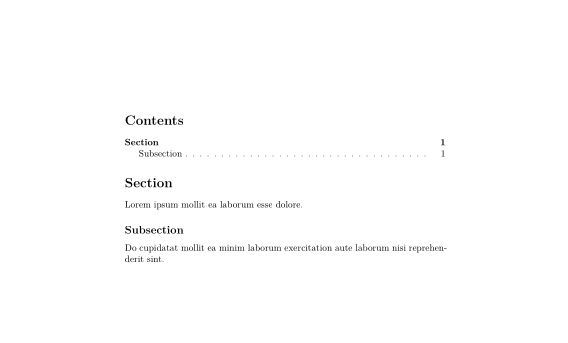
The received output does not contain the title and does not contain the author as specified in metadata.yaml. Furthermore, the language specified in report.yaml as lang: de does not have an effect.
The expected PDF output is:
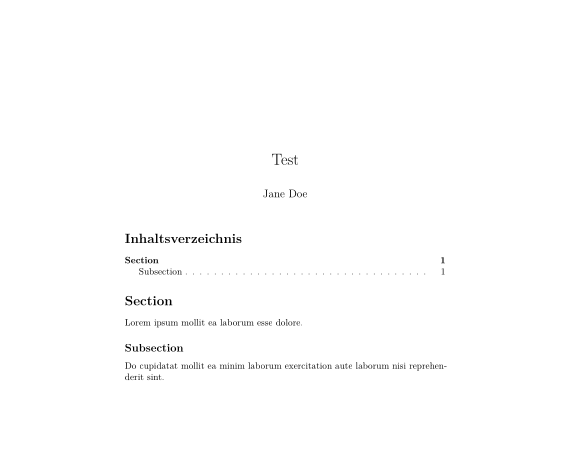
The expected output contains the title and the author. Additionally, the table of contents is displayed as specified in the report.yaml with lang: de, i.e. the German variant of “Table of Contents”: ”Inhaltsverzeichnis“.
Yet, the expected output can be achieved by running:
pandoc -o test.pdf test.md -V lang:de -V toc=true
Possible cause (confusion)
The problem might be due to my own confusion regarding the default files. The pandoc manual on default files states that,
“[t]he --defaults option may be used to specify a package of options.”
In my understanding that means, the default files conveniently can contain options or variables that should normally be passed as a long parameter list. The metadata files contain variables like title, doi, author etc. The default files contain for example the lang: variable or the pdf-engine: variable. For example, it makes sense to me that the bibliography path should belong in the defaults file (see #6099).
But it is confusing that the pandoc manual on default files also gives an example, where metadata options are specified:
# metadata values specified here are parsed as literal
# string text, not markdown:
metadata:
  author:
  - Sam Smith
  - Julie Liu
This is confusing, because, as the name suggests, metadata belongs to the corresponding metadata file. You can specify the path to the metadata files with metadata-files:. Yet, this does not work as explained above.
In any case the variables from the metadata file should be accepted, as well as variables from the default file—especially in combination. If this is not the case by an unknown design decision, then the pandoc manual on default files should make it clearer what exactly the defaults file can contain and what the metadata files can contain (see #5990)—and how they interact (see #6142).
 periodicpoint
All 6 comments
the pandoc manual on default files should make it clearer what exactly the defaults file can contain and what the metadata files can contain.
I can relate to your confusion, but I'm not sure how the manual could be made clearer. The very next sentence after the one you quoted from the pandoc manual on default files says
Here is a sample defaults file demonstrating all of the fields that may be used
and the description of the --metadata-file states
Generally, the input will be handled the same as in YAML metadata blocks.
Nevertheless, suggestions for specific improvements are of course always welcome, especially in the form of pull requests.
 tarleb
on 21 Mar 2020
tarleb
on 21 Mar 2020
@tarleb, thank you very much for your quick response. Yes, you are right, the manual states this, too. I do understand that you can point to the metadata files even within your defaults file via --metadata-file. This is exactly what I want to achieve. Yet, it is not working.
(The point that is unclear, in my opinion, is that there is no clear distinction between parameters and meta-data in this approach. Which in most cases is probably not a problem. However, the uncertainty becomes obvious at the latest when trying to find the issue.)
However, this is not the main point I wanted to make, but that the combination of defaults and metadata described above does not work. The problem described above remains. Please correct me if I miss something.
periodicpoint
on 21 Mar 2020
lang isn't a valid field in a defaults file. (Put this in variables or better, in your metadata file.)
When I try with your defaults file, I get:
% pandoc -d report.yaml
Error parsing report.yaml line 10 column 0:
Unknown option "lang"
You're putting it in the defaults directory of the user data file; why don't you eliminate that variable and just specify the full path to the defaults file as I did, and see if you get the same result. Without lang it works fine for me.
 jgm
on 21 Mar 2020
jgm
on 21 Mar 2020
@jgm, thank you so much for the clarification:
langisn't a valid field in a defaults file.
This solved the issue.
BTW: Absolute and relative paths both work equally well.
@tarleb, @jgm, thanks for your time, I really appreciate it.
periodicpoint
on 22 Mar 2020
The objective of the defaults file is to separate data that contributes to the semantic content of the document but is not part of text or headers, which is the strict and proper characterization of metadata, from data that determines how the application processes the transformation of a document and might suitably be applied to any other document of comparable structure. Although the enhancements created so far have not achieved this objective to the maximal possible extent, they are best understood in this context. Perhaps an earlier introduction of the conceptual distinction would aid comprehension as well as limit the possibility of the kind of misunderstanding expressed by the user.
 brainchild0
on 9 Apr 2020
brainchild0
on 9 Apr 2020
I believe this had been resolved. Closing.
tarleb
on 9 Apr 2020
Related issues
 RyanGreenup
·
4Comments
RyanGreenup
·
4Comments
 georgewsinger
·
4Comments
georgewsinger
·
4Comments
 XiaTeng1993
·
3Comments
XiaTeng1993
·
3Comments
 krobelus
·
4Comments
krobelus
·
4Comments
 cnblogs-dudu
·
5Comments
cnblogs-dudu
·
5Comments
Most helpful comment
langisn't a valid field in a defaults file. (Put this invariablesor better, in your metadata file.)When I try with your defaults file, I get:
You're putting it in the defaults directory of the user data file; why don't you eliminate that variable and just specify the full path to the defaults file as I did, and see if you get the same result. Without
langit works fine for me.