Pandoc: HTML->docx <br> compatibility issues with Word Online (again)
I'm very greatful for all help with issue #5358. The converted files html->docx now opens editable in Word Online!
There is however another compatibility problem now with Word Online. When there is a br-tag in the HTML, it doesn't show as a new line, but instead converts to something Word Online calls [Text Wrapping Break] and the tool tip says it can't be displayed in Word Online but must be seen and edited in the Word app. See screenshot:

How to test this
To test this, create a sample file, input.html with the following text:
Test line 1<br/><br/>Test line 2
Then run
pandoc -o output.docx input.html
Upload output.docx to OneDrive and open it in Word Online. The file then looks like this:

I'm happy to supply any testers with O365 log ins tied to my developer account to test this! Just give me an email and I'll give you an account.
 fjellandermedia
All 8 comments
Can you post a docx file with line-breaks (not a new paragraph) that can be opened in word online? (or just post the relevant XML). Basically, what is inserted when you hit Alt-Enter, or maybe it's Shift-Enter or something in Word online.
 mb21
on 19 Mar 2019
mb21
on 19 Mar 2019
Sure! Here is the file:
Document1.docx
fjellandermedia
on 20 Mar 2019
So this works in Word Online?
The difference I see is that it has
<w:r><w:br /></w:r
where pandoc has
<w:r><w:br w:type="textWrapping" /></w:r>
According to the documentation, textWrapping is the default type for br, so we should be able to omit the attribute, if it makes a difference.
@fjellandermedia if you are able to edit the document.xml inside the docx created by pandoc (it's just a zip file with docx extension) you could try remove the w:type="textWrapping", resaving, and seeing if it works then in Word Online.
 jgm
on 21 Mar 2019
jgm
on 21 Mar 2019
@fjellandermedia if you are able to edit the document.xml inside the docx created by pandoc (it's just a zip file with docx extension) you could try remove the w:type="textWrapping", resaving, and seeing if it works then in Word Online.
Yes, that works! If I edit out w:type="textWrapping the document looks fine in Word Online. Nice that it is such an easy fix.
fjellandermedia
on 21 Mar 2019
I thought this looked like a problem with Word Online not supporting their own format (it kind of is).
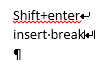
However playing around with my local Word, I saw that a manual line break Shift+Enter yields <w:br/> internally. BUT manually inserting an object wrapping break (Insert -> wrapping break) yields
<w:br w:type="textWrapping" w:clear="all"/>
which seems to be unsupported on Word Online.
Local Word (notice the different break symbols):
Word Online:
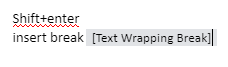
Since they are slightly different things, I'd tend to make pandoc use the "manual linebreak" option.
From https://word.tips.net/T000183_Adding_a_Break_to_Your_Document.html
Text-wrapping breaks. These breaks, which are not available in Word 97, are closely akin to line breaks (Shift+Enter). A text-wrapping break breaks a line of text and moves the text to the next line. This type of break is intended for use with text that wraps around graphics.
 agusmba
on 21 Mar 2019
agusmba
on 21 Mar 2019
Since they are slightly different things, I'd tend to make pandoc use the "manual linebreak" option.
Ah, I didn't notice that there were two different types! But it seems smart to use the "manual linebreak" in pandoc. Mostly because it's the most widely supported break, but also because it's most likely that what's in the source document.
fjellandermedia
on 21 Mar 2019
Perhaps I was misled by this
http://officeopenxml.com/WPtextSpecialContent-break.php
which says that type="textWrapping" is the default.
See also
http://www.datypic.com/sc/ooxml/t-w_ST_BrType.html
But if we have learned empirically that br behaves differently when this type is explicitly specified, we can leave it off.
jgm
on 21 Mar 2019
@jgm you were not misled, actually, <w:br w:type="textWrapping" w:clear="none"/> and </w:br> seem to be equivalent (in local Word):
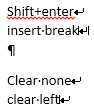
And even the first longer form gets converted into the second simpler form when saving in local Word.
However Word Online definitely does not support any br with the explicit textWrapping type:
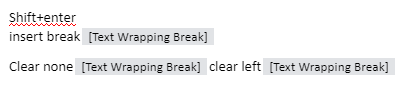
It's a problem of W.O. supporting only a subset of docx, but if we can use the equivalent short form for br we'll be fine.
agusmba
on 22 Mar 2019
Related issues
 cnblogs-dudu
·
5Comments
cnblogs-dudu
·
5Comments
 chrissound
·
4Comments
chrissound
·
4Comments
 timtroendle
·
3Comments
timtroendle
·
3Comments
 acate
·
3Comments
acate
·
3Comments
 timjb
·
5Comments
timjb
·
5Comments
Most helpful comment
I thought this looked like a problem with Word Online not supporting their own format (it kind of is).
However playing around with my local Word, I saw that a manual line break
Shift+Enteryields<w:br/>internally. BUT manually inserting an object wrapping break (Insert -> wrapping break) yieldswhich seems to be unsupported on Word Online.
Local Word (notice the different break symbols):
Word Online:
Since they are slightly different things, I'd tend to make pandoc use the "manual linebreak" option.
From https://word.tips.net/T000183_Adding_a_Break_to_Your_Document.html