Pandoc: -t ipynb not capturing output with some HTML in 2.7
Been playing around with ipynb conversion in the latest pandoc (2.7, running on Ubuntu), and noticed a little bug:
Markdown -> ipynb conversion seems to miss cells that contain some kinds of HTML. For example, when converted to ipynb, this markdown:
::: {.cell .code execution_count="5"}
``` {.python}
# NO CODE
import pandas as pd
pd.DataFrame([['hi', 'there'], ['this', 'is'], ['a', 'DataFrame']], columns=['Word A', 'Word B'])
```

::: {.output .execute_result execution_count="5"}
<div>
<style scoped>
    .dataframe tbody tr th:only-of-type {
        vertical-align: middle;
    }

    .dataframe tbody tr th {
        vertical-align: top;
    }

    .dataframe thead th {
        text-align: right;
    }
</style>
<table border="1" class="dataframe">
  <thead>
    <tr style="text-align: right;">
      <th></th>
      <th>Word A</th>
      <th>Word B</th>
    </tr>
  </thead>
  <tbody>
    <tr>
      <th>0</th>
      <td>hi</td>
      <td>there</td>
    </tr>
    <tr>
      <th>1</th>
      <td>this</td>
      <td>is</td>
    </tr>
    <tr>
      <th>2</th>
      <td>a</td>
      <td>DataFrame</td>
    </tr>
  </tbody>
</table>
</div>
:::
:::
is converted as a single markdown-style input cell, rather than a code input and HTML output cell. For example, when the markdown just contains the input code, it renders as:

but when it contains both the input and the output cells (as above) then it renders like:
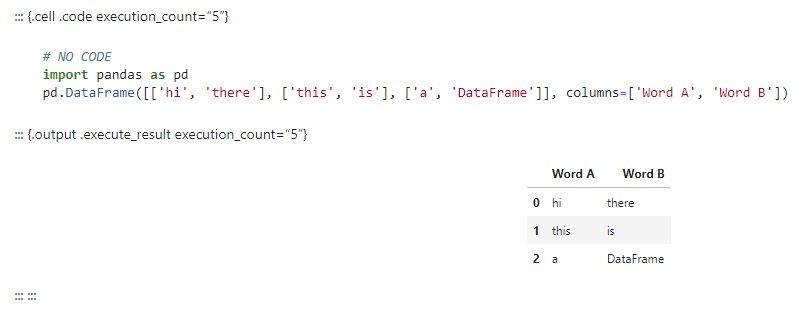
Other output types seem to be OK (e.g., an folium map that outputs an interactive map).
 choldgraf
All 15 comments
Interesting, this may be a markdown parser issue -- some kind of interaction between parsing the raw HTML block and parsing the fenced div? If you put all of the HTML inside a raw block, it works as expected.
`
{=html}
| Word A | Word B | |
|---|---|---|
| 0 | hi | there |
| 1 | this | is |
| 2 | a | DataFrame |
```
````
 jgm
on 6 Mar 2019
jgm
on 6 Mar 2019
Wow, this is really weird. Pandoc doesn't recognize this
::: {.output .execute_result execution_count="5"}

<table border="1" class="dataframe">
  <tr>
    <td>hi</td>
    <td>there</td>
  </tr>
</table>

:::
as a fenced div. But if you remove the indentation on the HTML elements, it works...
jgm
on 6 Mar 2019
Here's an even smaller pair:
::: {.output}
<table>
 <tr>
  <td>hi</td>
 </tr>
</table>
:::
does not get recognized, but
::: {.output}
<table>
 <tr>
  <td>hi</td>
</tr>
</table>
:::
does.
jgm
on 6 Mar 2019
that is pretty interesting, I didn't realize indentation was used at all for parsing html...I guess it's a markdown/embedded html interaction as you showed above
choldgraf
on 6 Mar 2019
I will try to fix all of this; it has to do with pandoc's support for markdown inside block-level HTML tags. In the mean time, I recommend the following to work around it:
pandoc -t ipynb -f markdown-markdown_in_html_blocks-native_divs --ipynb-output=all
I think a couple of related changes are called for:
- [ ] the bug above must be fixed
- [x]
--ipynb-output=best(the default) should include all data formats when you're going toipynb. - [x] we need to handle native Divs when they occur in output cells.
jgm
on 6 Mar 2019
See the issue5354 branch for some WIP on this
jgm
on 6 Mar 2019
OK, after a bit more reflection, I've realized that the sort of thing you're trying to do won't work. Inside the output cells, we need a 1-1 mapping of mime types and content, but with the markdown_in_html_blocks extension enabled, pandoc will parse your HTML table as an interleaved series of raw html blocks and plain paragraphs.
For this reason, it's important either to disable markdown_in_html_blocks or (my preference) to use the raw block syntax as suggested in my first comment above.
I can make a note of this in the documentation.
jgm
on 6 Mar 2019
I've made some improvements in output cell handling, so again you may want to hold off a bit on your blog post...
jgm
on 6 Mar 2019
no problem - part of the point of this blog post was to find pain points and bugs :-)
choldgraf
on 6 Mar 2019
am I correct that the end result will be "if you're using pandoc with ipynb, you should enable markdown_in_html_blocks? I don't think we'll be able to use the raw block syntax because those outputs are often programmatically generated, right? At least on the round-trip side, if the output has HTML in it we can wrap in an {.html} code block yeah?
One thing I wanna do is "how to write a pandoc-style text file so that it'll convert to a jupyter notebook" section...people often want their content to be in text format, not notebook format, so this is a helpful conversation!
choldgraf
on 6 Mar 2019
Disable markdown_in_html_blocks, not enable.
A couple thoughts:
We could modify the markdown writer so that, when
raw_attributeis enabled, it emits explicit raw blocks. That would be a behavior change that might surprise some people, but it would be easy enough to disable it by disabling the extension. This would give you better round-trip performance with ipynb.Disabling
markdown_in_html_blockswon't work by itself with your example. The reason is that, withnative_divsenabled, pandoc will parse the<div>as a native pandoc Div element, containing two RawBlocks. This doesn't work well with ipynb, which requires a 1-1 map between mime types and blocks. So you'd really need to disable bothmarkdown_in_html_blocksandnative_divs.pandoc -f markdown-markdown_in_html_blocks-native_divsshould work well with your original example.
jgm
on 6 Mar 2019
At least on the round-trip side, if the output has HTML in it we can wrap in an {.html} code block yeah?
No, this will be treated as code to be displayed verbatim, not rendered as HTML.
jgm
on 6 Mar 2019
right right, good point.
OK I'll keep exploring the conversion stuff in the coming days. I'm not convinced that there should be a technical change on the pandoc side (beyond bugfixes etc)...I generally try to see if we can fix at the documentation level first and see if users get frustrated, and if enough of them still do, then try technical fixes :-)
choldgraf
on 6 Mar 2019
Closing in favor of #5360 for the remaining, markdown reader issue.
jgm
on 10 Mar 2019
Related issues
 acate
·
3Comments
acate
·
3Comments
 cnblogs-dudu
·
5Comments
cnblogs-dudu
·
5Comments
 krobelus
·
4Comments
krobelus
·
4Comments
 eins78
·
5Comments
eins78
·
5Comments
 velimir
·
4Comments
velimir
·
4Comments