Pandoc: Pandoc 2.0 installer - no way to choose install path
When I try to update my pandoc version to pandoc 2.0 I can't choose the path. The advanced install option button is grayed out in MSI installer. I would like to install pandoc to a custom path. If this is like that only because I chose to install it for my user only it is still somehow false as I would expect that to only have an impact on registry stuff - not install path.
 GiantCrocodile
All 54 comments
Is this different from previous versions of the installer?
 jgm
on 16 May 2017
jgm
on 16 May 2017
I'm not sure but I dislike to be forced to install it on some fixed place on my disk @jgm .
GiantCrocodile
on 16 May 2017
@nkalvi any thoughts?
jgm
on 17 May 2017
I'll check it this week.
@GiantCrocodile Could you please provide us more details?
Windows version/edition etc.?
 nkalvi
on 17 May 2017
nkalvi
on 17 May 2017
@GiantCrocodile Allowing custom path for current user would require more checking of permissions - I think that's why I left it disabled. If it is a strong need for you, I could take a look at alternatives/improvements.
nkalvi
on 17 May 2017
Hm, why is it problematic to check for permissons? I would have expected the installer to be a complete solution so you don't have to bother with this yourself.
This happens on Windows 10 although it is for any Windows the same I think, simply because it is not implemented/enabled like you said.
I asked for this because I don't want to put software on my C:\ partition because software belongs in my situation to other partitions. This has backup- and general folder structure reasons. If this is too much work, it isn't that worse because pandoc is small. But if it grows in future, I would care of being able to change path.
GiantCrocodile
on 17 May 2017
@GiantCrocodile I was very new (still is) to WiX toolkit when I looked the installer. I'll see what can be done.
By the way, in your system a non-admin user can store files outside his/her profile area, right?
nkalvi
on 17 May 2017
Well ... I can't confirm atm because I forgot how Windows behaves usually with permissions. But I can tell you I'm the only admin here so I don't mind much :). Installer should ask for permissions if they are needed so I can confirm UAC dialog or cancel it.
GiantCrocodile
on 18 May 2017
@GiantCrocodile Thanks.
Installer does handle permissions correctly for admin installs.
I understand your case well - I'll take a look this weekend.
nkalvi
on 18 May 2017
@GiantCrocodile I'm sorry, I couldn't attend to it this weekend. Will try later in the week.
nkalvi
on 22 May 2017
Any news on this @nkalvi?
GiantCrocodile
on 26 Jun 2017
Sorry, haven't had a chance yet.
nkalvi
on 26 Jun 2017
I have a medium level problem now. I updated pandoc to v2.0.1.1 and I can't run the new version because the installer chose a different default path than v1 and thus my console just finds old pandoc version. This shouldn't happen just because there is a new default path and we can't change the install path to the old one.
GiantCrocodile
on 9 Nov 2017
Just curious, what directories are involved in your case?
I don't recall any such problems going back and forth between 1.9.x and 2.0-devel and later 2.0.x proper. Using Windows 7 Profesional, and Windows 10 Home.
 agusmba
on 9 Nov 2017
agusmba
on 9 Nov 2017
pandoc 1.19.2.1
Compiled with pandoc-types 1.17.0.4, texmath 0.9, skylighting 0.1.1.4
Default user data directory: C:\Users\<user>\AppData\Roaming\pandoc
pandoc v2:
C:\Users\<user>\AppData\Local\Pandoc
Mmmm, I don't have anything under C:\Users\<user>\AppData\Roaming\pandoc anymore, but I don't recall uninstalling anything, maybe the 2.0 installer took care of it?
agusmba
on 10 Nov 2017
@GiantCrocodile Hmm. I don't see any changes to default path in the installer, so I'm not sure why.
Is uninstalling both versions and installing the latest version feasible in your situation?
Also, could you please provide more detail about the system (masking any private info) by running these in a powershell:
dir env:
systeminfo
nkalvi
on 10 Nov 2017
Tomorrow I will try to remove both versions and install latest one and see if it helps me.
Below you will find requested info @nkalvi. I removed any sensible or not necessary information. If you miss something, just tell me.
dir env:
Name                           Value
----                           -----
ALLUSERSPROFILE                C:\ProgramData
APPDATA                        C:\Users\<user>\AppData\Roaming
CommonProgramFiles             C:\Program Files\Common Files
CommonProgramFiles(x86)        C:\Program Files (x86)\Common Files
CommonProgramW6432             C:\Program Files\Common Files
ComSpec                        C:\WINDOWS\system32\cmd.exe
HOMEDRIVE                      C:
HOMEPATH                       \Users\<user>
LOCALAPPDATA                   C:\Users\<user>\AppData\Local
OS                             Windows_NT
ProgramData                    C:\ProgramData
ProgramFiles                   C:\Program Files
ProgramFiles(x86)              C:\Program Files (x86)
ProgramW6432                   C:\Program Files
PSModulePath                   C:\Users\<user>\Documents\WindowsPowerShell\Modules;C:\Program Files\Window...
PUBLIC                         C:\Users\Public
SESSIONNAME                    Console
SystemDrive                    C:
SystemRoot                     C:\WINDOWS
TEMP                           C:\Users\<user>\AppData\Local\Temp
TMP                            C:\Users\<user>\AppData\Local\Temp
USERNAME                       <user>
USERPROFILE                    C:\Users\<user>
windir                         C:\WINDOWS
systeminfo:
Betriebssystemname:                            Microsoft Windows 10 Pro
Betriebssystemhersteller:                      Microsoft Corporation
Betriebssystemkonfiguration:                   Eigenständige Arbeitsstation
Betriebssystem-Buildtyp:                       Multiprocessor Free
Windows-Verzeichnis:                           C:\WINDOWS
System-Verzeichnis:                            C:\WINDOWS\system32
Startgerät:                                    \Device\HarddiskVolume2
Systemgebietsschema:                           de;Deutsch (Deutschland)
Eingabegebietsschema:                          de;Deutsch (Deutschland)
Zeitzone:                                      (UTC+01:00) Amsterdam, Berlin, Bern, Rom, Stockholm, Wien
Thank you @GiantCrocodile. I'll test this on a Windows 10 Pro system tomorrow.
nkalvi
on 10 Nov 2017
@GiantCrocodile I was able to test it only under Microsoft Windows 10 Enterprise (10.0.15063):
- Installed first version 1.19.2.1, and then 2.0.1.1
- Both were installed to
<user>\AppData\Local\Pandoc\ - Since installation path was same, only the latest version is found in the path.
So I'm not sure what happened in your case.
Were you logged into a domain when you installed the older version? I haven't tested that situation.
nkalvi
on 10 Nov 2017
@nkalvi No, I wasn't logged into a domain. I'm just using a local account. I upgraded my pandoc multiple times with different versions (not just these 2 updates) and it was all time fine with v1. In the past I also had to install a nightly version to approve that a bugfix was the solution for an issue I did report. So could it be related to some commit from a nightly version which was reverted and thus can't be found in current versions/master branch?
GiantCrocodile
on 10 Nov 2017
@GiantCrocodile May be. BTW, have you had a chance to uninstall the old version manually and install the new version?
nkalvi
on 10 Nov 2017
@nkalvi This would be my next question now. How can I remove the v1 version? I just checked my C:\Users\<user>\AppData\Roaming\pandoc path and it doesn't exist. In general I wasn't able to find any pandoc directory in AppData\Roaming or AppData\local. pandoc v2 has been removed.
GiantCrocodile
on 10 Nov 2017
@GiantCrocodile Could you run where pandoc in a command prompt and see where it is? Also, could you please check for any Pandoc entries under Add/Remove Programs in the control panel?
nkalvi
on 10 Nov 2017
There are no entries in Add/Remove Programs. I didn't know that where exists under Windows. I tried it and it shows me this: Z:\Software\Anaconda3\Scripts\pandoc.exe. Maybe Anaconda3 did mix up some things? Not sure why it does manage my pandoc installation. Mabye because of `conda update --all?
GiantCrocodile
on 10 Nov 2017
@GiantCrocodile Also check and post the result of set path (please remove and personal details).
Aha, that's the culprit :)
nkalvi
on 10 Nov 2017
@nkalvi pandoc isn't listed in set path output.
GiantCrocodile
on 10 Nov 2017
@GiantCrocodile But Z:\Software\Anaconda3\Scripts\ must be; otherwise where wouldn't list it.
nkalvi
on 10 Nov 2017
@GiantCrocodile Also, I'm not at all familiar with Anaconda - could you please check their docs as to how to install/remove/update packages?
nkalvi
on 10 Nov 2017
@nkalvi Anaconda3 has 3 entries. The question is - why did it take over my pandoc and why isn't pandoc v2 prefered by OS then? I can't remove Anaconda3 but I don't want it to manage pandoc too.
conda install -c conda-forge pandoc seem to work fine as a update solution - it will change the update channel.
GiantCrocodile
on 10 Nov 2017
>pandoc -v
pandoc 2.0.0.1
Compiled with pandoc-types 1.17.2, texmath 0.9.4.4, skylighting 0.4.2
Default user data directory: C:\Users\<user>\AppData\Roaming\pandoc
Copyright (C) 2006-2017 John MacFarlane
Web:  http://pandoc.org
This is free software; see the source for copying conditions.
There is no warranty, not even for merchantability or fitness
for a particular purpose.
@GiantCrocodile Pandoc installer appends its path to the existing path. So if Anaconda was installed prior to Pandoc, Anaconda's path with take precedence.
nkalvi
on 10 Nov 2017
@nkalvi I'm not sure, could be true that I did install Anaconda first and then pandoc. I don't remember clear enough to be sure.
Regardless that this was some kind of software conflict, I would still like to see a way to change the path of pandoc :). And I did appreciate your fast support regarding my problem, thanks alot!
GiantCrocodile
on 10 Nov 2017
@GiantCrocodile You're most welcome.
I have been tied up with other tasks lately and I haven't touched/updated my Windows dev machine for a while. So I won't be able to look into customizing the user installation path (as you know, the admin install permits it).
So far I haven't seen any issues with path being appended instead of prepended; I feel appending is a _safer_ option.
nkalvi
on 10 Nov 2017
@nkalvi What do you mean with So I won't be able to look into customizing the user installation path (as you know, the admin install permits it).? Do you mean that I could change the path of pandoc installation if I run it as an admin? I would like to change the path but I can't - it is grayed out. I can't run the file as admin, no option for this in context menu of Windows on the pandoc msi installer file.
GiantCrocodile
on 10 Nov 2017
@GiantCrocodile
- Start the installer and accept the license terms.
- Select Install for all users of this machine
- Then select Advanced - this will let you customize the path.
Sorry if I misunderstood your question.
nkalvi
on 10 Nov 2017
I think we found the issue here @nkalvi. I don't want to install pandoc for every user and thus I never did tick the checkbox. If you don't tick it, the installer won't run as an admin and you can't change the field. Is this a bug? I don't see a reason why I'm forced to install pandoc for every user if I want to change the path.
GiantCrocodile
on 10 Nov 2017
@GiantCrocodile
Allowing user installations to choose path will require additional permission checking - that is what I don't have time to do.
I wouldn't say it is a _bug_, may be a an _enhancement_. So far there haven't been many requesting it.
nkalvi
on 10 Nov 2017
Thanks for clarification about changing path with admin install. I will take this into account.
GiantCrocodile
on 10 Nov 2017
It would be great if you guys can add a feature that allows users to set up the path manually. For instance in Ubuntu 18.04.1, I am running into some similar issues as the pandoc path is automatically set up to the anaconda environment askubuntu
 manolo20
on 18 Oct 2018
manolo20
on 18 Oct 2018
@manolo20 This issue is about the Windows installer. For Linux, just grab the binary (or debian package) from https://github.com/jgm/pandoc/releases, it's much more up to date than the one's in the debian package manager.
 mb21
on 18 Oct 2018
mb21
on 18 Oct 2018
@mb21 Yes, sorry for deviating the issue to Linux. Similar to @GiantCrocodile my problem is linked to the anaconda environment. My comment was just to let the developers know that it would be great to add the feature that I mentioned in my previous comment, although as nkalvi already said adding this feature will require some time for development.
manolo20
on 18 Oct 2018
@manolo20 Under Windows, with the installer package I was using, it was more involved to accommodate the change. That's why I was hesitant to take on that task. Though it may not be relevant for you, 'Admin' install option under Windows allows you to customize the path, only 'User Only' install doesn't.
nkalvi
on 18 Oct 2018
@nkalvi
Hello, I am working on a project for my supervisor. He tends to not understand computers so I am creating a shiny app (RStudio) that uses Pandoc. I was able to install R and Rstudio onto this USB drive but I cannot install Pandoc onto this stick. I am afraid he will not know how to install Pandoc on the computer.
I really like how you were able to get people to change the path of the installation! Is there a way to change the path from the local disk to a different drive? At the moment it gives me an error.
If not, can I just copy and paste the folder and tell it where the Directory is? (properties)
 Dear-Mercy
on 10 Jul 2019
Dear-Mercy
on 10 Jul 2019
@Dear-Mercy
I assume you tried using the admin install option - I haven't tried installing on an external drive before, so I'll try it and let you know.
Could you please provide the exact error you're getting? Also please let us know which version of Windows and the PC type (part of workgroup or domain) etc.
Pandoc's installation is very simple, so it shouldn't be hard to copy and make the necessary changes manually.
I may not be able to look into this today, but I'll after two weeks.
nkalvi
on 10 Jul 2019
Understood, I am using Windows 10 Home, on a Laptop (HP ProBook 6470b) this is a personal laptop because I know I need admin control.
Attached is the error I am receiving, I attempted to just plunge through it but to no avail.
the USB drive will be plugged into a computer that I will not have admin control over
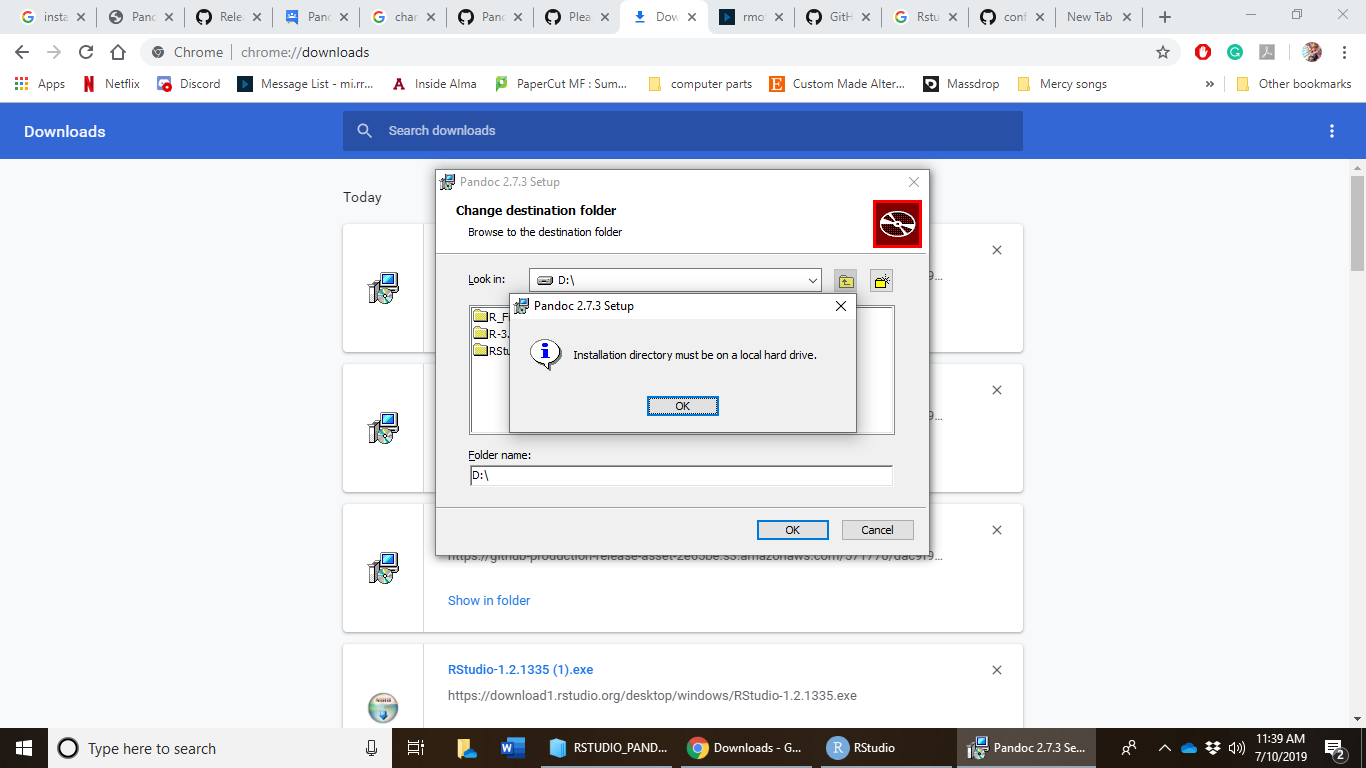
Dear-Mercy
on 10 Jul 2019
@Dear-Mercy Thank you for the details. I'll take a quick look if I get chance today, but I'll attend to after two weeks.
nkalvi
on 10 Jul 2019
@Dear-Mercy
I don't have time today for a proper solution - but if you wish, please try the following workaround.
Assign a mount point to the drive. I used Disk Management, selected the drive, selected 'Add...' and created a folder 'pandoc' under my username and selected it.
Run the Pandoc installer in admin mode and select this folder. Pandoc will be installed using this path.
Pandoc ran as expected when I started it from a folder in my local drive. I also verified that worked fine after removing the USB drive (safely) and reinserting it. I haven't tried after rebooting, or with multiple USB drives connected in different insertion order.
Since the assigned drive letter won't be always the same, I don't this is a good solution.
I hope this helps. I'll attend to this after two weeks.
nkalvi
on 10 Jul 2019
@Dear-Mercy
I'm sorry - I overlooked
the USB drive will be plugged into a computer that I will not have admin control over
so it may not work.
But as you can see, Pandoc doesn't have that many files so it may work if run from the root of the installation. Otherwise path and other variables (please refer to the docs) need to be adjusted accordingly.
nkalvi
on 10 Jul 2019
Thank you! I will look into the documents to change the roots.
Dear-Mercy
on 10 Jul 2019
@Dear-Mercy Were you able to find a suitable solution?
nkalvi
on 1 Aug 2019
I think about using pandoc again in the future and it would be nice if this becomes possible so I don't have to live with bad structure in my filesystem :).
GiantCrocodile
on 20 Nov 2019
:) I'm a bit tied up for a few days. I'll look into this when I get a chance.
nkalvi
on 20 Nov 2019
@GiantCrocodile You know we supply a Windows zip now?
you can unzip the files anywhere you like.
jgm
on 21 Nov 2019
Related issues
 timjb
·
5Comments
timjb
·
5Comments
 XiaTeng1993
·
3Comments
XiaTeng1993
·
3Comments
 RyanGreenup
·
4Comments
RyanGreenup
·
4Comments
 velimir
·
4Comments
velimir
·
4Comments
 krobelus
·
4Comments
krobelus
·
4Comments
Most helpful comment
@GiantCrocodile
Allowing user installations to choose path will require additional permission checking - that is what I don't have time to do.
I wouldn't say it is a _bug_, may be a an _enhancement_. So far there haven't been many requesting it.