Pandas: DataFrame.boxplot() ignored figsize keyword
The DataFrame.boxplot reference documentation says I can change the size of a plot though the figsize keyword, but this appears not to work.
Using df.plot(kind='box') does respect figsize.
import pandas as pd
import numpy as np
import matplotlib.pyplot as plt
import sys

print("pandas version = {}".format(pandas.__version__))
print("python version = {}".format(sys.version))
df = pd.DataFrame(np.random.rand(10, 5), columns=['A', 'B', 'C', 'D', 'E'])
df.plot(kind='box', figsize=(12,8))
plt.show()

df.boxplot(return_type='axes', figsize=(12,8))
plt.show()

 cswarth
All 8 comments
Thanks for the report.
We are generally steering people towards the df.plot API, but I think boxplot has a couple quirks that haven't been handled from the .plot(kind=) side.
 TomAugspurger
on 5 Jan 2016
TomAugspurger
on 5 Jan 2016
Thanks Tom, I just ran across the note about the df.plot API in the 0.17.0 release notes.
This works as expected, and respects the figsize keyword
df.plot.box(return_type='axes', figsize=(12,8))
I also ran into this issue just now (I am using .19 Pandas) when using the _boxplot_ method. But following Tom's advice - using df.plot.box, as opposed to df.boxplot - solved the problem
 lermana
on 10 Mar 2017
lermana
on 10 Mar 2017
Two questions:
- Should boxplot's grid parameter default to True? (see def for boxplot() in _core.py). That does not appear to be the case with df.plot(kind='box').
- This is likely my newbie error, but:
-- when I run the test program from PyCharm, df.boxplot() shows the correct (12,8) figsize.
-- when I run the test program from the command line (i.e. "python test11959.py), df.boxplot() shows a figsize of (6.4, 4.8).
In both cases I believe the same dev environment pandas is being used (judging by pd.__version__, pd.__file__)
 JimStearns206
on 7 Jun 2017
JimStearns206
on 7 Jun 2017
Should boxplot's grid parameter default to True? (see def for boxplot() in _core.py). That does not appear to be the case with df.plot(kind='box').
I suppose it's been like that for a while. It should probably follow axes.grid...
This is likely my newbie error, but:
I'm not sure why that would be. Keep in mind that the default hasn't changed, df.boxplot just respects it now. Is it possible that its two separate environments with different matplotlib versions? The matplotlib default figsize did change in 2.0
TomAugspurger
on 7 Jun 2017
Closed by #16445
TomAugspurger
on 7 Jun 2017
I suppose [boxplot showing grid lines, but plot(kind='box')] has been like that for a while. It should probably follow axes.grid...
plt.boxplot does not show gridlines by default. df.plot(kind='box') follows that convention, but df.boxplot() does not. Pngs:
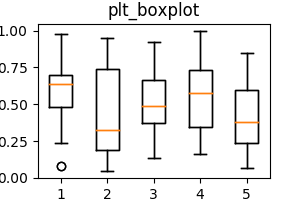


Test program attached. Writing the test program revealed some more discrepancies:
- The color scheme for box border and quartile and median lines differs between matplotlib and pandas. But the color scheme within pandas is consistent, and better IMHO than matplotlib's, so I don't propose changing pandas here.
- pd.plot() supports keyword arguments such as title. pd.boxplot does not. (See "Side excursion" in attached test program). But neither does plt.boxplot(). So should pd.boxplot be consistent with pd.box(kind='box') or with plt.boxplot()? Dunno - your call.
If you agree that df.boxplot should follow the no grid line default of plt.boxplot(), I'll create an issue and fix it.
If you agree that df.boxplot should support keyword arguments, I'll add that to the same issue or create another issue, and fix that as well.
import matplotlib.pyplot as plt
import numpy as np
# Modify PYTHONPATH appropriately to find pandas development version.
import pandas as pd
import sys

print("pandas version = {}, from={}".format(pd.__version__, pd.__file__))
print("python version = {}".format(sys.version))

def is_grid_on(axes):
    """
    From pandas/tests/plotting/common.py._check_grid_settings._is_grid_on

    :return: True if plot has grid on else False
    """
    xoff = all(not g.gridOn
               for g in axes.xaxis.get_major_ticks())
    yoff = all(not g.gridOn
               for g in axes.yaxis.get_major_ticks())
    return not (xoff and yoff)


dataset = np.random.rand(10,5)
df = pd.DataFrame(dataset, columns=['A', 'B', 'C', 'D', 'E'])
figsize=(3,2)

# Matplotlib boxplot
fig = plt.figure(1, figsize=figsize)
ax = fig.add_subplot(111)
bp = ax.boxplot(dataset)
plt_boxplot = plt.boxplot(dataset)
plt.title("plt_boxplot")  # plt.boxplot() doesn't support title as keywd arg
fig.savefig('plt_boxplot.png')
# plt.show()
assert not is_grid_on(ax)

# Pandas plot(kind='box')
pd_plot_kind_box = df.plot(kind='box', figsize=figsize,
        title="pd_plot_kind_box.png")  # pd.plot() supports title keywd arg
pd_plot_kind_box.get_figure().savefig('pd_plot_kind_box.png')
# plt.show()
assert not is_grid_on(pd_plot_kind_box.axes)

# Pandas boxplot

# Side excursion: df.boxplot doesn't support title parameter. Should it?
try:
    pd_boxplot = df.boxplot(return_type='axes', figsize=figsize,
                            title='pd_boxplot.png')
except TypeError as te:
    assert te.args[0] == "boxplot() got an unexpected keyword argument 'title'"

pd_boxplot = df.boxplot(return_type='axes', figsize=figsize)
plt.title("pd_boxplot.png")
pd_boxplot.get_figure().savefig('pd_boxplot.png')
# plt.show()
assert not is_grid_on(pd_boxplot.axes)
I'm inclined to just leave it as is for now.
TomAugspurger
on 12 Jun 2017
Related issues
 idanivanov
·
3Comments
idanivanov
·
3Comments
 andreas-thomik
·
3Comments
andreas-thomik
·
3Comments
 MatzeB
·
3Comments
MatzeB
·
3Comments
 marcelnem
·
3Comments
marcelnem
·
3Comments
 amelio-vazquez-reina
·
3Comments
amelio-vazquez-reina
·
3Comments
Most helpful comment
Thanks Tom, I just ran across the note about the
df.plotAPI in the 0.17.0 release notes.This works as expected, and respects the figsize keyword