Pandas: BUG: read_excel with multi-indexed column ignores index_col=None
From SO: http://stackoverflow.com/questions/34020061/excel-to-pandas-dataframe-using-first-column-as-index
@chris-b1 another one on the multi-index excel issues .. :-)
Small test case: content of excel file:
| A | A | B | B |
| --- | --- | --- | --- |
| key | val | key | val |
| 1 | 2 | 3 | 4 |
| 1 | 2 | 3 | 4 |
gives:
In [2]: pd.read_excel("test_excel_index_col.xlsx", header=[0,1], index_col=None)
Out[2]:
A     A    B
key val key  val
1     2    3   4
1     2    3   4
It's not super clear in the formatting of the dataframe, but the [1, 1] is the index and [A, key] are seen as the level names of the multi-indexed columns.
 jorisvandenbossche
All 18 comments
We don't support writing to this format (multi-index columns w/ no row index) because it's ambiguous on the way back in. But it seems reasonable to support reading it, I'll take a look.
 chris-b1
on 1 Dec 2015
chris-b1
on 1 Dec 2015
I got the same problem
 pheman
on 20 Jan 2017
pheman
on 20 Jan 2017
From https://github.com/pandas-dev/pandas/issues/15180#issuecomment-274065068 - consider changing default of index_col to some kind of sentinel (e.g. 'infer') so that passing None means something.
chris-b1
on 20 Jan 2017
@chris-b1 @jreback I have a proposed fix here: https://github.com/stephenrauch/pandas/commit/1204b315beadd68904a15a875b2254eb0aa68bc9 Before I do all the docs and stuff I wanna make sure I am headed in the right direction. Thanks.
 stephenrauch
on 14 Mar 2017
stephenrauch
on 14 Mar 2017
Per review comment from @jreback here is proposed api for read_excel. It is the same as read_csv.
index_col : int or sequence or
False, defaultNone
Column (0-indexed) to use as the row labels of the DataFrame. If a
sequence is given, those columns will be combined into aMultiIndex.
IfNone(default), pandas will use the first column as the
index. IfFalse, force pandas to not use the first column as the index
(row names).
Updates are here:
https://github.com/stephenrauch/pandas/commit/9b37ff94643296d489498138c79bb0244aaa3f79
So if this proposed API looks ok, I will do the PR.
stephenrauch
on 14 Mar 2017
Thanks @stephenrauch, that api looks good to me, please open it as a PR. One subtlety for the docs, if not using a MultiIndex header, index_col=None won't always use the first column as an index, it takes an inference path based on the shape of the data (same as for read_csv IIRC). e.g.
In [31]: df = pd.DataFrame({'a': [1, 2, 3], 'b': [4, 5, 5]})

In [32]: df.to_excel('temp.xlsx', index=False)

In [33]: pd.read_excel('temp.xlsx')

   a  b
0  1  4
1  2  5
2  3  5
it takes an inference path based on the shape of the data
@chris-b1 @jreback Are there any test cases (or maybe some other description) that show how index_col=None works for something other than the index in the first column? Either for the csv or excel cases? I am having trouble grokking what is meant by the shape of the data in this case.
stephenrauch
on 15 Mar 2017
Not sure csv actually works this way. But for current Excel behavior:
Sheet 1

parses a row index
In [297]: pd.read_excel('temp.xlsx', sheetname='Sheet1')
Out[297]:
      a  b  c
row1  1  2  4
row2  1  2  4
row3  1  2  4
Sheet2

No row index
In [298]: pd.read_excel('temp.xlsx', sheetname='Sheet2')
Out[298]:
   a  b  c
0  1  2  4
1  1  2  4
2  1  2  4
Has this problem been solved? I met the same question.
 chenweisomebody126
on 6 Jun 2017
chenweisomebody126
on 6 Jun 2017
As of now I still see the same issue. when using multi headers with read_excel, pandas always assigns the first column as index.
 araespahan
on 15 Dec 2017
araespahan
on 15 Dec 2017
Another vote for a fix. I'm running 0.22 and it seems so hackish to have to write the code to save the 'index' to a named column and then reset the index.
Pandas is a 'great' module - thank you -
 sdicker8
on 3 Apr 2018
sdicker8
on 3 Apr 2018
Vote for index_col=False to fix this
 the-rccg
on 10 Jul 2018
the-rccg
on 10 Jul 2018
Just encountered this issue and I am looking for a fix. @stephenrauch has the PR been made for this?
 rileymcdowell
on 11 Jul 2018
rileymcdowell
on 11 Jul 2018
@rileymcdowell no PRs have been made but would welcome any if you are interested
 WillAyd
on 13 Jul 2018
WillAyd
on 13 Jul 2018
I'll put together a PR from @stephenrauch's work in the next couple of days.
rileymcdowell
on 14 Jul 2018
I've dug into this and ran into a decision point. Consider the following spreadsheet (Taken from the test suite).
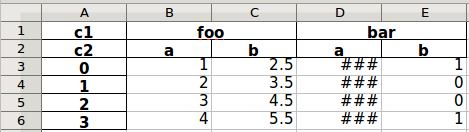
Right now, this is interpreted by the read_excel function as a MultiIndex where sheet cells A1 and A2 (values c1 and c2) represent the level names of the MultiIndex.
MultiIndex(levels=[['bar', 'foo'], ['a', 'b']],
           labels=[[1, 1, 0, 0], [0, 1, 0, 1]],
           names=['c1', 'c2'])
The situation that brought me to find this github issue is that in this example, I expect cells A1 and A2 (values c1 and c2) to be interpreted as another set of levels in the MultiIndex. For example
MultiIndex(levels=[['bar', 'c1', 'foo'], ['a', 'b', 'c2']],
           labels=[[1, 2, 2, 0, 0], [2, 0, 1, 0, 1]],
           names=['', ''])
The test suite explicitly covers the existing functionality of the former. This behavior differs from that of the read_csv function, which behaves most similarly to the latter.
A workaround is to allow a sentinel value of index_col=False as suggested in this issue, but a change to support this would also touch some of the core logic in pandas.io.parsers. For example this check which limits non-null index_col settings to have numeric values. That seems like it could have far-reaching consequences.
Any thoughts about how best to tackle this?
rileymcdowell
on 15 Jul 2018
The situation that brought me to find this github issue is that in this example, I expect cells A1 and A2 (values c1 and c2) to be interpreted as another set of levels in the MultiIndex. For example
Hmm well I disagree since this representation matches what you'd see with a normal data frame representation, but regardless of opinions I think it just speaks to what @chris-b1 mentioned earlier that this is really ambiguous so there's not necessarily a right answer
This behavior differs from that of the read_csv function, which behaves most similarly to the latter.
Can you clarify this with an example? CSV doesn't have the concept of a merged cell like you have with the foo and bar cells so I don't think this is apples-to-apples
A workaround is to allow a sentinel value of index_col=False as suggested in this issue, but a change to support this would also touch some of the core logic in pandas.io.parsers. For example this check which limits non-null index_col settings to have numeric values. That seems like it could have far-reaching consequences.
Isn't False a valid value for read_csv? If so then there's got to be something with that implementation that isn't limited by what you've found
Thanks for the investigation!
WillAyd
on 16 Jul 2018
@rileymcdowell I would agree with @WillAyd that the former of the two behaviors you describe is the most intuitive way to interpret an Excel file. If you can I would encourage you to submit a PR with this behavior.
 ian-contiamo
on 18 Sep 2018
ian-contiamo
on 18 Sep 2018
Related issues
 idanivanov
·
3Comments
idanivanov
·
3Comments
 scls19fr
·
3Comments
scls19fr
·
3Comments
 swails
·
3Comments
swails
·
3Comments
 ericdf
·
3Comments
ericdf
·
3Comments
 BDannowitz
·
3Comments
BDannowitz
·
3Comments
Most helpful comment
Vote for index_col=False to fix this