Pagedown is great to have the TOC. However, for long reports, the user still prefers the bookmark because they are able to go to different sections directly, without having to return to the TOC first, again and again.
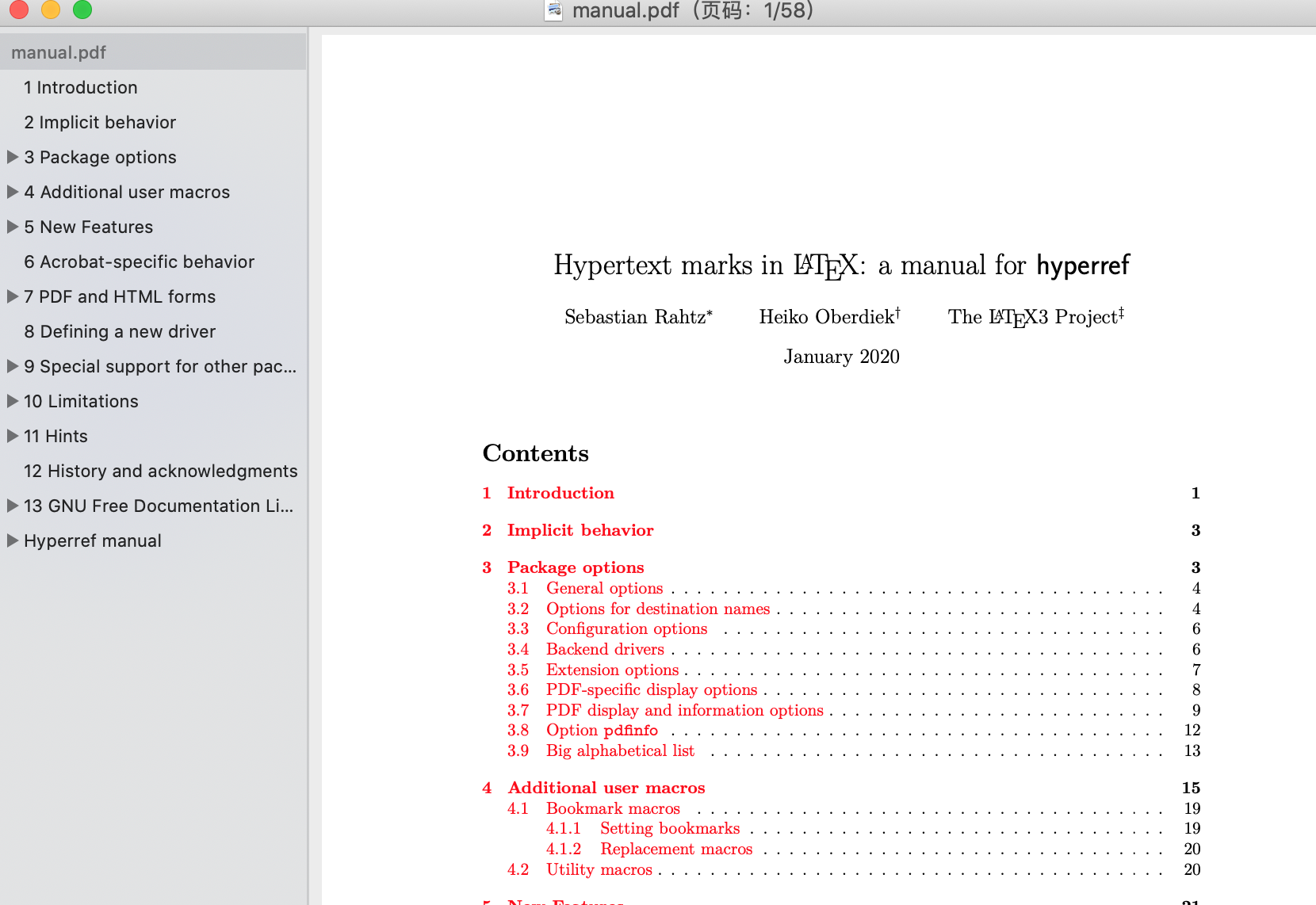
So my feature request is: I hope pagedown can generate the bookmarks as the LaTeX hyperref does.
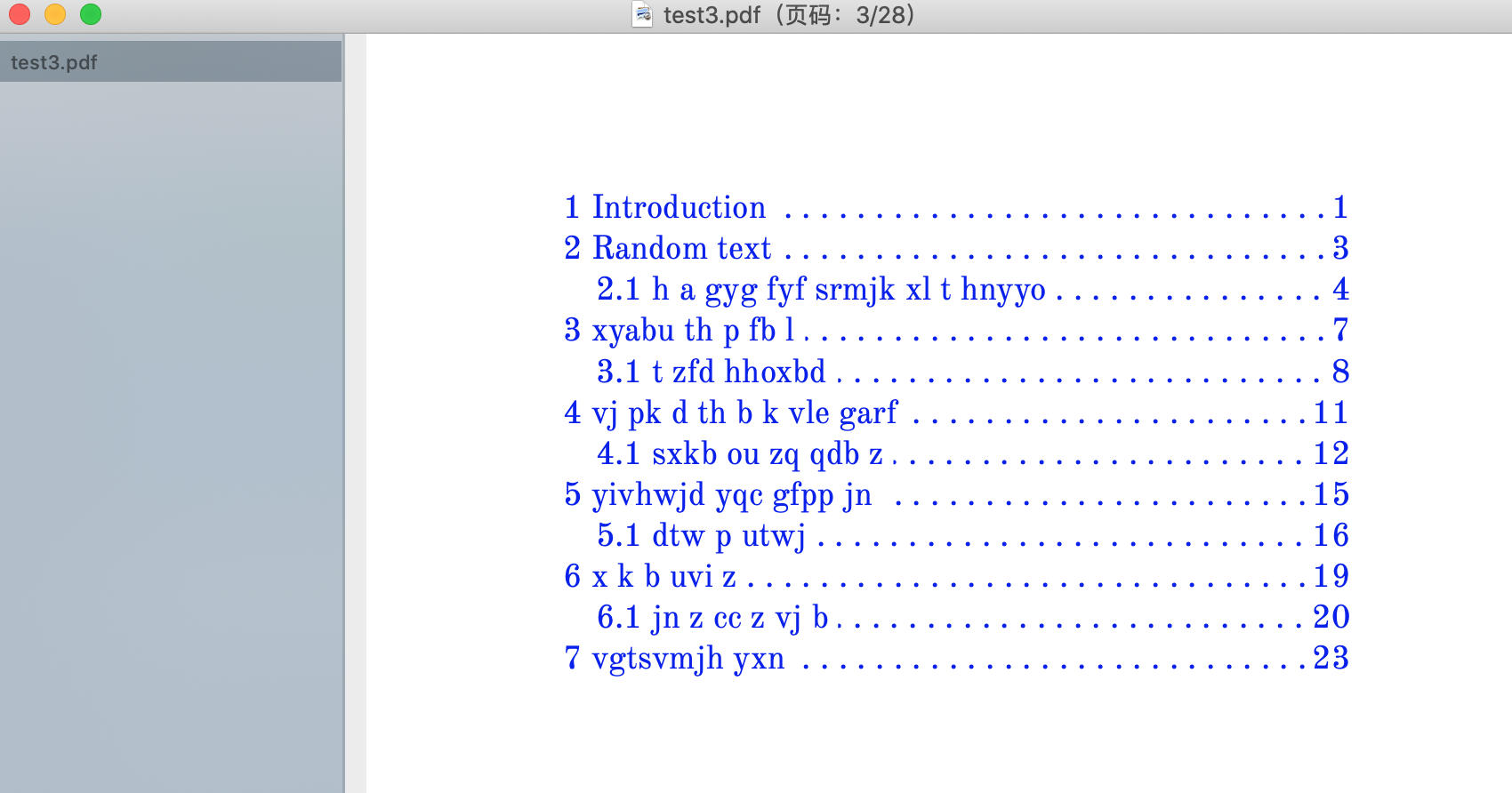
Now pagedown generates TOC without bookmarks
LaTeX is able to generate bookmarks
 shrektan
All 6 comments
I agree with you, it would be great to have this feature.
For now, the PDF is created by Chrome. Outline is still a missing feature in Chrome PDF generation, see the related issues in the Chromium project: here and here.
In order to add bookmarks/outline, we should post-process Chrome's PDF. AFAIK, it is possible:
with Ghostscript using pdfmark, see this post for instance (more tutorials are available online).
using Node.js pdf-lib package. This library is used by the Paged.js project in its pagedjs-cli tool.
I hadn't had time to investigate further. If someone can help, let us know!
 RLesur
on 3 May 2020
RLesur
on 3 May 2020
I have just tested pdfmark for a while, which is not diffiult to use. I think I can help on this.
However, I need to know the TOC data in advance. I mean, I need to know which section is referring to which page in order to prepare the configure file for pdfmark.
It looks like magic for me that pagedown is able to generate the TOC with proper page references. And I have no idea at all about how pagedown works for this and where to find the data I need.
Would you two @yihui @RLesur mind to give me some hints?
Thanks a lot.
shrektan
on 1 Jun 2020
IMO, the most reliable way to obtain the TOC and the page numbers for the TOC entries is through JavaScript.
I would try to do the following thing:
using JS, get the TOC entries and their page numbers, build a JSON object with these informations. This script would be called in the
PagedConfig.after()functionsend this JSON object to the R session when printing to PDF like https://github.com/rstudio/pagedown/commit/179e91cc5ea5407325a3800c4c360614fe84bc0f. When received by R, build a similar R object with TOC entries and page numbers
assign this object in the
tokenenvironment and attach it as an attribute of the returned value ofchrome_print()
After that, I think the ghostscript end is more easy (build the pdfmarks and post process the pdf).
RLesur
on 1 Jun 2020
Since I'm familiar with Paged.js, I wrote the JS end that can be called in the PagedConfig.after() function:
// from https://stackoverflow.com/q/21647928
const toUTF16BE = x => {
  let res = '';
  for (i=0; i < x.length; i++) {
    let hex = x.charCodeAt(i).toString(16);
    hex = ('000' + hex).slice(-4);
    res += hex
  }
  res = 'feff' + res ;
  return res;
}

const findPage = el => {
  while (el.parentElement) {
    el = el.parentElement;
    if (el.getAttribute('data-page-number')) {
      return parseInt(el.getAttribute('data-page-number'));
    }
  }
  return null;
};

const tocEntriesInfos = ul => {
  const tocEntries = ul.children; // tocEntries are 'li' elements
  let result = []; // where we store the results

  for (const li of tocEntries) {
    // get the title and encode it in UTF16BE (pdfmark is encoded in UTF16BE with BOM)
    const title = toUTF16BE(li.querySelector('a').textContent);

    // get the page number
    const href = li.querySelector('a').getAttribute('href');
    const el = document.querySelector(href);
    const page = findPage(el);

    // get the children
    let children = [];
    if (li.querySelector('ul')) {
      children = tocEntriesInfos(li.querySelector('ul'));
    }

    result.push({
      title: title,
      page: page,
      children: children
    });
  }

  return result;
};
the tocEntriesInfos() function can be called like that in PagedConfig.after():
  window.PagedConfig.after = (flow) => {
    // ...
    const tocList = flow.source.querySelector('.toc > ul');
    const tocInfos = tocEntriesInfos(tocList);
    // ...
  };
Thank you so much. You even wrote the UTF16BE converter :D
I'll try to build a proto based on this.
shrektan
on 2 Jun 2020
Just to update that I've built a proto of generating bookmark for pagedown and it looks really good.
Many thanks to @RLesur 's JS code, as I just need to put the code into the right place and write a simple converter that can translate the TOC object to the correct pdfmark's setting format (as the title has already been encoded under UTF16BE, it's much easier).
I'll try to file a PR in the following days.
shrektan
on 6 Jun 2020
Related issues
 xf15
·
3Comments
RLesur
·
4Comments
xf15
·
3Comments
RLesur
·
4Comments
 paulcbauer
·
4Comments
paulcbauer
·
4Comments
 yihui
·
5Comments
xf15
·
4Comments
yihui
·
5Comments
xf15
·
4Comments
Most helpful comment
I agree with you, it would be great to have this feature.
For now, the PDF is created by Chrome. Outline is still a missing feature in Chrome PDF generation, see the related issues in the Chromium project: here and here.
In order to add bookmarks/outline, we should post-process Chrome's PDF. AFAIK, it is possible:
with Ghostscript using pdfmark, see this post for instance (more tutorials are available online).
using Node.js pdf-lib package. This library is used by the Paged.js project in its pagedjs-cli tool.
I hadn't had time to investigate further. If someone can help, let us know!