Pagedown: position and alignment in the sidebar
I have spent the entire day on this and could not figure it out. Could anyone point me to information regarding combination of variables that allow you to control the text and image position within the sidebar.
More specifically, how the different relevant bits of the css (page margins, sidebar padding, other position controls for specific groups like #contact or #skills all interact with one another? Does the paged.js come into this at all?
Goal is to simply move everything in the current sidebar up, and to decrease the size of the sidebar overall and the amount of space in the right margin while maintaining control over text alignment to get things centered.
 mr-illington
All 3 comments
I don't know whether you are familiar with the Chrome Developer Tools. If you aren't, I highly recommend to learn the basics https://developers.google.com/web/tools/chrome-devtools/.
Here are the main characteristics of the page layout and the sidebar.
In html_resume, Paged.js is mainly used to interpret the CSS at-page rules:
https://github.com/rstudio/pagedown/blob/e7d8b07caef91eea43f1af01b3e439e95def792a/inst/resources/css/resume.css#L1-L4
From these rules, Paged.js builds a pagebox area. Here is a screenshot of Chrome DevTools for this pagebox area:
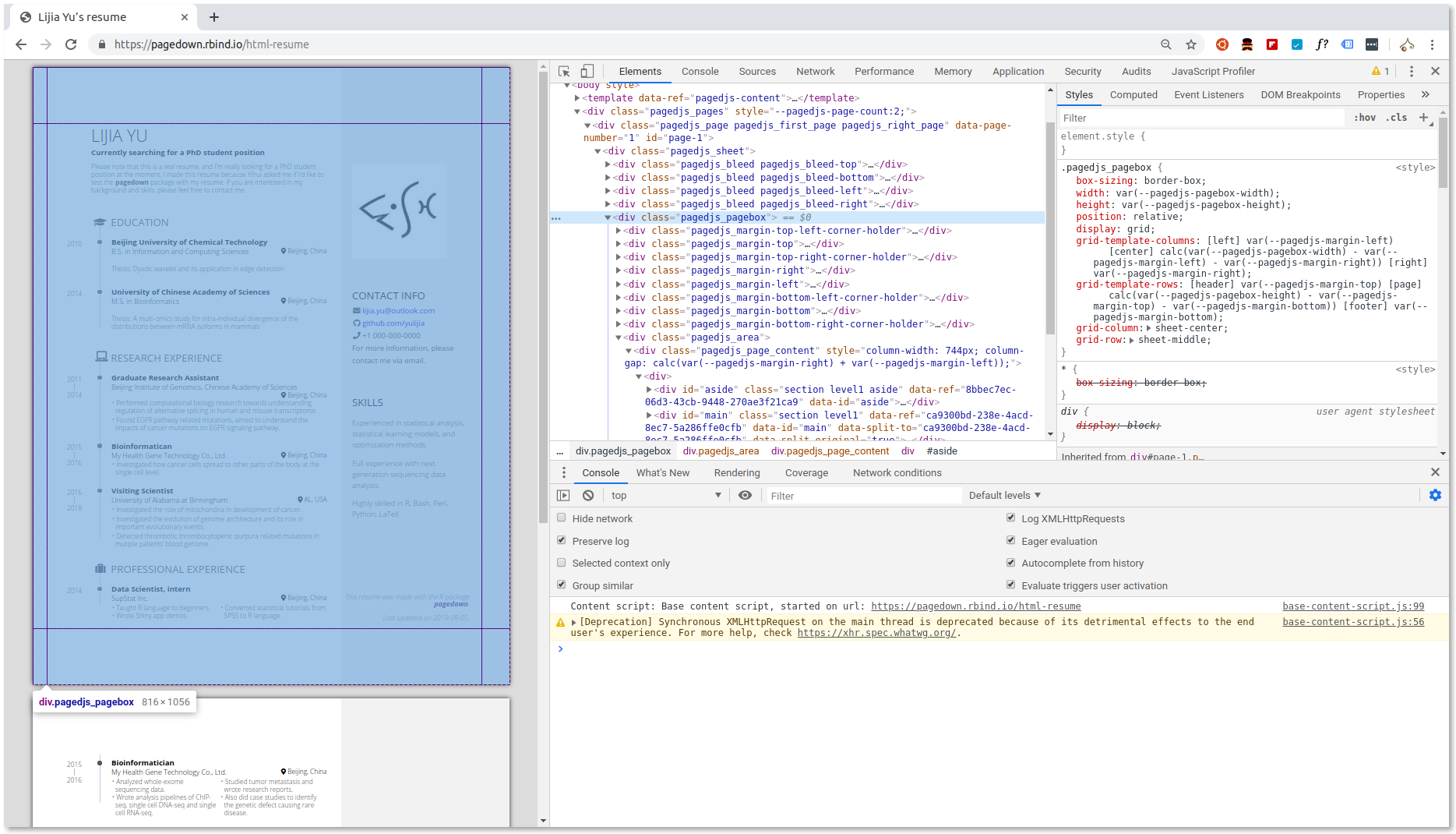
The pagebox is materialised by a grid.
If you want to modify the right margin, you need to modify two lines (give identical values):
https://github.com/rstudio/pagedown/blob/e7d8b07caef91eea43f1af01b3e439e95def792a/inst/resources/css/resume.css#L3
(this is the second value) and
To modify the page top and bottom margins, you have to modify this line (first and third values) https://github.com/rstudio/pagedown/blob/e7d8b07caef91eea43f1af01b3e439e95def792a/inst/resources/css/resume.css#L3
The sidebar is a block. Here is the screenshot of Chrome DevTools for the sidebar:

The sidebar has no margin, only paddings. The sidebar width is defined here (you can modify it):
https://github.com/rstudio/pagedown/blob/e7d8b07caef91eea43f1af01b3e439e95def792a/inst/resources/css/resume.css#L16
The sidebar left and right paddings are identical. They are defined by a unique value here (you can modify it):
https://github.com/rstudio/pagedown/blob/e7d8b07caef91eea43f1af01b3e439e95def792a/inst/resources/css/resume.css#L21
We did not need to define a CSS variable for the top and bottom paddings. They are identical and defined here:
https://github.com/rstudio/pagedown/blob/e7d8b07caef91eea43f1af01b3e439e95def792a/inst/resources/css/resume.css#L97
The value of 0.6in can be modified.
I hope that you will be able to achieve your own customisation by modifying some of these values.
 RLesur
on 20 Sep 2019
RLesur
on 20 Sep 2019
This was a helpful overview - thank you. The trick for me was figuring out that order of the 4 margins in line 3. I had been modifying the left margin the whole time instead of the right one. To my eye, I have prefered to make a little denser use of the right panel, and keep my photo in line with the name (no top and bottom padding) - looks great!
mr-illington
on 23 Sep 2019
@mr-illington I understand well. If you are interested in, the syntax is explained here https://developer.mozilla.org/en-US/docs/Web/CSS/margin#Syntax
RLesur
on 23 Sep 2019
Related issues
 beatrizmilz
·
4Comments
beatrizmilz
·
4Comments
 AnabelleLaurent
·
4Comments
AnabelleLaurent
·
4Comments
 maibennett
·
4Comments
maibennett
·
4Comments
 yihui
·
5Comments
RLesur
·
5Comments
yihui
·
5Comments
RLesur
·
5Comments
Most helpful comment
I don't know whether you are familiar with the Chrome Developer Tools. If you aren't, I highly recommend to learn the basics https://developers.google.com/web/tools/chrome-devtools/.
Here are the main characteristics of the page layout and the sidebar.
In
html_resume, Paged.js is mainly used to interpret the CSS at-page rules:https://github.com/rstudio/pagedown/blob/e7d8b07caef91eea43f1af01b3e439e95def792a/inst/resources/css/resume.css#L1-L4
From these rules, Paged.js builds a pagebox area. Here is a screenshot of Chrome DevTools for this pagebox area:
The pagebox is materialised by a grid.
If you want to modify the right margin, you need to modify two lines (give identical values):
https://github.com/rstudio/pagedown/blob/e7d8b07caef91eea43f1af01b3e439e95def792a/inst/resources/css/resume.css#L3
(this is the second value) and
https://github.com/rstudio/pagedown/blob/e7d8b07caef91eea43f1af01b3e439e95def792a/inst/resources/css/resume.css#L12
To modify the page top and bottom margins, you have to modify this line (first and third values) https://github.com/rstudio/pagedown/blob/e7d8b07caef91eea43f1af01b3e439e95def792a/inst/resources/css/resume.css#L3
The sidebar is a block. Here is the screenshot of Chrome DevTools for the sidebar:
The sidebar has no margin, only paddings. The sidebar width is defined here (you can modify it):
https://github.com/rstudio/pagedown/blob/e7d8b07caef91eea43f1af01b3e439e95def792a/inst/resources/css/resume.css#L16
The sidebar left and right paddings are identical. They are defined by a unique value here (you can modify it):
https://github.com/rstudio/pagedown/blob/e7d8b07caef91eea43f1af01b3e439e95def792a/inst/resources/css/resume.css#L21
We did not need to define a CSS variable for the top and bottom paddings. They are identical and defined here:
https://github.com/rstudio/pagedown/blob/e7d8b07caef91eea43f1af01b3e439e95def792a/inst/resources/css/resume.css#L97
The value of
0.6incan be modified.I hope that you will be able to achieve your own customisation by modifying some of these values.