Pagedown: Adding blank spaces using custom CSS
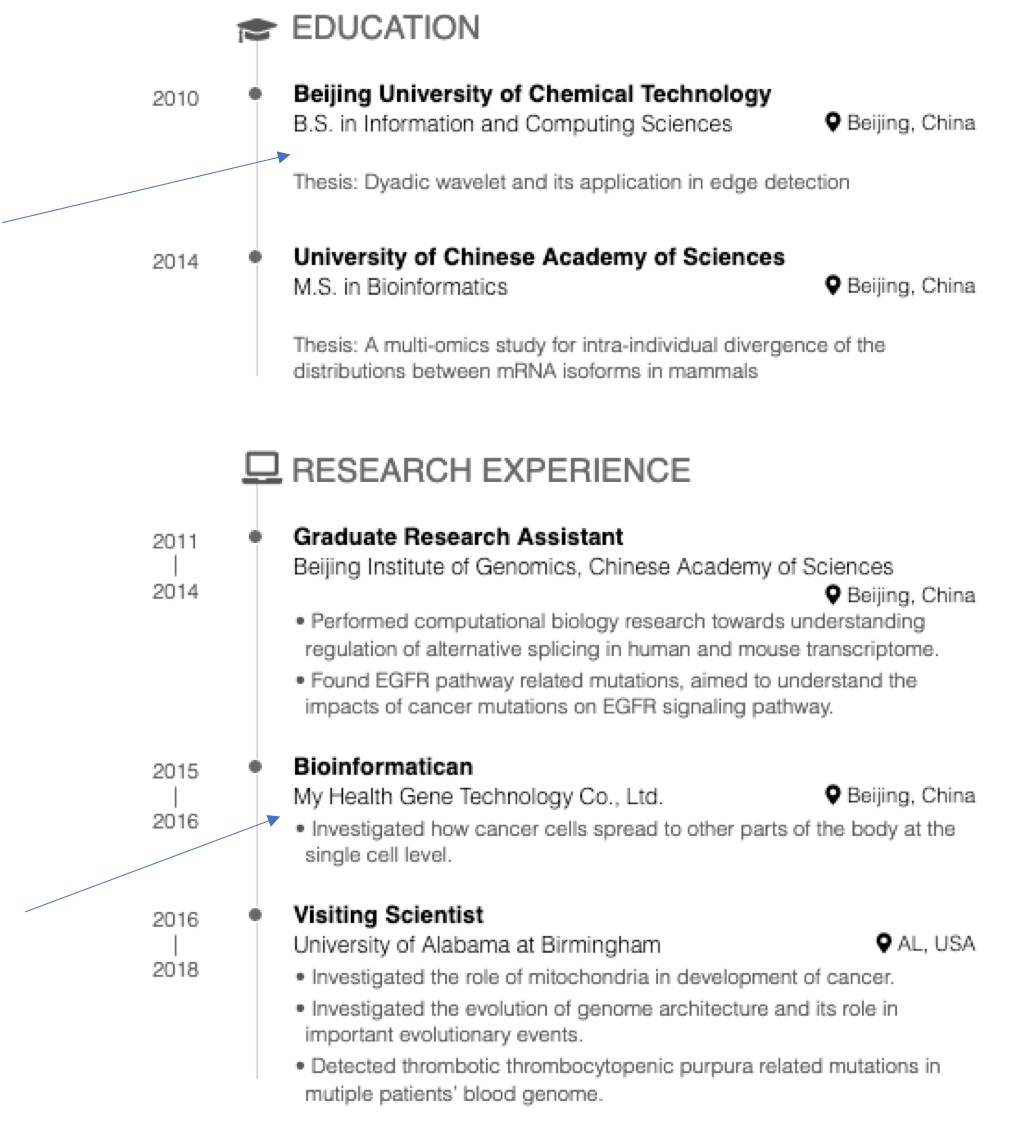
Hello, is it possible to add spaces between the headings and content within sections? I want to achieve the spacings shown in the education section of the image, but in the research experience section. I tried to use custom CSS, but couldn't achieve the desired result. Many thanks.
 Dr-Joe-Roberts
All 9 comments
I think that this rule should do the trick:
.details ul {
  padding-top: calc(1em + 0.05in);
}
 RLesur
on 2 Apr 2019
RLesur
on 2 Apr 2019
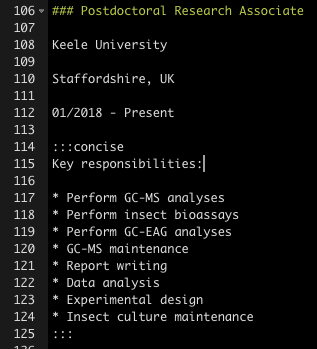
Many thanks for your help. The rule provided in your previous post does introduce a space where required, but it pushes the heading for my consise list back to unwanted position (see image). Is there any way around this?

This is how I have written the section in markdown.
Dr-Joe-Roberts
on 3 Apr 2019
As @yihui would certainly say, we are trying to "fold the blinds" :smile: .
I hope this new rule will be good:
.details > div:not(.concise) > ul {
  padding-top: calc(1em + 0.05in);
}
edit: do not use both the previous answer and this one
RLesur
on 3 Apr 2019
Apologies for the delayed response, I have been at a conference with limited access to my laptop.
I have tried the new rule provided in your latest post, but it doesn't seem to have made any difference? There is still no space between the 'key responsibilites' and the list.
EDIT: It appears that if my text isn't in the concise format then there is a space. However, if in the concise format then there is not.
EDIT EDIT: Further investigation suggests that the space is added in some sections and not others, regardless of whether the concise format is being used. For example the space is added in education, but not research.
Dr-Joe-Roberts
on 5 Apr 2019
No worries!
When I tested with your example, there was no space in the concise format.
I've noticed once that depending on the length of the "place" content and the "location" content, an extra space could be added. I wonder whether it could explain what you observed.
Would it be possible for you to share a reproducible example?
RLesur
on 5 Apr 2019
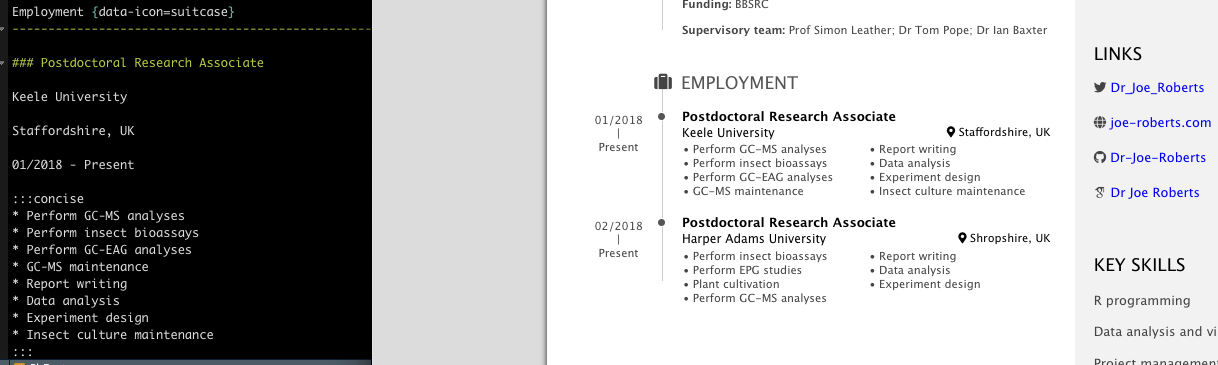
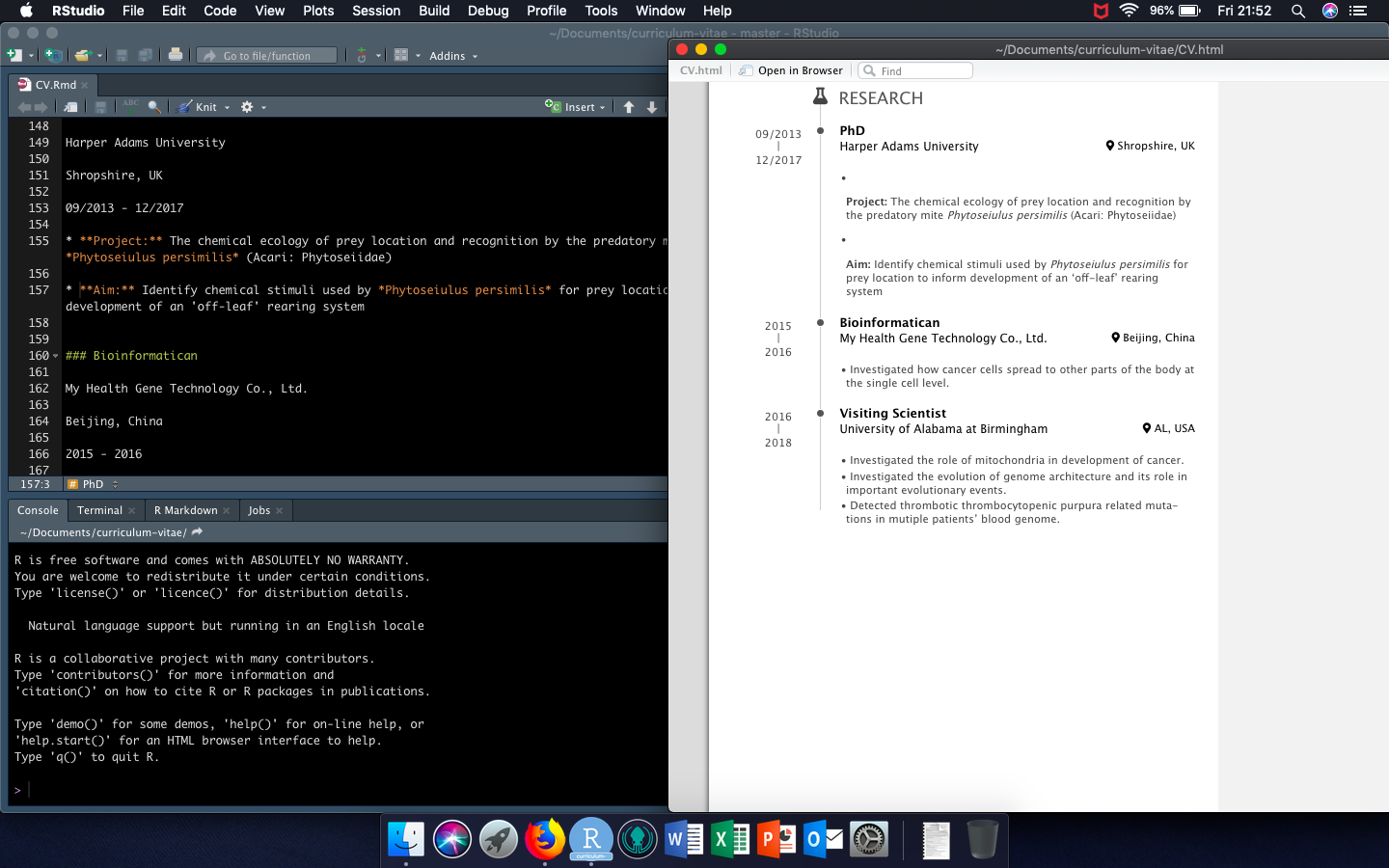
Thanks for such a quick response, I really appreciate the amount of help you are providing. I hope these screenshots can suffice for a reproducible example, if not please just let me know and I will be able to provide some tomorrow.
Concise bullet points, no space:
Weird formatting without concise:
Dr-Joe-Roberts
on 5 Apr 2019
It would be much more helpful for me to help you if you could provide the Rmd file (or a link to the html file on a web server).
RLesur
on 5 Apr 2019
Yes, of course, my apologies. Please find the relevant files here: https://github.com/Dr-Joe-Roberts/curriculum-vitae
Dr-Joe-Roberts
on 5 Apr 2019
Okay, so I have solved the issue of the missing spaces. In order to implement them as I wanted, it is necessary to add data-concise=true to the section title after data-icon like this: Employment {data-icon=suitcase data-concise=true}.
I hope this helps anyone else that reads this thread!
Dr-Joe-Roberts
on 5 Jun 2019
Related issues
 cderv
·
4Comments
cderv
·
4Comments
 martinschmelzer
·
3Comments
martinschmelzer
·
3Comments
 xf15
·
4Comments
RLesur
·
4Comments
xf15
·
4Comments
RLesur
·
4Comments
 maibennett
·
4Comments
maibennett
·
4Comments