Example for reproducibility:
```{r}
title: "Someone's resume"
author: Your Name
output: pagedown::html_resume
Aside
Picture, etc.
Contact info
Email, phone number, ...
Skills
- One
- Two
- Three
Disclaimer
A footer in the sidebar.
Main
Your Name {#title}
Arbitrary content.
Education {data-icon=graduation-cap}
University One
Title
Location
Year
Arbitrary content
Section
Subsection
Title
Location
Year
More info
::: aside
Some notes in the sidebar.
:::
```
 dktanwar
All 13 comments
I am not sure to understand well this issue.
IMO, the aside pandoc div _works_ as it is expected to work (even if the result of this example is ugly).
Here's a screenshot I've obtained from the example (I've added some colors on elements to highlight them)

With this screenshot, you can see that the aside div is present: it overlaps the aside bar content, but it appears.
Do you get a similar result?
 RLesur
on 21 Feb 2019
RLesur
on 21 Feb 2019
No.
I got:
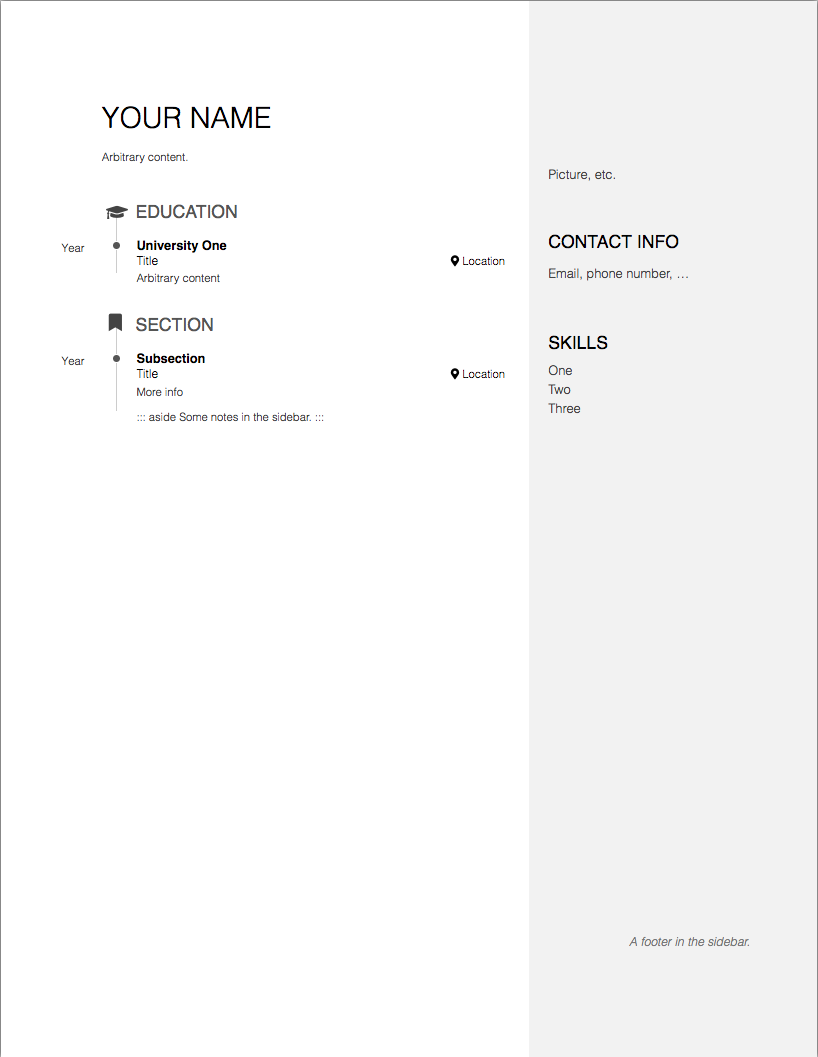
dktanwar
on 21 Feb 2019
dktanwar
on 21 Feb 2019
Thanks for these extra informations: my guess is about your Pandoc version.
As stated in the README file, you need Pandoc >= 2.2.3 to use pagedown.
Could you execute xfun::session_info('rmarkdown') and paste the result in this thread?
RLesur
on 21 Feb 2019
You got it! That was the problem! Thank you so much!
Good to know about the xfun package..
dktanwar
on 21 Feb 2019
Another issue:
I am only able to use aside thing when I am having this structure:
### Subsection

Title

Location

Year

More info

::: aside
Some notes in the sidebar.
:::
How to put aside comment for any sentence?
What I would like is:
- This is comment

::: aside
This is a side comment for above
:::
Appearance expected:
- This is a comment This is a side comment for above
dktanwar
on 22 Feb 2019
I'm not sure to understand well your need.
Does something like that suit your need?
- This is comment [This is a side comment for above]{style="float:right;"}
Sorry for being not clear.
What I am trying to do is, put
- This is comment [This is a side comment for above]{style="float:**aside;**"}
The comment should go in the aside "grey" bar.
dktanwar
on 25 Feb 2019
Thanks for your explanations.
First of all, the CSS float property has a limited list of values (aside is illegal), see https://developer.mozilla.org/en-US/docs/Web/CSS/float#Values
From my understanding of your need, I think that something like that could achieve your goal:
- This is comment [This is a side comment for above]{style="position:absolute;left:calc(var(--main-width) + var(--sidebar-horizontal-padding));"}
This code is ugly but we can simplify it later. Please, could you test that and tell me if the result is ok for you?
RLesur
on 25 Feb 2019
Yes, this is what I was looking for. Thank you!
I will update you here with a link to my CV, in case you would like to use as an example..
dktanwar
on 26 Feb 2019
@dktanwar Yes, we would very much like to include a link to an example of a real CV. Thank you!
 yihui
on 26 Feb 2019
yihui
on 26 Feb 2019
Hi @dktanwar,
the link to your CV we put as example in pagedown readme was no more working. And the repos does not seem to exist.
For now I removed it. Please fill free to provide your new url, I did not find it myself.
Thanks a lot !
 cderv
on 17 Jul 2019
cderv
on 17 Jul 2019
Hi @cderv
Thank you!
Sorry, I completely forgot to update here the link: https://dktanwar.github.io/CV/Deepak_Tanwar.html
Also, repo: https://github.com/dktanwar/dktanwar.github.io
dktanwar
on 18 Jul 2019
Related issues
cderv
·
4Comments
 filippogambarota
·
3Comments
filippogambarota
·
3Comments
 AnabelleLaurent
·
4Comments
RLesur
·
4Comments
AnabelleLaurent
·
4Comments
RLesur
·
4Comments
 martinschmelzer
·
3Comments
martinschmelzer
·
3Comments
Most helpful comment
Thanks for your explanations.
First of all, the CSS float property has a limited list of values (
asideis illegal), see https://developer.mozilla.org/en-US/docs/Web/CSS/float#ValuesFrom my understanding of your need, I think that something like that could achieve your goal:
This code is ugly but we can simplify it later. Please, could you test that and tell me if the result is ok for you?