Pact-js: Windows issue in installing
Software versions
- OS: e.g. Win10 - 64
- Consumer Pact library: e.g. Pact JS v7.0.1
- Node Version:
10.11.0
Expected behaviour
do a pact test on windows on top of a create-react-app working with jest
Actual behaviour
test systematically failling because of errors similar as these ones
ERROR: [email protected]/21176 on NTBWIP-90370:
    Pact Binary Error: C:/Users/eadrien/app/node
_modules/@pact-foundation/pact-node/standalone/win32-1.61.1/lib/ruby/lib/ruby/2.2.0/rubygems/core_ext/kernel_require.rb:54:in `require': cannot
load such file -- bundler/rubygems_integration (LoadError)
PopsicleError: Unable to connect to "http://127.0.0.1:5000/interactions"
Caused by: Error: connect ECONNREFUSED 127.0.0.1:5000
Steps to reproduce
installing npm i -D @pact-foundation/pact@latest on a create react application and then create the folowing file app.test.js
import path from 'path'
import { Pact } from '@pact-foundation/pact'

import { login, setCurrentUser } from '../../actions/authActions'
import { USER_LOGIN }from '../../actions/types'
import jwt_decode from 'jwt-decode'

// Define Server Port
const PACT_SERVER_PORT  = 5000;

// Start Pact Server/Provider
describe('Pact', () => {
  const provider = new Pact({
    consumer: 'MyConsumer',
    provider: 'MyProvider',
    port: PACT_SERVER_PORT ,
    cors: true,
    pactfileWriteMode: 'update',
    log: path.resolve(process.cwd(), 'logs', 'pact.log'),
    dir: path.resolve(process.cwd(), 'pacts'),
    spec: 2,
  })

 const EXPECTED_BODY = [{success: true}]
 const TOKEN = 'Bearer eyJhbGciOiJIUzI1NiIsInR5cCI6IkpXVCJ9.eyJpZCI6IjViYzBlY2ExMDc0MzA3NWZlY2IzNjBmMiIsIm5hbWUiOiJFcndhbiBSaW91IiwiYXZhdGFyIjoiaHR0cHM6Ly9saDYuZ29vZ2xldXNlcmNvbnRlbnQuY29tLy0zblQxdGNjUF9TYy9BQUFBQUFBQUFBSS9BQUFBQUFBQUNPYy91ZkJCQ2RmRW1RZy9waG90by5qcGc_c3o9NTAiLCJyb2xlIjpbImFkbWluIiwidXNlciJdLCJpYXQiOjE1NDAyMTk3OTUsImV4cCI6MTU0MDIyNjc5NX0.4PAyyfLBNuqw0LQjR62Y6cVuXo7Uu7lVb4O-VmpTFJA'

  beforeAll(() => provider.setup())
  afterAll(() => provider.finalize())


  describe("works", () => {
    beforeAll(done => {
      const interaction = {
        state: 'I have user credentials',
        uponReceiving: 'login with user credentials',
        withRequest: {
          method: 'POST',
          path: '/api/auth',
          headers: { 'Accept': 'application/json' }
        },
        willRespondWith: {
          status: 200,
          headers: {
            'Content-Type': 'application/json',
            'Authorization': TOKEN
           },
          body: EXPECTED_BODY
        }
      }
      provider.addInteraction(interaction).then(done, done)
    })

    it('should create an action to login', () => {
      const decoded = jwt_decode(TOKEN)
      const expectedAction = {
        type: USER_LOGIN,
        payload: decoded,
      }
      expect(setCurrentUser(decoded)).toEqual(expectedAction)
    })

    it('successfully verifies', () => provider.verify())
  })
})
 erwanriou
All 21 comments
@mefellows @erwanriou I'm currently preparing a workshop about pact-js and am trying to get Pact running with Jest in a react app and I'm running into exactly the same issue.
The error is thrown at the first call to provider.setup() in my case. I guess the Pact mock server does not start correctly, hence the "unable to connect" error.
However, I don't have a clue how to debug the mock server startup.
 thombergs
on 23 Oct 2018
thombergs
on 23 Oct 2018
I've pushed a minimal example to reproduce: https://github.com/thombergs/pact-react-consumer
It's a minimal setup, there's not even a real interaction with the pact mock server except a provider.setup().
Steps to recreate:
npm installnpm run test
Error:
console.warn node_modules/@pact-foundation/pact-web/pact-web.js:19289
    Passing in consumer/provider to PactWeb is deprecated,
            and will be removed in the next major version

  console.info node_modules/@pact-foundation/pact-web/pact-web.js:19291
    Setting up Pact using mock service on port: "8080"

  console.error node_modules/jest-environment-jsdom/node_modules/jsdom/lib/jsdom/virtual-console.js:29
    Error: Error: connect ECONNREFUSED 127.0.0.1:8080
        at Object.dispatchError (C:\daten\workspaces\pact-react-consumer\node_modules\jest-environment-jsdom\node_modules\jsdom\lib\jsdom\living\xhr-utils.js:65:19)
        at EventEmitter.client.on.err (C:\daten\workspaces\pact-react-consumer\node_modules\jest-environment-jsdom\node_modules\jsdom\lib\jsdom\living\xmlhttprequest.js:676:20)
        at emitOne (events.js:121:20)
        at EventEmitter.emit (events.js:211:7)
        at Request.preflightClient.on.err (C:\daten\workspaces\pact-react-consumer\node_modules\jest-environment-jsdom\node_modules\jsdom\lib\jsdom\living\xhr-utils.js:412:47)
        at emitOne (events.js:116:13)
        at Request.emit (events.js:211:7)
        at Request.onRequestError (C:\daten\workspaces\pact-react-consumer\node_modules\request\request.js:881:8)
        at emitOne (events.js:116:13)
        at ClientRequest.emit (events.js:211:7) undefined
Thanks guys, I'll see what can be done. We recently added automated Windows builds so hopefully we can reproduce the failure there.
cc: @mboudreau
 mefellows
on 23 Oct 2018
mefellows
on 23 Oct 2018
@thombergs Thanks for the example. One thing that comes to mind is windows screwing around with file locks on the ruby binary because it's in use, and since jest is parallel, it might try to run more than one binary at a time, hence the issue. I can't confirm just yet, but it's something I've seen many, _many_, _many_ times before because windows was apparently designed by a sadist.
One thing you could do to test this theory is to run the mock server and try to move that exact file to another location and see what windows has to say about that. If that is the case, I'm not sure there's much we can do here since I don't think there's a way to remove windows file locking based on the executable's settings. However, our Rust implementation of the core library might be better at handling this since it would only be a single executable that does't have a need for external files.
I'll need to investigate further, but I don't have much time on my plate at the moment, so any extra insights that you can do on your own would be greatly appreciated.
 mboudreau
on 24 Oct 2018
mboudreau
on 24 Oct 2018
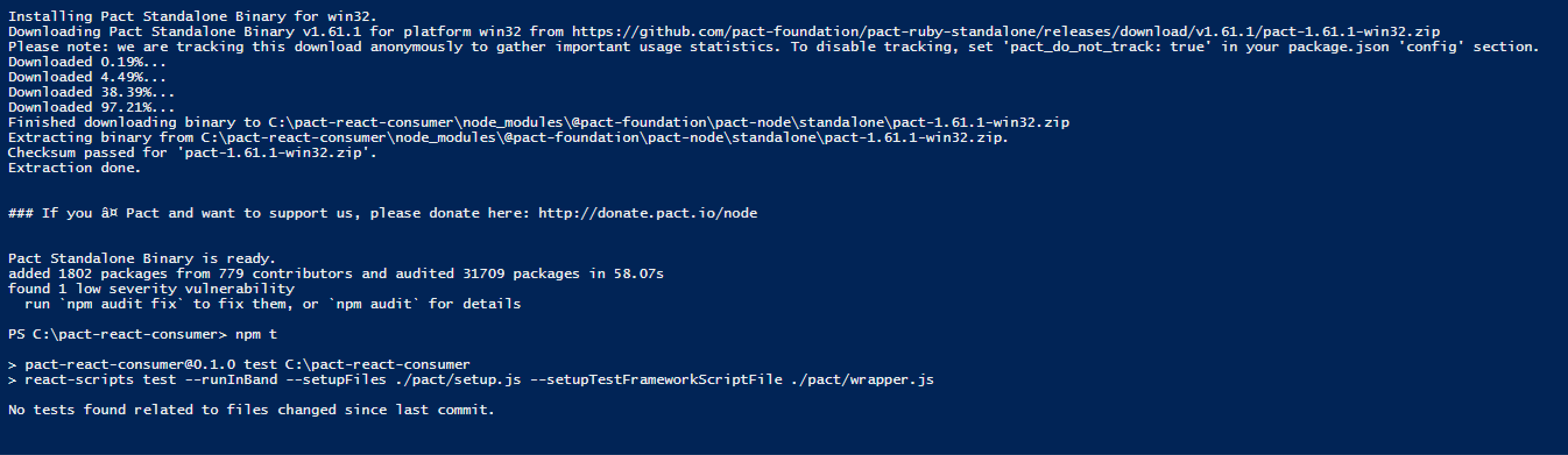
I just tried this morning with Node 8 / Windows 10 and that project passed (see screenshot).
I've just installed latest node (11) and it seems to work also:
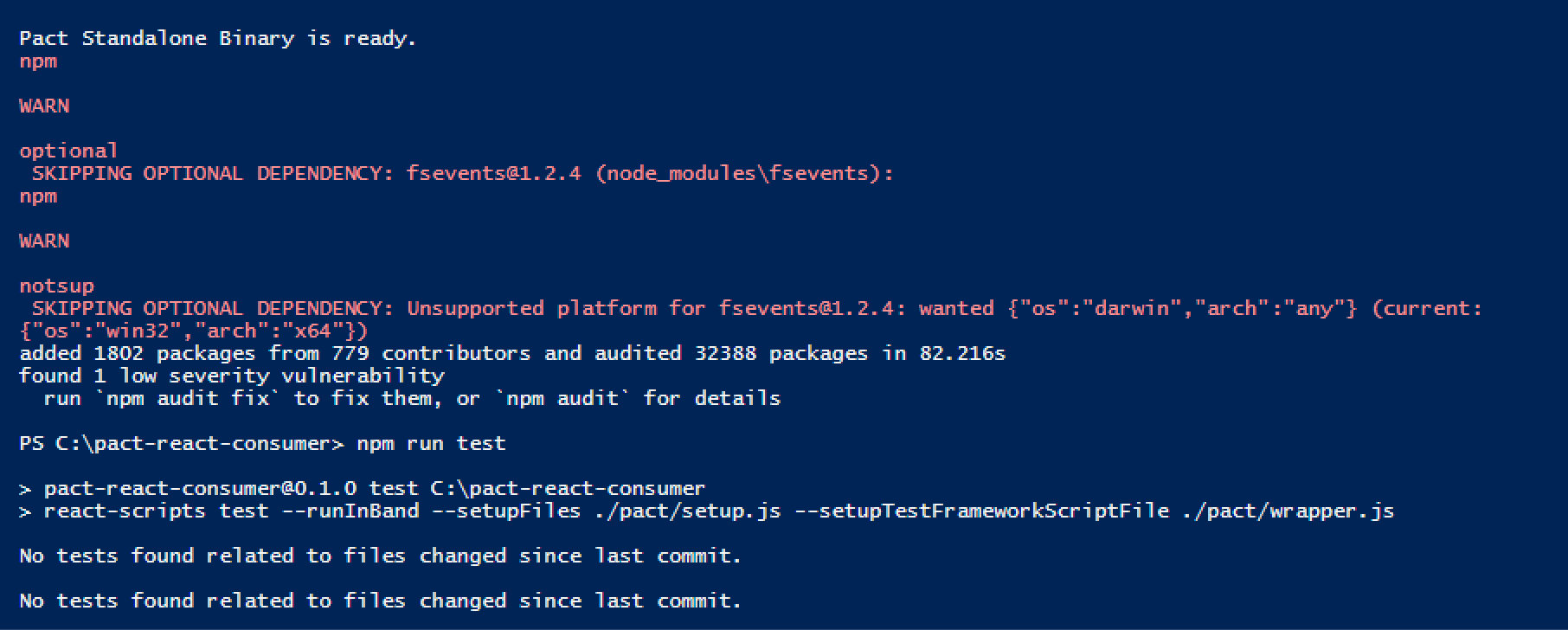
It doesn't appear to be invoking the setup/wrapper at all, perhaps because it's not seeing any tests. I'll keep digging in my spare time.
mefellows
on 24 Oct 2018
@thombergs I think you're project is not going to work anyway. Looking at the setup file, you're using the PactWeb package, which _doesn't start any mock server_ (it just communicates to one that has been setup) and is designed to run in non-node environments (e.g. jasmine/karma in the browser). So Error: Error: connect ECONNREFUSED 127.0.0.1:8080 is not surprising - unless you're starting the server somewhere else, this will always happen.
Additionally, PactWeb doesn't have a setup() method (which is the step that starts a server). Perhaps we should add it to the DSL, and log a warning so that people get feedback that perhaps they have the wrong package?
For Jest, you would want to be using the @pact-foundation/pact package.
mefellows
on 24 Oct 2018
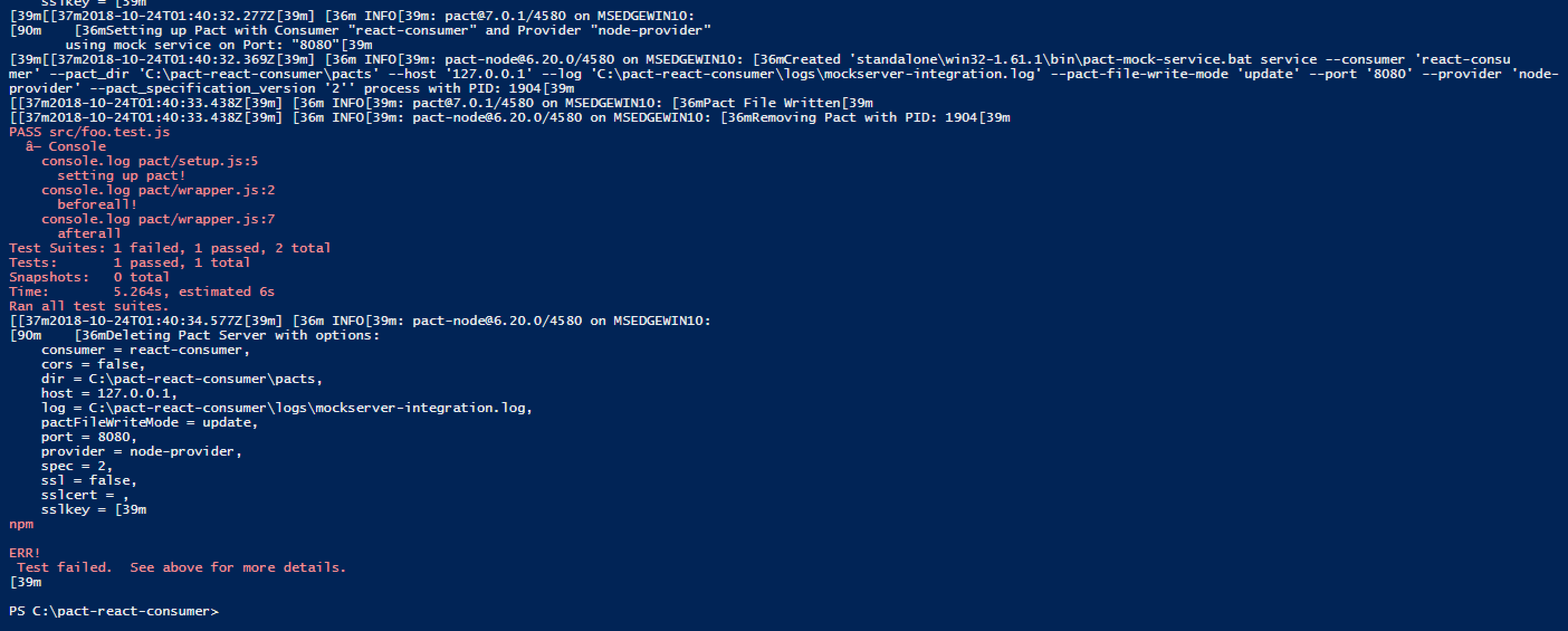
Confirmed it works switching back to the correct dependency and making the minor updates (e.g. constructor).
@erwanriou would you be able to create a similar repo for me to try and re-create the issue?
mefellows
on 24 Oct 2018
@mboudreau you saved my day, thanks a lot for digging into it! It works for me now. Seems that @erwanriou has a different issue though, since he already is using @pact-foundation/pact.
thombergs
on 24 Oct 2018
I will try to reproduce your example then and tell you my feedback. Maybe i made a mistake somewhere in the configs.
erwanriou
on 24 Oct 2018
Thanks @erwanriou, that would be great.
mefellows
on 24 Oct 2018
@mefellows Can you push on thombergs the exact change you made in his repository? I just downloaded the last node version and will now install exactly the same way he did. but since he used pactweb i want to be sure that you only change the require to @pact-foundation/pact.
erwanriou
on 24 Oct 2018
@erwanriou see https://github.com/thombergs/pact-react-consumer/pull/1
mefellows
on 24 Oct 2018
@mefellows Ahh nice, tomorow i try it
erwanriou
on 24 Oct 2018
No worries - good luck! Also, if you get a nice setup we'd happily accept
it as an example to demo/test as part of the build.
On Thu, Oct 25, 2018 at 6:01 AM Erwan Riou notifications@github.com wrote:
@mefellows https://github.com/mefellows Ahh nice, tomorow i try it
—
You are receiving this because you were mentioned.
Reply to this email directly, view it on GitHub
https://github.com/pact-foundation/pact-js/issues/234#issuecomment-432787452,
or mute the thread
https://github.com/notifications/unsubscribe-auth/AADSjHqjKQqdWB3hi94hmfNSGjfadRrBks5uoLkRgaJpZM4X1HXq
.
--
Matt Fellows
www.onegeek.com.au
calendly.com/mfellows
mefellows
on 24 Oct 2018
Hi @mefellows, i keep trying to install pact and i was actually wondering. I have an error during the installation of Pact with node-gyp that is strange (after it the process still continu and finish the pact installation)
react-pact\node_modules\dtrace-provider>if not defined npm_config_node_gyp (node "C:\Program Files\nodejs\node_modules\npm\node_modules\npm-lifecycle\node-gyp-bin\\..\..\node_modules\node-gyp\bin\node-gyp.js" rebuild )  else (node "C:\Program Files\nodejs\node_modules\npm\node_modules\node-gyp\bin\node-gyp.js" rebuild )
gyp ERR! configure error
gyp ERR! stack Error: Can't find Python executable "/path/to/executable/python2.7", you can set the PYTHON env variable.
gyp ERR! stack     at PythonFinder.failNoPython (C:\Program Files\nodejs\node_modules\npm\node_modules\node-gyp\lib\configure.js:484:19)
gyp ERR! stack     at PythonFinder.<anonymous> (C:\Program Files\nodejs\node_modules\npm\node_modules\node-gyp\lib\configure.js:509:16)
gyp ERR! stack     at C:\Program Files\nodejs\node_modules\npm\node_modules\graceful-fs\polyfills.js:284:29
gyp ERR! stack     at FSReqCallback.oncomplete (fs.js:161:21)
gyp ERR! System Windows_NT 10.0.17134
gyp ERR! command "C:\\Program Files\\nodejs\\node.exe" "C:\\Program Files\\nodejs\\node_modules\\npm\\node_modules\\node-gyp\\bin\\node-gyp.js" "rebuild"
gyp ERR! cwd C:\Users\eadrien\Dropbox\01 PROGRAMATION\TUTORIELS\PACT\react-pact\node_modules\dtrace-provider
gyp ERR! node -v v11.1.0
gyp ERR! node-gyp -v v3.8.0
gyp ERR! no
I was wondering if it could have something to do with my current issue. I installed node again and separatly node-gyp again and python again doing it all in admin terminal
npm install -g node-gyp
npm install --global --production windows-build-tools
npm config set python python2.7
npm config set msvs_version 2017
npm config set python /path/to/executable/python2.7
After setup a exact similar project at the one you updated from @thombergs it create me this error:
console.error node_modules/jest-environment-jsdom/node_modules/jsdom/lib/jsdom/virtual-console.js:29
    Error: Cross origin http://localhost forbidden
        at dispatchError (C:\Users\eadrien\Dropbox\01 PROGRAMATION\TUTORIELS\PACT\react-pact\node_modules\jest-environment-jsdom\node_
modules\jsdom\lib\jsdom\living\xhr-utils.js:65:19)
        at Object.validCORSHeaders (C:\Users\eadrien\Dropbox\01 PROGRAMATION\TUTORIELS\PACT\react-pact\node_modules\jest-environment-j
sdom\node_modules\jsdom\lib\jsdom\living\xhr-utils.js:77:5)
        at receiveResponse (C:\Users\eadrien\Dropbox\01 PROGRAMATION\TUTORIELS\PACT\react-pact\node_modules\jest-environment-jsdom\nod
e_modules\jsdom\lib\jsdom\living\xmlhttprequest.js:847:21)
        at Request.client.on.res (C:\Users\eadrien\Dropbox\01 PROGRAMATION\TUTORIELS\PACT\react-pact\node_modules\jest-environment-jsd
om\node_modules\jsdom\lib\jsdom\living\xmlhttprequest.js:679:38)
        at Request.emit (events.js:182:13)
        at Request.onRequestResponse (C:\Users\eadrien\Dropbox\01 PROGRAMATION\TUTORIELS\PACT\react-pact\node_modules\request\request.
js:1062:10)
        at ClientRequest.emit (events.js:182:13)
        at HTTPParser.parserOnIncomingClient [as onIncoming] (_http_client.js:562:21)
        at HTTPParser.parserOnHeadersComplete (_http_common.js:109:17)
        at Socket.socketOnData (_http_client.js:449:20) undefined

  console.error node_modules/@pact-foundation/pact/pact.js:113


  console.error node_modules/@pact-foundation/pact/pact.js:114
    Pact verification failed!

  console.error node_modules/@pact-foundation/pact/pact.js:115
    {"timestamp":"2018-11-09T10:43:03.475+0000","status":404,"error":"Not Found","message":"No message available","path":"/interaction
s/verification"}
I think the problem is with this python variable that not detected, am i right? I wanted to reproduce it working to produce a proper readme that would enhace this case and the steps to cover it... (and go back quickly to linux after, i just can't handle windows anymore)
erwanriou
on 9 Nov 2018
I changed the path of python that was actually wrong, but it keep saying me the same error :
k Error: Can't find Python executable "C:\Users\eadrien\.windows-build-tools\python27\", you can set the PYTHON env variable.
gyp ERR! stack     at PythonFinder.failNoPython (C:\Program Files\nodejs\node_modules\npm\node_modules\node-gyp\lib\configure.js:484:19)
gyp ERR! stack     at PythonFinder.<anonymous> (C:\Program Files\nodejs\node_modules\npm\node_modules\node-gyp\lib\configure.js:509:16)
gyp ERR! stack     at C:\Program Files\nodejs\node_modules\npm\node_modules\graceful-fs\polyfills.js:284:29
gyp ERR! stack     at FSReqCallback.oncomplete (fs.js:161:21)
gyp ERR! System Windows_NT 10.0.17134
gyp ERR! command "C:\\Program Files\\nodejs\\node.exe" "C:\\Program Files\\nodejs\\node_modules\\npm\\node_modules\\node-gyp\\bin\\node-gyp.js" "rebuild"
gyp ERR! cwd C:\Users\eadrien\Dropbox\01 PROGRAMATION\TUTORIELS\PACT\react-pact\node_modules\dtrace-provider
gyp ERR! node -v v11.1.0
gyp ERR! node-gyp -v v3.8.0
gyp ERR!
But i check and the executable is there :
PS C:\Users\eadrien\.windows-build-tools\python27> ls
Directory: C:\Users\eadrien\.windows-build-tools\python27
Mode                LastWriteTime         Length Name
----                -------------         ------ ----
d-----        11/9/2018  11:14 AM                DLLs
d-----        11/9/2018  11:14 AM                Doc
d-----        11/9/2018  11:14 AM                include
d-----        11/9/2018  11:14 AM                Lib
d-----        11/9/2018  11:14 AM                libs
d-----        11/9/2018  11:14 AM                Scripts
d-----        11/9/2018  11:14 AM                tcl
d-----        11/9/2018  11:14 AM                Tools
-a----        4/30/2018   5:41 PM          38586 LICENSE.txt
-a----        4/30/2018   5:37 PM         493404 NEWS.txt
-a----        4/30/2018   5:31 PM          28160 python.exe
-a----        4/30/2018   5:31 PM          28160 pythonw.exe
-a----        4/14/2018  11:47 PM          56951 README.txt
Here my repo btw
erwanriou
on 9 Nov 2018
Apologies for the delay in getting back to you @erwanriou. I was able to pull your repository and run the tests on a clean Windows environment (a MS Edge Windows 10 from modern.ie).
I didn't use the react-scripts version as it seemed to cripple my VM, but running jest directly worked fine i.e.
PS C:\react-pact> .\node_modules\.bin\jest --runInBand --setupFiles ./src/test/pact/setup.js --setupTestFrameworkScriptFile ./src/test/pact/wrapper.js
[[37m2018-12-01T06:33:35.368Z[39m] [36m INFO[39m: [email protected]/10156 on MSEDGEWIN10:
[90m [36mCreating Pact Server with options:
consumer = react-consumer,
cors = true,
dir = C:\react-pact\pacts,
host = 127.0.0.1,
log = C:\react-pact\logs\mockserver-integration.log,
pactFileWriteMode = overwrite,
port = 8080,
provider = node-provider,
spec = 2,
ssl = false,
sslcert = ,
sslkey = [39m
[39m[[37m2018-12-01T06:33:35.368Z[39m] [36m INFO[39m: [email protected]/10156 on MSEDGEWIN10:
[90m [36mSetting up Pact with Consumer "react-consumer" and Provider "node-provider"
using mock service on Port: "8080"[39m
[39m[[37m2018-12-01T06:33:36.082Z[39m] [36m INFO[39m: [email protected]/10156 on MSEDGEWIN10: [36mCreated 'standalone\win32-1.61.1\bin\pa
ct-mock-service.bat service --consumer 'react-consumer' --cors 'true' --pact_dir 'C:\react-pact\pacts' --host '127.0.0.1' --log 'C:\react-pact
\logs\mockserver-integration.log' --pact-file-write-mode 'overwrite' --port '8080' --provider 'node-provider' --pact_specification_version '2'
' process with PID: 5704[39m
[[37m2018-12-01T06:33:39.317Z[39m] [36m INFO[39m: [email protected]/10156 on MSEDGEWIN10: [36mPact File Written[39m
[[37m2018-12-01T06:33:39.317Z[39m] [36m INFO[39m: [email protected]/10156 on MSEDGEWIN10: [36mRemoving Pact with PID: 5704[39m
.\node_modules\.bin\jest : PASS src/test/App.test.js (5.111s)
At line:1 char:1
+ .\node_modules\.bin\jest --runInBand --setupFiles ./src/test/pact/set ...
+ ~~~~~~~~~~~~~~~~~~~~~~~~~~~~~~~~~~~~~~~~~~~~~~~~~~~~~~~~~~~~~~~~~~~~~
+ CategoryInfo : NotSpecified: (PASS src/test/App.test.js (5.111s):String) [], RemoteException
+ FullyQualifiedErrorId : NativeCommandError
Testing Pact test
/auth API
√ should create an action to login (107ms)
Test Suites: 1 passed, 1 total
Tests: 1 passed, 1 total
Snapshots: 0 total
Time: 8.848s, estimated 10s
Ran all test suites.
[[37m2018-12-01T06:33:40.478Z[39m] [36m INFO[39m: [email protected]/10156 on MSEDGEWIN10:
[90m [36mDeleting Pact Server with options:
consumer = react-consumer,
cors = true,
dir = C:\react-pact\pacts,
host = 127.0.0.1,
log = C:\react-pact\logs\mockserver-integration.log,
pactFileWriteMode = overwrite,
port = 8080,
provider = node-provider,
spec = 2,
ssl = false,
sslcert = ,
sslkey = [39m
[39m
PS C:\react-pact> cat .\logs\mockserver-integration.log
I, [2018-11-30T22:33:39.189531 #8404] INFO -- : Registered expected interaction GET /api/auth
D, [2018-11-30T22:33:39.189531 #8404] DEBUG -- : {
"description": "Get ",
"request": {
"method": "GET",
"path": "/api/auth",
"headers": {
"Accept": "application/json"
}
},
"response": {
"status": 200,
"headers": {
"Content-Type": "application/json"
}
}
}
I, [2018-11-30T22:33:39.221724 #8404] INFO -- : Received request GET /api/auth
D, [2018-11-30T22:33:39.221724 #8404] DEBUG -- : {
"path": "/api/auth",
"query": "",
"method": "get",
"headers": {
"Accept": "application/json",
"Referer": "http://localhost/",
"User-Agent": "Mozilla/5.0 (win32) AppleWebKit/537.36 (KHTML, like Gecko) jsdom/11.12.0",
"Accept-Language": "en",
"Origin": "http://localhost",
"Host": "localhost:8080",
"Accept-Encoding": "gzip, deflate",
"Connection": "close",
"Version": "HTTP/1.1"
}
}
I, [2018-11-30T22:33:39.221724 #8404] INFO -- : Found matching response for GET /api/auth
D, [2018-11-30T22:33:39.221724 #8404] DEBUG -- : {
"status": 200,
"headers": {
"Content-Type": "application/json"
}
}
I, [2018-11-30T22:33:39.283878 #8404] INFO -- : Verifying - interactions matched
I, [2018-11-30T22:33:39.299012 #8404] INFO -- : Cleared interactions
I, [2018-11-30T22:33:39.314886 #8404] INFO -- : Writing pact for node-provider to C:/react-pact/pacts/react-consumer-node-provider.json
PS C:\react-pact>
(I'm not quite so sure about the RemoteException issue, but the tests seem to pass and the pact log file indicates all went expected there).
In any case, I'm certainly not getting anything related to Python there so I'm guessing there's something peculiar in your environment that's breaking things. This being said, there seems to be a Python runtime there, so maybe that's helping?
Python 2.7.15 (v2.7.15:ca079a3ea3, Apr 30 2018, 16:30:26) [MSC v.1500 64 bit (AMD64)] on win32
It looks to be the node-gyp, specifically the dtrace-provider bindings (this seems to be a common recurrence from the pact-node dependency) which is a transitive dependency of a log package we use. Perhaps there is some more advice over there?
mefellows
on 1 Dec 2018
Hi @mefellows, that strange. i will try it in an other environment than this one. Well at least happy that its only a problem of environment. Then its mean my example could work. I gave you a feedback on an other windows environment soon.
erwanriou
on 10 Dec 2018
This issue has been automatically marked as stale because it has not had recent activity. It will be closed if no further activity occurs. Thank you for your contributions.
![stale[bot] picture](https://avatars.githubusercontent.com/in/1724?v=4&s=40) stale[bot]
on 10 Feb 2019
stale[bot]
on 10 Feb 2019
Closing due to inactivity.
mefellows
on 30 Jun 2019
Related issues
 danhlee329
·
7Comments
mefellows
·
7Comments
danhlee329
·
7Comments
mefellows
·
7Comments
 TimothyJones
·
4Comments
TimothyJones
·
4Comments
 kamenomagic
·
9Comments
kamenomagic
·
9Comments
 MichaelSu1983
·
7Comments
MichaelSu1983
·
7Comments