Packages: [Python] wrong hot pink highlighting for regex/f-string
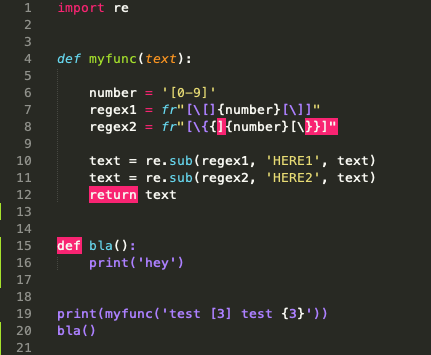
The regex and the program below work fine but 2 lines are getting highlighted with hot pink as if they were incorrect.
- Sublime Version: 3.2.2 build 3211
- OS Version: mac
import re


def myfunc(text):

    number = '[0-9]'
    regex1 = fr"[\[]{number}[\]]"
    regex2 = fr"[\{{]{number}[\}}]"

    text = re.sub(regex1, 'HERE1', text)
    text = re.sub(regex2, 'HERE2', text)
    return text


print(myfunc('test [3] test {3}'))
I have simplified the program above to show the issue and remove the noise. So it might look like a ridiculous way of doing that, but it's just because I have removed all the context.

Is there a way I can disable this hot pink in the mean time?
UPDATE:
It also affects subsequent function definitions:
 fersarr
All 4 comments
LGTM with master branch. st3 branch untested.
 jfcherng
on 22 May 2020
jfcherng
on 22 May 2020
Cool, thanks for checking. So, does that mean that it's just a matter of time until there's a new release?
fersarr
on 26 May 2020
The st3 branch seems good on my test. So you can follow the step in README to use the "latest" syntax definition. Or if you know the fact that syntaxes are just built-in plugins/packages and you know how to override a plugin file.
jfcherng
on 26 May 2020
worked perfectly! thank you!
fersarr
on 27 May 2020
Related issues
 iamntz
·
4Comments
iamntz
·
4Comments
 deathaxe
·
3Comments
deathaxe
·
3Comments
 n-kort
·
3Comments
n-kort
·
3Comments
 darkred
·
4Comments
darkred
·
4Comments
 Kristinita
·
4Comments
Kristinita
·
4Comments
Most helpful comment
LGTM with
masterbranch.st3branch untested.