Packages: [Haskell] Syntax Highlighting with Guards
From @kasceh (me) on November 16, 2015 12:36, duplicated by @FichteFoll
The first piped statement with a guard when not using an = (which isn't necessary) isn't coloured properly, and the the statement following it isn't coloured properly either.
The following is valid Haskell:
handleLookup :: Either String Code -> String
handleLookup x
  | Either.isLeft x       = "Issue: " ++ fromLeft x
  | otherwise             = "Code: "  ++ fromRight x
but is highlighted like so:

whereas having an = after handleLookup x on line 2, styles it like so:

EDIT:
Seems to be a general issue that Sublime doesn't fully understand what can terminate a partial-statement:
Correct syntax, Incorrect highlighting:
 )
)
Incorrect syntax, correct highlighting
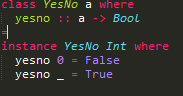
Copied from duplicate: https://github.com/SublimeTextIssues/DefaultPackages/issues/159
Copied from original issue: SublimeTextIssues/Core#1024
 JoeMShanahan
All 6 comments
This issue affects me as well. Found it here via google: https://forum.sublimetext.com/t/haskell-syntax-highlighting-bug/9456/4
 Wizek
on 6 Dec 2017
Wizek
on 6 Dec 2017
This has been open for over three years. Is there any way to get this seen by the relevant people?
Version 3.1.1 Build 3176

 ghost
on 7 Feb 2019
ghost
on 7 Feb 2019
I think the biggest problem we have right now is that no one has really stepped forward to seriously maintain the Haskell mode. I would honestly do it, but I have my hands full with work and the Scala mode.
My best recommendation would be to check out fixing it yourself! sublime-syntax is honestly a joy to work with, and pull requests are very much welcomed on this repository. The official Discord is a great place to jump in and ask questions; all of us will be more than willing to help you out.
 djspiewak
on 7 Feb 2019
djspiewak
on 7 Feb 2019
Apologies if that came off as crass. I was under the impression that Sublime Text is maintained by a small group and wasn't sure who should be made aware of the problems with the Haskell mode, and how pull requests are integrated with the closed source.
I'm not sure I have the skills necessary to fix this as I'm currently working through an introductory book on the language. Do you have any insight into the scope of this problem?
ghost
on 7 Feb 2019
@widmur Guessing completely wildly based on literally nothing other than general knowledge of how ST works… I think what's happening here is some context is not being popped correctly. Haskell has a particularly tricky syntax, and a lot of its block inference stuff is difficult to encode without context sensitivity. I'm guessing it's viewing instance as part of the type on the previous non-whitespace line. That's obviously wrong, and some newline lookahead is in order to prevent this sort of thing, but an easier fix is to just do something like - match: '(?={{keywords}})' and then pop: true in the relevant context, where {{keywords}} is simply a regular expression which includes all Haskell reserved words (at least those that are invalid as part of a type). The purpose being to just get you back into main when instance is seen. It's a hack but it usually works pretty well.
Again, this is based on nothing. I would start by adding it as a test case in the syntax test and then seeing if you can figure out which context is responsible for running away with things. Adding a meta_scope declaration at the top of various contexts, where the meta_scope you set is the context name, is a very useful debugging trick. Ctrl-Shift-P (on mac) will show you the full set of scopes of the character under the cursor.
I don't expect it'll be too hard to make it work, at least in this case. Making it work more reliably in general might take some more involved tweaking, depending on the state of things.
djspiewak
on 8 Feb 2019
This issue has been solved by a previous commit, hence it is being closed.
 wbond
on 24 Oct 2019
wbond
on 24 Oct 2019
Related issues
 caub
·
3Comments
caub
·
3Comments
 darkred
·
4Comments
darkred
·
4Comments
 Kristinita
·
4Comments
Kristinita
·
4Comments
 okdana
·
3Comments
okdana
·
3Comments
 deathaxe
·
3Comments
deathaxe
·
3Comments
Most helpful comment
I think the biggest problem we have right now is that no one has really stepped forward to seriously maintain the Haskell mode. I would honestly do it, but I have my hands full with work and the Scala mode.
My best recommendation would be to check out fixing it yourself! sublime-syntax is honestly a joy to work with, and pull requests are very much welcomed on this repository. The official Discord is a great place to jump in and ask questions; all of us will be more than willing to help you out.