Packages: <ddns-scripts> ddns-scripts_cloudflare.com-v4 not updating subdomain A record, and changes traffic status on success
DNS provider: Cloudflare
Device: Linksys WRT1200AC
Firmware: LEDE
Version: LEDE Reboot 17.01.4 r3560-79f57e422d / LuCI lede-17.01 branch (git-17.290.79498-d3f0685)
Packages installed:
- ddns-scripts
- ddns-scripts_cloudflare.com-v4
- curl
- wget
Issue (some names are custom, for the sake of the issue description):
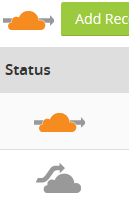
I own mydomain.com, and have been able to successfully change the "mydomain.com" A record via LEDE. If I put a false value on Cloudflare's admin dashboard, and then perform the update via the router, I see it successfully changed within a minute. However, it changes the traffic status from going through Cloudflare (orange cloud icon), to DNS only (grey cloud icon).
Now, I want to update home.mydomain.com via the router, because I am adding more routers at physical locations. I put the settings in LEDE, and specified the Lookup Hostname as "home.mydomain.com" and Domain as "mydomain.com". This time, the A record is not changing.
tldr:
Issue 1: When Cloudflare's A record is updated, it changes the traffic status from Cloudflare, to DNS only.
Issue 2: I cannot update subdomain A records, only the main domain A record.
I've attached a log from the router, as well as an image showing the Cloudflare icons mentioned above.
 sinayion
All 11 comments
Hi Harry,
some versions back the syntax of "domain" was changed to get rid of the need to always update/rebuild tld_names.dat.gz
option domain - "[email protected]" # syntax changed to remove split_FQDN() function and rebuild tld_names.dat.gz
please try
 chris5560
on 10 Nov 2017
chris5560
on 10 Nov 2017
Cheers, @chris5560, that worked! Issue 2 is fixed.
Issue 1 is still there, though, where the change in the A record causes the Cloudflare proxy to turn off. I think I found what is needed to be changed here: https://api.cloudflare.com/#dns-records-for-a-zone-update-dns-record. If I'm reading that right, we need the following variable added to the script:
"proxied": true
sinayion
on 11 Nov 2017
It's easy to add this variable to the script (command send to Cloudflair) but do we need a new ddns-scripts config variable for it ?
Do you know what happens, if this parameter is always set to "true" ?
I'm not familiar with Cloudflair; thanks for support
chris5560
on 11 Nov 2017
We definitely need this variable added, and also shown in the relevant luci config page, where users can choose between the two values "true" and "false". This is a relevant cloudflare page: https://support.cloudflare.com/hc/en-us/articles/200169626-What-subdomains-are-appropriate-for-orange-gray-clouds-
From that page:
- If proxied is set to true: An orange cloud means your web traffic is running through Cloudflare making your site faster, safer and smarter.
- If proxied is set to false: A gray cloud means your web traffic is not running through Cloudflare.
I would assume that "true" should be the default for users.
EDIT: I got a response from a Cloudflare support rep, and the conversation is pasted below. He says there is a way for the script to just keep the current value. So I guess we have two options:
- Basic version of the update script that just keeps the current value on the Cloudflare dashboard.
- An advanced version of this in the UI would be to have three options for the "proxied" value: true, false, keep; where "keep" would perform the suggestion below.
Harry K.:
This is the ticket I made: https://github.com/openwrt/packages/issues/5097#issuecomment-343655805. I suggested that true should be the defualt value for proxied, once they add it to their update scripts; do you agree, or should it be false?Damian P.:
Hi,It depends really, I'm sure some people have a use case for it to be 'grey-clouded' by default and do not want the proxy to be enabled when the record is updated.
Ideally the record should keep the value that is currently set, so if the record is orange-clouded it remains orange-clouded and if it is grey it remains grey.
They should be using the update 'PUT' method to just replace the IP Address -- https://api.cloudflare.com/#dns-records-for-a-zone-update-dns-record and not change the current value of the proxied setting.
Damian | Cloudflare Support Engineer
sinayion
on 11 Nov 2017
Hi,
I had the same problem and thanks to this issue I successfully added the optional paramter 'false' and now the state of 'proxied' is not changed anymore. But there is another similar problem: When I change the TTL from 'Automatic' to something else on the cloudflare webpage, after the script has successfully updated the IP, the TTL is changed back to 'Automatic'. It would be nice, if this parameter can be kept as it is, too. Could this be fixed on the same way? Or, wouldn't it be better to allow e.g. a comma separated list of such parameters. Maybe something like this in the optional parameter field: proxied=false, ttl=2m (or 2h or 1d or any of the other possible values for ttl).
Thanks in advance and best
 dkadioglu
on 4 Apr 2018
dkadioglu
on 4 Apr 2018
@dkadioglu would you mind helping me with the config you used? I've been trying to get this working without luck for a few hours now! It seems like the SSL certificate doesn't work?
Here's a dump of the logs:
  175119  info : Starting main loop at 2018-05-08 17:51
 175119       : Detect local IP on 'network'
 175119       : Local IP '192.222.194.13' detected on network 'wan'
 175119       : Update needed - L: '192.222.194.15' <> R: '104.27.179.209'
 175119       : parsing script '/usr/lib/ddns/update_cloudflare_com_v4.sh'
 175119       : #> /usr/bin/curl -RsS -o /var/run/ddns/cloudflare_ipv4.dat --stderr /var/run/ddns/cloudflare_ipv4.err --noproxy '*' --header 'X-Auth-Email: [email protected]'  --header 'X-Auth-Key: *password*'  --header 'Content-Type: application/json'  --request GET 'https://api.cloudflare.com/client/v4/zones?name=pycvala.de'
 175119 ERROR : cURL Error: '77'
 175119       : curl: (77) Error reading ca cert file /etc/ssl/certs/ca-certificates.crt - mbedTLS: (-0x2180) X509 - The CRT/CRL/CSR format is invalid, e.g. different type expected
 175119  WARN : Transfer failed - retry 1/0 in 60 seconds
 pycvalade
on 8 May 2018
pycvalade
on 8 May 2018
If looks like there are problems to lookup the IP for "sip.domain.com".
Does this host exists in World Wide DNS?
Could you "nslookup" or "ping" this host?
Could you "nslookup" or "ping" i.e. google.com?
chris5560
on 13 May 2018
@pycvalade puuh, never had that problem. To me the error sounds more like something is wrong with the file containing the ca-certs. Does curl work for any other url, e.g. https://www.google.com or something else via https? Maybe you can try to reinstall the package ca-certificates? Just some ideas to check.
dkadioglu
on 15 May 2018
Hi guys!
Thanks for the help, tried a few things, still nothing:
- restarted router, just in case
- removed 0 byte crt:
root@py-net:~# rm /etc/ssl/certs/ca-certificates.crt - installed ca-certificates,
/etc/ssl/certs/ca-certificates.crtdoesn't exist after install, but there's a bunch of files in/etc/ssl/certs/though... - tried curl on https, fails because
/etc/ssl/certs/ca-certificates.crtdoesn't exist:
root@py-net:~# curl https://www.google.com
curl: (77) Error reading ca cert file /etc/ssl/certs/ca-certificates.crt - mbedTLS: (-0x3E00) PK - Read/write of file failed
- curl from router downloads 0 bytes:
curl -o /etc/ssl/certs/ca-certificates.crt http://curl.haxx.se/ca/cacert.pem - download from my computer (on the same network) works..
Anyway.. found a way around all of this:
scp Downloads/cacert.pem [email protected]:/etc/ssl/certs/ca-certificates.crt
Checking back logs, I see success :)
 103922       : IPv4 at CloudFlare.com already up to date
 103922  info : Update successful - IP '192.222.194.15' send
 103922  info : Forced update successful - IP: '192.222.194.15' send
 103922       : Waiting 600 seconds (Check Interval)
Thanks for your help! Someone might want to look into the ca-certificates bundle? Cheers!
pycvalade
on 15 May 2018
completed understand! thanks everyone
Hi Harry,
some versions back the syntax of "domain" was changed to get rid of the need to always update/rebuild tld_names.dat.gz
# option domain - "[email protected]" # syntax changed to remove split_FQDN() function and rebuild tld_names.dat.gz
please try@sinayion I also have question both your issuse1&2. But I still don't understand how to fix it after read those words above, so could you explain it specific for me? both of your issue. thanks a lot!
 Mosney
on 5 Jul 2018
Mosney
on 5 Jul 2018
fixed in latest snapshot and 18.06 tree with referenced update commit.
 dibdot
on 8 Aug 2018
dibdot
on 8 Aug 2018
Related issues
 zorun
·
4Comments
zorun
·
4Comments
 gacallea
·
3Comments
gacallea
·
3Comments
 domomg
·
9Comments
domomg
·
9Comments
 alexhenrie
·
3Comments
alexhenrie
·
3Comments
 leleobhz
·
12Comments
leleobhz
·
12Comments
Most helpful comment
Hi Harry,
some versions back the syntax of "domain" was changed to get rid of the need to always update/rebuild tld_names.dat.gz
option domain - "[email protected]" # syntax changed to remove split_FQDN() function and rebuild tld_names.dat.gz
please try