suggestion:
please name some free ttf to use in a p5.js sketch with loadFont in the WebGL tutorial and on
https://p5js.org/reference/#/p5/loadFont
thanks!
 Kango
Kango
All 13 comments
Welcome! 👋 Thanks for opening your first issue here! And to ensure the community is able to respond to your issue, be sure to follow the issue template if you haven't already.
![welcome[bot] picture](https://avatars0.githubusercontent.com/in/4141?v=4&s=40) welcome[bot]
on 23 Apr 2019
welcome[bot]
on 23 Apr 2019
Inconsolata used in the reference is a free font. What kind of font suggestion are you thinking of? A general list of suggestions is probably a bit out of scope as that is more of a graphic design/typography problem rather than a programming one.
 limzykenneth
on 24 Apr 2019
limzykenneth
on 24 Apr 2019
Hello,
thanks for your quick reply.
I would appreciate it if you could provide the free font Inconsolata as a online resource.
I wasn’t able to run the code from the Learn / tutorial section:
let myFont;
function preload() {
myFont = loadFont('assets/AvenirNextLTPro-Demi.otf'); // problem : won‘t work
}
function setup() {
fill('#ED225D');
textFont(myFont);
instead of 'assets/AvenirNextLTPro-Demi.otf' it would be cool to have an online font (and also online textures)
to test it with https://editor.p5js.org/Kango/sketches/
So I and other beginners could use a CORS https://developer.mozilla.org/en-US/docs/Web/HTTP/CORS -compatible webl URL.
Thanks a ton!
Regards, Chrisir
Pfarrer Christoph Römhild
Rheinsberg
https://www.kirche-wittstock-ruppin.de/rheinsberg
0172 / 176 33 88
Von: Kenneth Lim [mailto:[email protected]]
Gesendet: Mittwoch, 24. April 2019 00:48
An: processing/p5.js
Cc: Kango; Author
Betreff: Re: [processing/p5.js] loadFont: free fonts and URL? (#3706)
Inconsolata used in the reference is a free font. What kind of font suggestion are you thinking of? A general list of suggestions is probably a bit out of scope as that is more of a graphic design/typography problem rather than a programming one.
—
You are receiving this because you authored the thread.
Reply to this email directly, view it on GitHub https://github.com/processing/p5.js/issues/3706#issuecomment-486002104 , or mute the thread https://github.com/notifications/unsubscribe-auth/AABWUOWO7TYCKLOGOSSWNNDPR6GZXANCNFSM4HH4ZXHA . https://github.com/notifications/beacon/AABWUOWTOJM3COK2WXKBX33PR6GZXANCNFSM4HH4ZXHA.gif
Kango
on 24 Apr 2019
Hi @Kango you can download the font here: https://fonts.google.com/specimen/Inconsolata?selection.family=Inconsolata
or include the google fonts link in the head of your html file.
 lmccart
on 26 Apr 2019
lmccart
on 26 Apr 2019
Hello,
thanks for your quick reply.
I am not sure if this helps though.
I want to use the font in https://editor.p5js.org/Kango/sketches/
I wasn’t able to run the code from the Learn / tutorial section.
This
myFont = loadFont('assets/AvenirNextLTPro-Demi.otf'); // problem : won‘t work
won‘t work.
Hence my idea was to provide the free font Inconsolata as a online resource
that we can use via a CORS https://developer.mozilla.org/en-US/docs/Web/HTTP/CORS -compatible webl URL
as suggested her:
https://github.com/processing/p5.js/wiki/Getting-started-with-WebGL-in-p5
Thanks!
Kango
P.S.
let myFont;
function preload() {
myFont = loadFont('assets/AvenirNextLTPro-Demi.otf'); // problem : won‘t work
}
function setup() {
fill('#ED225D');
textFont(myFont);
https://github.com/processing/p5.js/wiki/Getting-started-with-WebGL-in-p5
Von: Lauren McCarthy [mailto:[email protected]]
Gesendet: Freitag, 26. April 2019 09:47
An: processing/p5.js
Cc: Kango; Mention
Betreff: Re: [processing/p5.js] loadFont: free fonts and URL? (#3706)
Hi @Kango https://github.com/Kango you can download the font here: https://fonts.google.com/specimen/Inconsolata?selection.family=Inconsolata
or include the google fonts link in the head of your html file.
—
You are receiving this because you were mentioned.
Reply to this email directly, view it on GitHub https://github.com/processing/p5.js/issues/3706#issuecomment-486961925 , or mute the thread https://github.com/notifications/unsubscribe-auth/AABWUOQN2DXACNCCUG5JULDPSKXQVANCNFSM4HH4ZXHA . https://github.com/notifications/beacon/AABWUORLFWYRQYEZMCT3QXLPSKXQVANCNFSM4HH4ZXHA.gif
Kango
on 26 Apr 2019
hi @Kango the link I posted enables you to download it for free. click "select this font", click the popup that gets created in the bottom right of the screen, and click the download button.

lmccart
on 26 Apr 2019
Hi Lauren,
Sorry, but then I still can’t use it in the online editor
https://editor.p5js.org/Kango/sketches/
Hence my idea was to provide the font Inconsolata so that we can use it via a CORS https://developer.mozilla.org/en-US/docs/Web/HTTP/CORS -compatible webl URL
So this
myFont = loadFont('assets/AvenirNextLTPro-Demi.otf'); // problem : won‘t work
would be
myFont = loadFont('http:/p5js.org/assets/AvenirNextLTPro-Demi.otf'); // ????
Regards, Christoph
Von: Lauren McCarthy [mailto:[email protected]]
Gesendet: Freitag, 26. April 2019 11:19
An: processing/p5.js
Cc: Kango; Mention
Betreff: Re: [processing/p5.js] loadFont: free fonts and URL? (#3706)
hi @Kango https://github.com/Kango the link I posted enables you to download it for free. click "select this font", click the popup that gets created in the bottom right of the screen, and click the download button.
https://user-images.githubusercontent.com/191056/56797462-b7fc9680-684f-11e9-81a9-887fcd31cfed.png Screen Shot 2019-04-26 at 6 18 14 PM
—
You are receiving this because you were mentioned.
Reply to this email directly, view it on GitHub https://github.com/processing/p5.js/issues/3706#issuecomment-486989169 , or mute the thread https://github.com/notifications/unsubscribe-auth/AABWUOSSGAIWYQ6RVLTXXZ3PSLCJHANCNFSM4HH4ZXHA . https://github.com/notifications/beacon/AABWUOTKWVDJDWWSFHQBHADPSLCJHANCNFSM4HH4ZXHA.gif
Kango
on 26 Apr 2019
@kango you can upload files to the editor by clicking the < button and then clicking "add file".
alternatively, you can this line between the "\
<link href="https://fonts.googleapis.com/css?family=Inconsolata" rel="stylesheet">
for more help with this, please visit the forum
I don't think it's necessary to provide font files on the p5 website because they are freely available around the web.
lmccart
on 26 Apr 2019
Thanks, doesn’t work.
Why do you tell me: you can this line between the "" tags of your html file
when I try to use this: https://editor.p5js.org/Kango/sketches/oPYdANKKH ?
I don’t have access to the html file.
This site https://github.com/processing/p5.js/wiki/Getting-started-with-WebGL-in-p5
contains this code that does not work.
How do you plan to fix it?
It does not work because we can’t linkt the otf directly: myFont = loadFont('assets/AvenirNextLTPro-Demi.otf');
Please change the website https://github.com/processing/p5.js/wiki/Getting-started-with-WebGL-in-p5
so that the code is runable in https://editor.p5js.org for Beginners.
Thanks.
Christoph
More information:
The problem is this: myFont = createFont('https://fonts.googleapis.com/css?family=Inconsolata'); // !!!!!!!!!!!
that I changed following your advice.
let myFont;
function preload() {
myFont = createFont('https://fonts.googleapis.com/css?family=Inconsolata'); // !!!!!!!!!!!
}
function setup() {
fill('#ED225D');
textFont(myFont);
textSize(36);
text('p5*js', 10, 50);
}
It doesn’t run in the web editor https://editor.p5js.org/Kango/sketches/oPYdANKKH
showing this error:
Gr@https://cdnjs.cloudflare.com/ajax/libs/p5.js/0.7.3/p5.min.js:3:188914
you adviced me to upload files ( it says: File must be of type JavaScript, CSS, JSON, TXT, CSV, or TSV. but t worked anyway )
This is what I got.
Why isn’t it showing Hello?
Christoph
Von: Lauren McCarthy [mailto:[email protected]]
Gesendet: Freitag, 26. April 2019 11:30
An: processing/p5.js
Cc: Kango; Mention
Betreff: Re: [processing/p5.js] loadFont: free fonts and URL? (#3706)
@Kango https://github.com/Kango you can upload files to the editor by clicking the < button and then clicking "add file".
alternatively, you can this line between the "" tags of your html file:
``
for more help with this, please visit the forum
I don't think it's necessary to provide font files on the p5 website because they are freely available around the web.
—
You are receiving this because you were mentioned.
Reply to this email directly, view it on GitHub https://github.com/processing/p5.js/issues/3706#issuecomment-486992582 , or mute the thread https://github.com/notifications/unsubscribe-auth/AABWUOX75BFSMXZEABIF4W3PSLDSDANCNFSM4HH4ZXHA . https://github.com/notifications/beacon/AABWUORADWXI7KETV46TK2LPSLDSDANCNFSM4HH4ZXHA.gif
Kango
on 26 Apr 2019
Hi @kango.
You can upload a font file from your computer like this:
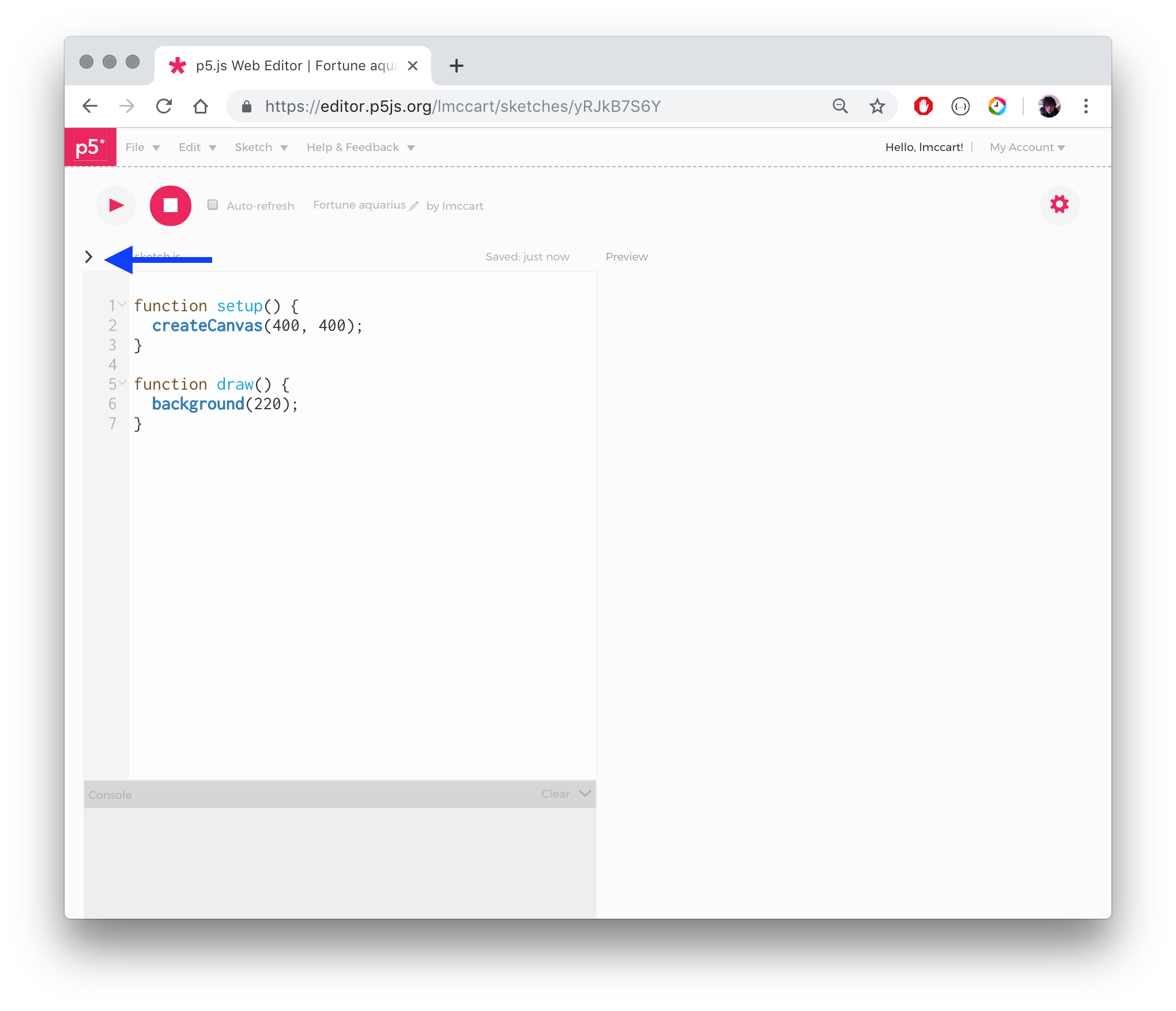
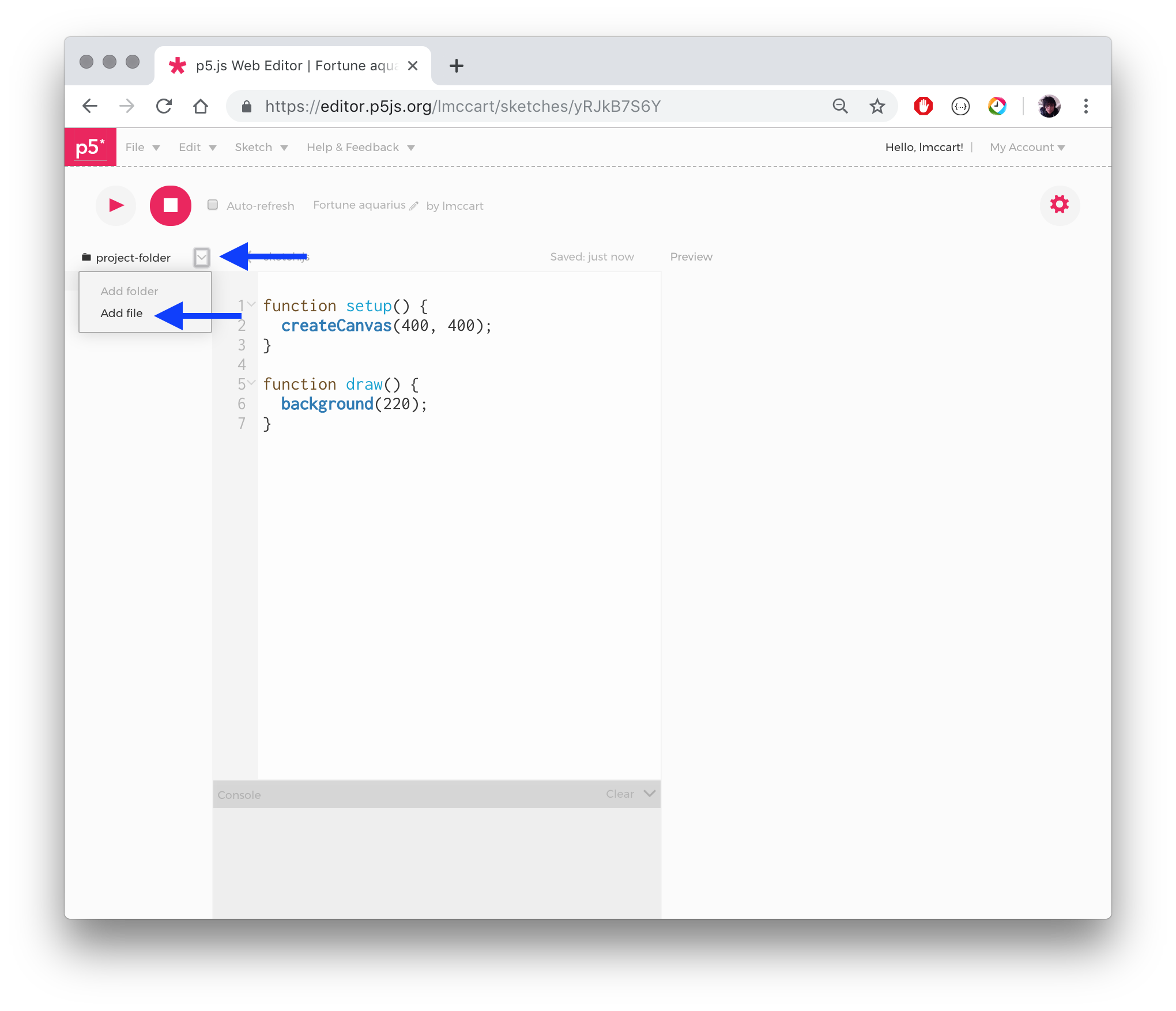
Alternatively, you can access the index file of your sketch and add a line into the head like this:
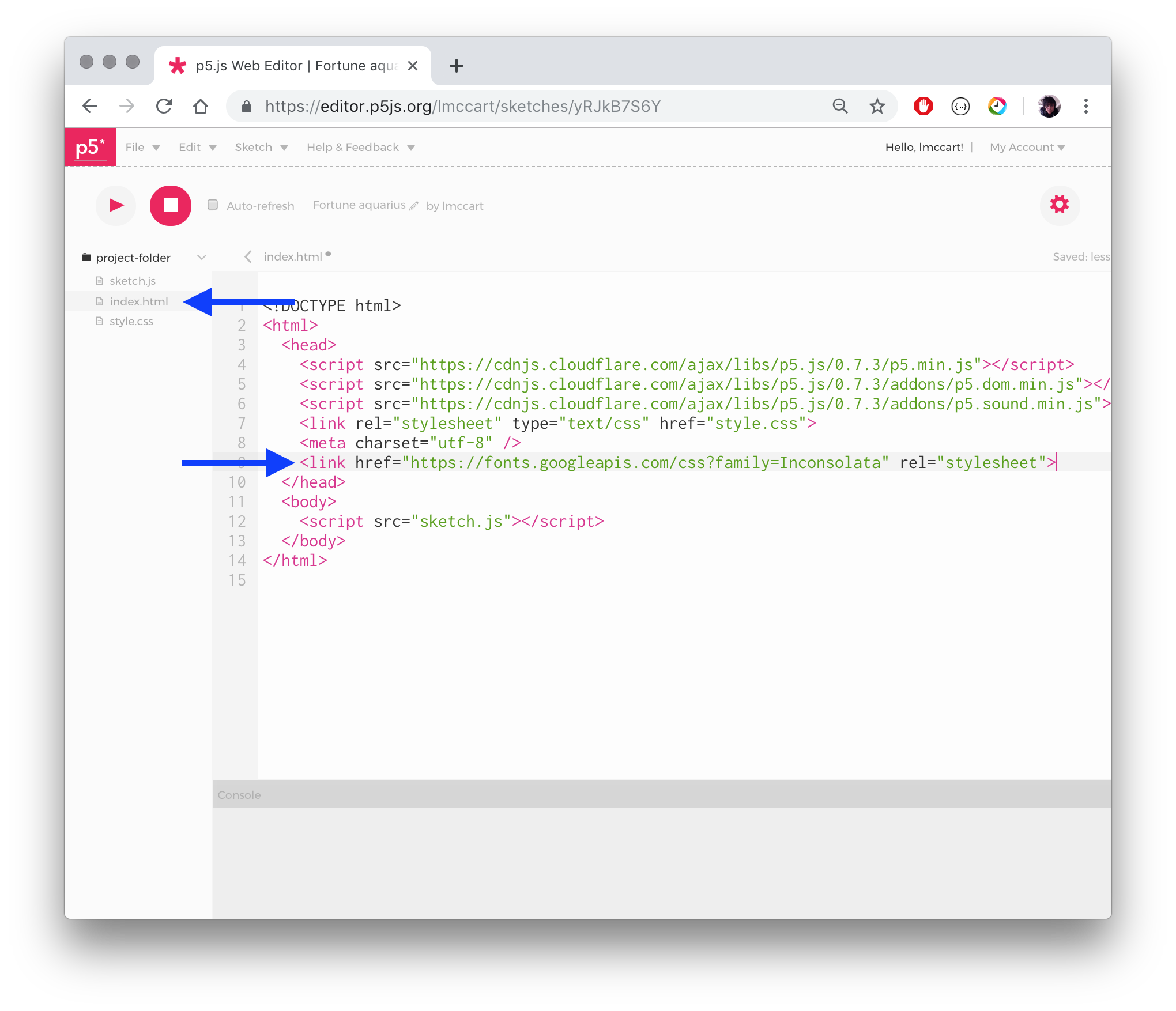
As a third option, you could open the example for Typography: Letters and it already has a font file loaded for you that you can build off of.
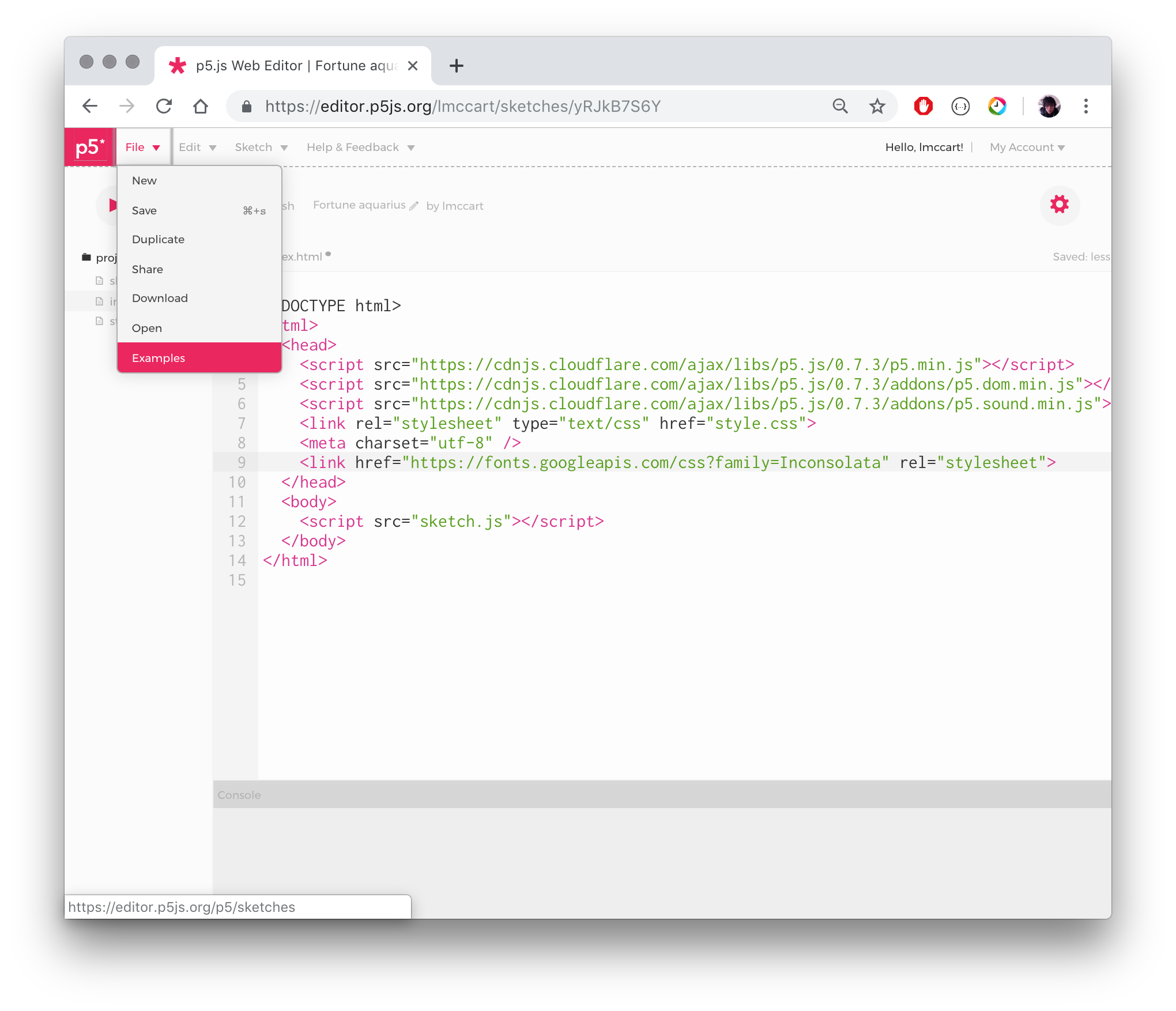

Hope that helps! We'll work on adding the webgl example as another option to open from the editor so you can more easily have this exact example. But any of the options 1-3 should get you there for now. For more assistance with this, please visit the forum
lmccart
on 26 Apr 2019
This thread in the p5 discourse processing support community might also help fix any issues too.
https://discourse.processing.org/t/how-to-use-google-fonts-in-p5js-online-editor/6893
 hellonearthis
on 27 Apr 2019
hellonearthis
on 27 Apr 2019
please just fix the example on This site https://github.com/processing/p5.js/wiki/Getting-started-with-WebGL-in-p5
and use a CORS accessible font in this line:
myFont = loadFont('assets/AvenirNextLTPro-Demi.otf');
Better for beginners.
Cheers, Christoph
Von: Brett Cooper [mailto:[email protected]]
Gesendet: Samstag, 27. April 2019 01:37
An: processing/p5.js
Cc: Kango; Mention
Betreff: Re: [processing/p5.js] loadFont: free fonts and URL? (#3706)
This thread in the p5 discourse processing support community might also help fix any issues too.
https://discourse.processing.org/t/how-to-use-google-fonts-in-p5js-online-editor/6893
—
You are receiving this because you were mentioned.
Reply to this email directly, view it on GitHub https://github.com/processing/p5.js/issues/3706#issuecomment-487231926 , or mute the thread https://github.com/notifications/unsubscribe-auth/AABWUOQ7CVG4NHCLHFJGOADPSOGYNANCNFSM4HH4ZXHA . https://github.com/notifications/beacon/AABWUORTTD3CVSF42FEDW73PSOGYNANCNFSM4HH4ZXHA.gif
Kango
on 28 Apr 2019
;-)
Thanks!!!
Am 28.04.2019 um 13:06 schrieb Lauren McCarthy notifications@github.com:
yep we're working on it. just trying to help you out in the meantime :)
—
You are receiving this because you were mentioned.
Reply to this email directly, view it on GitHub, or mute the thread.
Kango
on 28 Apr 2019
Related issues
 aferriss
·
3Comments
aferriss
·
3Comments
 sps014
·
3Comments
sps014
·
3Comments
 swirly
·
3Comments
swirly
·
3Comments
 bassamanator
·
3Comments
bassamanator
·
3Comments
 oranyelik
·
3Comments
oranyelik
·
3Comments