P5.js: set() not working as intended when copying image to graphics
Nature of issue?
- [x] Found a bug
Most appropriate sub-area of p5.js?
- [x] Image
Which platform were you using when you encountered this?
- [x] Desktop/Laptop
Details about the bug:
- p5.js version: v0.6.0 and also v0.6.1
- Web browser and version: Mozilla Firefox 60.0.1
- Operating System: Linux Ubuntu 18.04
- Steps to reproduce this:
let img;
let gs;

function preload() {
  img = loadImage('image.png');
}

function setup() {
  gs = createGraphics(100,100);
  createCanvas(100,100);
  background(255);
  gs.background(0);
  gs.set(0,0,img);
  gs.updatePixels();
  image(gs,0,0);
}
As image.png take any image with see through pixels (with alpha = 0). Instead of actually copying those pixels and hence making parts of gc see-through, it behaves like gs.image(img,0,0); drawing img on top of gs.
 mike239x
All 8 comments
Is this the same problem as #2984?
 Zalastax
on 11 Jun 2018
Zalastax
on 11 Jun 2018
@Zalastax No, even though it came from the same source. Kevin (the guy in your link) talks about copying (via set function) of Graphics to Graphics, I talk about copying Image to Graphics. With Kevin it looks like it doesn't work the intended way whatsoever, with me it works, but not the intended way.
mike239x
on 12 Jun 2018
Hello !
I think this issue is not limited to only graphics object, as the set method in
p5.Renderer2d.prototype.set , calls this.drawingContext.drawImage directly, similar to the image method, when an image is passed to the set method.
We can attain the desired behavior (setting the exact pixels as the image) by clearing the region of the canvas where the image is going to be drawn using clearRect and then using drawImage on the drawing context.
Should this be implemented like this ?
Waiting for suggestions,
Thank you !
 Ajayneethikannan
on 16 Mar 2019
Ajayneethikannan
on 16 Mar 2019
I'm not able to reproduce this on mac, I've tried firefox and chrome and all works fine. Can anyone reproduce this on pc or linux?
 lmccart
on 15 Dec 2019
lmccart
on 15 Dec 2019
I am not able to reproduce this on windows with chrome, firefox, or edge.
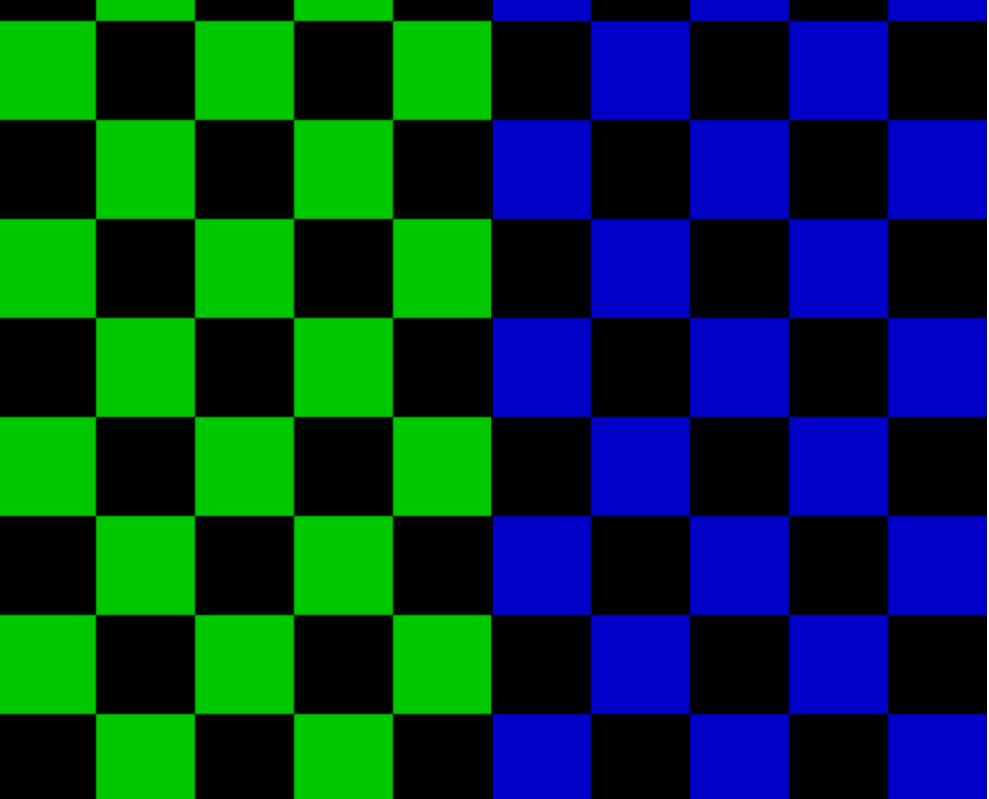
This sketch:
let img;
let gs;

function preload() {
  // checkerboard image with transparent squares
  img = loadImage('image.png');
}
function setup() {
  gs = createGraphics(img.width, img.height);
  createCanvas(img.width, img.height);
  // blue background in main canvas
  background(0, 0, 200);
  // green rectangle over left half of graphics canvas
  gs.fill(0, 200, 0);
  gs.rect(0, 0, img.width / 2, img.height);
  // draw checkerboard image in graphics canvas
  gs.set(0, 0, img);
  gs.updatePixels();
  // draw graphics on main canvas
  image(gs, 0, 0);
}
gives me this in all tested browsers:
 stalgiag
on 16 Dec 2019
stalgiag
on 16 Dec 2019
I'm going to close this then, if anyone can reproduce please comment and we can reopen
lmccart
on 16 Dec 2019
@lmccart
Oh boy, it took me a while to understand what is going on.
What past me said is the following: gs.set(0,0,img); behaves exactly the same way as gs.image(img,0,0), which is a bug.
Let me explain that on the example @stalgiag provided.
He colors background of the graphics object green, then writes
  // draw checkerboard image in graphics canvas
  gs.set(0, 0, img);
Here is a mistake - the written code is supposed to "set" pixels of gs to those of img, and not "draw" img on top of gs (as the comment suggests), so the result should have been so that the green background of gs is gone, so in the resulting image there should be only blue squares.
The reason for why this is important - if I drew something on the graphics object and want to erase a part of it, there is no quick way to do so, except for doing it pixel-wise, which is much slower.
mike239x
on 24 Dec 2019
Ah I understand now. Thank you for clarifying @mike239x . I thought the problem was that set was not transferring transparent pixels, but I now understand the problem to be that it isn't replacing pixels with transparent pixels when appropriate.
In that case, @Ajayneethikannan 's suggestion should work well. I am going to reopen, and add a help wanted label.
stalgiag
on 24 Dec 2019
Related issues
 bassamanator
·
3Comments
bassamanator
·
3Comments
 ghost
·
3Comments
ghost
·
3Comments
 ogoossens
·
3Comments
stalgiag
·
3Comments
ogoossens
·
3Comments
stalgiag
·
3Comments
 NamanSharma5
·
3Comments
NamanSharma5
·
3Comments