P5.js: Simple stroke appearing outside shape
Nature of issue?
- [x] Found a bug
- [ ] Existing feature enhancement
- [ ] New feature request
Most appropriate sub-area of p5.js?
- [x] Color
- [ ] Core/Environment/Rendering
- [ ] Data
- [ ] Events
- [ ] Image
- [ ] IO
- [ ] Math
- [ ] Typography
- [ ] Utilities
- [ ] WebGL
- [ ] Other (specify if possible)
Which platform were you using when you encountered this?
- [ ] Mobile/Tablet (touch devices)
- [x] Desktop/Laptop
- [ ] Others (specify if possible)
Details about the bug:
- p5.js version: 0.6.0
- Web browser and version: 65.0.3325.181
- Operating System: macOS High Sierra 10.13.4
- Steps to reproduce this:
- Draw a simple shape with a
stroke()in the keyPressed event handler for the RIGHT_ARROW keyCode - Draw the same shape with
noStroke()in the keyPressed event handler for the LEFT_ARROW keyCode
Expected behavior: Stroke on all sides of the shape is removed.
Observed behavior: Stroke does not appear to be removed from all sides. In the case of rect, only top and left strokes are removed.
See JSFiddle here: https://jsfiddle.net/5xuxrwpu/435
Screen shots:
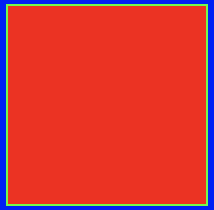
Notice above that the stroke appears on all four sides as expected.
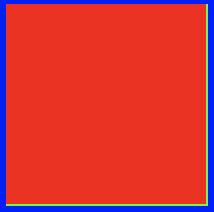
Notice above that the stroke still remains for the bottom and right sides.
I have observed similar behavior when using strokeWidth(0) and other shapes, but I didn't find anything in the documentation that suggested what I might be doing wrong here. I am brand new to P5 and graphics programming in general so I apologize in advance if I have missed something obvious!
 oranyelik
All 3 comments
wow, that's really weird. i see the same on Chrome/windows Version 65.0.3325.181 (Official Build) (64-bit)
 Spongman
on 25 Apr 2018
Spongman
on 25 Apr 2018
looks like you need to redraw the background on keypress. currently, you are drawing it only once in setup, so if you draw the stroked shape first, and then the nostroke() one, you will see the stroke of the previously drawn shape showing through from underneath. try modifying your code like this:
function setup() {
  createCanvas(640, 360);
  background(0, 0, 255);
}

function keyPressed() {
  switch (window.keyCode) {
    case RIGHT_ARROW:
      background(0, 0, 255);
      stroke(0, 255, 0);
      fill(255, 0, 0);
      rect(5, 5, 100, 100);
      break
    case LEFT_ARROW:
      background(0, 0, 255);
      noStroke();
      fill(255, 0, 0);
      rect(5, 5, 100, 100);
      break
  }
}
you can post further programming questions in the forum for help.
 lmccart
on 25 Apr 2018
lmccart
on 25 Apr 2018
i think something subtle is happening here: you're seeing a rounding error in the stroke width. you currently have the strokeWeight set to the default 1. and rectangles are drawn with half the stroke inside the rectangle, and half the stroke outside the rectangle (ie centered on the rectangle boundary). the browser can't draw a half-pixel wide line, so it has to round the values somehow, and it chooses to round the values UP. so, you end up with a green border whose top & left edges are 'inside' the bounds of the rectangle, and whose bottom & right edges are 'outside' the border of the rectangle. this means that when you draw the stroke-less rectangle it only overwrites the top & left edges. if you set strokeWeight(2) in your setup function, then the stroke will be symmetrical and the width of the part that is not obscured by the stroke-less rectangle will be the same for all edges.
if you want the rectangle's stroke to be drawn inside the rectangle's border, you'll need to shrink the rectangle by half the stroke width in all directions.
Spongman
on 25 Apr 2018
Related issues
 ogoossens
·
3Comments
ogoossens
·
3Comments
 dhowe
·
3Comments
dhowe
·
3Comments
 b0nb0n
·
3Comments
b0nb0n
·
3Comments
 aferriss
·
3Comments
aferriss
·
3Comments
 kartikay-bagla
·
3Comments
kartikay-bagla
·
3Comments
Most helpful comment
i think something subtle is happening here: you're seeing a rounding error in the stroke width. you currently have the
strokeWeightset to the default 1. and rectangles are drawn with half the stroke inside the rectangle, and half the stroke outside the rectangle (ie centered on the rectangle boundary). the browser can't draw a half-pixel wide line, so it has to round the values somehow, and it chooses to round the values UP. so, you end up with a green border whose top & left edges are 'inside' the bounds of the rectangle, and whose bottom & right edges are 'outside' the border of the rectangle. this means that when you draw the stroke-less rectangle it only overwrites the top & left edges. if you setstrokeWeight(2)in yoursetupfunction, then the stroke will be symmetrical and the width of the part that is not obscured by the stroke-less rectangle will be the same for all edges.if you want the rectangle's stroke to be drawn inside the rectangle's border, you'll need to shrink the rectangle by half the stroke width in all directions.