Nature of issue?
- [ ] Found a bug
- [ ] Existing feature enhancement
- [ x ] New feature request
Most appropriate sub-area of p5.js?
- [ ] Color
- [ ] Core
- [ ] Data
- [ ] Events
- [ ] Image
- [ ] IO
- [ ] Math
- [ ] Typography
- [ ] Utilities
- [ x ] WebGL
- [ ] Other (specify if possible)
Which platform were you using when you encountered this?
- [ x ] Mobile/Tablet (touch devices)
- [ x ] Desktop/Laptop
- [ x ] Others (specify if possible)
New feature details: I would like to request a better way to create a gradient. My app (clay53.github.io/Art-Project-1; https://repl.it/@ClaytonHickey/Art-Project-1) has a gradient background and other kind of gradients. However, the current way to do this according to the reference (https://p5js.org/examples/color-linear-gradient.html) is to create a bunch of lines with strokes of different colors. This way is very taxing in WebGL, much more than in the default rendering engine, however, I have to use WebGL for "layers". If anyone knows how to make a better gradient it should definitely be integrated into the base methods for p5.js - also, please tell me.
 clay53
All 4 comments
hopefully this is coming very soon. a side-effect of #2670 is per-vertex coloring.
so
  translate(-width/2, -height/2);
  noStroke();

  beginShape();

  fill(255, 0, 0);
  vertex(0, 0);
  vertex(width, 0);

  fill(0, 255, 0);
  vertex(width, height);
  vertex(0, height);

  endShape(CLOSE);
will give you

 Spongman
on 29 Mar 2018
Spongman
on 29 Mar 2018
👍2
@Spongman That sounds good. For now, I added a "gradientDetail" variable:
function yGradient (c1, c2, o, x, y, w, h, mode) {
    fill(0);
    strokeWeight(h/gradientDetail);
    for (var i = 0; i < gradientDetail; i++) {
        let yo = i/gradientDetail*h
        stroke(lerpColor(c1, c2, (i/gradientDetail+o)));
        if (mode === CORNER) {
            line(x, y+yo, x+w, y+yo);
        } else if (mode === CENTER) {
            line(x-w/2, y+yo-h/2, x+w/2, y+yo-h/2);
        }
    }
}
Relates to #4141
The sample above provided by https://github.com/processing/p5.js/issues/2750#issuecomment-377291020 works with version 0.8.0 but in version 0.9.0 the output is wrong:
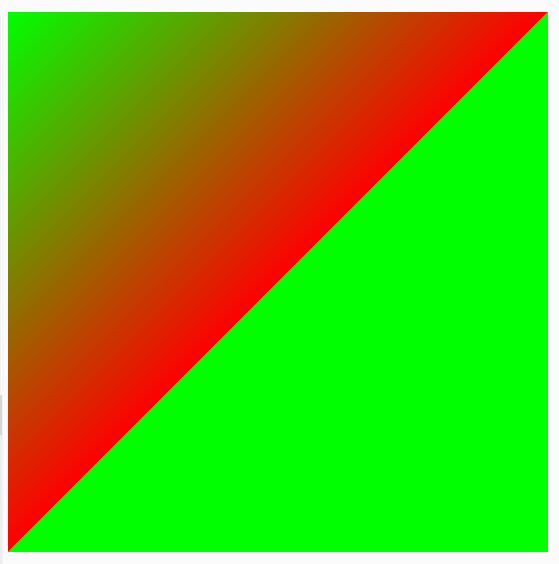
 haschdl
on 10 Nov 2019
haschdl
on 10 Nov 2019
👍1
Per-vertex fill for WEBGL is working as #4147 . The code in the comments will produce the desired gradient in the current master branch. Closing for organizational purposes. Thanks!
 stalgiag
on 10 Dec 2019
stalgiag
on 10 Dec 2019
Was this page helpful?
0 / 5 - 0 ratings
Related issues
 oranyelik
·
3Comments
oranyelik
·
3Comments
 ghost
·
3Comments
ghost
·
3Comments
 kappaxbeta
·
3Comments
kappaxbeta
·
3Comments
 swirly
·
3Comments
swirly
·
3Comments
 sps014
·
3Comments
sps014
·
3Comments
Most helpful comment
hopefully this is coming very soon. a side-effect of #2670 is per-vertex coloring.
so
will give you
