P5.js: pointlight and directional light strange behavior
Found a bug (i think)
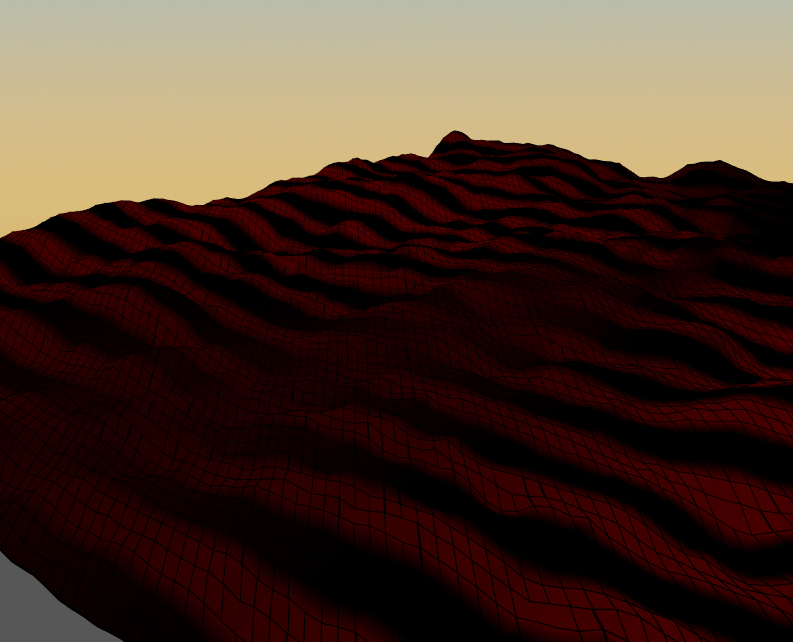
The pointlight and directional light functions are making some sort of strip-pattern across multiple triangle strips.
Most appropriate sub-area of p5.js?
- [ ] Color
- [ ] Core
- [ ] Data
- [ ] Events
- [ ] Image
- [ ] IO
- [ ] Math
- [ ] Typography
- [ ] Utilities
- [x] WebGL
- [ ] Other (specify if possible)
Which platform were you using when you encountered this?
- [ ] Mobile/Tablet (touch devices)
- [x] Desktop/Laptop
- [ ] Others (specify if possible)
Details about the bug:
- p5.js version: p5.js v0.6.0 January 19, 2018
- Web browser and version: Chrome 63.0.3239.132
- Operating System: Windows 10 Pro 64bit
My code (can be seen in action on this site: http://webspot.ddns.me/users/BrowserGame/)
var cnv,
    x, y,
    scl = 10, nodes = 100, perlinZoom = 10, deltaHeight = 70,
    shift,
    rot = 0,
    heightMap = [];

function setup() {
    cnv = createCanvas(innerWidth, innerHeight, WEBGL);
    cnv.parent("gameContainer");
    setAttributes('antialias', true);

    stroke(0);
    // noStroke();
    fill(100, 255, 100);
    strokeWeight(1);
    shift = scl * nodes / 2;

    for (x = 0; x < nodes; x ++) {
        heightMap[x] = [];
        for (y = 0; y < nodes; y++) {
            heightMap[x][y] = noise(x / perlinZoom, y / perlinZoom) * deltaHeight;
        }
    }
}

function draw() {
    background(0, 0, 0, 0);
    fpsUpdater();

    ambientLight(50, 50, 50);
    pointLight(255, 255, 255, 100, 100, 0);

    rotateX(radians(70));
    if (mouseIsPressed) {rot = radians(-mouseX / 5.0);}
    rotateZ(rot);
    // translate(-shift, -shift, 0);

    sphere(100);
    // terrain();
}

function terrain() {
    for (y = 0; y < nodes - 1; y ++) {
        beginShape(TRIANGLE_STRIP);
        for (x = 0; x < nodes; x ++) {
            vertex(x * scl, y * scl, heightMap[x][y]);
            vertex(x * scl , (y + 1) * scl, heightMap[x][y+1]);
        }
        endShape();
    }
}
Thanks for a bugfix or info on how to "repair" my code. 😄
-Jonas
 KargJonas
All 7 comments
ha! that's so weird.
here's a slightly simple repro of the bug: https://codepen.io/Spongman/pen/jZOOWX?editors=0010
 Spongman
on 29 Jan 2018
Spongman
on 29 Jan 2018
Right?
I guess I'll have to wait for a fix..
KargJonas
on 29 Jan 2018
Transposing the x and y coordinates (i.e. drawing the strips vertically instead of horizontally) does transpose the stripes. Indeed the stripes appear to run transverse to the drawn strip (confirmed by only drawing 1 strip in the above repro sketch). Moving the pointLight does translate the pattern. The geometry looks to be correct so I am thinking this issue is with how the normals are computed.
 tau-
on 29 Jan 2018
tau-
on 29 Jan 2018
this is 'fixed' in my render-pipeline branch inasmuch as the normals don't do this weird twisting. however, you're probably never going to get the behavior you're looking for doing triangle strips like this. the reason is that, for smooth shading at least, the complete set of edges at every vertex isn't known at the time of rendering, so the edges of one strip are unable to effect the vertex normals of its neighbors. flat shading is not going to work either because the vertices are shared between the triangles.
in order to render a terrain like this you'll probably need to build a p5.Geometry yourself with faces and computed normals. unfortunately you're going to have to poke around in the internals of the API in order to get this to work well. the model loading code might be a good place to start if you want to go this route.
Spongman
on 30 Jan 2018
Thanks for the replies. I'll try to fix it at some point..
The link is now offline.
KargJonas
on 31 Jan 2018
i have made a sample that demonstrates how to render a terrain like yours in p5.js using custom geometry. be warned, though, it's running on a custom build of p5.js, you won't be able to run that sketch on the released version.
here: https://codepen.io/Spongman/pen/rJOoJa?editors=0010
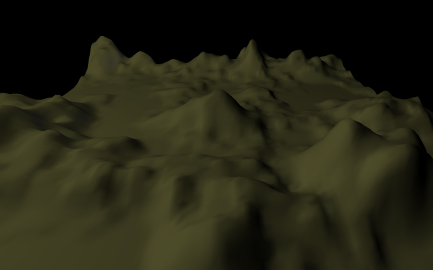
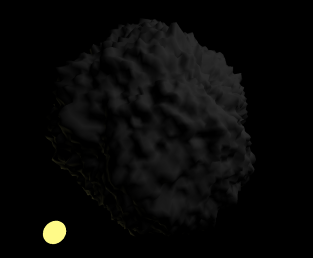
here's another (after Peitgen & Saupe): https://codepen.io/Spongman/pen/NyGZZy?editors=1010
Spongman
on 2 Feb 2018
Oh, wow!
This looks amazing!
KargJonas
on 2 Feb 2018
Related issues
 Vbbab
·
3Comments
Vbbab
·
3Comments
 NamanSharma5
·
3Comments
NamanSharma5
·
3Comments
 kappaxbeta
·
3Comments
kappaxbeta
·
3Comments
 bassamanator
·
3Comments
bassamanator
·
3Comments
 oranyelik
·
3Comments
oranyelik
·
3Comments
Most helpful comment
i have made a sample that demonstrates how to render a terrain like yours in p5.js using custom geometry. be warned, though, it's running on a custom build of p5.js, you won't be able to run that sketch on the released version.
here: https://codepen.io/Spongman/pen/rJOoJa?editors=0010
here's another (after Peitgen & Saupe): https://codepen.io/Spongman/pen/NyGZZy?editors=1010