Nature of issue?
- [ ] Found a bug
- [x ] Existing feature enhancement
- [ ] New feature request
Most appropriate sub-area of p5.js?
- [ ] Color
- [ ] Core
- [ ] Data
- [ ] Events
- [ ] Image
- [ ] IO
- [x ] Math
- [ ] Typography
- [ ] Utilities
- [ ] WebGL
- [ ] Other (specify if possible)
Which platform were you using when you encountered this?
- [ ] Mobile/Tablet (touch devices)
- [x ] Desktop/Laptop
- [ ] Others (specify if possible)
Details about the bug:
- p5.js version: 0.5.1
- Web browser and version: 61.0.3163.91
- Operating System: Windows 10
- Steps to reproduce this: Just using the p5.js map function.
Feature enhancement details:
The current map function be enhanced. The definition of the mapping function is to map one range to another, which implies that the returned value does not go go past the minimum or maximum bounds set in start2 and stop2 of the default function. However, if you run the function on a number that will go past the bounds, it simply returns whatever that calculation is. For example,
If I have a value that is supposed to go between 0-60, and I want it to be between 0-360 in my program, but it happens to go to 61, the upper bounds are not adhered to, and the value will be beyond the range set:
let x = 61;
map(x, 0, 60, 0, 360); //returns 366
What I propose is adding in an optional boolean parameter I called withinBounds that by default can be omitted to get the default map response everyone would expect; however, if it is set to true, then the value returned will stay within the new range provided (inclusive)

//Edits thanks to meiamsome
p5.prototype.map = function (n, start1, stop1, start2, stop2, withinBounds) {
  var newval = ((n - start1)/(stop1 - start1)) * (stop2 - start2) + start2;
  if (!withinBounds) {
    return newval;
  }
  return this.constrain(newval, start2, stop2);
}
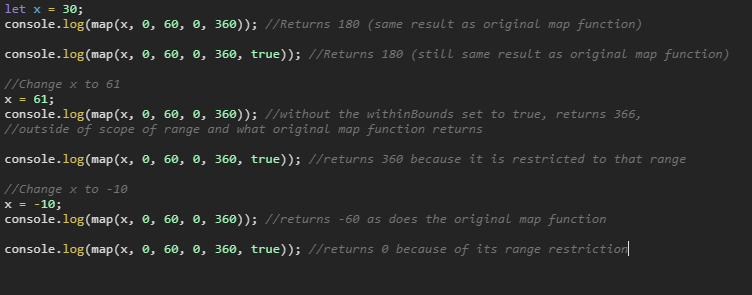
let x = 30;
console.log(map(x, 0, 60, 0, 360)); //Returns 180 (same result as original map function)

console.log(map(x, 0, 60, 0, 360, true)); //Returns 180 (still same result as original map function)

//Change x to 61
x = 61;
console.log(map(x, 0, 60, 0, 360)); //without the withinBounds set to true, returns 366,
//outside of scope of range and what original map function returns

console.log(map(x, 0, 60, 0, 360, true)); //returns 360 because it is restricted to that range

//Change x to -10
x = -10;
console.log(map(x, 0, 60, 0, 360)); //returns -60 as does the original map function

console.log(map(x, 0, 60, 0, 360, true)); //returns 0 because of its range restriction
New feature details:
 marcusparsons
All 8 comments
The suggested boolean feature looks like a nice combination of map and constrain and I think it could be useful.
start2 does not cancel like you suggest because the multiplication takes place first. All of your examples work because your start2 is zero.
 meiamsome
on 21 Sep 2017
meiamsome
on 21 Sep 2017
Ah, thank you for that correction! I will edit this and remove that "simplification".
marcusparsons
on 21 Sep 2017
Looks good to me! I would probably prefer an implementation like the following so that we reduce code duplication (And tertiary operators!):
p5.prototype.map = function (n, start1, stop1, start2, stop2, withinBounds) {
  var newval = ((n - start1)/(stop1 - start1)) * (stop2 - start2) + start2;
  if (!withinBounds) {
    return newval;
  }
  return this.constrain(newval, start2, stop2);
}
Ah, I'm still pretty much a newbie to p5.js. I've been programming with JavaScript for years, but I recently got addicted to Dan Shiffman's "The Coding Train" on Youtube. Anyways, I love it, and I shall make that edit, as well!
marcusparsons
on 21 Sep 2017
Everything looks good. @marcusparsons You can file a PR if you want 😉
 limzykenneth
on 22 Sep 2017
limzykenneth
on 22 Sep 2017
@limzykenneth, I'm pretty sure I did the pull request completely wrong, because I'm also a Git newbie, unfortunately, but the file is there. I tried committing the file itself via Github but it wouldn't allow that. So, I compressed it and uploaded it.
marcusparsons
on 22 Sep 2017
@marcusparsons Some instruction is available here but they are terribly vague. I think your problem is that you didn't push to your fork and instead tried to push directly to this repo. Try the following in your terminal: (assuming you have committed the changes to git in your local copy)
git remote add myFork https://github.com/marcusparsons/p5.js.git
git push myFork master
You should see in your fork that there's a new commit that you have added.
Once there go ahead and click "New Pull Request" and you don't really need to change anything just click "Create Pull Request" and fill in the title & body then submit.
limzykenneth
on 22 Sep 2017
Perfect instructions, @limzykenneth! Thank you for your help, and I've submitted the pull request, https://github.com/processing/p5.js/pull/2197. And thank you to @meiamsome for keeping me humble! haha :)
marcusparsons
on 23 Sep 2017
Related issues
 Patchy12
·
3Comments
Patchy12
·
3Comments
 Vbbab
·
3Comments
Vbbab
·
3Comments
 bassamanator
·
3Comments
bassamanator
·
3Comments
 kartikay-bagla
·
3Comments
kartikay-bagla
·
3Comments
 swirly
·
3Comments
swirly
·
3Comments
Most helpful comment
Ah, I'm still pretty much a newbie to p5.js. I've been programming with JavaScript for years, but I recently got addicted to Dan Shiffman's "The Coding Train" on Youtube. Anyways, I love it, and I shall make that edit, as well!