P5.js: Add screenX, screenY and screenZ
Would be great if you could add screenX etc for getting the 2D screen coordinates of a 3D vector. Currently trying to map HTML text to a 3D object and maths is making my head hurt!
Thanks for all the great work.
 brendandawes
All 12 comments
that sounds great.
i think we need to use _projection of vectors on planes_.
correct me if i'm wrong.
it would be particularly nice if we could do this.
//example code
var screenVector = threeDVector.getCanvasPoint();
 AkashGutha
on 4 Aug 2016
AkashGutha
on 4 Aug 2016
Hi @brendandawes ,
As @AkashGutha suggested you need to project a point on a plane, namely the front plane of your camera view frustum.
Fortunately for us it is exactly what OpenGL and the graphics pipeline do when we push vertices to the GPU to be rendered. All this steps are done using transformation 4x4 matrices in different stages changing the space coordinates of our vertices :
- the _ModelView_ matrix set the vertices from object to camera space,
- the _Projection_ matrix set the vertices in Normalize Device Coordinates ranging in [-1, 1]³ (roughly, a normalized 3D cube mapping the screen),
- the _NDC_ coordinates are then transformed in screen-space using our screen viewport informations.
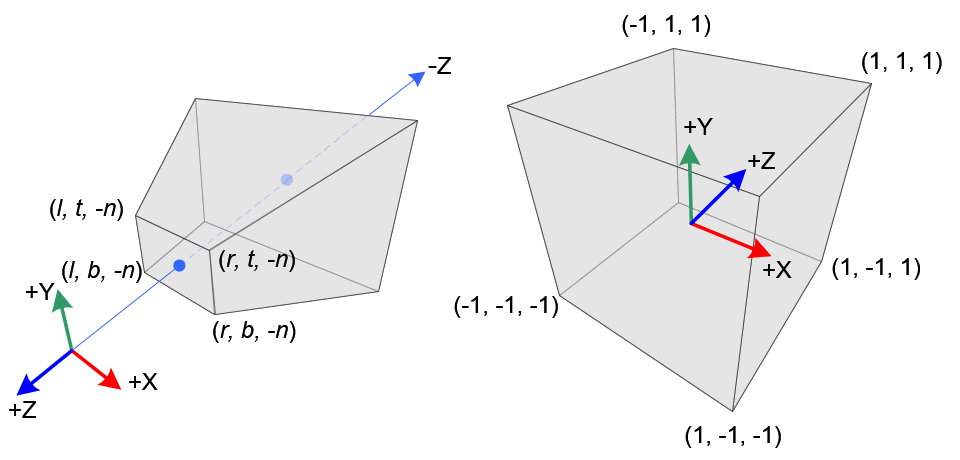
_Perspective vs NDC space (credits to songho)._
So depending on our needs we have to simulate this steps (_world to canvas_ coordinates) or undo them (_canvas to world_ coordinates), to get our vertices in the right space :wink:
Here's what you're looking for :
/* unlicense.org */

/* Multiply a 4x4 homogeneous matrix by a Vector4 considered as point
 * (ie, subject to translation). */
function multMatrixVector(m, v) {
  if (!(m instanceof p5.Matrix) || !(v instanceof p5.Vector)) {
    print('multMatrixVector : Invalid arguments');
    return;
  }

  var _dest = createVector();
  var mat = m.mat4;

  // Multiply in column major order.
  _dest.x = mat[0] * v.x + mat[4] * v.y + mat[8] * v.z + mat[12];
  _dest.y = mat[1] * v.x + mat[5] * v.y + mat[9] * v.z + mat[13];
  _dest.z = mat[2] * v.x + mat[6] * v.y + mat[10] * v.z + mat[14];
  var w =   mat[3] * v.x + mat[7] * v.y + mat[11] * v.z + mat[15];

  if (Math.abs(w) > Number.EPSILON) {
    _dest.mult(1.0 / w);
  }

  return _dest;
}

/* Project a vector from Canvas to World coordinates. */
function projectCanvasToWorld(canvas, vCanvas) {
  // Retrieve the ModelView and Projection matrices.
  var mv = canvas.uMVMatrix.copy();
  var p  = canvas.uPMatrix.copy();

  // Compute the ModelViewProjection matrix.
  var mvp = mv.mult(p);

  // Inverts the MVP.
  var invMVP = mvp.invert(mvp);

  // Transform the canvas vector to Normalized Device Coordinates (in [-1, 1]³),
  // Here viewport is (0, 0, drawingBufferWidth, drawingBufferHeight).
  var vNDC = createVector();
  vNDC.x = (-1.0 + 2.0 * (vCanvas.x / canvas.GL.drawingBufferWidth));
  vNDC.y = (-1.0 + 2.0 * (vCanvas.y / canvas.GL.drawingBufferHeight));
  vNDC.z = (-1.0 + 2.0 * (vCanvas.z));

  // Transform vector from NDC to world coordinates.
  var vWorld = multMatrixVector(invMVP, vNDC);

  return vWorld;
}

/* Project a vector from World to Canvas coordinates. */
function projectWorldToCanvas(canvas, vWorld) {
  // Calculate the ModelViewProjection Matrix.
  var mvp = (canvas.uMVMatrix.copy()).mult(canvas.uPMatrix);

  // Transform the vector to Normalized Device Coordinate.
  var vNDC = multMatrixVector(mvp, vWorld);

  // Transform vector from NDC to Canvas coordinates.
  var vCanvas = createVector();
  vCanvas.x = 0.5 * (vNDC.x + 1.0) * canvas.GL.drawingBufferWidth;
  vCanvas.y = 0.5 * (vNDC.y + 1.0) * canvas.GL.drawingBufferHeight;
  vCanvas.z = 0.5 * (vNDC.z + 1.0);

  return vCanvas;
}
_Note : Matrices operations being costly (especially inversion) you might want to optimize this for bulk transforms._
Due to a lack of 2d / 3d interop I'm not one hundred percent sure of the need to implement this to p5.js right now, but this could still be useful for mouse picking in 3d (especially for interactive applications).
Cheers :+1:
 tcoppex
on 23 Jan 2017
tcoppex
on 23 Jan 2017
Wow! @tcoppex Thanks for such a great explanation @AkashGutha
brendandawes
on 24 Jan 2017
@AkashGutha - this is cool. I don't fully understand why some kind of conversion function wouldn't be useful to implement in p5js right now, though - it sure seems like it would be handy!
 jaschanarveson
on 20 Apr 2017
jaschanarveson
on 20 Apr 2017
thanks for the suggestion @brendandawes! I think this is beyond the scope of p5 for now, we're trying to focus on getting core webgl working before expanding the api. but this could make a nice addon library using some of @tcoppex's solution above. see the docs here for how to create an addon: https://github.com/processing/p5.js/wiki/Libraries#creating-a-new-library
 lmccart
on 13 Jan 2018
lmccart
on 13 Jan 2018
@tcoppex Thanks to your wonderful piece of code I've started to build the interface I've wanted to do for a while as a way to navigate my work archive. A few work in progress vids here: https://www.instagram.com/p/BeV2tckn0dX/?taken-by=brendandawes The text overlays are all html divs and I'm using the EasyCam library for navigation, together with the sound lib. Amazing what Javascript can do these days. Love p5js! @lmccart
brendandawes
on 25 Jan 2018
Hi @brendandawes ,
As @AkashGutha suggested you need to project a point on a plane, namely the front plane of your camera view frustum.Fortunately for us it is exactly what OpenGL and the graphics pipeline do when we push vertices to the GPU to be rendered. All this steps are done using transformation 4x4 matrices in different stages changing the space coordinates of our vertices :
- the _ModelView_ matrix set the vertices from object to camera space,
- the _Projection_ matrix set the vertices in Normalize Device Coordinates ranging in [-1, 1]³ (roughly, a normalized 3D cube mapping the screen),
- the _NDC_ coordinates are then transformed in screen-space using our screen viewport informations.
_Perspective vs NDC space (credits to songho)._
So depending on our needs we have to simulate this steps (_world to canvas_ coordinates) or undo them (_canvas to world_ coordinates), to get our vertices in the right space 😉
Here's what you're looking for :
/* unlicense.org */

/* Multiply a 4x4 homogeneous matrix by a Vector4 considered as point
 * (ie, subject to translation). */
function multMatrixVector(m, v) {
  if (!(m instanceof p5.Matrix) || !(v instanceof p5.Vector)) {
    print('multMatrixVector : Invalid arguments');
    return;
  }

  var _dest = createVector();
  var mat = m.mat4;

  // Multiply in column major order.
  _dest.x = mat[0] * v.x + mat[4] * v.y + mat[8] * v.z + mat[12];
  _dest.y = mat[1] * v.x + mat[5] * v.y + mat[9] * v.z + mat[13];
  _dest.z = mat[2] * v.x + mat[6] * v.y + mat[10] * v.z + mat[14];
  var w =   mat[3] * v.x + mat[7] * v.y + mat[11] * v.z + mat[15];

  if (Math.abs(w) > Number.EPSILON) {
    _dest.mult(1.0 / w);
  }

  return _dest;
}

/* Project a vector from Canvas to World coordinates. */
function projectCanvasToWorld(canvas, vCanvas) {
  // Retrieve the ModelView and Projection matrices.
  var mv = canvas.uMVMatrix.copy();
  var p  = canvas.uPMatrix.copy();

  // Compute the ModelViewProjection matrix.
  var mvp = mv.mult(p);

  // Inverts the MVP.
  var invMVP = mvp.invert(mvp);

  // Transform the canvas vector to Normalized Device Coordinates (in [-1, 1]³),
  // Here viewport is (0, 0, drawingBufferWidth, drawingBufferHeight).
  var vNDC = createVector();
  vNDC.x = (-1.0 + 2.0 * (vCanvas.x / canvas.GL.drawingBufferWidth));
  vNDC.y = (-1.0 + 2.0 * (vCanvas.y / canvas.GL.drawingBufferHeight));
  vNDC.z = (-1.0 + 2.0 * (vCanvas.z));

  // Transform vector from NDC to world coordinates.
  var vWorld = multMatrixVector(invMVP, vNDC);

  return vWorld;
}

/* Project a vector from World to Canvas coordinates. */
function projectWorldToCanvas(canvas, vWorld) {
  // Calculate the ModelViewProjection Matrix.
  var mvp = (canvas.uMVMatrix.copy()).mult(canvas.uPMatrix);

  // Transform the vector to Normalized Device Coordinate.
  var vNDC = multMatrixVector(mvp, vWorld);

  // Transform vector from NDC to Canvas coordinates.
  var vCanvas = createVector();
  vCanvas.x = 0.5 * (vNDC.x + 1.0) * canvas.GL.drawingBufferWidth;
  vCanvas.y = 0.5 * (vNDC.y + 1.0) * canvas.GL.drawingBufferHeight;
  vCanvas.z = 0.5 * (vNDC.z + 1.0);

  return vCanvas;
}
_Note : Matrices operations being costly (especially inversion) you might want to optimize this for bulk transforms._
Due to a lack of 2d / 3d interop I'm not one hundred percent sure of the need to implement this to p5.js right now, but this could still be useful for mouse picking in 3d (especially for interactive applications).
Cheers 👍
hi there... i saw this code as i was wandering around to find a way to do this transformation... i just got confused... in your function projectCanvasToWorld(canvas, vCanvas), what is canvas and what is vCanvas? thank you so much again for your help...
 nevahid
on 10 Apr 2019
nevahid
on 10 Apr 2019
Hi @nevahid,
It's old code but to my remembrance canvas is the processing canvas object and vCanvas is the vector in canvas-space coordinates as the comments suggested. Consequently vWorld is the vector in world-space coordinates in the second function.
Hope that helps.
tcoppex
on 10 Apr 2019
@tcoppex thank you very much. i'm trying to figure it. but it gives me confusing positions, maybe i'm wrong somewhere... what i try to do is to get mouse position in p5.easycam camera... as i had to set the camera canvas to null, i used the p5.renderer as the canvas... maybe that is the point...
i still try to make it work.... thank you so much, and if you have any hints or help, i would really appreciate it...
nevahid
on 11 Apr 2019
Can anyone provide some insight for how the above code can be used? I don't quite understand what params should be fed as canvas and vWorld into the projectWorldToCanvas() function. Here's an example of something I'd be interested to extract screenX/Y/Z coords from. Also wonder if this works both with/without WEBGL mode?
 ffd8
on 16 Jul 2019
ffd8
on 16 Jul 2019
@ffd8: Here is my solution. It works with 2D and WEBGL mode. Both have its own difficulties:
In 2D I didn't find a way of getting the actual transformation matrix from the CanvasRenderingContext2D, so I've implemented some functions to track them.
In WEBGL mode the projection math is a bit more difficult. Thanks to @tcoppex it was already almost done. I had to adjust it a bit, maybe because p5js' way of handling WEBGL coordinates changed since 2016.
You'll find the function here:
https://github.com/bohnacker/p5js-screenPosition
And how it's used here:
https://editor.p5js.org/bohnacker/sketches/nUk3bVW7b
 bohnacker
on 18 Jul 2019
bohnacker
on 18 Jul 2019
@bohnacker Really nice solution and easy to implement, many thanks!
ffd8
on 18 Jul 2019
Related issues
 aman-tiwari
·
3Comments
aman-tiwari
·
3Comments
 aparrish
·
3Comments
aparrish
·
3Comments
 stalgiag
·
3Comments
stalgiag
·
3Comments
 kjhollen
·
3Comments
kjhollen
·
3Comments
 dhowe
·
3Comments
dhowe
·
3Comments
Most helpful comment
@ffd8: Here is my solution. It works with 2D and WEBGL mode. Both have its own difficulties:
In 2D I didn't find a way of getting the actual transformation matrix from the CanvasRenderingContext2D, so I've implemented some functions to track them.
In WEBGL mode the projection math is a bit more difficult. Thanks to @tcoppex it was already almost done. I had to adjust it a bit, maybe because p5js' way of handling WEBGL coordinates changed since 2016.
You'll find the function here:
https://github.com/bohnacker/p5js-screenPosition
And how it's used here:
https://editor.p5js.org/bohnacker/sketches/nUk3bVW7b