P5.js: lines between quads visible with noStroke()
This code:
var pts = [];

function setup() {
  createCanvas(640, 480);
}

function draw() {
  pts.push([mouseX, mouseY]);

  background(0);
  beginShape(QUAD_STRIP);
  noStroke();
  fill(255, 255);
  for (var i = 1; i < pts.length; i++) {
    var pt0 = pts[i-1];
    var pt = pts[i];
    var x0 = pt0[0];
    var y0 = pt0[1];

    var x = pt[0];
    var y = pt[1];
    var nx = -(y - y0);
    var ny = +(x - x0);
    var d = sqrt(nx * nx + ny * ny)
    if (0 < d) {
      nx /= d;
      ny /= d;
      vertex(x+10*nx, y+10*ny);
      vertex(x-10*nx, y-10*ny);
    }
  }
  endShape();
}
generates the following output:

There are lines or seams separating consecutive quads... shouldn't be a continuous shape? I'm using most recent download version of p5.
 codeanticode
All 9 comments
@codeanticode it turns out those seams are anti-aliasing effects. That'll happen with raw canvas if you draw two paths next to each other: demo. The background color will poke through because the shapes aren't perfectly touching.

The p5 shapes are created by breaking them into smaller pieces, so that each be independently colored. That has the unfortunate side-effect of those anti-aliasing gaps.
While this won't fix the p5 renderer - a fix for any sketches running into this bug would be to use a stroke (with weight 1) that matches the fill color.
 mikewesthad
on 11 Jul 2016
mikewesthad
on 11 Jul 2016
@mikewesthad Thanks for your comment and fix! However, the fix is effective only if the shapes are completely opaque, but not if they are semi-transparent. Do you think is there any workaround in that case?
codeanticode
on 11 Jul 2016
@codeanticode, no problem. Ah, right. Are you looking for the shape to be able to "overlap" itself like this:

If you aren't looking for that kind of overlap effect, my gut impulse would be to sidestep the p5 bug and draw the path yourself using canvas methods. If you draw the whole shape using one path (via canvas's beingPath, lineTo, moveTo, closePath and fill) - no more anti-aliasing issue, so the shape can be semi-transparent without a problem. The other workarounds that come to mind would be a lot slower or more tedious.
mikewesthad
on 11 Jul 2016
I created a workaround based on @mikewesthad input: http://codepen.io/nok/pen/bZoOkL

var pts = [];
var prev_mouse = undefined;

function setup() {
  createCanvas(640, 480);
}

function draw() {
  background(0);
  draw_pipe();
}

function mouseMoved() {  // <---
  // Data handling:
  if (typeof prev_mouse == 'undefined') {
    prev_mouse = [mouseX, mouseY];
  }
  var pt0 = prev_mouse;
  var pt  = [mouseX, mouseY];
  prev_mouse = [mouseX, mouseY];

  // Your code:
  var x0 = pt0[0];
  var y0 = pt0[1];
  var x  = pt[0];
  var y  = pt[1];
  var nx = -(y - y0);
  var ny = +(x - x0);
  var d  = sqrt(nx * nx + ny * ny)
  if (0 < d) {
    nx /= d;
    ny /= d;
    pts.push([x+10*nx, y+10*ny]);  // <---
    pts.push([x-10*nx, y-10*ny]);  // <---
  }
}

function draw_pipe() {
  // https://github.com/processing/p5.js/blob/657d46e088948c81ebdfb47297dcbd37c79a3cbc/src/core/p5.Renderer2D.js#L842-L865
  if (pts.length > 3) {
    this.drawingContext.fillStyle = 'rgb(255, 255, 255)';
    this.drawingContext.beginPath();
    var i;
    for (i = 0; i + 1 < pts.length; i += 2) {
      if (i + 3 < pts.length) {
        this.drawingContext.moveTo(pts[i+2][0], pts[i+2][1]);
        this.drawingContext.lineTo(pts[i  ][0], pts[i  ][1]);
        this.drawingContext.lineTo(pts[i+1][0], pts[i+1][1]);
        this.drawingContext.lineTo(pts[i+3][0], pts[i+3][1]);
      } else {
        this.drawingContext.moveTo(pts[i  ][0], pts[i  ][1]);
        this.drawingContext.lineTo(pts[i+1][0], pts[i+1][1]);
      }
    }
    this.drawingContext.closePath();
    this.drawingContext.fill();
  }
}
I think it's possible to trap this issue programmatically. But it will be an overhead to check whether the assigned points are matched or not. What do you think?
 nok
on 11 Jul 2016
nok
on 11 Jul 2016
@nok yes, this was helpful. For the time being I will use the moveTo/lineTo calls in my code. Thank you!
codeanticode
on 15 Jul 2016
@nok I had a local branch with a semi-fix for this that I just had a chance to push live: here. It fixes the specific issue that @codeanticode was having (i.e. when a shape has the same fill/stroke throughout) by trying to minimize the number of canvas paths drawn. If the fill/stroke is the same for all quads in the strip, then a single path can be drawn which avoids the anti-aliasing gap problem. I'm not sure there is anything reasonable that can be done when a single shape has multiple fill/stroke colors though. Is that what you were thinking about as fix?
mikewesthad
on 18 Jul 2016
Your (simpler) fix looks fine to me. You can create a push request.
nok
on 18 Jul 2016
@nox, on second thought, this fix would confuse users coming from processing. Paths in processing are meshes, so a quad strip that overlaps itself ends up just layering faces on top of one another:

Whereas in canvas, the way a path is filled depends on the winding order (ref). You can actually end up "subtracting" away from a filled area if you don't pay attention to the winding:
Initial quad strip:

Adding a quad face that "subtracts":

The current p5 implementation is probably best, so this issue should stay closed.
mikewesthad
on 18 Jul 2016
I've encountered a similar issue and came up with a quick-fix work-around using pixelDensity(). This may not be effective for all purposes, but I've decided to share it, since this one line of code may be a big time saver for those with artistic application.
Flower Generator (p5.js Web Editor) --> https://editor.p5js.org/cody.crary78/full/VbF4i1aXI
This program efficiently draws flowers by drawing a "half-petal", reflecting it over the x-axis, and then rotating all of the half petals about the origin a variable number of times. Since the petals meet on the lines of symmetry, there are seams because of the anti-aliasing effects. Just like the quad-problem of this thread, it only occurs on diagonals.
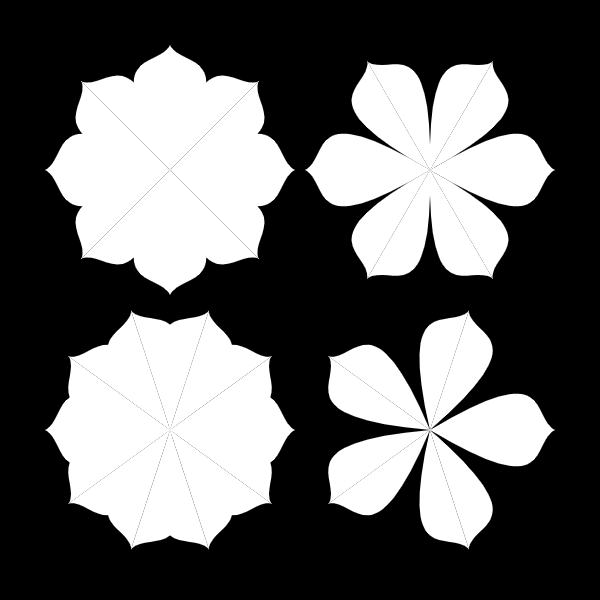
However, if you increase the pixel density in the setup, the seams are "filled in" with the increase in resolution.
function setup() {
  createCanvas(600, 600);
  pixelDensity(16); //<--------- The default value is 1, so 16 increases the density.
}

Since I am interested in image output, I am less concerned with the resulting taxation on program performance that may result from increasing pixel density. However, this may be a concern for some.
May this be of help to someone with a similar issue. - Cody
 SirCodyC
on 5 Jan 2021
SirCodyC
on 5 Jan 2021
Related issues
 Vbbab
·
3Comments
Vbbab
·
3Comments
 aparrish
·
3Comments
aparrish
·
3Comments
 oranyelik
·
3Comments
oranyelik
·
3Comments
 stalgiag
·
3Comments
stalgiag
·
3Comments
 ogoossens
·
3Comments
ogoossens
·
3Comments