P5.js-web-editor: Ability to override the image-rendering, width, height attributes of the canvas
Nature of issue?
- New feature request
New feature details:
Documentation of the property: image-rendering
Add the ability to set the image-rendering attribute of the canvas so that supported browsers (all modern browsers do). So that users can use image-rendering: pixelated; for example for the rendering canvas.
When using p5js on my site or own code, I can set the CSS properties myself by selecting the .p5Canvas class and overwriting the defaults. But I can't do that on the web editor or while embedding from the editor. Being able to set image-rendering: pixelated; in supported browsers is very useful for scaling pixelated graphics like 8-bit retro games.
What I currently do while embedding p5js sketches is:
.p5Canvas {
    display: block;
    width: 100% !important;
    max-width: 850px; // depending on content, useful for embedding
    height: auto !important;
    image-rendering: pixelated;
}
Then, if I create a sketch with createCanvas(100, 100); I will have a 100 x 100 canvas that scales with the content where it is embedded and can be dynamically resized, it's responsive, and thanks to image-rendering: pixelated; keeps the pixel perfect graphics without blurring, of course it can be set to auto to enable the browser scaling properties.
Being able to override the inline CSS properties of the canvas is very useful for having sketches being shown in full screen with a button, etc...
Another approach is removing the inline properties of the sketch or overriding them within the iframe by using the seamless property with the sandbox. There is probably a way to override that way, but having a simpler solution would be better. Thoughts?
 phrozen
All 6 comments
Welcome! 👋 Thanks for opening your first issue here! And to ensure the community is able to respond to your issue, be sure to follow the issue template if you haven't already.
![welcome[bot] picture](https://avatars.githubusercontent.com/in/4141?v=4&s=40) welcome[bot]
on 28 Feb 2021
welcome[bot]
on 28 Feb 2021
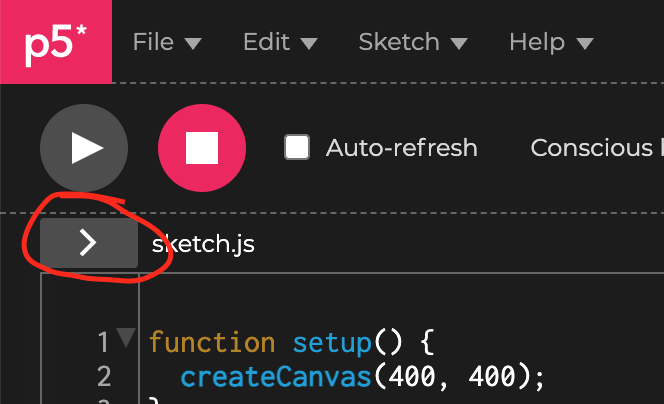
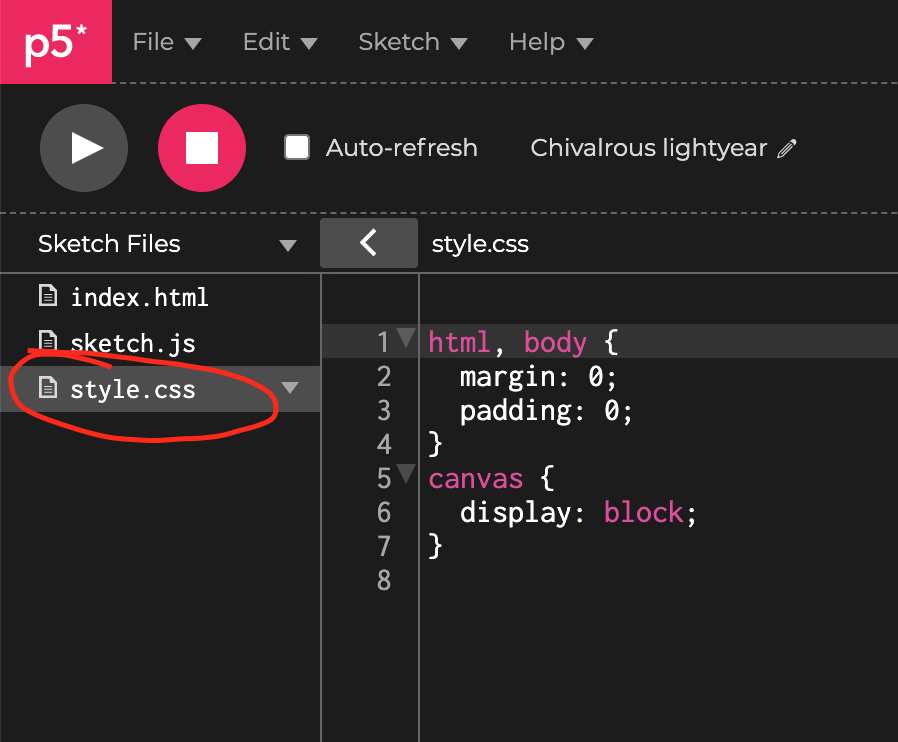
Thanks for the suggestion, @phrozen! You can edit the CSS for the sketch by clicking on the button that opens the Sidebar, to reveal the files:
Then click on style.css to edit it:
I hadn't heard of image-rendering, this is cool!
 catarak
on 10 Mar 2021
catarak
on 10 Mar 2021
Does that css is applied when embedding from the editor into an external site?
phrozen
on 11 Mar 2021
Does that css is applied when embedding from the editor into an external site?
Yes it does! Because the sketch is embedded in an iframe, I'm not sure if that will affect image-rendering, but my instinct is that it may.
catarak
on 12 Mar 2021
@catarak Thanks a lot! it works as expected! Although I had to override the default canvas size using !important which I personally dislike because the canvas' size style is inlined...
https://editor.p5js.org/phrozen/full/yzEB1X3oE
Check it out! It's using image-rendering: pixelated; (I don't think Firefox supports it, but you will be fine with any other browser)
phrozen
on 12 Mar 2021
Yay! I actually was wondering why the width and height were set inline, and I learned some stuff:
The
widthandheightattributes must be set for a canvas, because otherwise, they default to300pxand150px, respectively. From the w3 specification:The canvas element has two attributes to control the size of the coordinate space: width and height. These attributes, when specified, must have values that are valid non-negative integers. The rules for parsing non-negative integers must be used to obtain their numeric values. If an attribute is missing, or if parsing its value returns an error, then the default value must be used instead. The width attribute defaults to 300, and the height attribute defaults to 150.
The CSS
widthandheightare set to control the pixel density. It makes sense to have control over these separately to match the device pixel ratio, wherever the sketch is running. I think the idea is that p5.js handles thinking about this for you. As a contrast, you can see how you would handle this in three.js, which also renders to a canvas—much more complicated.
I'm going to close this issue since we figured it out. Thanks for the opportunity to think through all of this!
catarak
on 12 Mar 2021
Related issues
 runemadsen
·
5Comments
runemadsen
·
5Comments
 aferriss
·
5Comments
aferriss
·
5Comments
 andytilia
·
4Comments
aferriss
·
4Comments
andytilia
·
4Comments
aferriss
·
4Comments
 maartenwijntjes
·
3Comments
maartenwijntjes
·
3Comments
Most helpful comment
Yay! I actually was wondering why the width and height were set inline, and I learned some stuff:
The
widthandheightattributes must be set for a canvas, because otherwise, they default to300pxand150px, respectively. From the w3 specification:The CSS
widthandheightare set to control the pixel density. It makes sense to have control over these separately to match the device pixel ratio, wherever the sketch is running. I think the idea is that p5.js handles thinking about this for you. As a contrast, you can see how you would handle this in three.js, which also renders to a canvas—much more complicated.I'm going to close this issue since we figured it out. Thanks for the opportunity to think through all of this!