P5.js-web-editor: add soft wrap for long text
Nature of issue?
- New feature request
Feature enhancement details:
in the examples, and when writing examples for my classes, there tends to be long descriptive comments. It'd be amazing to have the ability to toggle softwrap or even have a setting for it in the editor so these comments can automatically remain within the editor window and prevent excess scrolling.
perhaps we could implement the wrap/hardwrap.js addon for code mirror to accomplish this?
https://codemirror.net/demo/hardwrap.html
I'd prefer that the line numbers are incremented with the soft wrap in account but this would still be a welcome addition: eg:
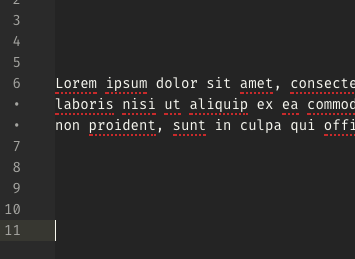
New feature details:
 bmoren
All 21 comments
comment/continuecomment.js
comtinue Comment addon could be an alternative to achieve a similar ease of commenting
bmoren
on 19 Feb 2019
This is maybe also as easy as adding a toggle to the settings for lineWrapping here? : https://github.com/processing/p5.js-web-editor/blob/master/client/modules/IDE/components/Editor.jsx#L82
bmoren
on 20 Feb 2019
i, personally, prefer not to have soft wrapping when writing code, as i find it confusing to look at. i see the value of it for comments, and i think perhaps the best approach would be the codemirror continuecomment addon, or a different codemirror addon that i don't know about (it seems there are a lot of these).
 catarak
on 20 Feb 2019
catarak
on 20 Feb 2019
I agree that having softwrap, especially for functions with a lot of parameters, gets really confusing.
eg.
```
ley x = map(mygreatvalue, startingVariable,
endingVariable, 1,1000); //very confusing!
````
It seems like the continue comment addon would be the ticket. If it's a welcome thing to try I can maybe have a go at it this weekend and see if it's a good behavior
bmoren
on 20 Feb 2019
go ahead and play around with it! in my experience, including codemirror plugins isn't super hard, it's just a matter of including the file and then updating the CodeMirror configuration when you instantiate it.
catarak
on 21 Feb 2019
can someone point me to the places I'll need to work in order to add a feature in the settings. I'm new with react, and there's a lot going on here!
bmoren
on 2 Mar 2019
@catarak @bmoren If I may weigh in, wrapping is a feature that is generally not preferred while writing code, but may become indispensable sometimes when editing long lines of code(say if copied from internet) where one may need to look upon whole line at once. Since the person is focusing only on that line(or small chunk) of code, it is not confusing for him/her for that particular period to enable wrapping. Hence, one can implement a shortcut to toggle between wrap and no-wrap (as implemented in VS Code, where the shortcut is Alt+Z)
 LakshSingla
on 4 Mar 2019
LakshSingla
on 4 Mar 2019
are there other scenarios in which adding a soft-wrap setting would be useful? one of the guiding principles of the web editor is keeping the amount of configuration options low, so i want to be cautious about adding stuff, and think carefully about its utility.
one thing to think about is a feature that's coming up is different editor views: code full screen, preview full screen, and code + preview side by side. maybe having a code full screen view will help with this issue?
catarak
on 4 Mar 2019
@catarak Soft wrap is implemented in https://jsfiddle.net, and I honestly feel it's been implemented very neatly. They're also using Codemirror and if you'll notice carefully quite a few things happen when a line wraps:
- that entire single line is given the uniform grey background even if it spans several "visual" lines
- the line numbering does not change, it remains 1 and spans several "visual lines" until 2

Certainly JSFiddle has a toggle switch for line wrapping, but even then it's settings are pretty minimal and easy to navigate.
As for a practical usecase for line wrapping, if you're an instructor wanting to demonstrate how a long line of code works (nearly ~80-100 chars), it might be a good idea if the students can see the whole line of code and see how the instructions relate to each other, rather than making the professor horizontally scroll through the line everytime the student wants to see something anywhere. Even when you're not an instructor but just programming on your own, you may want to be able to see what that argument was that you just passed to the function in the line above, without having to horizontally scroll.
Thoughts?
(Horizontally resizing the editor might not always be possible as it may reduce the output display area.)
 GaurangTandon
on 17 Mar 2019
GaurangTandon
on 17 Mar 2019
now that i'm thinking about it, in teaching contexts, soft wrap makes makes sense. @shiffman do you have any thoughts/opinions on line wrapping?
catarak
on 19 Mar 2019
Teaching context was my original reasoning for opening this issue, I'm still in favor of it for this reason. especially for adding long paragraph comments to describe whats happening in the code!
I do think that it should be a setting that can either be enabled or disabled, which makes me wonder what folks think should be by default soft wrap setting?
bmoren
on 19 Mar 2019
maybe... soft wrap on by default?
catarak
on 20 Mar 2019
Would it be better if:
- One could toggle between wrap and no wrap
- There is a provision in the
Settingsfor the user, whether he wants by default soft wrap on or off (would only make sense if it is a common thing like Theme or Autosave)
LakshSingla
on 20 Mar 2019
@LakshSingla my preference would be to have it be a provision in the Settings for the user (with wrap on by default) This way the user does not need to re-toggle each time and can set it and forget it based on preference.
bmoren
on 20 Mar 2019
What about a provision of both? Most editors have both. As long as it doesn't interfere with the minimalistic setup ideology of Web editor. In case it is implemented, I would like to take it up.
LakshSingla
on 21 Mar 2019
I'm not sure what you mean by a provision of both,
I imagined it would be a setting toggle like the current implementation of autosave in the user settings
Getting the softwrap enabled is no issue. There is a setting in the code mirror config that just needs to be set to true, see https://codemirror.net/doc/manual.html#config linewrapping. I've tested this, and it works great with the current editor build.
I'm not familiar with saving the user's preferences, as I've not done much react work, but that seems like the slightly more tricky part to implement. Go for it!
bmoren
on 21 Mar 2019
By both I mean a person can set one of it as the default one, which would be applied whenever a person opens the browser or a new sketch . A hotkey binding can be further added to quickly toggle between wrap and no-wrap (which would only apply for the current session only). One use case for this might be for when someone prefers the no-wrap version but needs to toggle it for a moment to see a huge line in entirety which he has copied online)
LakshSingla
on 21 Mar 2019
i'm officially on board with adding this! this should be in Preferences as "Word Wrap"
catarak
on 21 Mar 2019
Lemme begin work on this :).
LakshSingla
on 21 Mar 2019
@LakshSingla have you started on this? I was previously looking on this issue and had some work done previously , can I send in a pr if you don't mind , just wanted to ask before sending.
 siddhant1
on 22 Mar 2019
siddhant1
on 22 Mar 2019
@siddhant1 Yes, I have started work on this,
LakshSingla
on 22 Mar 2019
Related issues
 aferriss
·
5Comments
catarak
·
5Comments
aferriss
·
5Comments
catarak
·
5Comments
 hellonearthis
·
4Comments
hellonearthis
·
4Comments
 slowizzm
·
4Comments
aferriss
·
5Comments
slowizzm
·
4Comments
aferriss
·
5Comments
Most helpful comment
@catarak Soft wrap is implemented in https://jsfiddle.net, and I honestly feel it's been implemented very neatly. They're also using Codemirror and if you'll notice carefully quite a few things happen when a line wraps:
Certainly JSFiddle has a toggle switch for line wrapping, but even then it's settings are pretty minimal and easy to navigate.
As for a practical usecase for line wrapping, if you're an instructor wanting to demonstrate how a long line of code works (nearly ~80-100 chars), it might be a good idea if the students can see the whole line of code and see how the instructions relate to each other, rather than making the professor horizontally scroll through the line everytime the student wants to see something anywhere. Even when you're not an instructor but just programming on your own, you may want to be able to see what that argument was that you just passed to the function in the line above, without having to horizontally scroll.
Thoughts?
(Horizontally resizing the editor might not always be possible as it may reduce the output display area.)