Owlcarousel2: Center option with auto width - can't scroll/swipe to end of carousel - last items not visible
Hello,
I am building a site which uses OwlCarousel and the design behaviour has to be:
- On load, first image is fully visible, second image is partially visible, and then swipe through.

- On load the left margin has to be clear white, and as you swipe, the images push into the left margin

However when setting up the Carousel as follows:
CaseStudyGallery.owlCarousel({
    center:true,
    loop:false,
    margin:50,
    nav:false,
    responsive:{
        0:{
            items:1
        },
        767:{
            items:1,
            stagePadding:100,
            autoWidth:true
        },
        1366:{

            items:1,
            stagePadding:300,
            margin:75,
            autoWidth:true,
        }
    }
 });
You cannot physically swipe all the way across, you get to the 3rd to last item and the carousel will not let you swipe across to the end.

It looks as though the width calculation perhaps doesn't take into account the initial left offset maybe? As the total calculated with of the carousel items with margins is correct.
It will work fine with center: false OR center: true and autoWidth: false but then this breaks the desired design (which I have to make happen regardless...)
I have tried both OwlCarousel 2.2.1 and 2.3.0 beta.
Same issue.
I note the demo with centring works so a bit confused! Maybe that's because the demo is entirely same sized items?
Thanks,
Vicky
 pixelvicky
All 18 comments
Are you using the carousel in the same way as this demo - https://owlcarousel2.github.io/OwlCarousel2/demos/center.html#center-without-loop
It seems like you want the same effect. Are you adding an offset to the carousel rather than using center: true?
 keefyhub
on 8 Aug 2017
keefyhub
on 8 Aug 2017
Hiya,
Yeah that's just what I want it to do but the using the autoWidth parameter appears to cause the problems. Unfortunately each of our slides will be an uneven width due to the nature of the kind of images being shown.
Thanks for replying though!
Vicky
pixelvicky
on 8 Aug 2017
I had a quick test on slides of various widths, seems to be working fine - https://codepen.io/keefyboooo/pen/zdZjoe
Can you provide a link to the code so I can have a look?
Thanks
keefyhub
on 8 Aug 2017
Ok, so it might be something in our stylesheet, we do have owl-stage in a display:flex but I tried disabling that to no avail.
The test page is here: [ local url removed ]
pixelvicky
on 8 Aug 2017
I can't view a .local URL. Do you have a live URL or could you put what you have on an online editor like codepen or jsfiddle?
Thanks
keefyhub
on 8 Aug 2017
Sorry I meant to adjust that URL on pasting but forgot to change it to our staging site ☹
http://pixel.pxldev.eu/case-study/flare-audio-2/
Vicky
From: Keith Light notifications@github.com
Reply-To: OwlCarousel2/OwlCarousel2 reply@reply.github.com
Date: Tuesday, 8 August 2017 at 12:45
To: OwlCarousel2/OwlCarousel2 OwlCarousel2@noreply.github.com
Cc: Vicky Lamburn Vickyl@pixelbypixel.co.uk, Author author@noreply.github.com
Subject: Re: [OwlCarousel2/OwlCarousel2] Center option with auto width - can't scroll/swipe to end of carousel - last items not visible (#1999)
I can't view a .local URL. Do you have a live URL or could you put what you have on an online editor like codepen or jsfiddle?
Thanks
—
You are receiving this because you authored the thread.
Reply to this email directly, view it on GitHubhttps://github.com/OwlCarousel2/OwlCarousel2/issues/1999#issuecomment-320931420, or mute the threadhttps://github.com/notifications/unsubscribe-auth/AdZmEOgZl90w86lyYMz58fF---eoqg9Tks5sWEpZgaJpZM4OwfTT.
pixelvicky
on 8 Aug 2017
Thanks, it might be that the images aren't fully loaded before the owl carousel initialises. So if the width is being calculated by the total size of the loaded images (with a max-width of 500px) it might be calculating it incorrectly.
You try initialising owl-carousel after the window load event, or maybe look at setting the width on the .case-study-gallery__slide somehow.
keefyhub
on 8 Aug 2017
I tried setting the set up to happen in window load earlier and to no avail, the calculated width was the same and on screen sizes >= 1366px the images are set to have no max-width with max-width:none. Disabling this rule so they have a max-width of 500px actually means you can see all the items. Which is baffling.
I've set the img css to be:
width:auto;
height:auto;
max-width:none;
I'm a bit at a loss as what other adjustments I can make or what would be causing this issue.
The case-study-gallery__slide element is created by Javascript to create the carousel as the slider is only shown on desktop larger devices. I don't know if this is the root of the issue.
As I say, when you add up the actual widths of each .owl-item, and the margins, it does add up to the 4990px width calculated for owl-stage?
It's as if there is something else saying that's all there is.
Vicky
pixelvicky
on 8 Aug 2017
OK I think it might be the margin-right, when I remove that I can scroll to the end. The width should be the total of each item + the margin-right for each item.
Could you use padding inside the items instead of applying margin?
keefyhub
on 8 Aug 2017
Ok I tried that by setting the margin parameter to 0, that stlll means I can't get to the end of the slider, as the width is 4240px.
If I edit it live to remove the margin from 75px down to 0 in the Chrome Inspector that helps but I still can't quite get to the final item.
I have added padding-right: 75px to .case-study-gallery__slide
Unfortunately the last two items just still won't show.
I have updated http://pixel.pxldev.eu/case-study/flare-audio-2/ with the above.
pixelvicky
on 8 Aug 2017
is there margin still being applied to .owl-item? It looks like there is and that is stopping me from scrolling to the last item. Could you double check there is no margin being applied to the items.
keefyhub
on 8 Aug 2017
No definitely no margins, perhaps it's a cached core.js file causing the issue as the margin was derived from the margin: 75 parameter. Here is my copy of the HTML in the .eu site:
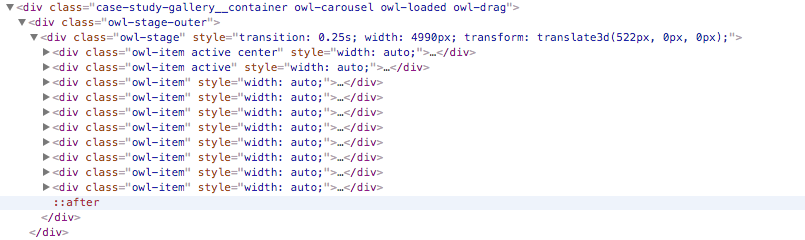
Sorry about all this!
pixelvicky
on 8 Aug 2017
No worries, for me it is still applying the margin right, when I remove it, I can see all the items. (typical that its working for me!)
Is your code wrapped in a $(window).on('load', function() {...});?
keefyhub
on 8 Aug 2017
I’m using Chrome for what it’s worth.
Yes the functions are declared outside of the window load event handler but the function is only called in a window load event handler on line 602 in core.js.
pixelvicky
on 8 Aug 2017
Hello,
im facing the same issue.
I edited the codepen to show you
https://codepen.io/anon/pen/KJKNRj
only the width of one item has been changed.
 clopes42
on 22 Jan 2019
clopes42
on 22 Jan 2019
I could cope with this issue with below (a workaround):
https://gist.github.com/zeroyonichihachi/a3b53e43118cef3c3e22d57e82130332
 tkfm-yamaguchi
on 23 Jan 2019
tkfm-yamaguchi
on 23 Jan 2019
I found another solution that works for me and might for the rest us.
I copied the code over to my js Files and just changed the order of the if else. center before autoWidth then everything works fine.
Maybe someone could fix this in the core files.
Owl.prototype.maximum = function (relative) {
    var settings = this.settings,
        maximum = this._coordinates.length,
        iterator,
        reciprocalItemsWidth,
        elementWidth;

    if (settings.loop) {
        maximum = this._clones.length / 2 + this._items.length - 1;
    } else if (settings.center) {
        maximum = this._items.length - 1;
    } else if (settings.autoWidth || settings.merge) {
        iterator = this._items.length;
        if (iterator) {
            reciprocalItemsWidth = this._items[--iterator].width();
            elementWidth = this.$element.width();
            while (iterator--) {
                reciprocalItemsWidth += this._items[iterator].width() + this.settings.margin;
                if (reciprocalItemsWidth > elementWidth) {
                    break;
                }
            }
        }
        maximum = iterator + 1;
    } else {
        maximum = this._items.length - settings.items;
    }

    if (relative) {
        maximum -= this._clones.length / 2;
    }

    return Math.max(maximum, 0);
};
 fbunduka
on 8 Feb 2019
fbunduka
on 8 Feb 2019
This solution worked for me – thank you so much @fbunduka !!
 trevormcgrath
on 26 Feb 2020
trevormcgrath
on 26 Feb 2020
Related issues
 Dipak-Chandran
·
3Comments
Dipak-Chandran
·
3Comments
 SimonHarte
·
3Comments
SimonHarte
·
3Comments
 hopea114y
·
3Comments
hopea114y
·
3Comments
 leecollings
·
3Comments
leecollings
·
3Comments
 siwel
·
3Comments
siwel
·
3Comments
Most helpful comment
I found another solution that works for me and might for the rest us.
I copied the code over to my js Files and just changed the order of the if else. center before autoWidth then everything works fine.
Maybe someone could fix this in the core files.