Outlookgooglecalendarsync: Constant syncing - not working properly
OGCS Version: v2.6.5.0
Installed
Problem Description
I cannot attach a logfile for today as it was not created when last run. I am attaching the file from yesterday.
Steps to Reproduce the Issue
- Just keeps running - setting is to rum every 6 hours
OGcalsync.log
Any other information
 michgal2k
All 32 comments
The fact that you can't find a log file for when it was repeatedly syncing sounds suspicious. My first suggestion would be close OGCS and Outlook, then re-open Outlook and OGCS (in that order).
It does look like you have Push Sync on too - maybe you just need to turn that off? Really can't tell much without a logfile that covers the problem... :disappointed:
 phw198
on 8 Jan 2018
phw198
on 8 Jan 2018
I tried that – ran a scan but still nothing populated in the logfile? Should I delete and re-install? Any other things I should try?
michgal2k
on 8 Jan 2018
Sorry forgot to mention – I also turn push sync off – still nothing
michgal2k
on 8 Jan 2018
Sorry for flooding your inbox. I rebooted my laptop. Ended up having a windows update, then I reran OGCS and now have a logfile.
michgal2k
on 8 Jan 2018
And is the constant sync problem still present?
:paperclips: Unfortunately, files can't be attached to the ticket when replying by email - please log in to GitHub to upload your OGcalsync.log file.
phw198
on 8 Jan 2018
Here is my latest logfile. It still appears to be trying to sync before the 6 hours and nothing has been updated or changed.
OGcalsync.log
michgal2k
on 8 Jan 2018
The first sync in your log file shows you closed OGCS, but magically a sync started 2 seconds later. Is it possible you had two instances of OGCS running? (Check in Task Manager just to make sure).
2018-01-07 20:37:19,925 INFO  1 OutlookGoogleCalendarSync.SyncTimer [0] -  Next sync scheduled for Monday, January 8, 2018 - 2:21:45 AM
2018-01-07 20:37:54,333 INFO  1 OutlookGoogleCalendarSync.Program [0] -  Application closed.
2018-01-07 20:37:56,005 INFO  1 OutlookGoogleCalendarSync.MainForm [0] -  Manual sync started.
2018-01-07 20:37:56,083 DEBUG  1 OutlookGoogleCalendarSync.Console [0] -  Sync version: 2.6.5.0
2018-01-07 20:37:56,083 DEBUG  1 OutlookGoogleCalendarSync.Console [0] -  Sync started at 1/7/2018 8:37:56 PM
2nd one works as expected:
2018-01-08 07:57:23,287 INFO  1 OutlookGoogleCalendarSync.SyncTimer [0] -  Next sync scheduled for Monday, January 8, 2018 - 7:58:23 AM
2018-01-08 07:58:23,282 DEBUG  1 OutlookGoogleCalendarSync.SyncTimer [0] -  Scheduled sync triggered.
2018-01-08 07:58:23,375 INFO  1 OutlookGoogleCalendarSync.MainForm [0] -  Scheduled sync started.
2018-01-08 07:58:23,453 DEBUG  1 OutlookGoogleCalendarSync.Console [0] -  Sync version: 2.6.5.0
2018-01-08 07:58:23,453 DEBUG  1 OutlookGoogleCalendarSync.Console [0] -  Sync started at 1/8/2018 7:58:23 AM
3rd one seems to be 2h30m late!
2018-01-08 08:59:48,675 INFO  1 OutlookGoogleCalendarSync.SyncTimer [0] -  Next sync scheduled for Monday, January 8, 2018 - 1:58:23 PM
2018-01-08 15:35:21,499 DEBUG  1 OutlookGoogleCalendarSync.SyncTimer [0] -  Scheduled sync triggered.
2018-01-08 15:35:23,906 INFO  1 OutlookGoogleCalendarSync.MainForm [0] -  Scheduled sync started.
2018-01-08 15:35:24,297 DEBUG  1 OutlookGoogleCalendarSync.Console [0] -  Sync version: 2.6.5.0
2018-01-08 15:35:24,297 DEBUG  1 OutlookGoogleCalendarSync.Console [0] -  Sync started at 1/8/2018 3:35:24 PM
I don't see any sign of it continually syncing though.
You haven't got any remnants of the old CodePlex ClickOnce install left have you?
phw198
on 9 Jan 2018
I checked Task Manager, only one instance appears. I do not see any remnants of the old code plex. How could it restart on its own?
michgal2k
on 9 Jan 2018
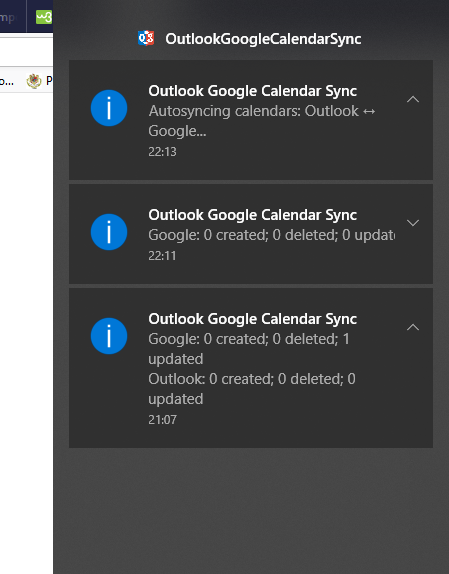
I am having a similar problem: the app is set up to sync every 6 hours with pushing outlook changes. Today with outlook closed it synced 4 times around 1 hour with outlook closed (3 times are in the print screen, 1 time more synced during me writing this).
I have also attached a log.
One question: should I start the app after I am starting outlook? Generally by me it is starting at boot and I am starting outlook after...
 vladbejenaru
on 23 Jan 2018
vladbejenaru
on 23 Jan 2018
:arrow_double_up: @vladbejenaru Please confirm if the issue remains on the alpha release. Upgrade to the latest alpha release by downloading its Setup.exe file and running it.
phw198
on 23 Jan 2018
Thanks! I have updated and I will follow it!
vladbejenaru
on 23 Jan 2018
Hello, same thing after update. I will stop for the moment the outlook push feature to see if anything changes...
vladbejenaru
on 24 Jan 2018
@vladbejenaru So can you summarise your setup? The logfile you've provided doesn't show OGCS starting up and the first entry is at 10:40 saying it can't sync because of no network - are you resuming from hibernate or something?
Looks like after that fail, you didn't wait until the next scheduled sync, but did a manual sync which runs through fine and sets the next sync in an hour's time. However, directly after, it looks like the original failed sync at 10:40 then also "completes" and sets to run in 5 mins time.
I'll investigate, but I don't think this is Push Sync related.
2018-01-24 10:40:56,531 DEBUG  1 OutlookGoogleCalendarSync.SyncTimer [0] -  Scheduled sync triggered.
2018-01-24 10:40:56,921 INFO  1 OutlookGoogleCalendarSync.MainForm [0] -  Scheduled sync started.
2018-01-24 10:41:00,129 ERROR  1 OutlookGoogleCalendarSync.Console [0] -  There does not appear to be any network available! Sync aborted.
2018-01-24 11:14:48,434 INFO  1 OutlookGoogleCalendarSync.MainForm [0] -  Manual sync started.
...
2018-01-24 11:14:49,035 INFO  1 OutlookGoogleCalendarSync.SyncTimer [0] -  Next sync scheduled for Mittwoch, 24. Jänner 2018 - 11:15:49
...
2018-01-24 11:15:07,023 INFO  1 OutlookGoogleCalendarSync.Console [0] -  Sync finished with success!
2018-01-24 11:15:07,066 DEBUG  1 OutlookGoogleCalendarSync.XMLManager [0] -  Setting 'LastSyncDate' updated to '24.01.2018 11:14:48'
2018-01-24 11:15:07,156 DEBUG  1 OutlookGoogleCalendarSync.XMLManager [0] -  Setting **'LastSyncDate' updated to '24.01.2018 10:40:56'**
2018-01-24 11:15:07,164 INFO  1 OutlookGoogleCalendarSync.Console [0] -  Another sync has been scheduled to automatically run in 5 minutes time.
2018-01-24 11:15:07,200 INFO  1 OutlookGoogleCalendarSync.SyncTimer [0] -  Next sync scheduled for Mittwoch, 24. Jänner 2018 - 11:20:07
:link: Issue #429
phw198
on 25 Jan 2018
Dear Paul, please let me know if I can help with anything! thanks!
vladbejenaru
on 25 Jan 2018
@vladbejenaru Yes, I was hoping for more information:
So can you summarise your setup? The logfile you've provided doesn't show OGCS starting up and the first entry is at 10:40 saying it can't sync because of no network - are you resuming from hibernate or something?
Could you provide the log for the previous day to the one you already uploaded - would like to see if it was mid sync etc when it went into sleep.
phw198
on 25 Jan 2018
@vladbejenaru Any update?
phw198
on 7 Feb 2018
Hello Paul! I unchecked the "push outlook changes immediately" and the app is behaving ok. For the sake of testing I have re-enabled. Right now I am sync-ing once per day with pushing Outlook changes immediately. I will report in couple of days.
p.s. should I update to the last beta?
thank you,
Vlad
vladbejenaru
on 7 Feb 2018
OK - and yes, please upgrade to v2.7.0.
phw198
on 7 Feb 2018
OGcalsync 2.txt
I have attached 2 log files. The app doesn't seem to be updating at all. It tries to run every 5 minutes. I am still using 2.6.5. Should I try what Vlad did above?
michgal2k
on 7 Feb 2018
OGcalsync 3.txt
I tried to do a manual sync - went through, even got the event created message but then said sync failed. Not sure why? Still attempting to run every 5 minutes or so but nothing happens.
michgal2k
on 8 Feb 2018
@michgal2k The golden rule is "always upgrade" - I don't have time to support people on releases that aren't the latest! So please get on to v2.7.0 ASAP...
It's very difficult to quite know what's going on or why because you guys aren't providing me any background information so I'm having to read between the lines.....but potentially the issue is affecting those with Push Sync on, who leave their computers on over night (or maybe let them go to sleep/hibernate without restarting OGCS) and syncs fail due to lack of network connectivity. Then when you come back to the computer multiple syncs get kicked off in parallel and either don't run at all because Busy syncing already. Rescheduled in 5 minutes, or they proceed at the same time (which shouldn't happen).
To narrow this down:
- With your current configuration, when the issue happens, does closing OGCS and restarting it temporarily resolve things?
- Turn off Push Sync - confirm the problem doesn't occur when resuming your computer the next day
- Turn on Push Sync, but close down OGCS at the end of your day, manually restart it the next day - confirm problem doesn't occur
Let me know your findings.
@vladbejenaru How are you going having turned off Push Sync? You're also leaving your computer on overnight, right?
phw198
on 10 Feb 2018
OK I've made some improvements, mainly around handling of sync cancellation, which might help.
:package: Could you try development release v2.7.0.7.zip (see instructions for applying) - make sure this applied on top of at least v2.7.0.
Please let me know how it goes!
phw198
on 11 Feb 2018
Hi Paul, the push functionality is back on on, with one sync per day. I am running now 2.6.5.0.
I am leaving the computer during the night on but sometimes I am closing the lid...
Can i leave it for another 1-2 days with this version, under supervision, especially during the week when I am working more and to install the version from attachment around Wednesday?
vladbejenaru
on 11 Feb 2018
Paul –
When I upgraded to 2.7.0 – my computer literally stopped working! Coincidence – not sure?
I ended up removing OGCS and reinstalled the latest version. So far that seems to work. Had to do a manual sync to get things going. I currently have push notifications set to OFF. Next scheduled sync is 1:18 pm today. I will continue to follow and report back tomorrow.
Thank you for your help
michgal2k
on 11 Feb 2018
@vladbejenaru I'm actually going to roll v2.7.0.7 into the next alpha release anyway, which should be out in the next few days, so no problem waiting a bit before upgrading.
@michgal2k I would very much hope that it's a coincidence! The install for OGCS is very basic and no-one's ever reported their computer's "stopped working" before...
phw198
on 12 Feb 2018
Everything seems to working fine. I have push notification OFF.
michgal2k
on 14 Feb 2018
:arrow_double_up: v2.7.1 is now out, so please upgrade by going to the About tab in OGCS, ticking the Check for Alpha releases box and then clicking Check for Update.
Having confirmed it appears to be Push Sync causing the problem, does it still happen under v2.7.1?
phw198
on 17 Feb 2018
Thanks Paul! it looks very good by me with 2.7.0. I think the (my) issue is solved.
thank you!
vladbejenaru
on 18 Feb 2018
Just installed 2.7.1 (btw. the updater from inside the app failed to download the setup.exe, I had to download and install manually) and will follow.
Anyway I have changed my settings now to autosync every 3 days and push outlook immediately. so far no complains! :D
vladbejenaru
on 18 Feb 2018
So far everything seems to be fixed
michgal2k
on 19 Feb 2018
Thanks for confirming the issue is now fixed :+1:
phw198
on 25 Feb 2018
Related issues
 jjkober
·
7Comments
jjkober
·
7Comments
 SemperF1
·
3Comments
SemperF1
·
3Comments
 dmccrea
·
6Comments
dmccrea
·
6Comments
 burneremail
·
6Comments
burneremail
·
6Comments
 sunk818
·
3Comments
sunk818
·
3Comments