Mojave sports a new dark theme which is not respected in pref panel.
 diversys
All 13 comments
More details, this is what we see on the upper level panel:
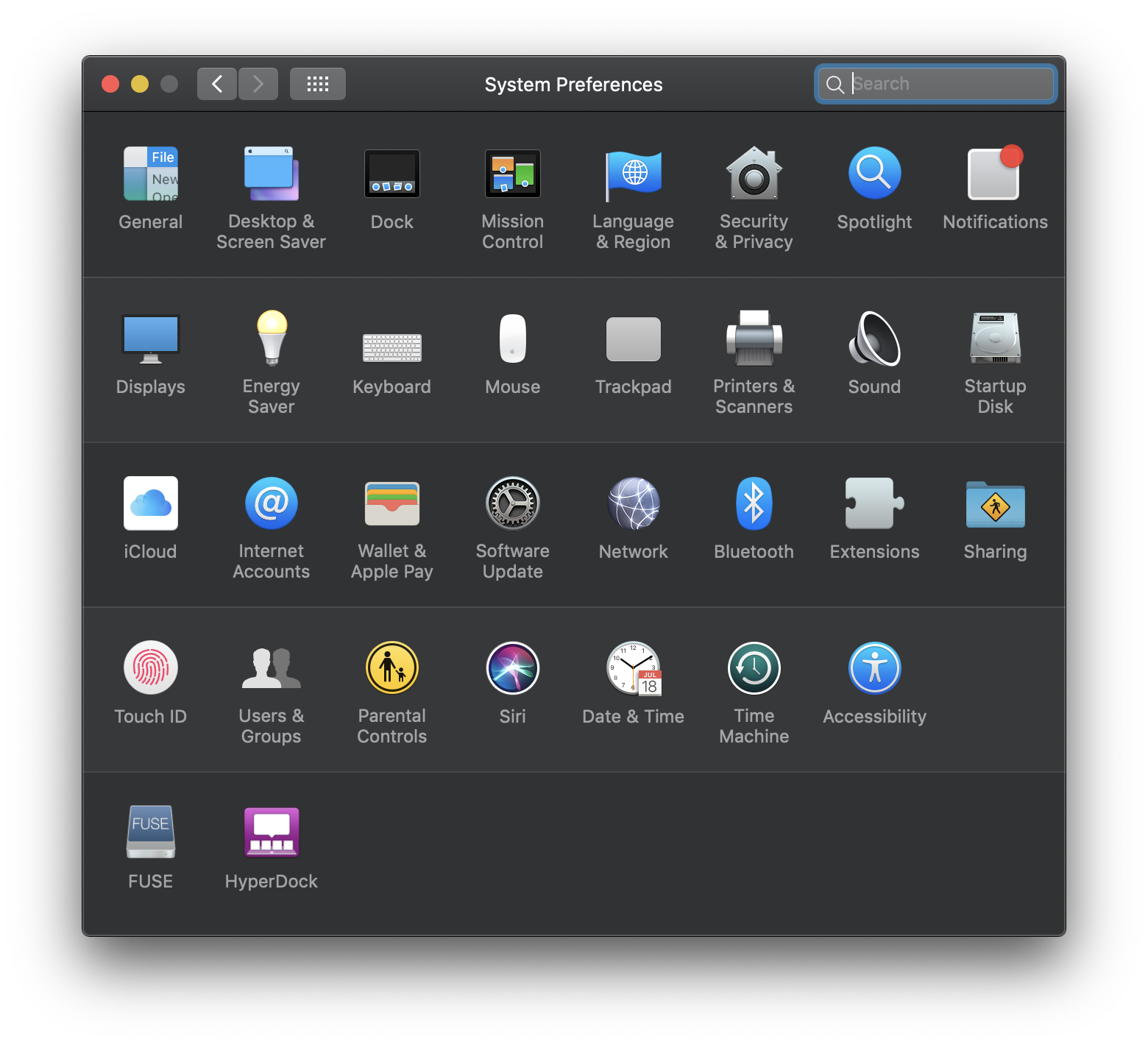
But when we click FUSE icon, we see a light mode panel:
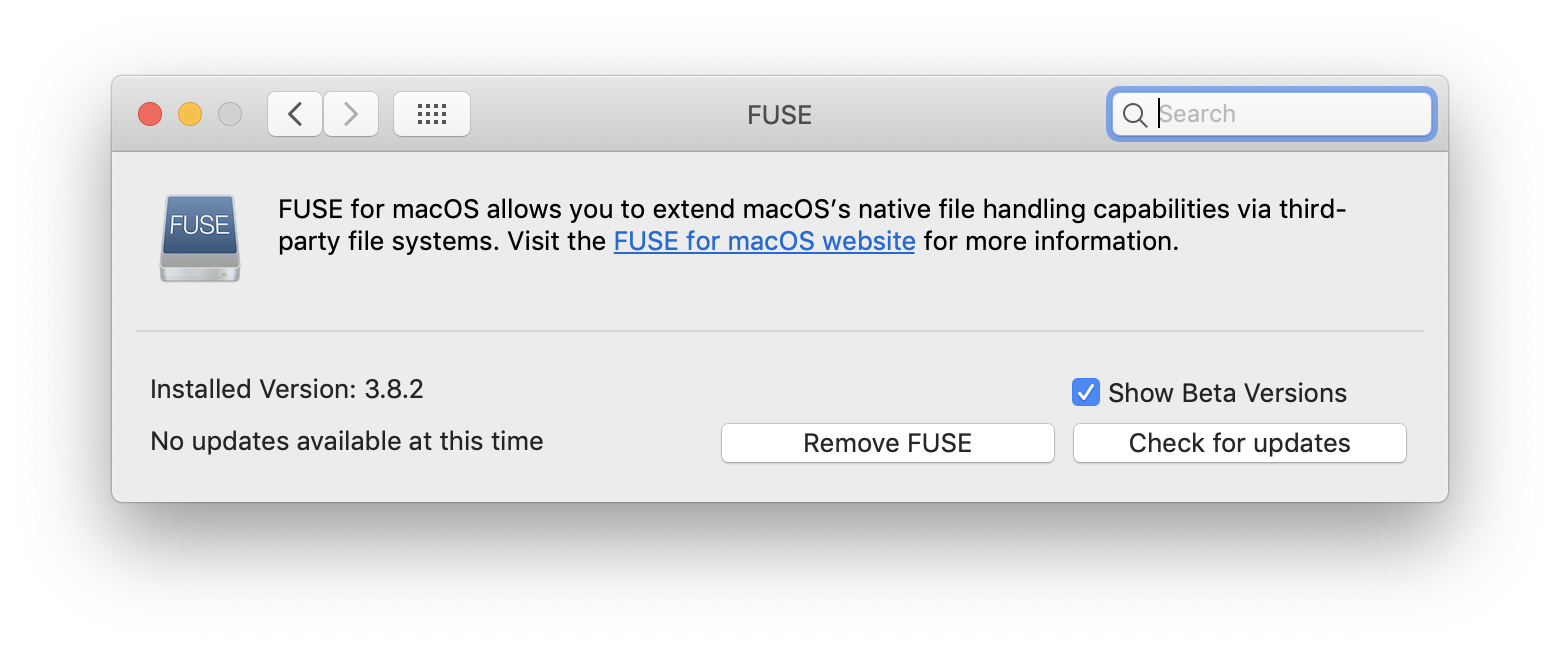
We wish FUSE supports the Dark Mode (https://developer.apple.com/design/human-interface-guidelines/macos/visual-design/dark-mode/).
 singularitti
on 8 Dec 2018
singularitti
on 8 Dec 2018
Getting this to work might not be trivial because FUSE still needs to support old versions of macOS. I will look into it but this has a low priority.
 bfleischer
on 14 Dec 2018
bfleischer
on 14 Dec 2018
The only way to enable the dark mode for the preference pane, I have found so far, is building the preference pane with the macOS 10.14 SDK, but that will not be possible since we need to support older versions of macOS as well. Any suggestions?
bfleischer
on 18 Dec 2018
Is there a way for dynamically switching themes between operation systems?
singularitti
on 18 Dec 2018
Any suggestions?
Separate build for macOS 10.14+?
 andreiborisov
on 31 Dec 2018
andreiborisov
on 31 Dec 2018
Granted this is only a minor cosmetic issue but if it's ever addressable - and in addition to where singularitti pointed to, maybe also look here?:
https://developer.apple.com/documentation/appkit/supporting_dark_mode_in_your_interface
 superbogie
on 1 Jan 2019
superbogie
on 1 Jan 2019
Linking to 10.14 doesn’t mean you can’t support older versions. For example the nib could stay the same but at runtime could update the control colors via the @available condition.
 kainjow
on 5 May 2019
kainjow
on 5 May 2019
Linking to 10.14 doesn’t mean you can’t support older versions. For example the nib could stay the same but at runtime could update the control colors via the @available condition.
This is true. Has nothing to do with support. You can easily build a preference pane with 10.15 SDK for almost all older versions.
 nrdev88
on 11 Dec 2019
nrdev88
on 11 Dec 2019
@kainjow @nrdev88 This is not the whole story and you are oversimplifying things.
On 10.6 64 bit preference panes need to support garbage collection. However, garbage collection feature has since been dropped from the macOS SDK. To make things even more complicated, newer versions of macOS will not load preference panes, that are built using garbage collection. The 32 bit image of the preference pane must use manual reference counting, otherwise it will not load on legacy versions of macOS. Newer versions of macOS do not even support 32 bit preference panes.
Starting with the macOS 10.12 SDK Xcode does not longer contain OpenSSL, but OpenSSL is still required by the preference pane (autoinstaller) on legacy versions of macOS. For newer versions CommonCrypto is used. Building the preference pane with an up to date version Xcode would imply bundling OpenSSL or another crypto library with the preference pane (autoinstaller).
Using the macOS 10.14 or 10.15 SDK to build the preference pane might be feasible, but it will require a lot of work and testing to get everything right. Simply setting the deployment target to 10.5 and adding a few @available conditions will not be enough to get it working.
bfleischer
on 11 Dec 2019
It’s almost 2020, it’s odd to me that 10.6, garbage collection, and 32-bit are concerns. Seems like osxfuse’s support for archaic macOS versions is overcomplicating the story ;)
kainjow
on 11 Dec 2019
@kainjow The master branch (Version 4 of FUSE for macOS) drops support for 10.5 to 10.8, but I did not have time to update the preference pane or finish work on the master branch. Sadly. supporting at least the last 5 major versions of macOS seems to be required by many companies.
bfleischer
on 11 Dec 2019
The feature is implemented in the upcoming version 4.0.0.
bfleischer
on 29 Feb 2020
macFUSE 4.0.0 supports dark mode on macOS 11. The new 4.0.1 release also supports dark mode on macOS 10.14 and 10.15.
bfleischer
on 1 Nov 2020
Related issues
 ivancitin
·
12Comments
ivancitin
·
12Comments
 aronkihui
·
5Comments
aronkihui
·
5Comments
 cadmartin
·
13Comments
cadmartin
·
13Comments
 akalin-keybase
·
8Comments
akalin-keybase
·
8Comments
 gioalex
·
3Comments
gioalex
·
3Comments
Most helpful comment
macFUSE 4.0.0 supports dark mode on macOS 11. The new 4.0.1 release also supports dark mode on macOS 10.14 and 10.15.