I've installed and re-installed Fuse many times along with ext2-fuse. Still, it doesn't work at all. I'm trying to mount a Raspberry PI image file on an SD card but the partition I want to edit doesn't seem to appear. Interestingly diskutil list does show me the partition but I cannot mount it or read it.
How do I know Fuse works? How can I debug it and test it?
 alkopop79
All 10 comments
I've tried mounting an SD card which seemed to crash ex2-fuse. I got the following error:
Process:               fuse-ext2 [43621]
Path:                  /usr/local/bin/fuse-ext2
Identifier:            fuse-ext2
Version:               ???
Code Type:             X86-64 (Native)
Parent Process:        bash [17065]
Responsible:           Terminal [916]
User ID:               501

Date/Time:             2016-12-28 09:11:35.284 +0000
OS Version:            Mac OS X 10.11.6 (15G1004)
Report Version:        11
Anonymous UUID:        13A9087F-EAF0-4223-B8C1-2615C8B07DA8

Sleep/Wake UUID:       BF9B6EDD-F502-4CA7-8E5F-4F8ED34DF9B7

Time Awake Since Boot: 58000 seconds
Time Since Wake:       280 seconds

System Integrity Protection: enabled

Crashed Thread:        0

Exception Type:        EXC_BREAKPOINT (SIGTRAP)
Exception Codes:       0x0000000000000002, 0x0000000000000000

Application Specific Information:
dyld: launch, loading dependent libraries

Dyld Error Message:
  Library not loaded: /usr/local/lib/libosxfuse_i64.2.dylib
  Referenced from: /usr/local/bin/fuse-ext2
  Reason: image not found

Binary Images:
    0x7fff62a41000 -     0x7fff62a78a47  dyld (360.22) <DC81CC9D-651A-3A45-8809-928282052BD3> /usr/lib/dyld
This is from the Terminal:
$ fuse-ext2 /dev/disk3s2 ~/mnt
dyld: Library not loaded: /usr/local/lib/libosxfuse_i64.2.dylib
  Referenced from: /usr/local/bin/fuse-ext2
  Reason: image not
dyld: Library not loaded: /usr/local/lib/libosxfuse_i64.2.dylib means FUSE is not installed, or at least not installed correctly. How did you install FUSE?
 bfleischer
on 28 Dec 2016
bfleischer
on 28 Dec 2016
No response, closed.
bfleischer
on 31 Jan 2017
Interestingly, this error reappeared with MacFuse 4.0.2
 surak
on 12 Nov 2020
surak
on 12 Nov 2020
I am also getting this error again. I thought it was BigSur related and I tried reinstalling MacFuse 4.0.3 after disabling csrutil as stated in #741 by mixtly87.


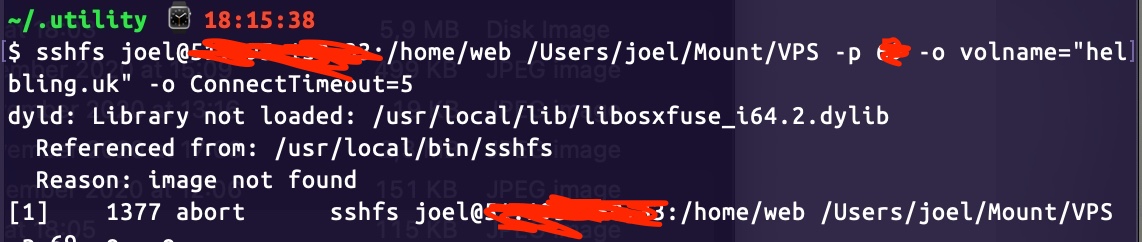
I checked the directories you mentioned in #741 and they all appear to have the required files in the right places. I also tried reloading the kext manually but this is still coming up.
 CamperGuy
on 22 Nov 2020
CamperGuy
on 22 Nov 2020
@CamperGuy The issue you are running into is not related to loading the kernel extension. The version of SSHFS, that you are using, was linked against a legacy version of the FUSE library. Run the following command in Terminal to create a symlink pointing to the new version of the library. The "dyld: Library not loaded ..." error should then be gone.
ln -s "libfuse.2.dylib" "/usr/local/lib/libosxfuse_i64.2.dylib"
That fixed it! Thank you so much
CamperGuy
on 23 Nov 2020
Same error after using BigSur
When I tried this suggested command to fix the libosxfuse_i64.2.dylib error:
ln -s "libfuse.2.dylib" "/usr/local/lib/libosxfuse_i64.2.dylib"
it shows the permission denied:
ln: /usr/local/lib/libosxfuse_i64.2.dylib: Permission denied
What should I do to solve this error?
 Yichao-Yao
on 24 Nov 2020
Yichao-Yao
on 24 Nov 2020
@Yichao-Yao Run the commend with sudo.
sudo ln -s "libfuse.2.dylib" "/usr/local/lib/libosxfuse_i64.2.dylib"
You need to be an admin user and enter your password when prompted. I will add the symlink in the next macFUSE update.
bfleischer
on 24 Nov 2020
Thx a lot, it works well now
Yichao-Yao
on 24 Nov 2020
Related issues
 gioalex
·
3Comments
gioalex
·
3Comments
 ilovezfs
·
10Comments
ilovezfs
·
10Comments
 s20blast
·
4Comments
s20blast
·
4Comments
 lakshmi-subramanya
·
10Comments
lakshmi-subramanya
·
10Comments
 AlexWang-16
·
5Comments
AlexWang-16
·
5Comments
Most helpful comment
@CamperGuy The issue you are running into is not related to loading the kernel extension. The version of SSHFS, that you are using, was linked against a legacy version of the FUSE library. Run the following command in Terminal to create a symlink pointing to the new version of the library. The "dyld: Library not loaded ..." error should then be gone.