Osu: Gameplay deadlocks at map start after retry
Describe the bug:
Was playing maps, decided to retry the map and ended up stuck at the start without any indication of it trying to start.
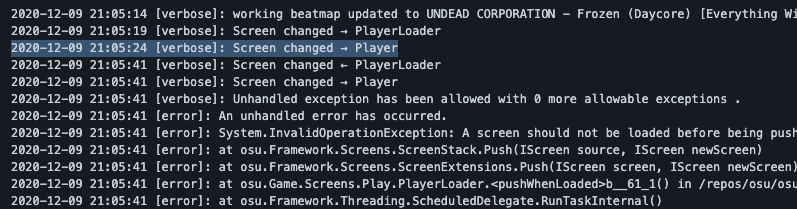
Pause menu didn't function, etc. however alt+f4 brought me back to the start with an unhandled exception in the code block below
2020-12-09 21:05:14 [verbose]: working beatmap updated to UNDEAD CORPORATION - Frozen (Daycore) [Everything Will Freeze]
2020-12-09 21:05:19 [verbose]: Screen changed → PlayerLoader
2020-12-09 21:05:24 [verbose]: Screen changed → Player
2020-12-09 21:05:41 [verbose]: Screen changed ← PlayerLoader
2020-12-09 21:05:41 [verbose]: Screen changed → Player
2020-12-09 21:05:41 [verbose]: Unhandled exception has been allowed with 0 more allowable exceptions .
2020-12-09 21:05:41 [error]: An unhandled error has occurred.
2020-12-09 21:05:41 [error]: System.InvalidOperationException: A screen should not be loaded before being pushed.
2020-12-09 21:05:41 [error]: at osu.Framework.Screens.ScreenStack.Push(IScreen source, IScreen newScreen)
2020-12-09 21:05:41 [error]: at osu.Framework.Screens.ScreenExtensions.Push(IScreen screen, IScreen newScreen)
2020-12-09 21:05:41 [error]: at osu.Game.Screens.Play.PlayerLoader.<pushWhenLoaded>b__61_1() in /repos/osu/osu.Game/Screens/Play/PlayerLoader.cs:line 369
2020-12-09 21:05:41 [error]: at osu.Framework.Threading.ScheduledDelegate.RunTaskInternal()
2020-12-09 21:05:41 [error]: at osu.Framework.Threading.Scheduler.Update()
2020-12-09 21:05:41 [error]: at osu.Framework.Graphics.Drawable.UpdateSubTree()
2020-12-09 21:05:41 [error]: at osu.Framework.Graphics.Containers.CompositeDrawable.UpdateSubTree()
2020-12-09 21:05:41 [error]: at osu.Framework.Graphics.Containers.CompositeDrawable.UpdateSubTree()
2020-12-09 21:05:41 [error]: at osu.Framework.Graphics.Containers.CompositeDrawable.UpdateSubTree()
2020-12-09 21:05:41 [error]: at osu.Framework.Graphics.Containers.CompositeDrawable.UpdateSubTree()
2020-12-09 21:05:41 [error]: at osu.Framework.Graphics.Containers.CompositeDrawable.UpdateSubTree()
2020-12-09 21:05:41 [error]: at osu.Framework.Graphics.Containers.CompositeDrawable.UpdateSubTree()
2020-12-09 21:05:41 [error]: at osu.Framework.Graphics.Containers.CompositeDrawable.UpdateSubTree()
2020-12-09 21:05:41 [error]: at osu.Framework.Graphics.Containers.CompositeDrawable.UpdateSubTree()
2020-12-09 21:05:41 [error]: at osu.Framework.Graphics.Containers.CompositeDrawable.UpdateSubTree()
2020-12-09 21:05:41 [error]: at osu.Framework.Graphics.Containers.CompositeDrawable.UpdateSubTree()
2020-12-09 21:05:41 [error]: at osu.Framework.Graphics.Containers.CompositeDrawable.UpdateSubTree()
2020-12-09 21:05:41 [error]: at osu.Framework.Graphics.Containers.CompositeDrawable.UpdateSubTree()
2020-12-09 21:05:41 [error]: at osu.Framework.Graphics.Containers.CompositeDrawable.UpdateSubTree()
2020-12-09 21:05:41 [error]: at osu.Framework.Graphics.Containers.CompositeDrawable.UpdateSubTree()
2020-12-09 21:05:41 [error]: at osu.Framework.Graphics.Containers.CompositeDrawable.UpdateSubTree()
2020-12-09 21:05:41 [error]: at osu.Framework.Graphics.Containers.CompositeDrawable.UpdateSubTree()
2020-12-09 21:05:41 [error]: at osu.Framework.Graphics.Containers.CompositeDrawable.UpdateSubTree()
2020-12-09 21:05:41 [error]: at osu.Framework.Graphics.Containers.CompositeDrawable.UpdateSubTree()
2020-12-09 21:05:41 [error]: at osu.Framework.Graphics.Containers.CompositeDrawable.UpdateSubTree()
2020-12-09 21:05:41 [error]: at osu.Framework.Graphics.Containers.CompositeDrawable.UpdateSubTree()
2020-12-09 21:05:41 [error]: at osu.Framework.Graphics.Containers.CompositeDrawable.UpdateSubTree()
2020-12-09 21:05:41 [error]: at osu.Framework.Platform.GameHost.UpdateFrame()
2020-12-09 21:05:41 [error]: at osu.Framework.Threading.GameThread.ProcessFrame()
Screenshots or videos showing encountered issue:
https://streamable.com/dgnds9
https://streamable.com/r2i34c
osu!lazer version:
Local release build @ 231c3414d7c7fc623f41810b4269fe3f6dea06d0
 InfinityGhost
All 5 comments
I think this is going to be caused by this schedule not getting cancelled?
Is there a reliable reproduction for this? I'd imagine not if it's the above - it'd probably be quite timing-dependent if that's the case.
 bdach
on 9 Dec 2020
bdach
on 9 Dec 2020
I think this is going to be caused by this schedule not getting cancelled?
Is there a reliable reproduction for this? I'd imagine not if it's the above - it'd probably be quite timing-dependent if that's the case.
So far I'm unable to reproduce this issue
InfinityGhost
on 9 Dec 2020
With the information provided, it would seem like the game somehow had the Player pushed, while the loader was still thinking that it hadn't been yet (causing the final unhandled exception on hitting PlayerLoader during the forced alt-f4 exit).
I do believe I've actually had this myself, but not sure I made an issue for it (may have just swept it under the rug). If you manage to reproduce again, please open the draw visualiser (Ctrl+F1) and try and figure the state of the screen stack when the screen is blank (ie. is there a Player at the end?).
Edit: looking at the log seems to confirm this, so the next thing we need to attain is exactly what state Player was in to cause this to happen.
 peppy
on 10 Dec 2020
peppy
on 10 Dec 2020
@bdach seems your suspicion is almost on the mark (although figuring out what was actually going on was made a bit more difficult due to https://github.com/ppy/osu-framework/pull/4084 - meaning the logs show that Player is pushed a final time, but this never actually occurs).
We don't want to schedule an extra pushWhenLoaded when the operation succeeds. Currently due to it being in finally, it is doing this, running one extra time, which can result in two scenarios:
- The second run happens on returning to the screen, at which point it's fine (will early return at
readyForPushbecause theplayerinstance is in aLoadedstate, notReady). - The second run happens on the next frame, before the current player has been displayed. One would think "but this is fine - there's a null check on
scheduledPushPlayer!", but unfortunately if theOnSuspendingis run after the first schedule but before the second, it will trigger acancelLoadwhich resets this tonull. This allows a secondscheduledPushPlayerto occur, to be eventually run after returning to the screen.
A simple solution would be adding a call to cancelLoad() in OnResuming, but not 100% sure we want this level of flaky logic in the first place. Will look at refactoring the whole process, I think.
peppy
on 10 Dec 2020
I can reproduce 100% of the time (if you are patient enough of getting second step right):
- load same map ^, or any epilepsy map
- when map is done loading, hover visual settings until it goes to gameplay
- when in player, press quick retry

 Joehuu
on 10 Dec 2020
Joehuu
on 10 Dec 2020
Related issues
 stageosu
·
3Comments
stageosu
·
3Comments
 lauthaiming
·
3Comments
lauthaiming
·
3Comments
 czapek1337
·
3Comments
czapek1337
·
3Comments
 LevKatenin
·
3Comments
LevKatenin
·
3Comments
 Moltanicaa
·
3Comments
Moltanicaa
·
3Comments
Most helpful comment
I can reproduce 100% of the time (if you are patient enough of getting second step right):