Osu: In-game log notification points to wrong location after data folder change
Describe the bug:
The log notification message pointed to the original location in ~/.local/share/osu/logs which was empty and not to the correct, relocated directory.
Screenshots or videos showing encountered issue:
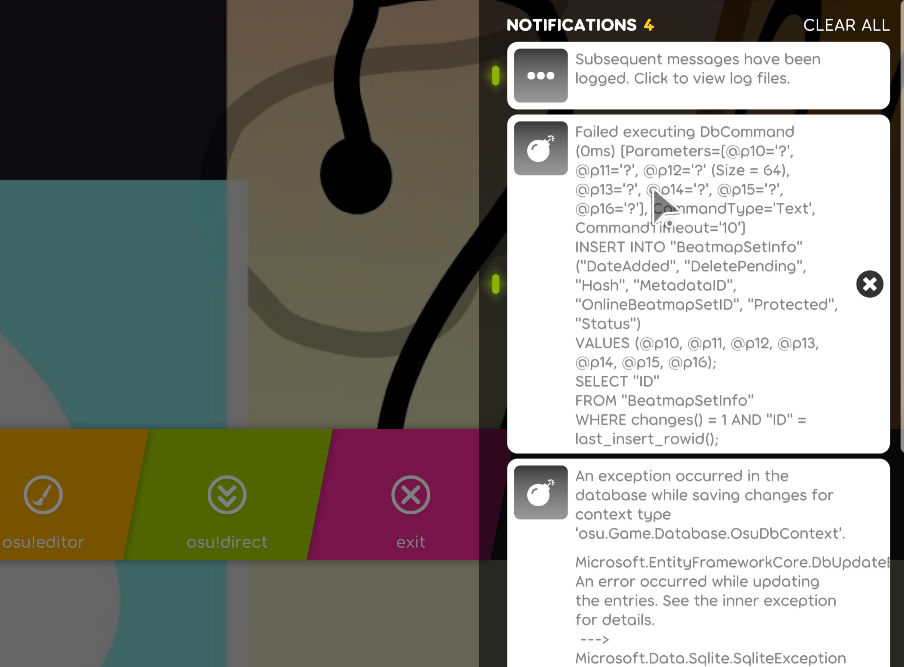
osu!lazer version:
2020.523.0
Logs:
N/A
 CThreee
All 12 comments
The log files are likely important here (especially runtime.log and database.log), please attach them here from your data folder.
 frenzibyte
on 24 May 2020
frenzibyte
on 24 May 2020
database.log
network.log
performance.log
runtime.log
These may have been overwritten because I have played and reopened a few times since. I had been able to recreate it when importing my songs again.
CThreee
on 24 May 2020
Yeah they are, is this issue reproducible or did it happen suddenly? also when did it happen, right after relocating the data folder?
frenzibyte
on 24 May 2020
I relocated the data folder then imported my songs once and then reimported them again without deleting. The notification gave the same original log folder location.
CThreee
on 24 May 2020
Cannot reproduce that with the steps you mentioned. can you attempt doing that and attach the logs if you got somewhere?
frenzibyte
on 24 May 2020
Sorry, I'm getting errors launching it now for some reason. I had relocated the folder through /mnt/ onto a separate drive.
CThreee
on 24 May 2020
As already mentioned, this discussion begins with providing correct logs.
 peppy
on 24 May 2020
peppy
on 24 May 2020
Bumping this because I've been able to replicate this problem myself on my own machine. I've attached the log files from where lazer actually logs its files too. Can provide the log files from the directory I'm being sent to as well if required.
Worth noting is that in the directory I'm being sent to, one of the log files (runtime.log) is being actively updated according to the date modified value. Will attach this log as well
runtime.log
updater.log
database.log
performance.log
network.log
From Roaming/osu/logs/
runtime.log
For reference my data folder is pointing to G:/Games/lazer/ and I relocated the data folder using the in game option to move your data directory
 EZ2ACTux
on 25 May 2020
EZ2ACTux
on 25 May 2020
Hmm, the database log doesn't seem to be showing any issues here, is there a database.log from the original data folder (%AppData%/osu/logs)? although I doubt there's much helpful information from that.
frenzibyte
on 25 May 2020
Here you go, I've attached the other 2 logs in there for good measure just in case
database.log
network.log
performance.log
If this doesn't shed much light on anything I'll try doing some analysis and fiddling about with breakpoints later tonight to see if I can shed any light on what's going on here
EZ2ACTux
on 25 May 2020
Yeah they're stale and don't provide any information, It's a bit weird that the message appears but never logged... can you confirm you got the exact same error as the one in the description of this thread?
If so, can you breakpoint at OsuDbContext.cs#L190 and read through all the error messages you get and send them here, also may be useful to know what the connection string of the context instance doing the operations is. (you can do that by attaching the instance to the logger by construction and read the connection string of the one logging errors)
frenzibyte
on 25 May 2020
Tried setting a breakpoint on the line you mentioned as well as for log level important and debug just in case.
Strangely though none of the breakpoints were actually tripped when I triggered an error. Gonna do a bit more poking about since I probably missed something obvious
EZ2ACTux
on 25 May 2020
Related issues
 Fatal3ty
·
3Comments
Fatal3ty
·
3Comments
 Gonzalo-Bruna
·
3Comments
Gonzalo-Bruna
·
3Comments
 Gabixel
·
3Comments
Gabixel
·
3Comments
 Moltanicaa
·
3Comments
Moltanicaa
·
3Comments
 smileyhead
·
3Comments
smileyhead
·
3Comments
Most helpful comment
Yeah they're stale and don't provide any information, It's a bit weird that the message appears but never logged... can you confirm you got the exact same error as the one in the description of this thread?
If so, can you breakpoint at
OsuDbContext.cs#L190and read through all the error messages you get and send them here, also may be useful to know what the connection string of the context instance doing the operations is. (you can do that by attaching the instance to the logger by construction and read the connection string of the one logging errors)