Describe the bug: feel free to close if not relevant. i have experienced this problem for almost a year (sorry for not reporting it. the first vid show lazer when started in fullscreen. but if started in borderless or windowed then fullscreened, game is normal (second vid)
before, the glitch doesnt affect the fps counter or the mouse cursor but recently (this year, i think) even the mentioned elements became glitched too. i tried turning off the bypass front to back but it partially fixed the problem (screenshot)
Screenshots or videos showing encountered issue: (change remove zip extenstion)
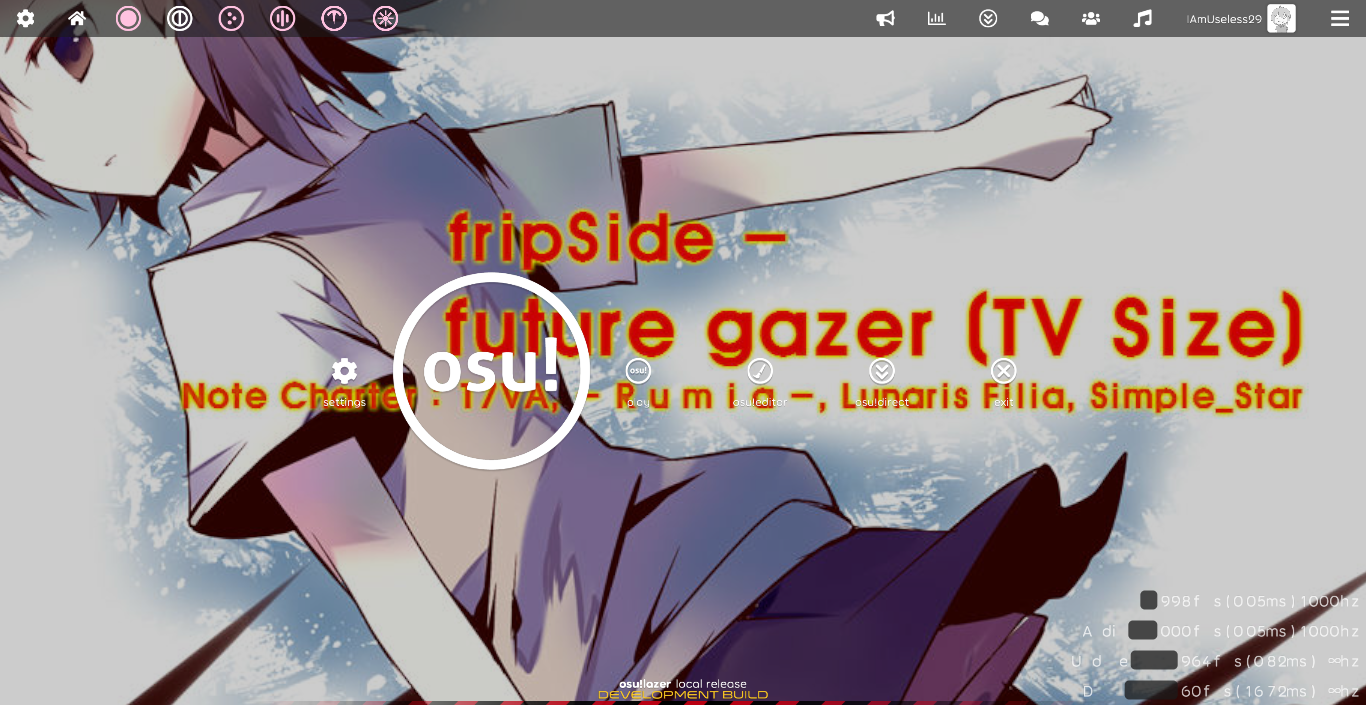
first vid: https://drive.google.com/file/d/1ReCPQ_WbM4kFnjPBa0QqWLVNV4Vz3fXJ/view?usp=sharing
second vid: https://drive.google.com/file/d/1QxvNpqCKOmC3Ou_NFEkhFhsKYULpkIIO/view?usp=sharing
osu!lazer version: master (but also happens on release versions)
Specs:
intel pentium p6200
6GB ram
1st gen intel HD Graphics (only supports opengl 2.1)
 enoslayd
All 8 comments
BTW, it doesnt happen on linux (only windows) and i dont receive any driver updates anymore
enoslayd
on 7 Apr 2020
Does it help if you enable the "Bypass front-to-back render pass" option at the bottom of settings?
 smoogipoo
on 7 Apr 2020
smoogipoo
on 7 Apr 2020
It partially fixed it ( like removing the black part of osu cookie seen in vid 1) but the gameplay elements is still broken (taiko don and katsu's, column bar line in mania)
Also it makes the black parts of mainmenu (seen in vid 1) transparent
enoslayd
on 7 Apr 2020
Interesting, you're reaching some GPU limits which we're not going to be able to solve in the next little while. You're going to have to wait until we add compatibility for older hardware.
But until then, can you provide your exact GPU specs via a dxdiag?
smoogipoo
on 7 Apr 2020
Ill post it later together with the vid showing some differences when turning on/off the bypass
enoslayd
on 7 Apr 2020
Vid 3 (using 2020.404.0): https://drive.google.com/file/d/1Rvsjd5uzhef6ggGcEXRG_GyYe-ua3yxs/view?usp=sharing
more logs and dxdiag
runtime.log
updater.log
database.log
DxDiag.txt
network.log
performance.log
You're going to have to wait until we add compatibility for older hardware.
Thats ok cause i can workaround it for a while. also thank you for noticing the problem, i can wait
enoslayd
on 7 Apr 2020
is this worth keeping open?
 peppy
on 8 Apr 2020
peppy
on 8 Apr 2020
Nope, let's close for now.
smoogipoo
on 8 Apr 2020
Related issues
 Gabixel
·
3Comments
Gabixel
·
3Comments
 lenzfilipski
·
3Comments
lenzfilipski
·
3Comments
 LanTenDragon
·
3Comments
LanTenDragon
·
3Comments
 DenshaOtk
·
3Comments
DenshaOtk
·
3Comments
 GameBoyYeet
·
3Comments
GameBoyYeet
·
3Comments
Most helpful comment
Vid 3 (using 2020.404.0): https://drive.google.com/file/d/1Rvsjd5uzhef6ggGcEXRG_GyYe-ua3yxs/view?usp=sharing
more logs and dxdiag
runtime.log
updater.log
database.log
DxDiag.txt
network.log
performance.log
Thats ok cause i can workaround it for a while. also thank you for noticing the problem, i can wait