Describe the crash:LoadLibrary with error 1114: A dynamic linkblibrary (DLL) initialization routine failed
*Screenshots or videos showing encountered issue:

*
osu!lazer version:2019.1011.0 and newer
Logs:log.zip
Computer Specifications: Windows 10 pro 64 bit version 1903
 zeeterv
All 16 comments
Please attach logs from %AppData%/osu/logs, if any present, and additionally Windows Event Viewer info by performing the following steps:
- Type
Event viewerin the Windows search bar (shortcut: Windows+S) and press Enter, or open the Run... button (Windows+R), type ineventvwrand press Enter. - The Event viewer window will appear. Expand Windows Logs on the left and choose Application. It might take a while to load.
- In the Actions pane on the right click Save All Events As..., then choose a location to save to.
- On the Display Information popup, select the second option, then the checkbox to show all available languages, then English (UK) (US would also do fine).
- Append the resulting
.evtxfile to this issue.
 bdach
on 22 Oct 2019
bdach
on 22 Oct 2019
Added
zeeterv
on 22 Oct 2019
Can you provide us with your hardware info? also, is your GPU switchable? I have the same problem after the .NET Core 3.0 update in lazer on Intel HD Graphics 3000 switchable with AMD Radeon HD 6630M.
Two things I had found while trying to find what the cause is:
- This issue happens when running an installed version of osu!lazer or running
osu.Desktopin VS 2017 (never got that on Rider 2019.2.2, VS 2019 untested) - This issue doesn't occur when running osu!lazer test browser or framework on any IDE (including VS 2017), though haven't tested
SampleGameyet..
 frenzibyte
on 22 Oct 2019
frenzibyte
on 22 Oct 2019
I've looked through the event viewer logs - unfortunately nothing decisive. Only mention of osu! is a Windows Error Reporting RADAR_PRE_LEAK_64 diagnostic entry, which as far as I can tell from googling doesn't actually mean much.
In light of that, I'd appreciate it if you could also attach DirectX diagnostic info by performing the following steps:
- Press Windows+R, type
dxdiagin the appearing window and press Enter. - You could be prompted if you'd want Windows to check if the device drivers are signed - there should be no harm in agreeing to that.
- In the DirectX Diagnostic Tool window that will appear, click Save All Information... and choose a file to save to.
- Attach the saved file to this issue.
bdach
on 22 Oct 2019
Seems like this may be related to switchable graphics in any case. You may be able to right-click on the icon and run with a particular GPU, or you'll need to go into your GPU driver software and make sure osu! is set to use the high performance graphics processor.
Additionally, I'd try reinstalling your graphics drivers.
 smoogipoo
on 23 Oct 2019
smoogipoo
on 23 Oct 2019
DxDiag.txt
Added
zeeterv
on 23 Oct 2019
The dxdiag output above shows just one card, so save for some Windows hiccup I think this is another Intel issue rather than switchable graphics in general. Driver version seems to be the latest too. Do releases prior to 2019.1011.0 work?
Sort of at a loss what to do next here without an actual machine I can reproduce/debug on, since this error looks like it's bound to be hairy...
bdach
on 23 Oct 2019
The dxdiag output above shows just one card, so save for some Windows hiccup I think this is another Intel issue rather than switchable graphics in general.
You may be wrong here, you don't get switchable graphics info by checking DxDiag (as I tested and found). a good way would be opening the device manager and checking the display adapters.
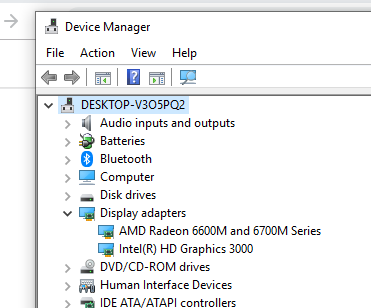
frenzibyte
on 24 Oct 2019
I'm afraid black screen Like making friends
zeeterv
on 25 Oct 2019
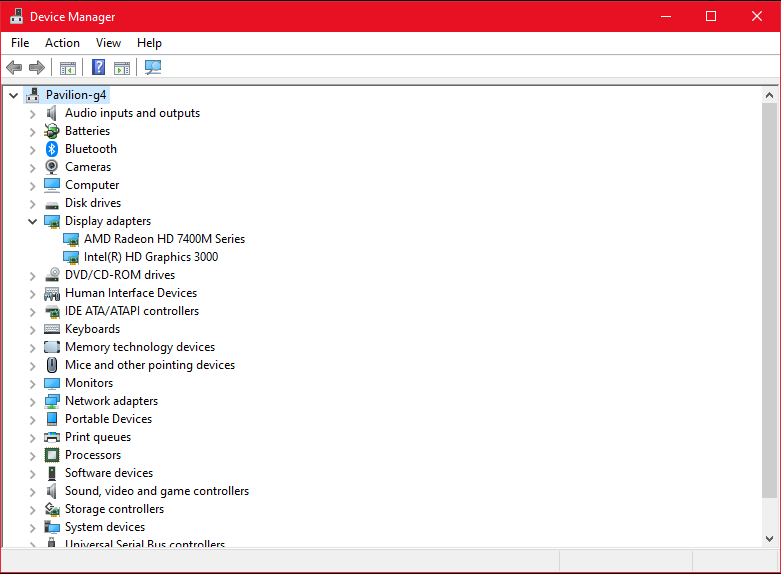
@zeeterv Can you please inform us whether you do have a switchable graphics card or not by doing what I said above, for steps on how to do it (for Windows 10):
- Press Windows+X, then select
Device Manager. - Inside the
Device Managerwindow, expand theDisplay adapterslist and screenshot what's inside.
frenzibyte
on 2 Nov 2019
zeeterv
on 2 Nov 2019
zeeterv
on 3 Nov 2019
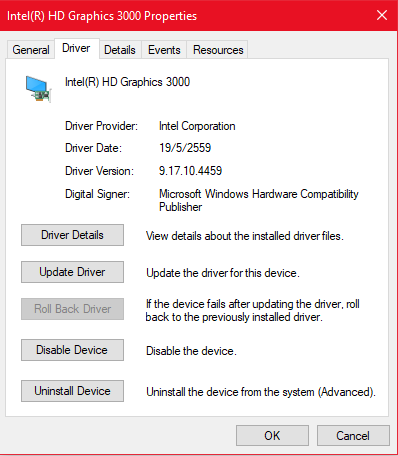
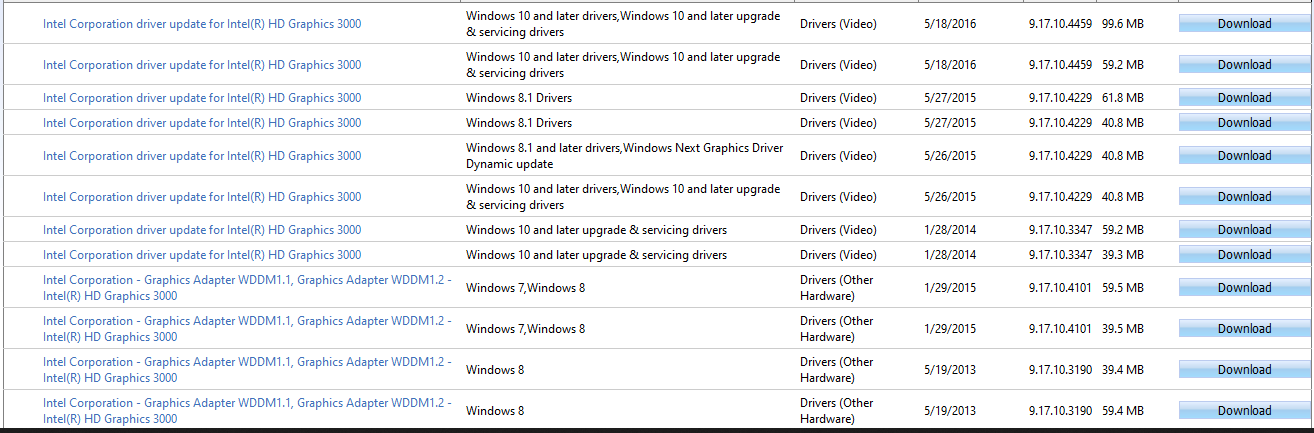
zeeterv
on 3 Nov 2019
and why i got this

zeeterv
on 3 Nov 2019
and why i got this
For that issue , please contact osu!support and not on github.
 RoARene317
on 9 Nov 2019
RoARene317
on 9 Nov 2019
After checking with @iiSaLMaN who owns the appropriate hardware it looks like #7088 might fix this too, since after it being applied the app host starts working again. Doing dotnet osu!.dll still doesn't work, but we can't do anything about that without modifying the binary of the dotnet host.
Closing and unlocking; if this does turn up again after the next release, please drop a comment and/or reopen.
bdach
on 8 Dec 2019
Related issues
 elweojus
·
3Comments
elweojus
·
3Comments
 Lerkeer
·
3Comments
Lerkeer
·
3Comments
 smileyhead
·
3Comments
smileyhead
·
3Comments
 Gonzalo-Bruna
·
3Comments
Gonzalo-Bruna
·
3Comments
 Moltanicaa
·
3Comments
Moltanicaa
·
3Comments