Osu: Windows Defender is active whenever osu!lazer is running
Describe the bug: Not entirely sure when it started, but I noticed that currently whenever osu!lazer is running and doing literally anything, my windows defender is showing up in the task manager using lots of cpu resources. I have noticed this on two different PCs now, one running on Windows 10 1809 and one on 1903. I am not entirely sure whether this issue is osu!lazer's fault or on windows defender's side, but as this certainly did not happen a while back something must have changed to cause this. I also am not experiencing this behaviour for any other app, which further hints towards the issue laying in osu!lazer.
An uneducated guess would be that some disk lookups for cached data are causing this.
Screenshots or videos showing encountered issue:

osu!lazer version: 2019.704.0
 Morilli
All 13 comments
Win 10 1809. I turned on Windows Defender and I'm not able to recreate the issue on my PC, doesn't matter what I do in-game. Perhaps some other installed software doesn't really like osu?
 Desconocidosmh
on 11 Jul 2019
Desconocidosmh
on 11 Jul 2019
@Morilli did you check how it works with different osu-framework based games? For example, with visual tests from the framework repo.
 UselessToucan
on 15 Jul 2019
UselessToucan
on 15 Jul 2019
I'm not entirely sure, but I think I can? (see video). One thing to note is that I'm never getting any issues when using dotnet run, I have to be running an executable.
Morilli
on 15 Jul 2019
This is very interesting. The next step would be to narrow down the cause. It looks to happen whenever you drag the slider bar, so I'd try some of the following things:
- Try disabling log output (most likely to be the issue) by adding a
returninLogger.csat line 286 or so. - Try dragging other slider bars (ie in the
TestSceneSliderBar) - Try disabling font loading (comment out all of the
AddStorelines inGame.cs)
If none of the above work, you're going to need to keep stripping out elements until we can narrow this down. I can give more ideas once you try the above.
 peppy
on 15 Jul 2019
peppy
on 15 Jul 2019
Try disabling log output (most likely to be the issue) by adding a return in Logger.cs at line 286 or so.
Doing just that resolves the issue completely.
Morilli
on 15 Jul 2019
Can you next try commenting out the whole IsDebugBuild area?
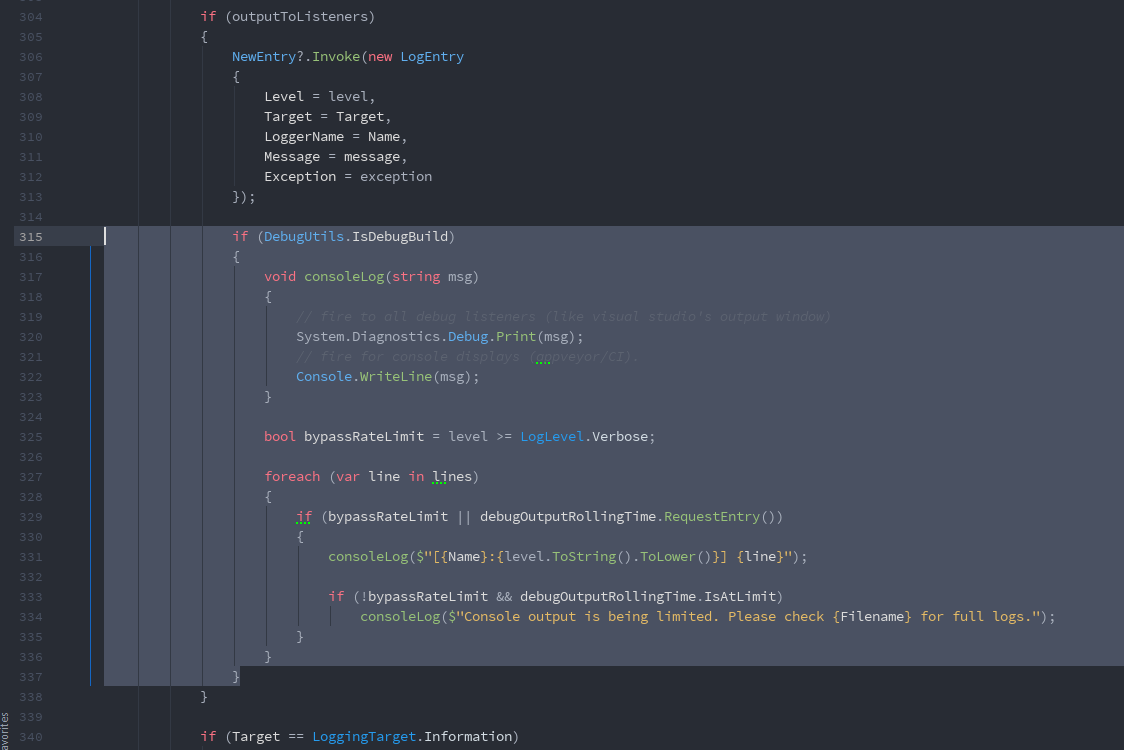
peppy
on 15 Jul 2019
After disabling only that if the issue still persists.
Morilli
on 15 Jul 2019
So it must be the disk writes below (you can try commenting out the stream writing part as a test).
Could you check how much output is going into the log files during this?
peppy
on 15 Jul 2019
Could you tell me where the log files are located? I couldn't find any in osu-framework\osu.Framework.Test\bin\Debug.
Morilli
on 15 Jul 2019
C:\Users\<username>\AppData\Roaming\visual-tests\logs
peppy
on 15 Jul 2019
I'm having a pretty long runtime.log:
runtime.log
Morilli
on 15 Jul 2019
I'm confident that the main issue osu!-side is the fact that >10KB of stacktraces are being written to the performance.log every second for me, even when just idling in song select. Denying access to that file immediately lowers the AV's cpu usage to 0%.
Morilli
on 15 Jul 2019
So it may be to do with the formatting of the stack traces themselves. You can toggle this off in settings (it's off by default). Not sure how to resolve this though, may need to report it to Microsoft.
peppy
on 16 Jul 2019
Related issues
 LevKatenin
·
3Comments
LevKatenin
·
3Comments
 Fatal3ty
·
3Comments
Fatal3ty
·
3Comments
 lauthaiming
·
3Comments
lauthaiming
·
3Comments
 elweojus
·
3Comments
elweojus
·
3Comments
 LanTenDragon
·
3Comments
LanTenDragon
·
3Comments