Prerequisites
- [ Y ] Can you reproduce the problem in a fresh installation of the "develop" branch?
- [ N ] Do you have any errors in the PHP error log, or javascript console?
- [ Y ] Did you check the osTicket forums?
- [ Y ] Did you perform a cursory search to see if your bug or enhancement is already reported?
For more information on how to write a good bug report
Description
"Advanced Search form" have a tab "Columns"
You could add/delete tab, but the result of searching will not return results related to the selected "Columns"
[Description of the bug or feature]
Steps to Reproduce
- Go to "Open"
- Click "Advanced Search"
- Add some criteria
- Click the tab "Columns"
Expected behavior: [What you expected to happen]
If you Choose "OPEN" or "CLOSED" or any other "Parent/TopLevel Queue" from "---My searches---" ComboBox, the function "Use standard columns" should be checked the column list should be possible to change in the same way, how it works when you add SubQueries in:
Admin Panel >> Settings >> Tickets >> Ticket Queues >> Add New Queue
I mean the columns should be inherited from "Parent/TopLevel Queue" and you should be able to add new/additional columns.
Attached Screenshot is showing what is wrong.
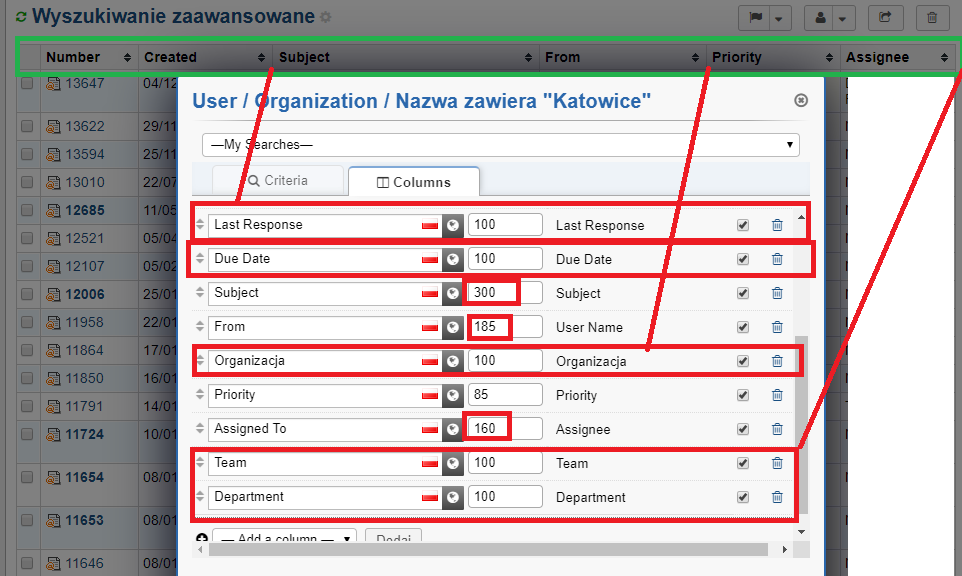
Actual behavior: [What actually happened]
The result always shows a list with column: Number, Created, Subject, From, Priority, Assignee
Never shows the expected/selected columns.
Even if you Choose "OPEN" or "CLOSED" or any other subqueries, from "---My searches---" ComboBox, the feature "Use standard columns" is always Checked.
Regardless of the above, you can add an additional column but it will not give you any effect on the result list - the columns on the list are always the same.
Versions
Admin panel -> Dashboard -> Information which also additionally gives you information about your server.
v1.14.1 (f1e9e88)
--
 mlipok
All 7 comments
@mlipok
Look at the top of the "Columns" tab in the Advanced Search popup and you will see that the "Use standard columns" setting is Disabled (meaning you can't change the value). Yea, we are supposed to hide the custom columns altogether for Advanced Searches. You are only supposed to customize the columns for Saved Searches, Personal Queues, Child Queues, and/or Parent Queues. I'm currently creating a fix for this but have ran into some other Search/Queue issues so I'm going to resolve those first.
Cheers.
 JediKev
on 16 Dec 2019
JediKev
on 16 Dec 2019
I would like to see a feature to preset columns for advance search or at least please use the same collumns and sort order like in OPEN TICKET I mean the same column and order like in ..../scp/tickets.php?queue=1
as I have strongly modified column for the queue=1 and I use them as a default column set and order.
mlipok
on 17 Dec 2019
@mlipok
I would like to see a feature to preset columns for advance search or at least please use the same collumns and sort order like in OPEN TICKET
We use the legacy columns (the standard columns before Custom Columns feature was introduced) for Advanced Searches. If you would like to change this you can Save the search so you can modify the columns or modify the codebase here to input your own standard columns:
Cheers.
JediKev
on 17 Dec 2019
@JediKev - I think feedback by @mlipok is something we should seriously consider. In user preference, like default queue, we can add queue selection to use for advanced search columns template.
 protich
on 17 Dec 2019
protich
on 17 Dec 2019
Right, I should've put but we will add this to our list at the end as I didn't mean that we wouldn't consider this..
JediKev
on 17 Dec 2019
Thanks.
If I can ..... I want to make one remark.
As I wrote before:
Even if you Choose "OPEN" or "CLOSED" or any other subqueries, from "---My searches---" ComboBox, the feature "Use standard columns" is always Checked
In this case this should be taken not from "default" queue, or even from user preference....
but this should be taken from the specified queue selected in from "---My searches---" ComboBox.
mlipok
on 18 Dec 2019
 host138
on 8 Jan 2021
host138
on 8 Jan 2021
Related issues
 cervedgroup
·
5Comments
cervedgroup
·
5Comments
 simonnzg
·
5Comments
mlipok
·
5Comments
simonnzg
·
5Comments
mlipok
·
5Comments
 ghost
·
3Comments
ghost
·
3Comments
 rachelsupport
·
5Comments
rachelsupport
·
5Comments
Most helpful comment
@JediKev - I think feedback by @mlipok is something we should seriously consider. In user preference, like default queue, we can add queue selection to use for advanced search columns template.