Osticket: tickets.json file not found / url not supported
Prerequisites
- [v ] Can you reproduce the problem in a fresh installation of the "develop" branch?
yes - [v ] Do you have any errors in the PHP error log, or javascript console?
[proxy_fcgi:error] [pid 15262] [client ###.###.###.###:64265] AH01071: Got error 'Primary script unknown\n' - [v ] Did you check the osTicket forums?
- [v ] Did you perform a cursory search to see if your bug or enhancement is already reported?
For more information on how to write a good bug report
Description
cannot access tickets.json file
Steps to Reproduce
- open
http://www.help-desk.tld/office/api/http.php/tickets.jsonin browser - says url not supported.
- open
http://www.help-desk.tld/office/api/tickets.jsonin browser - says file not found.
Expected behavior: [What you expected to happen]
I'd expect JSON to appear in the browser
Actual behavior: [What actually happened]
for http://www.help-desk.tld/office/api/http.php/tickets.json:
Warning: Declaration of AssignmentForm::render($options) should be compatible with Form::render($staff = true, $title = false, $options = Array) in /home/admin/domains/help-desk.tld/public_html/office/include/class.forms.php on line 4367

Warning: Declaration of TransferForm::render($options) should be compatible with Form::render($staff = true, $title = false, $options = Array) in /home/admin/domains/help-desk.tld/public_html/office/include/class.forms.php on line 4487
URL not supported
for the other it doesn't print any PHP errors.
Versions
Admin panel -> Dashboard -> Information which also additionally gives you information about you server.
--
osTicket versie | v1.10.1 (9ae093d) —  Bij de tijd
Web Server Software | Apache/2
MySQLversie | 5.6.26
PHPversie | 7.0.14

gdlib | Ten behoeve van afbeeldingsbewerking en PDFprinten
imap | Ten behoeve van emailontvangst
xml | XML API
xml-dom | Ten behoeve van emailverwerking
json | Bevordert de prestaties bij het creeren en verwerken van JSON
mbstring | Hoogst aanbevolen bij niet westeuropese taalinhoud
phar | Hoogst aanbevolen voor plugins en taalpakketten
intl | Hoogst aanbevolen bij niet westeuropese taalinhoud
fileinfo | wordt gebruikt om bestandstypen van uploads te detecteren
APCu | Verbetert de algehele prestaties
Zend Opcache | Verbetert de algehele prestaties

cgi.fix_pathinfo | "1" is aanbevolen als AJAX niet werkt
date.timezone | Europe/Amsterdam
happens in all browsers.
 dikkedimi
All 18 comments
I'm asking because I would like to use wordpress to put in tickets. this is now not an option.
dikkedimi
on 2 Feb 2018
@greezybacon @protich you seem to know more about the file mentioned in the errors
dikkedimi
on 2 Feb 2018
Warning: Declaration of AssignmentForm::render($options) should be compatible with Form::render($staff = true, $title = false, $options = Array) in /home/admin/domains/help-desk.tld/public_html/office/include/class.forms.php on line 4367
Warning: Declaration of TransferForm::render($options) should be compatible with Form::render($staff = true, $title = false, $options = Array) in /home/admin/domains/help-desk.tld/public_html/office/include/class.forms.php on line 4487
URL not supported
These errors are due to your PHP version. PHP 7.x+ isn't _fully_ supported yet so you might see these issues. In order to get around these errors try this pull request: https://github.com/osTicket/osTicket/pull/3349
Cheers.
 JediKev
on 2 Feb 2018
JediKev
on 2 Feb 2018
Did you get it to work @dikkedimi? In my v1.10 there is no tickets.json file in the api folder. I have been looking via Google for a way to auto create tickets, but found just old info that do not work with v 1.10
 deon42
on 15 Mar 2018
deon42
on 15 Mar 2018
I'm having the same issues with this URL, Using PHP version 5.6.30-0+deb8u1. I need to force it with http.php, but really need it with out that, just http://url.domain.com/api/tickets.json Enabled mod_rewrite, added the settings in Apache's config, but nothing.
 jesusaristigueta
on 20 Mar 2018
jesusaristigueta
on 20 Mar 2018
tickets.json is not a file....the api/.htaccess file should rewrite the URL and direct it to api/http.php which then sends a signal to create the Ticket or Task in the provided format (in your case JSON). If you are having issues with this then you are most likely having issues with URL Rewriting. If you URL Rewriting is working but it's still not creating tickets then please provide the PHP errors it throws. If you are not getting PHP errors then most likely your URL Rewriting isn't working.
Cheers.
JediKev
on 21 Mar 2018
Exactly, It looks like URL Rewriting issues, but the module is enabled and the .htaccess is set as it should. The Apache configs are looking as they should as well. Not sure of what's wrong.
jesusaristigueta
on 21 Mar 2018
Fixed it! It was Apache config issues after all :D
jesusaristigueta
on 21 Mar 2018
/etc/apache2/apache2.conf:
<Directory /var/www/>
        Options Indexes FollowSymLinks
        AllowOverride All
        Require all granted
</Directory>
and /etc/apache2/sites-available/000-default.conf:
<Directory "/var/www/html">
          AllowOverride All
</Directory>
Apache2 in Debian 9 😄
jesusaristigueta
on 21 Mar 2018
Hi
Mr jesusaristigueta ,
I am having the same issue but with nginx instead of Apache. How do I do the same thing with nginx?
 brightsunlight
on 7 Aug 2018
brightsunlight
on 7 Aug 2018
I am having trouble too, but I am not using Apache I am using windows IIS.
Is there a way to solve this in IIS? @greezybacon
 ericmpereira02
on 8 Aug 2018
ericmpereira02
on 8 Aug 2018
I tried jesusaristigueta's solution but still have this issue when trying to connect to .../api/http.php/tickets.json:
URL not supported
Also tried this tutorial for mod_rewrite
No issues prior to changing servers.
 discon-nected
on 4 Apr 2019
discon-nected
on 4 Apr 2019
Looks like my issue is different:
API Error (401)
Valid API key required
However the API key is the same I used before, sending from the same server. Creating a new one did not resolve the error. Perhaps the key is not being passed?
discon-nected
on 4 Apr 2019
@discon-nected
For the URL not supported error, try removing http.php from the URL; basically, make the URL like so .../api/tickets.json.
As for the Valid API key required error set your Default Log Level to DEBUG and then retry the API call. If you get an error again you'll see the API call in the System Logs. Here you will see what IP address made the call and you should create an API key for that specific IP address. Once you do this you should be able to pass the key as a param like X-API-Key: <API-KEY>. After this you should be able to create Tickets/Tasks without issues.
Cheers.
JediKev
on 4 Apr 2019
@JediKev Thanks for the reply. The URL not supported evidently doesn't mean my message was not routed correctly. If I disable API key validation, the tickets are created normally. I posted more details of my issue in the forums: https://forum.osticket.com/d/93805-error-in-v1-11-valid-api-key-required
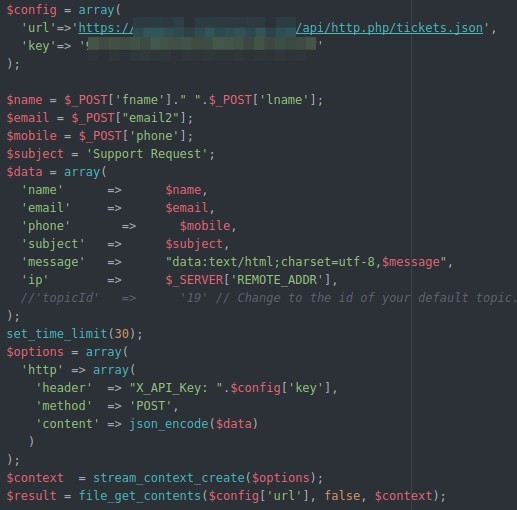
The sending IP address matches the IP shown in the error logs. This worked fine on my other server before migrating and upgrading to v1.11. I am using the same DB so all the settings were transferred to the new server. Here is the code I use...
discon-nected
on 4 Apr 2019
@discon-nected
Do you have the API Key's Status set to Active and do you have the options Can Create Tickets (XML/JSON/EMAIL) and Can Execute Cron Enabled?
Cheers.
JediKev
on 4 Apr 2019
I have all of those except Can Execute Cron which I did not enable in the previous installation either.
discon-nected
on 4 Apr 2019
@discon-nected
You're going to have to do some var_dump()ing to see why it's not recognizing the API Key and/or IP address. You can start here:
https://github.com/osTicket/osTicket/blob/develop/include/api.tickets.php#L99-L100
Dump both $this->requireApiKey() and $this->requireApiKey()->canCreateTickets() above the if() statement and see which one is failing (if any). If one is failing lookup that function and see where it breaks. This will lead you to the root of the issue.
Cheers.
JediKev
on 4 Apr 2019
Related issues
 joseaguardia
·
4Comments
joseaguardia
·
4Comments
 F3000
·
5Comments
F3000
·
5Comments
 markus4000
·
3Comments
markus4000
·
3Comments
 simonnzg
·
5Comments
simonnzg
·
5Comments
 ghost
·
6Comments
ghost
·
6Comments
Most helpful comment
/etc/apache2/apache2.conf:
and /etc/apache2/sites-available/000-default.conf:
Apache2 in Debian 9 😄