Osticket: Fixed problem with nginx url routing
This doesn't work:
http://support.domain/scp/ajax.php/tickets/123/canned-resp/21.json?_=1511356939972
Throw error:
URL not supported
I fixed by editing the get_path_info function in /include/class.osticket.php#L366
    function get_path_info() {
        if(isset($_SERVER['PATH_INFO']))
            return $_SERVER['PATH_INFO'];

        if(isset($_SERVER['ORIG_PATH_INFO']))
            return $_SERVER['ORIG_PATH_INFO'];

        //TODO: conruct possible path info.

        return null;
    }
With:
    function get_path_info() {
        if(!empty($_SERVER['PATH_INFO']))
            return $_SERVER['PATH_INFO'];

        if(isset($_SERVER['ORIG_PATH_INFO']))
            return $_SERVER['ORIG_PATH_INFO'];

        //
    $path_info = substr($_SERVER['REQUEST_URI'], strlen($_SERVER['SCRIPT_NAME']));
    if (strpos($path_info, '?') !== false) {
        $path_info = substr($path_info, 0, strpos($path_info, "?"));
    }
    if (isset($path_info[0]) && $path_info[0] == '/') {
        return $path_info;
    }

        return null;
    }
Nginx config:
##
# support.domain
#
# osticket website
# https://www.nginx.com/resources/wiki/start/topics/recipes/osticket/
# https://askubuntu.com/questions/294946/how-to-change-root-password-in-ubuntu
##
server {
    listen 80;
    server_name support.domain

    root /var/www/domain/subdomains/support/public;

    access_log  /var/log/nginx/support.domain.access.log;
    error_log  /var/log/nginx/support.domain.error.log;

    client_max_body_size 2000M;
    client_body_buffer_size 100M;
    client_header_buffer_size 10M;
    large_client_header_buffers 2 10M;

    client_body_timeout 12;
    client_header_timeout 12;
    keepalive_timeout 15;
    send_timeout 10;

    gzip             on;
    gzip_comp_level  2;
    gzip_min_length  1000;
    gzip_proxied     expired no-cache no-store private auth;
    gzip_types       text/plain application/x-javascript text/xml text/css application/xml;

    set $path_info "";

    # Deny access to all files in the include directory
    location ~ /include {
        deny all;
        return 403;
    }

    # Requests to /api/* need their PATH_INFO set, this does that
    if ($request_uri ~ "^/api(/[^\?]+)") {
        set $path_info $1;
    }

    # /api/*.* should be handled by /api/http.php if the requested file does not exist
    location ~ ^/api/(tickets|tasks)(.*)$ {
        try_files $uri $uri/ /api/http.php$is_args$args;
    }

    # /scp/ajax.php needs PATH_INFO too, possibly more files need it hence the .*\.php
    if ($request_uri ~ "^/scp/.*\.php(/[^\?]+)") {
        set $path_info $1;
    }

    # Make sure requests to /scp/ajax.php/some/path get handled by ajax.php
    location ~ ^/scp/ajax.php/(.*)$ {
        try_files $uri $uri/ /scp/ajax.php$is_args$args;
    }

    location ~ ^/ajax.php/(.*)$ {
        try_files $uri $uri/ /ajax.php$is_args$args;
    }

    location / {
        index     index.php;
        #try_files $uri $uri/ /index.php$is_args$args;
    }

    location ~ \.php$ {
        try_files $uri =404;
        # fastcgi_split_path_info ^(.+\.php)(/.+)$;
        fastcgi_pass php;
        fastcgi_index index.php;
        include fastcgi_params;
        fastcgi_param SCRIPT_FILENAME $document_root$fastcgi_script_name;
        fastcgi_param SCRIPT_NAME $fastcgi_script_name;
        fastcgi_param PATH_INFO $fastcgi_path_info;
    }
}
 howdu
howdu
All 41 comments
Thanks for posing your solution.
nginx is not a support web server at this time.
But hopefully someone else who wants to use nginx will see your thread and this will help them.
 ntozier
on 22 Nov 2017
ntozier
on 22 Nov 2017
After a couple of hours searching found this and it worked for me, thanks!
 patrickqbis
on 2 Feb 2018
patrickqbis
on 2 Feb 2018
Unfortunately did not fix my API problem
it also throws a URL Not supported error both on
/backoffice/api/tickets.json
and
/backoffice/api/http.php/tickets.json
While i have no problems accessing
http://www.my-dom.com/backoffice
and
http://www.my-dom.com/backoffice/scp
I think it should work fine from the root folder (which is backoffice in my case).
 dikkedimi
on 2 Feb 2018
dikkedimi
on 2 Feb 2018
The comment from @howdu fixed an issue for me with clients uploading images! Has anybody submitted a PR request with that code yet? I might do so if not.
 caseyamcl
on 24 Jan 2019
caseyamcl
on 24 Jan 2019
@caseyamcl
As @ntozier mentioned, NGINX is not a supported web server (ie. takes extra configurations to get it running). You can make a pull if you want to but idk if it'll be merged as we don’t support NGINX and this works just fine on Apache/IIS.
We plan to support most major web servers in future versions so please stay tuned.
Cheers.
 JediKev
on 24 Jan 2019
JediKev
on 24 Jan 2019
Fix worked for me using php7.2 and Nginx! Thanks @howdu
 mindovermiles262
on 24 Jan 2019
mindovermiles262
on 24 Jan 2019
So far this seems to have worked for me.
This is the first application I've come across that doesn't support a particular webserver. Is there a reason for this?
What's done special in osticket that its not webserver agnostic?
nginx is a "HUGE" major web server. I'm quite shocked I had to find a github issue to get it working.
 Cronus89
on 13 Feb 2019
Cronus89
on 13 Feb 2019
takes extra configurations to get it running
This would be why.
ntozier
on 13 Feb 2019
@howdu Why not make a pull request. Your patch fixes the nginx issue
 49e94b8f256530dc0d41f740dfe8a4c1
on 17 Mar 2019
49e94b8f256530dc0d41f740dfe8a4c1
on 17 Mar 2019
@49e94b8f256530dc0d41f740dfe8a4c1
Because NGINX is not supported at this time.
Cheers.
JediKev
on 17 Mar 2019
Fix worked like a charm.
php7.3 and nginx!
Thank you @howdu
 alcad
on 29 Mar 2019
alcad
on 29 Mar 2019
@alcad,
Here is a screenshot of what I am experiencing with nginx, php 7.3 and v 1.10_5
https://drive.google.com/open?id=1rg3UUOHhY5g2cJ8EEpoLwntFr_wGecGh
 nappy-d
on 5 Apr 2019
nappy-d
on 5 Apr 2019
@nappy-d you have to patch
as in @howdu ticket:
editing /include/class.osticket.php#L366
        //
    $path_info = substr($_SERVER['REQUEST_URI'], strlen($_SERVER['SCRIPT_NAME']));
    if (strpos($path_info, '?') !== false) {
        $path_info = substr($path_info, 0, strpos($path_info, "?"));
    }
    if (isset($path_info[0]) && $path_info[0] == '/') {
        return $path_info;
    }
https://github.com/osTicket/osTicket/issues/4090#issue-276070944
alcad
on 5 Apr 2019
@JediKev and @ntozier
nginx requires a custom configuration for each system, but there is a good wiki on their site:
https://www.nginx.com/resources/wiki/start/topics/recipes/osticket/
you can simply point to that page for osTicket nginx configuration support
IMHO everybody uses nginx knows that nginx requires a little of customization; as you can see in wiki, you can find configuration for a lot of standard systems (joomla, WP, Drupal, django, etc.)
alcad
on 5 Apr 2019
@alcad
The "recipe" you linked still does not cover all things, especially with the new v1.11. I had to add and remove some things in order for it to work correctly and it still doesn't work all the way for things like Help Tips, etc.
I know most everyone knows it takes a little customization but it's the simple fact of needing to implement a recipe along with even the default recipe doesn't work all the way means we don't support it. It takes additional knowledge and effort to get it working and pleb installers/admins wouldn't know what to do. We hope to provide full support out of the box for most of the popular webservers in the future. Stay tuned!
Cheers.
JediKev
on 8 Apr 2019
Maybe this will help someone.
After do a lot of "trial and error" I made it work.
Just don't use IF -> https://www.nginx.com/resources/wiki/start/topics/depth/ifisevil/
To workaround the IF in the location I set $path_info2
location ~ ^/soporte/ajax.php/(.*)$ {
try_files $uri $uri/ /soporte/ajax.php?$query_string;
set $path_info2 /$1;
}
And remember to change -> fastcgi_param PATH_INFO $path_info2;
 zingaya
on 1 Jul 2019
zingaya
on 1 Jul 2019
I am getting the below errors, Please help.
ln: failed to create symbolic link '/etc/nginx/sites-enabled/osticket': File exists
 siddu530
on 19 Oct 2019
siddu530
on 19 Oct 2019
@siddu530
NGINX is not supported at this time. Please use Apache or IIS.
(Btw the error is stating that a configuration file for osTicket already exists. Just rename it..)
Cheers.
JediKev
on 19 Oct 2019
@JediKev
With Apache it is working but i am not able to install the tool.
The URL or IP was not opening in browser, Please help here.
siddu530
on 19 Oct 2019
@siddu530
Once again, NGINX is not supported at this time so you will not receive support for this. Also, Github is a place to report issues and or feature requests. If you want assistance with an issue like this you will need to create a post on our Forum and let the community assist you.
With this being said you will need to research tutorials and such on how to modify NGINX/osTicket to make it work.
Cheers.
JediKev
on 19 Oct 2019
I am getting the below errors, Please help.
ln: failed to create symbolic link '/etc/nginx/sites-enabled/osticket': File exists
you need to delete first symbolic link file then create a symbolic link
 ersanjay1995
on 14 Mar 2020
ersanjay1995
on 14 Mar 2020
@siddu530
NGINX is not supported at this time. Please use Apache or IIS.
(Btw the error is stating that a configuration file for osTicket already exists. Just rename it..)
Cheers.
i am not agree with you as of now osticket website running on Nginx server so all working on Nginx server.
ersanjay1995
on 14 Mar 2020
@ersanjay1995
i am not agree with you as of now osticket website running on Nginx server so all working on Nginx server.
What I mean by “not supported” is it’s not supported out of the box. You have to make quite a few configuration changes, etc. with NGINX to get everything working properly. Whereas with Apache/IIS you don’t need to configure anything for osTicket to function properly.
Cheers.
JediKev
on 14 Mar 2020
I am getting the below errors, Please help.
ln: failed to create symbolic link '/etc/nginx/sites-enabled/osticket': File exists
I am getting the below errors, Please help.
ln: failed to create symbolic link '/etc/nginx/sites-enabled/osticket': File existsyou need to delete first symbolic link file then create a symbolic link
u
This doesn't work:
http://support.domain/scp/ajax.php/tickets/123/canned-resp/21.json?_=1511356939972Throw error:
URL not supportedI fixed by editing the get_path_info function in /include/class.osticket.php#L366
    function get_path_info() {
        if(isset($_SERVER['PATH_INFO']))
            return $_SERVER['PATH_INFO'];

        if(isset($_SERVER['ORIG_PATH_INFO']))
            return $_SERVER['ORIG_PATH_INFO'];

        //TODO: conruct possible path info.

        return null;
    }
With:
    function get_path_info() {
        if(!empty($_SERVER['PATH_INFO']))
            return $_SERVER['PATH_INFO'];

        if(isset($_SERVER['ORIG_PATH_INFO']))
            return $_SERVER['ORIG_PATH_INFO'];

        //
  $path_info = substr($_SERVER['REQUEST_URI'], strlen($_SERVER['SCRIPT_NAME']));
  if (strpos($path_info, '?') !== false) {
      $path_info = substr($path_info, 0, strpos($path_info, "?"));
  }
  if (isset($path_info[0]) && $path_info[0] == '/') {
      return $path_info;
  }

        return null;
    }
Nginx config:
##
# support.domain
#
# osticket website
# https://www.nginx.com/resources/wiki/start/topics/recipes/osticket/
# https://askubuntu.com/questions/294946/how-to-change-root-password-in-ubuntu
##
server {
  listen 80;
  server_name support.domain

  root /var/www/domain/subdomains/support/public;

  access_log  /var/log/nginx/support.domain.access.log;
  error_log  /var/log/nginx/support.domain.error.log;

  client_max_body_size 2000M;
  client_body_buffer_size 100M;
  client_header_buffer_size 10M;
  large_client_header_buffers 2 10M;

  client_body_timeout 12;
  client_header_timeout 12;
  keepalive_timeout 15;
  send_timeout 10;

  gzip             on;
  gzip_comp_level  2;
  gzip_min_length  1000;
  gzip_proxied     expired no-cache no-store private auth;
  gzip_types       text/plain application/x-javascript text/xml text/css application/xml;

  set $path_info "";

  # Deny access to all files in the include directory
  location ~ /include {
      deny all;
      return 403;
  }

  # Requests to /api/* need their PATH_INFO set, this does that
  if ($request_uri ~ "^/api(/[^\?]+)") {
      set $path_info $1;
  }

    # /api/*.* should be handled by /api/http.php if the requested file does not exist
    location ~ ^/api/(tickets|tasks)(.*)$ {
        try_files $uri $uri/ /api/http.php$is_args$args;
    }

    # /scp/ajax.php needs PATH_INFO too, possibly more files need it hence the .*\.php
    if ($request_uri ~ "^/scp/.*\.php(/[^\?]+)") {
        set $path_info $1;
    }

    # Make sure requests to /scp/ajax.php/some/path get handled by ajax.php
    location ~ ^/scp/ajax.php/(.*)$ {
        try_files $uri $uri/ /scp/ajax.php$is_args$args;
    }

    location ~ ^/ajax.php/(.*)$ {
        try_files $uri $uri/ /ajax.php$is_args$args;
    }

    location / {
        index     index.php;
        #try_files $uri $uri/ /index.php$is_args$args;
    }

    location ~ \.php$ {
        try_files $uri =404;
        # fastcgi_split_path_info ^(.+\.php)(/.+)$;
        fastcgi_pass php;
        fastcgi_index index.php;
        include fastcgi_params;
        fastcgi_param SCRIPT_FILENAME $document_root$fastcgi_script_name;
        fastcgi_param SCRIPT_NAME $fastcgi_script_name;
        fastcgi_param PATH_INFO $fastcgi_path_info;
    }
}
It works! thanks
 godfreymakori
on 30 May 2020
godfreymakori
on 30 May 2020
Maybe this will help someone.
After do a lot of "trial and error" I made it work.
Just don't use IF -> https://www.nginx.com/resources/wiki/start/topics/depth/ifisevil/
To workaround the IF in the location I set $path_info2location ~ ^/soporte/ajax.php/(.*)$ {
try_files $uri $uri/ /soporte/ajax.php?$query_string;
set $path_info2 /$1;
}
And remember to change -> fastcgi_param PATH_INFO $path_info2;
Many thanks - helped me much with 1.14.2! ;)
 AndrewG10i
on 10 Jun 2020
AndrewG10i
on 10 Jun 2020
$path_info = substr($_SERVER['REQUEST_URI'], strlen($_SERVER['SCRIPT_NAME']));
if (strpos($path_info, '?') !== false) {
$path_info = substr($path_info, 0, strpos($path_info, "?"));
}
if (isset($path_info[0]) && $path_info[0] == '/') {
return $path_info;
}
Worked on Ubuntu 18.04.4 LTS, Nginx 1.14.0 OST 1.14.2
Thanks !
 gpico
on 13 Jul 2020
gpico
on 13 Jul 2020
Hi,
Everthing is working with this fix only my call to api/tickets.json not :(
I get url not found
my nginx conf
server {

        # SSL configuration
        #
        # listen 443 ssl default_server;
        # listen [::]:443 ssl default_server;
        #
        # Note: You should disable gzip for SSL traffic.
        # See: https://bugs.debian.org/773332
        #
        # Read up on ssl_ciphers to ensure a secure configuration.
        # See: https://bugs.debian.org/765782
        #
        # Self signed certs generated by the ssl-cert package
        # Don't use them in a production server!
        #
        # include snippets/snakeoil.conf;

        root folder/public;
        set $path_info "";
        # Requests to /api/* need their PATH_INFO set, this does that

        if ($request_uri ~ "^/support/api(/[^\?]+)") {
                set $path_info $1;
        }

    # /api/*.* should be handled by /api/http.php if the requested file does not exist
    location ~ ^/support/api/(tickets|tasks)(.*)$ {
        try_files $uri $uri/ /support/api/http.php?$query_string;
    }
        # /scp/ajax.php needs PATH_INFO too, possibly more files need it hence the .*\.php
        if ($request_uri ~ "^/support/scp/.*\.php(/[^\?]+)") {
                set $path_info $1;
        }
        if ($request_uri ~ "^/support/.*\.php(/[^\?]+)") {
                set $path_info $1;
        }

                fastcgi_param  PATH_INFO    $path_info;

        # Make sure requests to /scp/ajax.php/some/path get handled by ajax.php
        location ~ ^/support/scp/ajax.php/(.*)$ {
                try_files $uri $uri/ /support/scp/ajax.php;
        }

        # Make sure requests to /ajax.php/some/path get handled by ajax.php
        location ~ ^/support/ajax.php/(.*)$ {
                try_files $uri $uri/ /support/ajax.php;
        }
        location / {
                try_files $uri $uri/ /index.php?$query_string;
        }
        # Add index.php to the list if you are using PHP
        index index.php;

        server_name domain;


        # pass PHP scripts to FastCGI server
        #
        location ~ \.php$ {
                include snippets/fastcgi-php.conf;
        #
        #       # With php-fpm (or other unix sockets):
                fastcgi_pass unix:/var/run/php/php7.4-fpm.sock;
 include fastcgi_params;
        fastcgi_param SCRIPT_FILENAME $document_root$fastcgi_script_name;
        fastcgi_param SCRIPT_NAME $fastcgi_script_name;
        fastcgi_param PATH_INFO $fastcgi_path_info;
        #       fastcgi_pass 127.0.0.1:9000;
        }
my ticketos is in a folder named support in public
 kennysinkeler
on 22 Sep 2020
kennysinkeler
on 22 Sep 2020
@kennysinkeler
Try updating:
location ~ ^/support/api/(tickets|tasks)(.*)$ {
    try_files $uri $uri/ /support/api/http.php?$query_string;
}
To:
location ~ ^/support/api/(?:tickets|tasks).*$ {
    try_files $uri $uri/ /support/api/http.php?$query_string;
}
Once you're done updating the config file you have to restart NGINX so the changes will be applied.
References:
JediKev
on 22 Sep 2020
@kennysinkeler
Try updating:
location ~ ^/support/api/(tickets|tasks)(.*)$ {
    try_files $uri $uri/ /support/api/http.php?$query_string;
}
To:
location ~ ^/support/api/(?:tickets|tasks).*$ {
    try_files $uri $uri/ /support/api/http.php?$query_string;
}
Once you're done updating the config file you have to restart NGINX so the changes will be applied.
References:
Cheers.
That didn't work :(
kennysinkeler
on 22 Sep 2020
Thanks @howdu this fixed my issue post-upgrade
 apjone
on 26 Sep 2020
apjone
on 26 Sep 2020
This is also a bug with latest osTicket on Ubuntu 18 Server LTS with Apache/PHP 7.2 and PHP-FPM. The suggested fix for the osticket class in the includes directory did not work for me. I am doing more digging to come up with a more permanent fix.
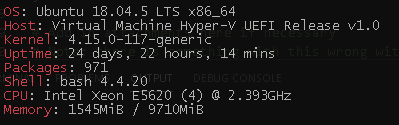
```Apache Server Status for localhost (via 127.0.0.1)
Server Version: Apache/2.4.29 (Ubuntu) mod_fcgid/2.3.9 OpenSSL/1.1.1
Server MPM: prefork
Server Built: 2020-08-12T21:33:25
PHP 7.2.24-0ubuntu0.18.04.6 (cli) (built: May 26 2020 13:09:11) ( NTS )
Copyright (c) 1997-2018 The PHP Group
Zend Engine v3.2.0, Copyright (c) 1998-2018 Zend Technologies
with Zend OPcache v7.2.24-0ubuntu0.18.04.6, Copyright (c) 1999-2018, by Zend Technologies
 nano11bravo
on 7 Oct 2020
nano11bravo
on 7 Oct 2020
Everyone,
I can load Canned Responses just fine using NGINX with the following config:
    server {
        set $path_info "";

        location ~ ^/include {
            deny all;
            return 403;
        }

        if ($request_uri ~ "^/api(/[^\?]+)") {
            set $path_info $1;
        }

        location ~ ^/api/(?:tickets|tasks).*$ {
            try_files $uri $uri/ /api/http.php?$query_string;
        }

        if ($request_uri ~ "^/scp/.*\.php(/[^\?]+)") {
            set $path_info $1;
        }

        location ~ ^/scp/ajax.php/(.*)$ {
            try_files $uri $uri/ /scp/ajax.php?$query_string;
        }

        if ($request_uri ~ "^/.*\.php(/[^\?]+)") {
            set $path_info $1;
        }

        location ~ ^/ajax.php/.*$ {
            try_files $uri $uri/ /ajax.php?$query_string;
        }

        location ~ ^/kb/ajax.php/.*$ {
            try_files $uri $uri/ /kb/ajax.php?$query_string;
        }

        location / {
            index index.php index.html index.htm;
            try_files $uri $uri/ index.php;
        }

        location ~ \.php$ {
            fastcgi_param SCRIPT_FILENAME $document_root$fastcgi_script_name;
            include fastcgi_params;
            fastcgi_param PATH_INFO $path_info;
            fastcgi_index index.php;
            fastcgi_read_timeout 9000;
            fastcgi_buffers 16 16k;
            fastcgi_buffer_size 32k;
        }

        location ~ /\.(?!well-known).* {
            deny all;
        }
    }
Cheers.
JediKev
on 7 Oct 2020
Everyone,
I can load Canned Responses just fine using NGINX with the following config:
    server {
        set $path_info "";

        location ~ ^/include {
            deny all;
            return 403;
        }

        if ($request_uri ~ "^/api(/[^\?]+)") {
            set $path_info $1;
        }

        location ~ ^/api/(?:tickets|tasks).*$ {
            try_files $uri $uri/ /api/http.php?$query_string;
        }

        if ($request_uri ~ "^/scp/.*\.php(/[^\?]+)") {
            set $path_info $1;
        }

        location ~ ^/scp/ajax.php/(.*)$ {
            try_files $uri $uri/ /scp/ajax.php?$query_string;
        }

        if ($request_uri ~ "^/.*\.php(/[^\?]+)") {
            set $path_info $1;
        }

        location ~ ^/ajax.php/.*$ {
            try_files $uri $uri/ /ajax.php?$query_string;
        }

        location ~ ^/kb/ajax.php/.*$ {
            try_files $uri $uri/ /kb/ajax.php?$query_string;
        }

        location / {
            index index.php index.html index.htm;
            try_files $uri $uri/ index.php;
        }

        location ~ \.php$ {
            fastcgi_param SCRIPT_FILENAME $document_root$fastcgi_script_name;
            include fastcgi_params;
            fastcgi_param PATH_INFO $path_info;
            fastcgi_index index.php;
            fastcgi_read_timeout 9000;
            fastcgi_buffers 16 16k;
            fastcgi_buffer_size 32k;
        }

        location ~ /\.(?!well-known).* {
            deny all;
        }
    }
Cheers.
This fixed my problem with NGINX and PHP 7.4 FastCGI 👍
But I had to add one more line in location ~ \.php$ { to get working php-fastcgi with nginx
fastcgi_pass unix:/var/run/php/php7.4-fpm.sock;
 KleinDevDE
on 23 Oct 2020
KleinDevDE
on 23 Oct 2020
Hello,
OP's fix had originally mitigated this bug but I can see that despite adding the fix on new versions, the behavior still exists.
Does anyone have a solution for this?
As far as nginx not being supported, I find it disappointed that is still the case. It's become a industry standard for a reason and choosing not to support it because it may need extra customizations is not a very good excuse any more.
Almost all other FOSS software I use supports nginx so I doubt osTicket is so complex that it can't be done. It seems to be it's not supported out of stubbornness. With that being said, I understand this is FOSS and not paid for and up to the maintainer.
 corporatefoo
on 11 Mar 2021
corporatefoo
on 11 Mar 2021
How is it, we're in 2021, and they don't have a published nginx config file for their application. When will this become supported as you have been saying "we'll be supporting most common webservers in the future" since 2018.
 adambirds
on 21 Mar 2021
adambirds
on 21 Mar 2021
@adambirds Probably because osTicket does not support nginx.
ntozier
on 21 Mar 2021
@ntozier and don't you think they should considering its either the first or second highest used webserver in the world (depending on the source) - https://w3techs.com/technologies/overview/web_server or https://news.netcraft.com/archives/category/web-server-survey/
Its cutting a lot of potential users off becuase they refuse to publish a supported nginx config.
adambirds
on 21 Mar 2021
I moved to docker and luckily found a great container that utilizes nginx as the webserver and it works flawlessly. Perhaps you can adapt his config or just use docker as I have.
https://github.com/CampbellSoftwareSolutions/docker-osticket
https://github.com/CampbellSoftwareSolutions/docker-osticket/blob/master/files/etc/nginx/nginx.conf
Cronus89
on 22 Mar 2021
@adambirds @Cronus89
In v2.0 we aim to support not only a multitude of webservers but a multitude of database systems as well. You can follow the v2.0 roadmap here (please note this is currently a very basic roadmap that we will expand over time):
Cheers.
JediKev
on 22 Mar 2021
Its cutting a lot of potential users off becuase they refuse to publish a supported nginx config.
Why would it fall to the Devs to write and publish a configuration file for a specific webserver software?
This is open source. Anyone in the community could/can write and publish a working configuration file.
ntozier
on 22 Mar 2021
@ntozier because surely they would like their software to be used more, so then maybe more people will contribute or sponsor the project which would allow them to work on the software more, and also someone offered to create a pull request way further up this thread with a working nginx config and the response was it probably won't get added as we don't support it.
And even if they did accept the pull request, unless the devs officially support nginx, if there is any issues or bugs with the software they'll just say its not supported. Thats why.
adambirds
on 22 Mar 2021
Related issues
 lifeofguenter
·
4Comments
lifeofguenter
·
4Comments
 mlipok
·
5Comments
mlipok
·
5Comments
 rob-tv
·
3Comments
rob-tv
·
3Comments
 F3000
·
5Comments
F3000
·
5Comments
 ghost
·
6Comments
ghost
·
6Comments
Most helpful comment
So far this seems to have worked for me.
This is the first application I've come across that doesn't support a particular webserver. Is there a reason for this?
What's done special in osticket that its not webserver agnostic?
nginx is a "HUGE" major web server. I'm quite shocked I had to find a github issue to get it working.