Osticket: Task - Alerts & Notices: Last Respondent not working [1.10]
In short
"When I create and assign a new task, the assigned Agent is notified via Email. If I then type in a message, the assigned agent is notified via Email. If the assigned agent responds to my message, I never receive an email alert. I've set the alerts under Settings > Task > Alerts & Notices to notify the Last Respondent under New Activity Alert."
Reported here:
http://osticket.com/forum/discussion/89749/last-respondent-not-notified-when-replying-to-a-task
@JediKev confirmed this bug
 ntozier
All 6 comments
So after looking into this deeper, it is technically not a bug. Let’s say I login as Agent 1, create a Task and Assign to Agent 2, as Agent 1 I post an update which alerts Agent 2 (the Assigned Agent), I login as Agent 2, go to the Task, post an update as Agent 2, and now Agent 2 is the last respondent, not Agent 1…so when the system grabs the Last Respondent for the Activity Notice it is Agent 2 which is who posted the update so the system will not send out an alert.
Code Reference:
postReply()
function postReply($vars, &$errors, $alert = true) {
...
    $this->lastrespondent = $response->staff;
...
    $this->onActivity( array(
....
TLDR;
The lastrespondent is set to the responding agent before the onActivity() method is called so technically Agent 2 is the Last Respondent, not Agent 1.
 JediKev
on 12 Mar 2020
JediKev
on 12 Mar 2020
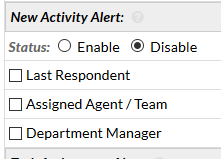
Thank you, @JediKev, for this info - but if this is the case, the following options for the alerts don't make any sense, do they? The "last respondent" would always be the agent triggering the alert. They don't need the alert, but the "previous last respondent" does.
/scp/settings.php?t=tasks#alerts
 jfbkbh
on 11 Apr 2020
jfbkbh
on 11 Apr 2020
I agree with @jfbkbh
The last respondent will never be alerted, right?
My case:
I post an update, my friend don't receive an email, but i notified him, out of osticket. My friend post an update and (again) nothing about email notification for me.
Can you reopen this issue or reply with an example @JediKev, please ?
Thank you!
 brunomilet
on 17 Jun 2020
JediKev
on 17 Jun 2020
brunomilet
on 17 Jun 2020
JediKev
on 17 Jun 2020
@JediKev, now I get the emails. However when I try to append an answer by replying the email, a new ticket is opened. =/
brunomilet
on 29 Jun 2020
@brunomilet
As stated in the footer of the alert, you are not supposed to reply to that alert.

Cheers.
JediKev
on 29 Jun 2020
Related issues
 jamesangi
·
5Comments
jamesangi
·
5Comments
 lifeofguenter
·
4Comments
lifeofguenter
·
4Comments
 rob-tv
·
3Comments
rob-tv
·
3Comments
 ghost
·
6Comments
ghost
·
6Comments
 joseaguardia
·
4Comments
joseaguardia
·
4Comments
Most helpful comment
@ntozier @brunomilet @jfbkbh
Try this out:
Cheers.