Osiris: Crashing & Backtrack not working with chams
I tested backtrack and it doesn't work how backtrack is meant to and CSGO randomly crashed.
Examples of backtracking:
https://www.youtube.com/watch?v=ceaqz66WRBc&t=29s
https://www.youtube.com/watch?v=Nrot2tbLN68&t=1s
 CleverSource
All 36 comments
To note: It only crashed while using backtrack.
CleverSource
on 12 May 2019
What do you think the backtracking is doing then...
 ghost
on 12 May 2019
ghost
on 12 May 2019
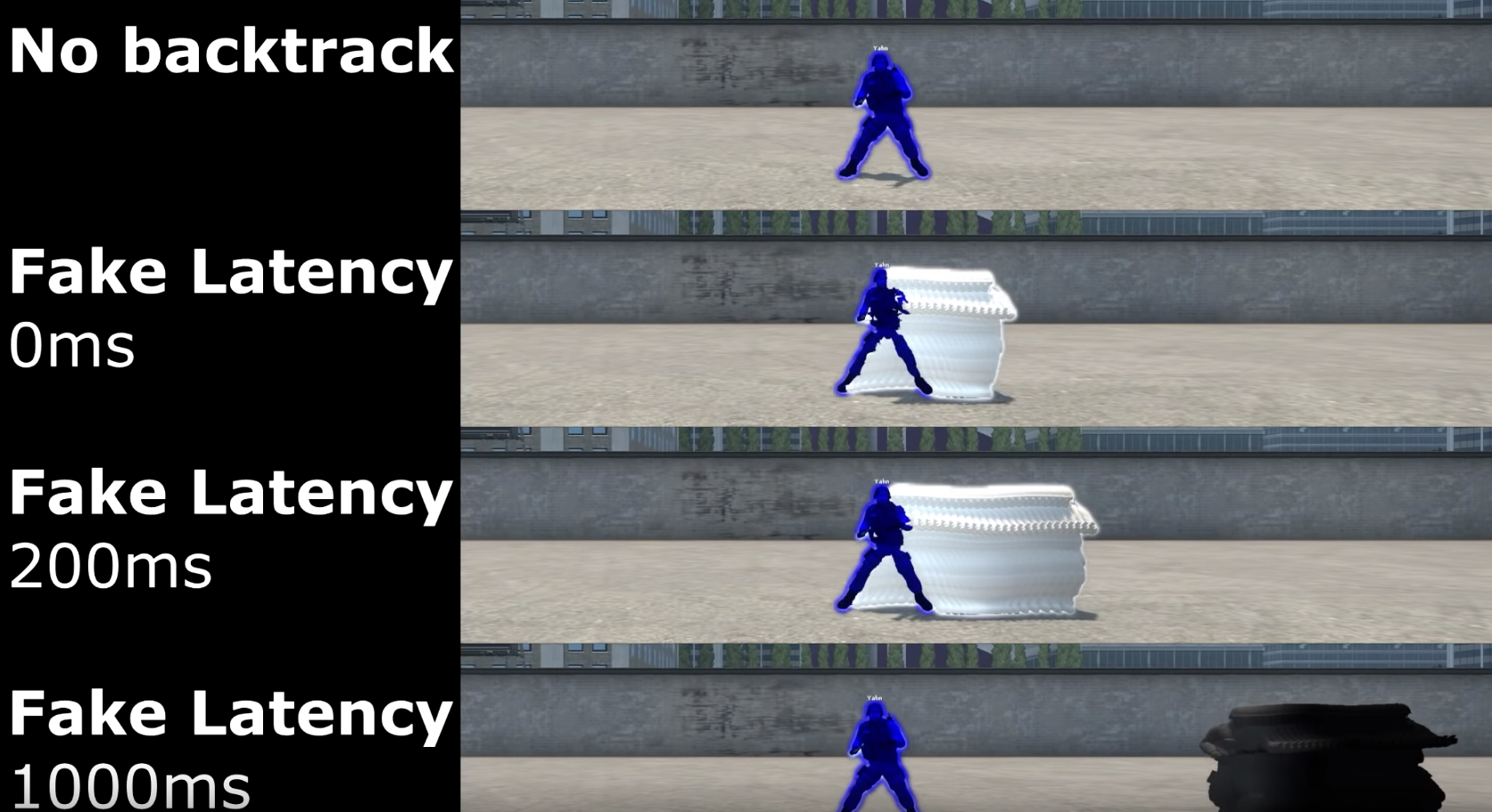
Look at the videos I provided, they show exactly what backtrack is. I'm mainly stating it will crash when used and that chams don't work with it.
CleverSource
on 12 May 2019
did you use backtrack after this commit?
 mr-nv
on 12 May 2019
mr-nv
on 12 May 2019
Yes, I used it on commit 2430.
Here is an example of how backtrack is meant to look with chams:
CleverSource
on 12 May 2019
uncomment what was done in that commit and try to use backtrack again
the chams i did show the last available record, not all available
about the crashes: i didnt experience them when i was playing around with backtrack, attach the debugger and show what it will show you when you crash
mr-nv
on 12 May 2019
I uncommented that commit, no noticeable changes but I did notice backtrack works. I still experience a random crash throughout playing though.
CleverSource
on 12 May 2019
did you attach the debugger?
mr-nv
on 12 May 2019
The visual studio debugger?
CleverSource
on 12 May 2019
yep
mr-nv
on 12 May 2019
How would I attach that? I've never used it on an external application only projects in vs2019
CleverSource
on 12 May 2019
Is it remote windows debugger?
CleverSource
on 12 May 2019
open csgo
press ctrl+alt+p in visual studio
attach to csgo and inject osiris
mr-nv
on 12 May 2019

Crash error!
CleverSource
on 12 May 2019
well, this means that backtrack is trying to access something which is literally nowhere
did it show where it crashed?
mr-nv
on 12 May 2019
It crashed in my folder that has Osiris.dll is located.
CleverSource
on 12 May 2019
The only files in there is the amazing dll injector called Inflame made by Daniel and Osiris.dll
CleverSource
on 12 May 2019
Did not mean to close it, sorry.
CleverSource
on 12 May 2019
i mean did it show the code which caused the crash
did you compile in debug mode?

mr-nv
on 12 May 2019
No it didn't show the code, I believe it was in Debug let me check.
CleverSource
on 12 May 2019
Turns out I was using the Release DLL, I'll rerun my tests and get it to crash while on the Debug DLL
CleverSource
on 12 May 2019
@CleverSource Remember to inject using LoadLibrary method.
 danielkrupinski
on 12 May 2019
danielkrupinski
on 12 May 2019
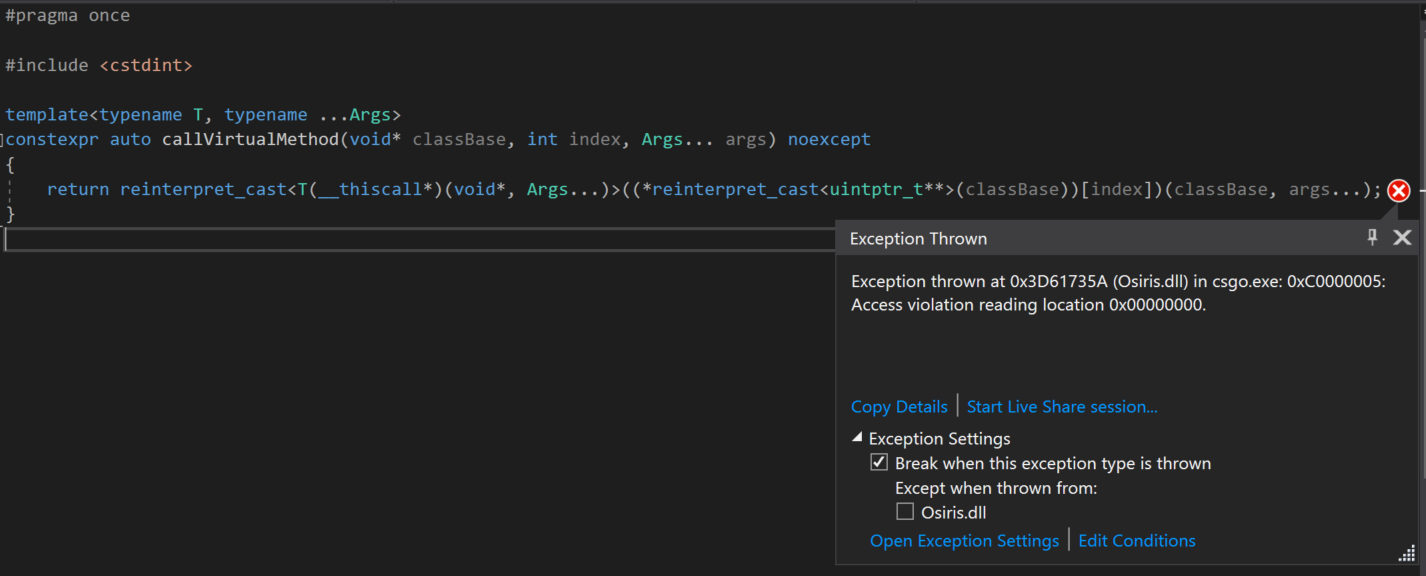
Happens in Utils.h
CleverSource
on 12 May 2019
@danielkrupinski I always use LoadLibrary.
CleverSource
on 12 May 2019
show the call stack
mr-nv
on 12 May 2019
It is happening here: https://github.com/danielkrupinski/Osiris/blob/master/Osiris/SDK/Utils.h
I'm on the latest commit and I reversed the changes on commit 2430 like @ultramemer said.
CleverSource
on 12 May 2019

Call stack
CleverSource
on 12 May 2019
@ultramemer Any extra information you need?
CleverSource
on 12 May 2019
try to revert this change
mr-nv
on 12 May 2019
@ultramemer Will do.
CleverSource
on 12 May 2019
@ultramemer I reverted it and I haven't experienced a crash. Seems to have fixed things.
CleverSource
on 12 May 2019
@ultramemer You may want to pull request it or I can. Well make a pull request with what I reverted.
CleverSource
on 12 May 2019
well, im sure Daniel will revert the second commit
only the second one because the first one worsens the aimbot (and this issue needs to get fixed too)
mr-nv
on 12 May 2019
@danielkrupinski When you can make sure to do that.
CleverSource
on 12 May 2019
Just pushed fix.
danielkrupinski
on 12 May 2019
@danielkrupinski Awesome!
CleverSource
on 12 May 2019
Related issues
 anarbmw
·
30Comments
anarbmw
·
30Comments
 KastenTop
·
28Comments
KastenTop
·
28Comments
 asmouman
·
28Comments
asmouman
·
28Comments
 Im-Beast
·
33Comments
Im-Beast
·
33Comments
 dapaster
·
23Comments
dapaster
·
23Comments
Most helpful comment
uncomment what was done in that commit and try to use backtrack again
the chams i did show the last available record, not all available
about the crashes: i didnt experience them when i was playing around with backtrack, attach the debugger and show what it will show you when you crash