Origin: openshift v3.11 does not start on Mac OS X
openshift v3.11 doesn't start on Mac OS X - I get this error :
I1011 17:03:53.454734 4717 flags.go:30] Running "create-kubelet-flags"
I1011 17:03:54.403630 4717 run_kubelet.go:49] Running "start-kubelet"
Error: error creating node config: could not create OpenShift configuration: cannot start container b6548528b2cc4d08bd93cafad01782d1152fd0495342967c53357b5ba42a1e9e; caused by: cannot start container b6548528b2cc4d08bd93cafad01782d1152fd0495342967c53357b5ba42a1e9e
Version
oc v3.11.0+0cbc58b
kubernetes v1.11.0+d4cacc0
features: Basic-Auth
Steps To Reproduce
oc cluster up --enable="*"
Current Result
I1011 17:06:09.096829 4733 flags.go:30] Running "create-kubelet-flags"
I1011 17:06:09.971090 4733 run_kubelet.go:49] Running "start-kubelet"
Error: error creating node config: could not create OpenShift configuration: cannot start container 495fbbe041498c85bf3862f163089844bff6fc444c38fb307992c824bd00deb6; caused by: cannot start container 495fbbe041498c85bf3862f163089844bff6fc444c38fb307992c824bd00deb6
Expected Result
openshift does not start
Additional Information
Full log:
tcunning@tcunning-OSX:~/src/cunningt/application-templates$ oc cluster up --enable="*"
Getting a Docker client ...
Checking if image openshift/origin-control-plane:v3.11 is available ...
Creating shared mount directory on the remote host ...
Determining server IP ...
Checking if OpenShift is already running ...
Checking for supported Docker version (=>1.22) ...
Checking if insecured registry is configured properly in Docker ...
Checking prerequisites for port forwarding ...
Checking if required ports are available ...
Checking if OpenShift client is configured properly ...
Checking if image openshift/origin-control-plane:v3.11 is available ...
Starting OpenShift using openshift/origin-control-plane:v3.11 ...
I1011 17:06:09.096829 4733 flags.go:30] Running "create-kubelet-flags"
I1011 17:06:09.971090 4733 run_kubelet.go:49] Running "start-kubelet"
Error: error creating node config: could not create OpenShift configuration: cannot start container 495fbbe041498c85bf3862f163089844bff6fc444c38fb307992c824bd00deb6; caused by: cannot start container 495fbbe041498c85bf3862f163089844bff6fc444c38fb307992c824bd00deb6
 cunningt
All 20 comments
The reason behind is this:
Mounts denied:
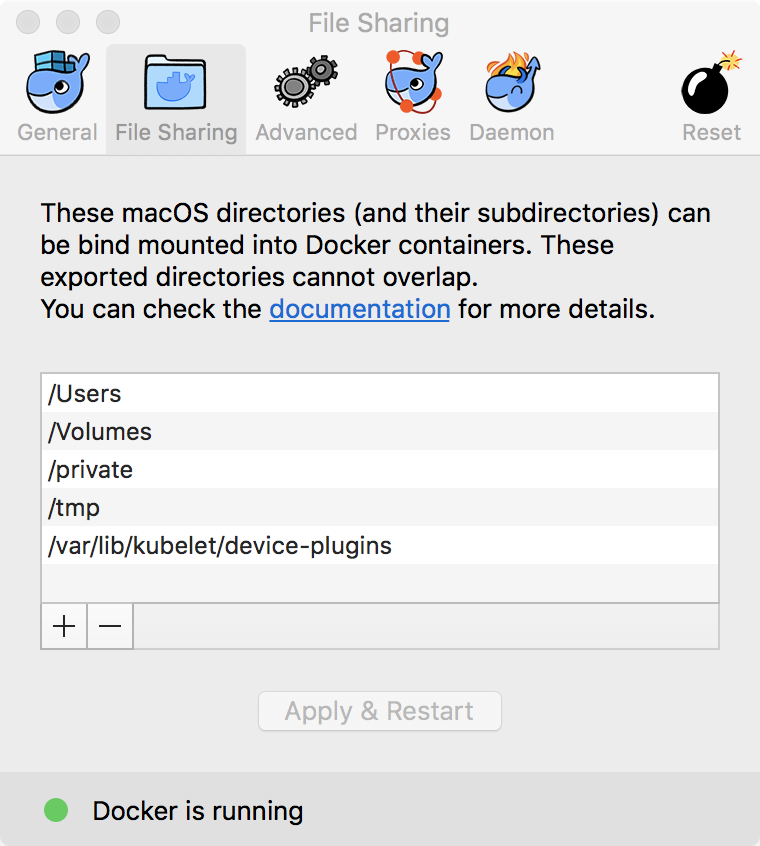
The path /var/lib/kubelet/device-plugins
is not shared from OS X and is not known to Docker.
You can configure shared paths from Docker -> Preferences... -> File Sharing.
See https://docs.docker.com/docker-for-mac/osxfs/#namespaces for more info.
 robertnosko
on 12 Oct 2018
robertnosko
on 12 Oct 2018
I came across same error. After adding /var/lib/kubelet/device-plugins to docker file sharing, cluster setup went ahead and end up with a different timeout error:
Tapass-MacBook-Pro:~ tapas-pc$ oc cluster up
Getting a Docker client ...
Checking if image openshift/origin-control-plane:v3.11 is available ...
Creating shared mount directory on the remote host ...
Determining server IP ...
Checking if OpenShift is already running ...
Checking for supported Docker version (=>1.22) ...
Checking if insecured registry is configured properly in Docker ...
Checking prerequisites for port forwarding ...
Checking if required ports are available ...
Checking if OpenShift client is configured properly ...
Checking if image openshift/origin-control-plane:v3.11 is available ...
Starting OpenShift using openshift/origin-control-plane:v3.11 ...
I1014 17:24:55.822191    8694 flags.go:30] Running "create-kubelet-flags"
I1014 17:24:56.976268    8694 run_kubelet.go:49] Running "start-kubelet"
I1014 17:24:57.326885    8694 run_self_hosted.go:181] Waiting for the kube-apiserver to be ready ...
I1014 17:25:23.121883    8694 interface.go:26] Installing "kube-proxy" ...
I1014 17:25:23.121912    8694 interface.go:26] Installing "kube-dns" ...
I1014 17:25:23.121922    8694 interface.go:26] Installing "openshift-service-cert-signer-operator" ...
I1014 17:25:23.121932    8694 interface.go:26] Installing "openshift-apiserver" ...
I1014 17:25:23.122352    8694 apply_template.go:81] Installing "openshift-service-cert-signer-operator"
I1014 17:25:23.122402    8694 apply_template.go:81] Installing "kube-proxy"
I1014 17:25:23.122408    8694 apply_template.go:81] Installing "openshift-apiserver"
I1014 17:25:23.122373    8694 apply_template.go:81] Installing "kube-dns"
I1014 17:26:00.271989    8694 interface.go:41] Finished installing "kube-proxy" "kube-dns" "openshift-service-cert-signer-operator" "openshift-apiserver"
Error: timed out waiting for the condition
Tapass-MacBook-Pro:~ tapas-pc$
 tapas4java
on 14 Oct 2018
tapas4java
on 14 Oct 2018
Hmm is this a problem due to /var vs. /private/var ?
 mshutt
on 17 Oct 2018
mshutt
on 17 Oct 2018
docker run -it --rm --privileged --pid=host justincormack/nsenter1 /bin/sh -c 'mkdir -p /var/lib/kubelet/device-plugins'
This seemed to allow oc cluster up to work... I had no way to add the /var/lib/kubelet path to the file-sharing because it's not choosable by way of the MacOS GUI? Perhaps I am missing something... Pining for a text entry box or a way to edit the paths that are shared directly...
mshutt
on 17 Oct 2018
After the previous command, it all "works"...
I1017 14:03:44.808524   16656 interface.go:41] Finished installing "sample-templates/jenkins pipeline ephemeral" "sample-templates/sample pipeline" "sample-templates/mongodb" "sample-templates/mariadb" "sample-templates/cakephp quickstart" "sample-templates/django quickstart" "sample-templates/nodejs quickstart" "sample-templates/rails quickstart" "sample-templates/mysql" "sample-templates/postgresql" "sample-templates/dancer quickstart"
I1017 14:04:11.811702   16656 interface.go:41] Finished installing "centos-imagestreams" "openshift-router" "sample-templates" "persistent-volumes" "openshift-image-registry" "openshift-web-console-operator"
Login to server ...
Creating initial project "myproject" ...
Server Information ...
OpenShift server started.

The server is accessible via web console at:
    https://127.0.0.1:8443

You are logged in as:
    User:     developer
    Password: <any value>

To login as administrator:
    oc login -u system:admin

WARNING: An HTTP proxy (gateway.docker.internal:3128) is configured for the Docker daemon, but you did not specify one for cluster up
WARNING: An HTTPS proxy (gateway.docker.internal:3129) is configured for the Docker daemon, but you did not specify one for cluster up
WARNING: A proxy is configured for Docker, however 172.30.1.1 is not included in its NO_PROXY list.
   172.30.1.1 needs to be included in the Docker daemon's NO_PROXY environment variable so pushes to the local OpenShift registry can succeed.
But I still have to do this :P
mshutt
on 17 Oct 2018
@mshutt : I think you can type out the /var/lib/kubelet path, but you can't hit the "+" button in Docker->File Sharing - you have to double click on the first empty field --
cunningt
on 17 Oct 2018
osnp :P Well then... So either mkdir the thing or add it explicitly to the list...
But then the internal docker-registry still does not work no matter the no-proxy passed to the docker daemon...
mshutt
on 17 Oct 2018
@mshutt Any idea what the permissions on the mkdir should be?
I tried doing the mkdir and adding it to the list, and I kept running into this - I'm guessing maybe it had something to do with permissions I set on /var/lib/kubelet https://github.com/openshift/origin/issues/21265
If I do the docker run you suggest, I get clean startup like you do though. Thanks much for the suggestion!
cunningt
on 17 Oct 2018
@cunningt
permissions? I mean I didn't set any permissions. I just ran the nsenter container and ran the mkdir -p /var/lib/kubelet/device-plugins which in turn created the /var/lib/kubelet directory and the default umask had the appropriate permissions for functionality. I never looked back to see if they were appropriate for security.
It looks like the dirs are created 775...
$ docker run -it --rm --privileged --pid=host justincormack/nsenter1 /bin/sh -c 'ls -ld /var/lib/kubelet; ls -l /var/lib/kubelet'
drwxr-xr-x    3 root     root          4096 Oct 17 17:50 /var/lib/kubelet
total 4
drwxr-xr-x    2 root     root          4096 Oct 18 15:00 device-plugins
That said, my cluster comes fully up, but builds fail to push the images to the internal registry due to this mess with the NO_PROXY and OSX Docker...
My personal recommend would be to run it in a CentOS VM on virtualbox. It's not as "sexy" a solution on OSX, but... eh....
mshutt
on 18 Oct 2018
albertredhatcom-MacBook-Pro-2:openshift-origin-client-tools-v3.11.0-0cbc58b-mac alwong$ ./oc cluster up
Getting a Docker client ...
Checking if image openshift/origin-control-plane:v3.11 is available ...
Creating shared mount directory on the remote host ...
Determining server IP ...
Checking if OpenShift is already running ...
Checking for supported Docker version (=>1.22) ...
Checking if insecured registry is configured properly in Docker ...
Checking prerequisites for port forwarding ...
Checking if required ports are available ...
Checking if OpenShift client is configured properly ...
Checking if image openshift/origin-control-plane:v3.11 is available ...
Starting OpenShift using openshift/origin-control-plane:v3.11 ...
I0107 14:31:37.588683    6407 flags.go:30] Running "create-kubelet-flags"
I0107 14:31:38.776252    6407 run_kubelet.go:49] Running "start-kubelet"
I0107 14:31:39.080611    6407 run_self_hosted.go:181] Waiting for the kube-apiserver to be ready ...
I get timeout for the apiserver.
 alberttwong
on 7 Jan 2019
alberttwong
on 7 Jan 2019
alberttwong
on 7 Jan 2019
alberttwong
on 7 Jan 2019
Was able to run oc cluster up --enable="*" without running the docker command stated above.
Steps:
- Install Kubernetes via the
enable kubernetes. This will enable kubernetes - Then disable it ( We need to disable it, because it blocks the ports needed by oc )

Although this still leads to
WARNING: A proxy is configured for Docker, however 172.30.1.1 is not included in its NO_PROXY list.
   172.30.1.1 needs to be included in the Docker daemon's NO_PROXY environment variable so pushes to the local OpenShift registry can succeed.
Environment:
OC:
oc v3.11.0+0cbc58b
kubernetes v1.11.0+d4cacc0
features: Basic-Auth
Docker:
Docker version 18.09.1, build 4c52b90
 francis-camillo-ext
on 22 Jan 2019
francis-camillo-ext
on 22 Jan 2019
Was able to run
oc cluster up --enable="*"without running the docker command stated above.Steps:
1. Install Kubernetes via the `enable kubernetes`. This will enable kubernetes

2. Then disable it ( We need to disable it, because it blocks the ports needed by oc )
Although this still leads to
WARNING: A proxy is configured for Docker, however 172.30.1.1 is not included in its NO_PROXY list.
   172.30.1.1 needs to be included in the Docker daemon's NO_PROXY environment variable so pushes to the local OpenShift registry can succeed.
Environment:
OC:
oc v3.11.0+0cbc58b
kubernetes v1.11.0+d4cacc0
features: Basic-AuthDocker:
Docker version 18.09.1, build 4c52b90
I can confirm that the above works: enable and disable kubernetes support in docker desktop for macos and re-run oc cluster up, avoids the "Error: error creating node config: could not create OpenShift configuration: cannot start container {uuid}" issue.
 rubin55
on 15 Mar 2019
rubin55
on 15 Mar 2019
Any views on how to solve the NO_PROXY issue or is it roll-back on the Docker Desktop for mac?
 stevef1uk
on 13 May 2019
stevef1uk
on 13 May 2019
Any views on how to solve the NO_PROXY issue or is it roll-back on the Docker Desktop for mac?
@stevef1uk Add the suggested IP from OC startup message to docker using it's GUI (preferences > proxies > bypass...).
 davi-romero
on 2 Aug 2019
davi-romero
on 2 Aug 2019
A bit late... like almost a year haha.
Are they ever going to release 4.1? On Prem? On hardware?
 rshutt
on 3 Aug 2019
rshutt
on 3 Aug 2019
Issues go stale after 90d of inactivity.
Mark the issue as fresh by commenting /remove-lifecycle stale.
Stale issues rot after an additional 30d of inactivity and eventually close.
Exclude this issue from closing by commenting /lifecycle frozen.
If this issue is safe to close now please do so with /close.
/lifecycle stale
 openshift-bot
on 1 Nov 2019
openshift-bot
on 1 Nov 2019
Stale issues rot after 30d of inactivity.
Mark the issue as fresh by commenting /remove-lifecycle rotten.
Rotten issues close after an additional 30d of inactivity.
Exclude this issue from closing by commenting /lifecycle frozen.
If this issue is safe to close now please do so with /close.
/lifecycle rotten
/remove-lifecycle stale
openshift-bot
on 1 Dec 2019
Rotten issues close after 30d of inactivity.
Reopen the issue by commenting /reopen.
Mark the issue as fresh by commenting /remove-lifecycle rotten.
Exclude this issue from closing again by commenting /lifecycle frozen.
/close
openshift-bot
on 31 Dec 2019
@openshift-bot: Closing this issue.
In response to this:
Rotten issues close after 30d of inactivity.
Reopen the issue by commenting
/reopen.
Mark the issue as fresh by commenting/remove-lifecycle rotten.
Exclude this issue from closing again by commenting/lifecycle frozen./close
Instructions for interacting with me using PR comments are available here. If you have questions or suggestions related to my behavior, please file an issue against the kubernetes/test-infra repository.
 openshift-ci-robot
on 31 Dec 2019
openshift-ci-robot
on 31 Dec 2019
Related issues
 slmzig
·
3Comments
slmzig
·
3Comments
 theone4ever
·
3Comments
theone4ever
·
3Comments
 tnozicka
·
3Comments
tnozicka
·
3Comments
 crobby
·
4Comments
crobby
·
4Comments
 davivd
·
4Comments
davivd
·
4Comments
Most helpful comment
docker run -it --rm --privileged --pid=host justincormack/nsenter1 /bin/sh -c 'mkdir -p /var/lib/kubelet/device-plugins'This seemed to allow
oc cluster upto work... I had no way to add the /var/lib/kubelet path to the file-sharing because it's not choosable by way of the MacOS GUI? Perhaps I am missing something... Pining for a text entry box or a way to edit the paths that are shared directly...