Origin: Access fail with 'oc cluster up --public-hostname=<public ip>' and redirect to 127.0.0.1
Version
oc v3.10.0+dd10d17
Steps To Reproduce
oc cluster up --public-hostname='
Current Result
oc v3.10.0+dd10d17
kubernetes v1.10.0+b81c8f8
features: Basic-Auth GSSAPI Kerberos SPNEGO

Server https://127.0.0.1:8443
openshift v3.10.0+a5e4ac9-10
kubernetes v1.10.0+b81c8f8
When I access https://<public ip>:8443,redirecting the address https://127.0.0.1:8443.
Expected Result
When I access https://<public ip>:8443, I could access normaly.
 cxyfreedom
All 24 comments
Here is a quick workaround until this gets sorted out:
fgrep -RIl 127.0.0.1:8443 openshift.local.clusterup/ | xargs sed -i 's/127.0.0.1:8443/$PUBLIC_IP:8443/g'
 jdoss
on 26 Aug 2018
jdoss
on 26 Aug 2018
@openshift/sig-master
 jwforres
on 1 Oct 2018
jwforres
on 1 Oct 2018
if you curl the URL are you getting redirected? or is it the web console getting incorrectly set up and redirecting to the wrong oauth URL?
cc @spadgett
jwforres
on 1 Oct 2018
The same here, configmaps/webconsole-config got improperly rendered with '127.0.0.1'
although I'm using 'oc cluster up --public-hostname=192.168.1.14'
[stirabos@openshift ~]$ oc get cm webconsole-config -n openshift-web-console -o yaml
apiVersion: v1
data:
  webconsole-config.yaml: |
    {"kind":"WebConsoleConfiguration","apiVersion":"webconsole.config.openshift.io/v1","servingInfo":{"bindAddress":"0.0.0.0:8443","bindNetwork":"tcp4","certFile":"/var/serving-cert/tls.crt","keyFile":"/var/serving-cert/tls.key","clientCA":"","namedCertificates":null,"maxRequestsInFlight":0,"requestTimeoutSeconds":0},"clusterInfo":{"consolePublicURL":"https://127.0.0.1:8443/console/","masterPublicURL":"https://127.0.0.1:8443","loggingPublicURL":"","metricsPublicURL":"","logoutPublicURL":""},"features":{"inactivityTimeoutMinutes":0,"clusterResourceOverridesEnabled":false},"extensions":{"scriptURLs":[],"stylesheetURLs":[],"properties":null}}
kind: ConfigMap
metadata:
  creationTimestamp: 2018-10-03T08:06:54Z
  name: webconsole-config
  namespace: openshift-web-console
  resourceVersion: "6232"
  selfLink: /api/v1/namespaces/openshift-web-console/configmaps/webconsole-config
  uid: 4a97e3de-c6e3-11e8-a889-001a4a160152
 tiraboschi
on 3 Oct 2018
tiraboschi
on 3 Oct 2018
It seams a kind of leftover from a previous attempt, if I delete the whole ~/openshift.local.clusterup and retry it works as expected.
Reproduction step:
oc cluster up
oc cluster down
oc cluster up --public-hostname=
tiraboschi
on 3 Oct 2018
I had the same problem, I used the work around provided by jdoss and this resolved the redirect issue
fgrep -RIl 127.0.0.1:8443 openshift.local.clusterup/ | xargs sed -i 's/127.0.0.1:8443/$PUBLIC_IP:8443/g'
you don't need to restart openshift after you do this which I did the first time.
Will this get fixed in an updated version
 mandibuswell
on 19 Oct 2018
mandibuswell
on 19 Oct 2018
Error is still here
oc v3.11.0+0cbc58b
kubernetes v1.11.0+d4cacc0
features: Basic-Auth GSSAPI Kerberos SPNEGO
Unable to connect to the server: x509: certificate signed by unknown authority
 Asgoret
on 24 Dec 2018
Asgoret
on 24 Dec 2018
Issue still present. Working on:
[root@localhost ~]# hostnamectl
   Static hostname: localhost.localdomain
         Icon name: computer-vm
           Chassis: vm
        Machine ID: e0f9f4d274fa4ef2b4e2b1670dafa645
           Boot ID: ef53e7fd0e984ea198d4878310678bc8
    Virtualization: microsoft
  Operating System: Fedora 29.20181210.0 (Atomic Host)
       CPE OS Name: cpe:/o:fedoraproject:fedora:29
            Kernel: Linux 4.19.6-300.fc29.x86_64
      Architecture: x86-64
After:
oc cluster up --public-hostname='okd'
web console is still bound to 127.0.0.1 (https://okd:8443 is redirected to https://127.0.0.1:8443):
[root@localhost ~]# oc version
oc v3.11.0+0cbc58b
kubernetes v1.11.0+d4cacc0
features: Basic-Auth GSSAPI Kerberos SPNEGO

Server https://127.0.0.1:8443
kubernetes v1.11.0+d4cacc0
After launching:
fgrep -RIl 127.0.0.1:8443 openshift.local.clusterup/ | xargs sed -i 's/127.0.0.1:8443/okd:8443/g'
web console remains bound to 127.0.0.1 (instead of okd):
[root@localhost ~]# oc version
oc v3.11.0+0cbc58b
kubernetes v1.11.0+d4cacc0
features: Basic-Auth GSSAPI Kerberos SPNEGO

Server https://127.0.0.1:8443
kubernetes v1.11.0+d4cacc0
https://okd:8443 still gets redirected to https://127.0.0.1:8443
Any hint?
 ctliv
on 27 Jan 2019
ctliv
on 27 Jan 2019
Hello,
Yes, this does happen if you first start it up as a local cluster - and then realise you need to access it via a Private / Public IP Address.
To fix it, delete the directory: openshift.local.clusterup or even better, delete the entire top level directory openshift-origin-server-v3.11.0-0cbc58b-linux-64bit.
Then run tar -zxvf openshift-origin-server-v3.11.0-0cbc58b-linux-64bit.tar.gz again.
And start up the cluster using: oc cluster up --public-hostname=<Public IP>
You should now be able to access it via: https://<Public IP>:8443/console
 jinalshah
on 26 Feb 2019
jinalshah
on 26 Feb 2019
Thanks, @jinalshah .
Going to https://<Public IP>:8443/console now works.
Though https://<Public IP>:8443/ is still redirected to https://127.0.0.1:8443/console
So, somehow it's the /console that matters.
ctliv
on 2 Mar 2019
It seams a kind of leftover from a previous attempt, if I delete the whole ~/openshift.local.clusterup and retry it works as expected.
Reproduction step:
oc cluster up
oc cluster down
oc cluster up --public-hostname=
This fixed my cluster (fresh install on centos 7).
Previously I tried to modify the yaml files on openshift.local.clusterup with references to 127.0.0.1:8443 and it fixed the situation too (I think I had to modify some filters related with CORS, but not sure if this impacted into the expected result).
 avisiedo
on 17 May 2019
avisiedo
on 17 May 2019
- oc cluster down
- reboot the host
- rm -rf openshift.local.clusterup
- rm -rf .kube/
- oc cluster up --public-hostname=10.71.33.193
- oc cluster status
- https://10.71.33.193:8443/console/
 jainthomas87
on 3 Jun 2019
jainthomas87
on 3 Jun 2019
Having same issue. starting cluster with
oc cluster up --image 'openshift/origin-${component}:v3.11.0' --public-hostname x.x.x.x --routing-suffix x.x.x.x.nip.io
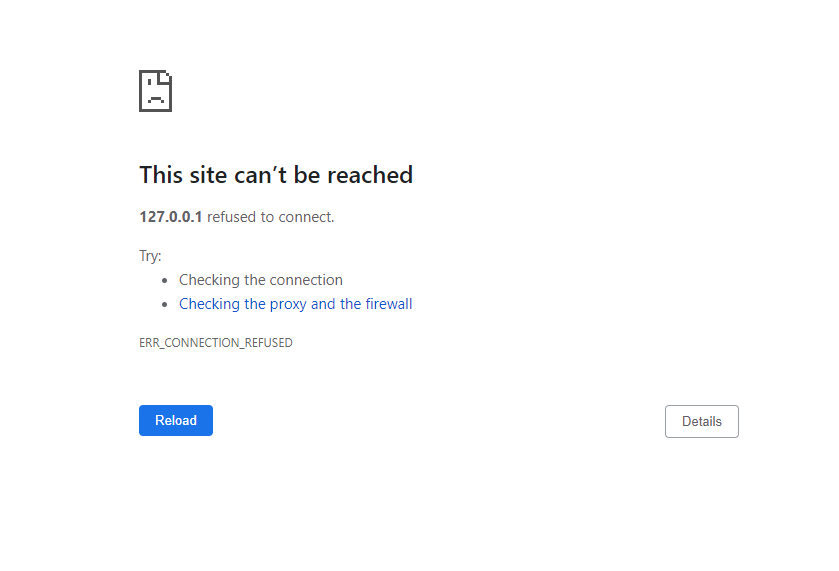
[vchepeli@localhost ~]$ hostnamectl
   Static hostname: localhost.localdomain
         Icon name: computer-vm
           Chassis: vm
        Machine ID: 1201eac5de174a66880138fd864f910b
           Boot ID: 596ab33d6a8b460d9e71989b08701916
    Virtualization: microsoft
  Operating System: CentOS Linux 7 (Core)
       CPE OS Name: cpe:/o:centos:centos:7
            Kernel: Linux 3.10.0-957.21.3.el7.x86_64
      Architecture: x86-64
 vchepeli
on 21 Jun 2019
vchepeli
on 21 Jun 2019
Same here. The issue is still not solved. It seems to work if I use "public-hostname" right from the start and explicitly navigate to "…:8443/console" but further links take me back to 127.0.0.1.
This is a Debian 9 system with Docker 18.09.6 using the openshift-origin-server-v3.11.0-0cbc58b-linux-64bit.tar.gz release file.
Very annoying. I have spent countless hours trying various proposed fixes but am now very close to giving up.
 Signum
on 21 Jun 2019
Signum
on 21 Jun 2019
Hi those workaround does not work... Any update?
Running on redhat 7.6, docker version 18.09.6 using the openshift-origin-server-v3.11.0-0cbc58b-linux-64bit.tar.gz release file.
 DanielChuDC
on 19 Jul 2019
DanielChuDC
on 19 Jul 2019
Hi all, in the end, I access the console successful though https:/
Even after you have run oc cluster up --public-hostname=<server-ip> --routing-suffix=<server-ip>.nip.io, you will need to access link as https:/
The default route https:/
The route https:/
DanielChuDC
on 19 Jul 2019
Issues go stale after 90d of inactivity.
Mark the issue as fresh by commenting /remove-lifecycle stale.
Stale issues rot after an additional 30d of inactivity and eventually close.
Exclude this issue from closing by commenting /lifecycle frozen.
If this issue is safe to close now please do so with /close.
/lifecycle stale
 openshift-bot
on 17 Oct 2019
openshift-bot
on 17 Oct 2019
/remove-lifecycle stale
 gaurs
on 30 Oct 2019
gaurs
on 30 Oct 2019
Issues go stale after 90d of inactivity.
Mark the issue as fresh by commenting /remove-lifecycle stale.
Stale issues rot after an additional 30d of inactivity and eventually close.
Exclude this issue from closing by commenting /lifecycle frozen.
If this issue is safe to close now please do so with /close.
/lifecycle stale
openshift-bot
on 16 Apr 2020
/remove-lifecycle stale
Still occuring in oc v3.11.0+0cbc58b with --public-hostname set.
 acuteaura
on 4 May 2020
acuteaura
on 4 May 2020
Issues go stale after 90d of inactivity.
Mark the issue as fresh by commenting /remove-lifecycle stale.
Stale issues rot after an additional 30d of inactivity and eventually close.
Exclude this issue from closing by commenting /lifecycle frozen.
If this issue is safe to close now please do so with /close.
/lifecycle stale
openshift-bot
on 3 Aug 2020
Stale issues rot after 30d of inactivity.
Mark the issue as fresh by commenting /remove-lifecycle rotten.
Rotten issues close after an additional 30d of inactivity.
Exclude this issue from closing by commenting /lifecycle frozen.
If this issue is safe to close now please do so with /close.
/lifecycle rotten
/remove-lifecycle stale
openshift-bot
on 2 Sep 2020
still happening.....
 omeryounus
on 21 Sep 2020
omeryounus
on 21 Sep 2020
/remove-lifecycle rotten
Can confirm, still an issue.
acuteaura
on 21 Sep 2020
Related issues
 thincal
·
5Comments
thincal
·
5Comments
 theone4ever
·
3Comments
theone4ever
·
3Comments
 rkrmishra
·
4Comments
rkrmishra
·
4Comments
 davivd
·
4Comments
davivd
·
4Comments
 alikhajeh1
·
3Comments
alikhajeh1
·
3Comments
Most helpful comment