Origin: How to set a custom DNS server when using the oc cluster up?
I have an Openshift Origin cluster up and working on a Ubuntu 4.13.0-31-generic machine by following/using the oc cluster up command found at https://github.com/openshift/origin/blob/master/docs/cluster_up_down.md.
I am now trying to get the pods created in the cluster to use a custom DNS server (or an upstream Nameserver) so the pods can resolve hostnames on my local network.
I would like the pods to point to Nameserver 10.100.10.200 (or even as the second DNS server after 172.30.0.1 so it acts as an upstream Nameserver).
Version
oc version
oc v3.7.1+ab0f056
kubernetes v1.7.6+a08f5eeb62
features: Basic-Auth GSSAPI Kerberos SPNEGOServer https://127.0.0.1:8443
openshift v3.7.1+ab0f056
kubernetes v1.7.6+a08f5eeb62
Steps To Reproduce
execute the oc cluster up command
oc cluster up --public-hostname="xxxx.net" --routing-suffix="xxxx.net"Starting OpenShift using openshift/origin:v3.7.1 ...
OpenShift server started.The server is accessible via web console at:
https://xxxx.net:8443You are logged in as:
User: developer
Password:To login as administrator:
oc login -u system:adminCreate a simple Pod to use as a test environment
Create a file named busybox.yaml with the following contents:
apiVersion: v1
kind: Pod
metadata:
  name: busybox
  namespace: default
spec:
  containers:
  - name: busybox
    image: busybox
    command:
      - sleep
      - "3600"
    imagePullPolicy: IfNotPresent
  restartPolicy: Always
oc login -u system:adminkubectl create -f busybox.yamloc project default
Current Result
kubectl exec busybox cat /etc/resolv.conf
nameserver 172.30.0.1
search default.svc.cluster.local svc.cluster.local cluster.local
options ndots:5
kubectl exec -ti busybox -- nslookup [a hostname on local network]
Server: 172.30.0.1
Address 1: 172.30.0.1 kubernetes.default.svc.cluster.localnslookup: can't resolve '[a hostname on local network]'
command terminated with exit code 1
Expected Result
I would like to get hostnames on my local network to be resolved by the pods using a custom DNS server eg.
nameserver 10.100.10.200
search default.svc.cluster.local svc.cluster.local cluster.local
options ndots:5
or (upstream Nameserver)
nameserver 172.30.0.1
nameserver 10.100.10.200
search default.svc.cluster.local svc.cluster.local cluster.local
options ndots:5
Additional Information
I noticed the dnsConfig info in the /var/lib/origin/openshift.local.config/master/master-config.yaml file
is set to -
...
dnsConfig:
  allowRecursiveQueries: true
  bindAddress: 0.0.0.0:8053
  bindNetwork: tcp4
...
Even after doing research and following https://developers.redhat.com/blog/2015/11/19/dns-your-openshift-v3-cluster/ article, the pods' /etc/resolv.conf still points to a nameserver 172.30.0.1.
Any steps one can provide to solve this issue would be much appreciated. I have been trying for the last few days to solve this.
 DKBgit
All 15 comments
@openshift/sig-developer-experience
 php-coder
on 31 Jan 2018
php-coder
on 31 Jan 2018
@DKBgit have you tried adding the DNS server to your host machine's resolv.conf?
 csrwng
on 1 Feb 2018
csrwng
on 1 Feb 2018
Thanks for the hint.
I realize after more research that the pods could not resolve a local hostname (eg. trdrdev) while the host could resolve that hostname.
What I found out was when a DNS server's /etc/dnsmasq.conf file has
# Never forward plain names (without a dot or domain part)
domain-needed
then it would not resolve the hostname (eg. trdrdev).
My local network's DNS server does not have that config so it was able to resolve a hostname (eg. trdrdev) but I believe the DNS server in the oc cluster probably has that configuration (the 'domain-needed' option).
Both the host and pods can resolve the hostname if it is trdrdev.localnet.
My network has a number of windows machines which does not have a domain attached to their hostnames. There is no domain controller for the windows machines.
Is there a way where one can configure the oc cluster's internal DNS server to _'have/not have'_ the domain-needed option?
DKBgit
on 1 Feb 2018
Is there a way where one can configure the oc cluster's internal DNS server to 'have/not have' the domain-needed option?
I'm not sure.
@openshift/sig-networking any thoughts?
csrwng
on 1 Feb 2018
Issues go stale after 90d of inactivity.
Mark the issue as fresh by commenting /remove-lifecycle stale.
Stale issues rot after an additional 30d of inactivity and eventually close.
Exclude this issue from closing by commenting /lifecycle frozen.
If this issue is safe to close now please do so with /close.
/lifecycle stale
 openshift-bot
on 2 May 2018
openshift-bot
on 2 May 2018
Stale issues rot after 30d of inactivity.
Mark the issue as fresh by commenting /remove-lifecycle rotten.
Rotten issues close after an additional 30d of inactivity.
Exclude this issue from closing by commenting /lifecycle frozen.
If this issue is safe to close now please do so with /close.
/lifecycle rotten
/remove-lifecycle stale
openshift-bot
on 1 Jun 2018
Rotten issues close after 30d of inactivity.
Reopen the issue by commenting /reopen.
Mark the issue as fresh by commenting /remove-lifecycle rotten.
Exclude this issue from closing again by commenting /lifecycle frozen.
/close
openshift-bot
on 1 Jul 2018
Am also experiencing similar.
When running oc cluster up in a corp environment, and when in the terminal of a pod, I try:
nslookup google.com
;; connection timed out; no servers could be reached
 magick93
on 22 Oct 2018
magick93
on 22 Oct 2018
@magick93 If you are using system with systemd, it might be one of issues described here https://kubernetes.io/docs/tasks/administer-cluster/dns-debugging-resolution/#known-issues
Probably simplest solution could be to use Minishift that does all necessary setup.
 PetrGlad
on 27 Nov 2018
PetrGlad
on 27 Nov 2018
I'm also experiencing the same problem. I have a single cluster (master) that I run with oc cluster up on Ubuntu 18.04. I can do nslookup google.com from a POD, what I need is access to my internal corporate network. If I start a normal Docker container on the master, though, then I can access both external services (google, github, etc) and internal services (from within the corporate network such as gitlab, db, etc), since Docker just copies the hosts /etc/resolv.conf into the container. Openshift doesn't follow this approach, alas.
Maybe this could help, but I can't get the hang of it.
sudo netstat -tunlp|grep 53
tcp        0      0 192.168.122.1:53        0.0.0.0:*               LISTEN      1385/dnsmasq
tcp        0      0 192.168.42.1:53         0.0.0.0:*               LISTEN      1331/dnsmasq
udp        0      0 192.168.122.1:53        0.0.0.0:*                           1385/dnsmasq
udp        0      0 192.168.42.1:53         0.0.0.0:*                           1331/dnsmasq
It seems I don't have neither Dnsmasq nor SkyDNS running
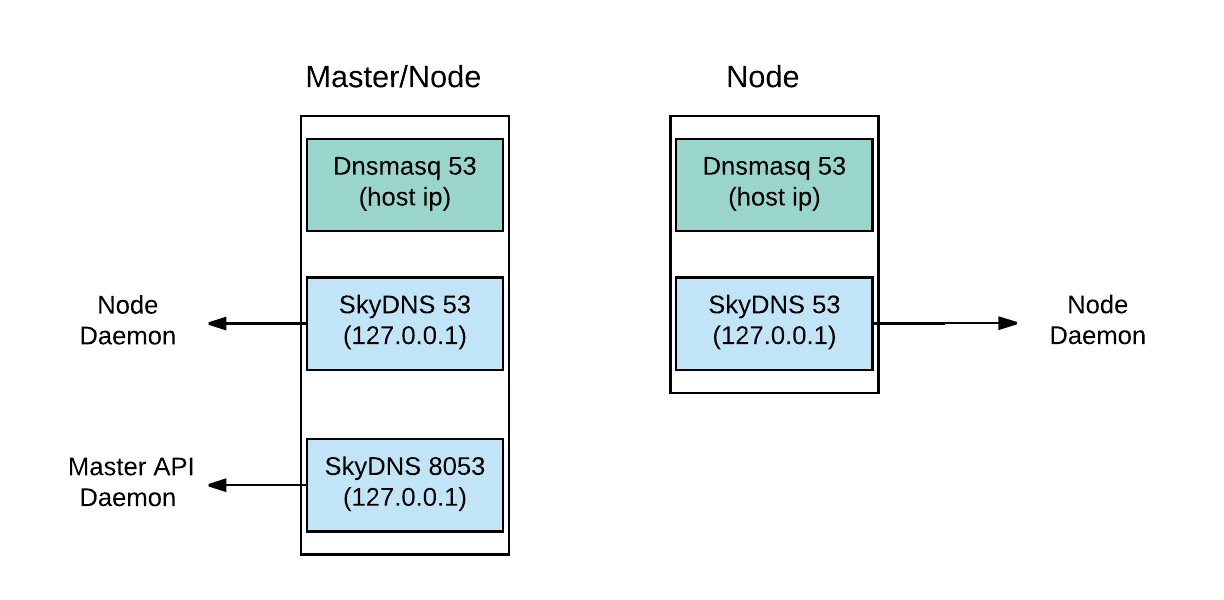
. The above dnsmasq comes with the local Docker installation I guess, and has nothing with openshift:
ps -ef|grep dnsmasq
libvirt+  1331     1  0 Feb21 ?        00:00:00 /usr/sbin/dnsmasq --conf-file=/var/lib/libvirt/dnsmasq/docker-machines.conf --leasefile-ro --dhcp-script=/usr/lib/libvirt/libvirt_leaseshelper
root      1332  1331  0 Feb21 ?        00:00:00 /usr/sbin/dnsmasq --conf-file=/var/lib/libvirt/dnsmasq/docker-machines.conf --leasefile-ro --dhcp-script=/usr/lib/libvirt/libvirt_leaseshelper
libvirt+  1385     1  0 Feb21 ?        00:00:00 /usr/sbin/dnsmasq --conf-file=/var/lib/libvirt/dnsmasq/default.conf --leasefile-ro --dhcp-script=/usr/lib/libvirt/libvirt_leaseshelper
root      1386  1385  0 Feb21 ?        00:00:00 /usr/sbin/dnsmasq --conf-file=/var/lib/libvirt/dnsmasq/default.conf --leasefile-ro --dhcp-script=/usr/lib/libvirt/libvirt_leaseshelper
ps -ef|grep openshift
root     21895 21874 10 00:51 ?        00:44:58 hyperkube kubelet --address=0.0.0.0 --allow-privileged=true --anonymous-auth=true --authentication-token-webhook=true --authentication-token-webhook-cache-ttl=5m --authorization-mode=Webhook --authorization-webhook-cache-authorized-ttl=5m --authorization-webhook-cache-unauthorized-ttl=5m --cadvisor-port=0 --cgroup-driver=systemd --client-ca-file=/var/lib/origin/openshift.local.config/node/node-client-ca.crt --cluster-domain=cluster.local --container-runtime-endpoint=unix:///var/run/dockershim.sock --containerized=false --experimental-dockershim-root-directory=/var/lib/dockershim --fail-swap-on=false --healthz-bind-address= --healthz-port=0 --host-ipc-sources=api --host-ipc-sources=file --host-network-sources=api --host-network-sources=file --host-pid-sources=api --host-pid-sources=file --hostname-override=localhost --http-check-frequency=0s --image-service-endpoint=unix:///var/run/dockershim.sock --iptables-masquerade-bit=0 --kubeconfig=/var/lib/origin/openshift.local.config/node/node.kubeconfig --max-pods=250 --network-plugin= --node-ip= --pod-infra-container-image=openshift/origin-pod:v3.11 --port=10250 --read-only-port=0 --register-node=true --root-dir=/var/lib/origin/cluster-up/home/AD.INEOR.SI/p.maslov/openshift.local.clusterup/openshift.local.volumes --tls-cert-file=/var/lib/origin/openshift.local.config/node/server.crt --tls-cipher-suites=TLS_ECDHE_ECDSA_WITH_CHACHA20_POLY1305 --tls-cipher-suites=TLS_ECDHE_RSA_WITH_CHACHA20_POLY1305 --tls-cipher-suites=TLS_ECDHE_ECDSA_WITH_AES_128_GCM_SHA256 --tls-cipher-suites=TLS_ECDHE_RSA_WITH_AES_128_GCM_SHA256 --tls-cipher-suites=TLS_ECDHE_ECDSA_WITH_AES_256_GCM_SHA384 --tls-cipher-suites=TLS_ECDHE_RSA_WITH_AES_256_GCM_SHA384 --tls-cipher-suites=TLS_ECDHE_ECDSA_WITH_AES_128_CBC_SHA256 --tls-cipher-suites=TLS_ECDHE_RSA_WITH_AES_128_CBC_SHA256 --tls-cipher-suites=TLS_ECDHE_ECDSA_WITH_AES_128_CBC_SHA --tls-cipher-suites=TLS_ECDHE_ECDSA_WITH_AES_256_CBC_SHA --tls-cipher-suites=TLS_ECDHE_RSA_WITH_AES_128_CBC_SHA --tls-cipher-suites=TLS_ECDHE_RSA_WITH_AES_256_CBC_SHA --tls-cipher-suites=TLS_RSA_WITH_AES_128_GCM_SHA256 --tls-cipher-suites=TLS_RSA_WITH_AES_256_GCM_SHA384 --tls-cipher-suites=TLS_RSA_WITH_AES_128_CBC_SHA --tls-cipher-suites=TLS_RSA_WITH_AES_256_CBC_SHA --tls-min-version=VersionTLS12 --tls-private-key-file=/var/lib/origin/openshift.local.config/node/server.key --cgroup-driver=cgroupfs --pod-manifest-path=/var/lib/origin/pod-manifests --file-check-frequency=1s --cluster-dns=172.30.0.2 --v=0
root     22272 22252 23 00:51 ?        01:44:20 hypershift openshift-kube-apiserver --config=/etc/origin/master/master-config.yaml
root     22341 22321  8 00:51 ?        00:39:04 openshift start etcd --config=/etc/origin/master/master-config.yaml
root     22416 22398  1 00:51 ?        00:06:37 hyperkube kube-scheduler --leader-elect=true --leader-elect-resource-lock=configmaps --port=10251 --kubeconfig=/etc/origin/master/openshift-master.kubeconfig --policy-config-file=
root     22496 22475  6 00:51 ?        00:28:00 hyperkube kube-controller-manager --enable-dynamic-provisioning=true --use-service-account-credentials=true --leader-elect-retry-period=3s --leader-elect-resource-lock=configmaps --controllers=* --controllers=-ttl --controllers=-bootstrapsigner --controllers=-tokencleaner --controllers=-horizontalpodautoscaling --pod-eviction-timeout=5m --cluster-signing-key-file= --cluster-signing-cert-file= --experimental-cluster-signing-duration=720h --root-ca-file=/etc/origin/master/ca-bundle.crt --port=10252 --service-account-private-key-file=/etc/origin/master/serviceaccounts.private.key --kubeconfig=/etc/origin/master/openshift-master.kubeconfig --openshift-config=/etc/origin/master/master-config.yaml
root     23270 23240  0 00:51 ?        00:02:01 openshift start network --enable=proxy --listen=https://0.0.0.0:8444 --config=/etc/origin/node/node-config.yaml
root     23715 23677  2 00:51 ?        00:10:01 hypershift openshift-apiserver --config=/etc/origin/master/master-config.yaml -v=0
root     24138 24097  0 00:51 ?        00:00:26 openshift start network --enable=dns --config=/etc/origin/node/node-config.yaml
root     24622 24583  4 00:51 ?        00:20:29 hypershift openshift-controller-manager --config=/etc/origin/master/master-config.yaml --v=0
root     24808 24775  1 00:51 ?        00:07:42 hypershift experimental openshift-webconsole-operator --config=/var/run/configmaps/config/operator-config.yaml -v=0
Still investigating...
 maslick
on 22 Feb 2019
maslick
on 22 Feb 2019
/reopen
maslick
on 25 Feb 2019
@maslick: You can't reopen an issue/PR unless you authored it or you are a collaborator.
In response to this:
/reopen
Instructions for interacting with me using PR comments are available here. If you have questions or suggestions related to my behavior, please file an issue against the kubernetes/test-infra repository.
 openshift-ci-robot
on 25 Feb 2019
openshift-ci-robot
on 25 Feb 2019
I have the same problem using oc cluster up. Pods inside openshift cannot get internet DNS, but no problem if I start the container directly from the host.
I'm using ubuntu virtual machine hosted in Amazon EC2. The OS uses systemd-resolved, resolving names in upstream servers as stated in https://kubernetes.io/docs/tasks/administer-cluster/dns-debugging-resolution/#known-issues
Wanna know how can I solve this issue to make my pods's Internet DNS back
 chihangc
on 19 Apr 2019
chihangc
on 19 Apr 2019
/remove-lifecycle stale
magick93
on 10 Jun 2019
Any progress on this so far?
 abhinavsinha1991
on 27 Aug 2019
abhinavsinha1991
on 27 Aug 2019
Related issues
 surajssd
·
4Comments
surajssd
·
4Comments
 davivd
·
4Comments
davivd
·
4Comments
 alikhajeh1
·
3Comments
alikhajeh1
·
3Comments
 smugcloud
·
5Comments
smugcloud
·
5Comments
 akram
·
3Comments
akram
·
3Comments
Most helpful comment
Am also experiencing similar.
When running
oc cluster upin a corp environment, and when in the terminal of a pod, I try: