Origin: Error from server (NotFound): buildconfigs.build.openshift.io "hello-maven-docker" not found
Version
oc v3.7.0-0.178.2
kubernetes v1.7.6+a08f5eeb62
features: Basic-Auth
Steps To Reproduce
The maven-pipeline.yaml template contains a pipeline that uses a maven node to build and package a WAR. It then builds an image with the WAR using a Docker-strategy OpenShift build.
To run this example:
- Ensure that you have a running OpenShift environment as described in the basic example
- Create a new project for your pipeline on the OpenShift web console:
- Login
- Click on New Project
- Enter a project name
- Click Create
- In the Add to Project page, click on Import YAML/JSON
- In a separate browser tab, navigate to maven-pipeline.yaml and copy its content.
- Paste the YAML text in the text box of the Import YAML/JSON tab.
- Click on Create
- Leave Process the template checked and click on Continue
- Modify the URL and Reference of the code repository if you have created your own fork.
- Click on Create
- Navigate to Builds -> Pipelines
- Click on Start Pipeline next to openshift-jee-sample
Current Result
Running on master in /var/lib/jenkins/jobs/manven-hello-maven/workspace
[Pipeline] {
[Pipeline] stage
[Pipeline] { (Build Image)
[Pipeline] unstash
[Pipeline] sh
**[workspace] Running shell script
- oc start-build hello-maven-docker --from-file=target/ROOT.war -n manven
Uploading file "target/ROOT.war" as binary input for the build ...
Error from server (NotFound): buildconfigs.build.openshift.io "hello-maven-docker" not found**
[Pipeline] }
[Pipeline] // stage
[Pipeline] }
[Pipeline] // node
[Pipeline] }
[Pipeline] // timeout
[Pipeline] echo
in catch block
[Pipeline] echo
Caught: hudson.AbortException: script returned exit code 1
[Pipeline] End of Pipeline
ERROR: script returned exit code 1
Finished: FAILURE
Expected Result
When the pipeline completes, the openshift-jee-sample application should be deployed and running.
 abinstephen1989
All 11 comments
@openshift/sig-developer-experience
 php-coder
on 9 Nov 2017
php-coder
on 9 Nov 2017
your pipeline looks wrong:
https://github.com/openshift/origin/blob/master/examples/jenkins/pipeline/maven-pipeline.yaml#L101
the buildconfig name should have "-docker" on it.
are you sure you're using our version of the pipeline and haven't modified it?
 bparees
on 9 Nov 2017
bparees
on 9 Nov 2017
please find the pipeline i am using
try {
   timeout(time: 20, unit: 'MINUTES') {
      def appName="hello-maven"
      def project=""

      node {
        stage("Initialize") {
          project = env.PROJECT_NAME
        }
      }

      node("maven") {
        stage("Checkout") {
          git url: "https://github.com/openshift/openshift-jee-sample.git", branch: "master"
        }
        stage("Build WAR") {
          sh "mvn clean package -Popenshift"
          stash name:"war", includes:"target/ROOT.war"
        }
      }

      node {
        stage("Build Image") {
          unstash name:"war"
          sh "oc start-build ${appName}-docker --from-file=target/ROOT.war -n ${project}"
          openshiftVerifyBuild bldCfg: "${appName}-docker", namespace: project, waitTime: '20', waitUnit: 'min'
        }
        stage("Deploy") {
          openshiftDeploy deploymentConfig: appName, namespace: project
        }
      }
   }
} catch (err) {
   echo "in catch block"
   echo "Caught: ${err}"
   currentBuild.result = 'FAILURE'
   throw err
}
@abinstephen1989 - based on your original description, I did not see where you instantiated the maven-pipeline.yaml with APP_NAME as hello-maven, in fact your step 15 implies you used the default openshift-jee-sample, nor do I see where you specify that you created the hello-maven-docker BuildConfig after the fact.
I'm curious as to what these sets of commands return when run in the namespace you instantiated the template:
oc get all -l app=hello-mavenoc get all -l app=maven-pipelineoc get all -l app=openshift-jee-sampleoc get all -l app=openshift-jee-sample-dockeroc get all -l app=hello-maven-docker
thanks
 gabemontero
on 10 Nov 2017
gabemontero
on 10 Nov 2017
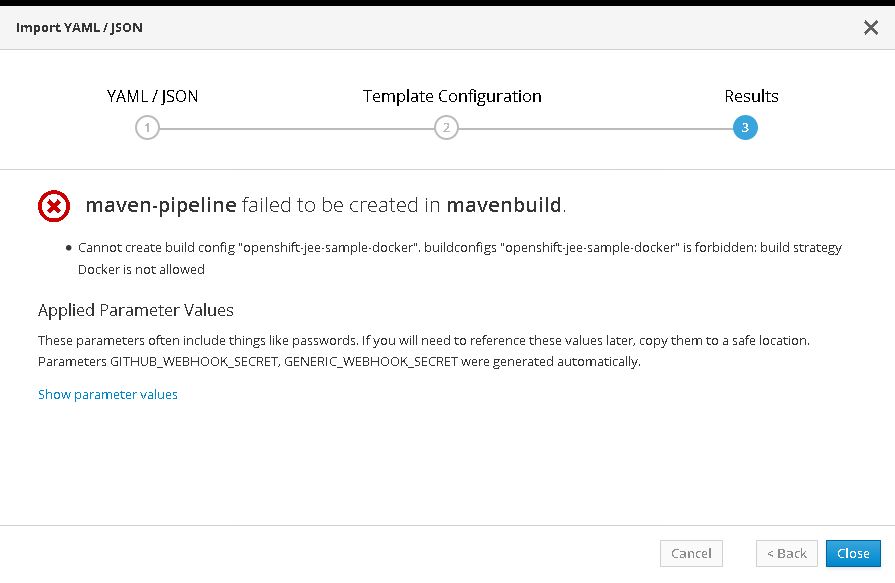
I got the attached error while creating project in open shift using below maven-pipeline.yaml .
apiVersion: v1
kind: Template
metadata:
  name: maven-pipeline
parameters:
- name: APP_NAME
  description: The name assigned to all of the application objects defined in this template.
  displayName: Application Name
  required: true
  value: openshift-jee-sample
- name: GIT_SOURCE_URL
  description: The source URL for the application
  displayName: Source URL
  required: true
  value: https://github.com/openshift/openshift-jee-sample.git
- name: GIT_SOURCE_REF
  description: The source Ref for the application
  displayName: Source Ref
  required: true
  value: master
- description: Github trigger secret.  A difficult to guess string encoded as part of the webhook URL.  Not encrypted.
  displayName: GitHub Webhook Secret
  from: '[a-zA-Z0-9]{40}'
  generate: expression
  name: GITHUB_WEBHOOK_SECRET
  required: true
- description: A secret string used to configure the Generic webhook.
  displayName: Generic Webhook Secret
  from: '[a-zA-Z0-9]{40}'
  generate: expression
  name: GENERIC_WEBHOOK_SECRET
  required: true
objects:
- apiVersion: v1
  kind: ImageStream
  metadata:
    labels:
      app: ${APP_NAME}
    name: ${APP_NAME}
  spec: {}
  status:
    dockerImageRepository: ""
- apiVersion: v1
  kind: ImageStream
  metadata:
    name: wildfly
  spec:
    tags:
    - annotations:
        supports: wildfly:10.1,jee,java
        tags: builder,wildfly,java
        version: "10.1"
      from:
        kind: DockerImage
        name: openshift/wildfly-101-centos7:latest
      name: "10.1"
    - annotations:
        supports: jee,java
        tags: builder,wildfly,java
      from:
        kind: ImageStreamTag
        name: "10.1"
      name: latest
- apiVersion: v1
  kind: BuildConfig
  metadata:
    annotations:
      pipeline.alpha.openshift.io/uses: '[{"name": "${NAME}", "namespace": "", "kind": "DeploymentConfig"}]'
    creationTimestamp: null
    labels:
      name: ${APP_NAME}
    name: ${APP_NAME}
  spec:
    strategy:
      jenkinsPipelineStrategy:
        jenkinsfile: |-
          try {
             timeout(time: 20, unit: 'MINUTES') {
                def appName="${APP_NAME}"
                def project=""

                node {
                  stage("Initialize") {
                    project = env.PROJECT_NAME
                  }
                }

                node("maven") {
                  stage("Checkout") {
                    git url: "${GIT_SOURCE_URL}", branch: "${GIT_SOURCE_REF}"
                  }
                  stage("Build WAR") {
                    sh "mvn clean package -Popenshift"
                    stash name:"war", includes:"target/ROOT.war"
                  }
                }

                node {
                  stage("Build Image") {
                    unstash name:"war"
                    sh "oc start-build ${appName}-docker --from-file=target/ROOT.war -n ${project}"
                    openshiftVerifyBuild bldCfg: "${appName}-docker", namespace: project, waitTime: '20', waitUnit: 'min'
                  }
                  stage("Deploy") {
                    openshiftDeploy deploymentConfig: appName, namespace: project
                  }
                }
             }
          } catch (err) {
             echo "in catch block"
             echo "Caught: ${err}"
             currentBuild.result = 'FAILURE'
             throw err
          }
      type: JenkinsPipeline
    triggers:
    - github:
        secret: "${GITHUB_WEBHOOK_SECRET}"
      type: GitHub
    - generic:
        secret: "${GENERIC_WEBHOOK_SECRET}"
      type: Generic
- apiVersion: v1
  kind: BuildConfig
  metadata:
    labels:
      app: ${APP_NAME}-docker
    name: ${APP_NAME}-docker
  spec:
    output:
      to:
        kind: ImageStreamTag
        name: ${APP_NAME}:latest
    postCommit: {}
    resources: {}
    runPolicy: Serial
    source:
      dockerfile: |-
        FROM wildfly
        COPY ROOT.war /wildfly/standalone/deployments/ROOT.war
        CMD $STI_SCRIPTS_PATH/run
      binary:
        asFile: ROOT.war
      type: Docker
    strategy:
      dockerStrategy:
        from:
          kind: ImageStreamTag
          name: wildfly:latest
      type: Docker
    triggers: {}
- apiVersion: v1
  kind: DeploymentConfig
  metadata:
    labels:
      app: ${APP_NAME}
    name: ${APP_NAME}
  spec:
    replicas: 1
    selector:
      app: ${APP_NAME}
      deploymentconfig: ${APP_NAME}
    strategy:
      rollingParams:
        intervalSeconds: 1
        maxSurge: 25%
        maxUnavailable: 25%
        timeoutSeconds: 600
        updatePeriodSeconds: 1
      type: Rolling
    template:
      metadata:
        labels:
          app: ${APP_NAME}
          deploymentconfig: ${APP_NAME}
      spec:
        containers:
        - image: ${APP_NAME}:latest
          imagePullPolicy: Always
          name: ${APP_NAME}
          ports:
          - containerPort: 8080
            protocol: TCP
          resources: {}
          terminationMessagePath: /dev/termination-log
          livenessProbe:
            httpGet:
              path: /
              port: 8080
              scheme: HTTP
            initialDelaySeconds: 10
            timeoutSeconds: 2
            periodSeconds: 10
            successThreshold: 1
            failureThreshold: 3
          readinessProbe:
            httpGet:
              path: /
              port: 8080
              scheme: HTTP
            initialDelaySeconds: 30
            timeoutSeconds: 2
            periodSeconds: 10
            successThreshold: 1
            failureThreshold: 3
        dnsPolicy: ClusterFirst
        restartPolicy: Always
        securityContext: {}
        terminationGracePeriodSeconds: 30
    test: false
    triggers:
    - type: ConfigChange
    - imageChangeParams:
        automatic: true
        containerNames:
        - ${APP_NAME}
        from:
          kind: ImageStreamTag
          name: ${APP_NAME}:latest
      type: ImageChange
  status: {}
- apiVersion: v1
  kind: Service
  metadata:
    annotations:
      openshift.io/generated-by: OpenShiftNewApp
    labels:
      app: ${APP_NAME}
    name: ${APP_NAME}
  spec:
    ports:
    - name: 8080-tcp
      port: 8080
      protocol: TCP
      targetPort: 8080
    selector:
      app: ${APP_NAME}
      deploymentconfig: ${APP_NAME}
    sessionAffinity: None
    type: ClusterIP
  status:
    loadBalancer: {}
- apiVersion: v1
  kind: Route
  metadata:
    name: ${APP_NAME}
    labels:
      app: ${APP_NAME}
  spec:
    to:
      kind: Service
      name: ${APP_NAME}
      weight: 100
    port:
      targetPort: 8080-tcp
    wildcardPolicy: None
Your cluster appears to be denying the permission to create docker strategy builds. see: https://docs.openshift.org/latest/admin_guide/securing_builds.html
bparees
on 13 Nov 2017
i was trying to create a user with role : cluster-admin but getting below error. I am using developer preview of Open shift. Is there anything like in developer preview we cant create cluster-admin.?? Please help..
C:\Downloads\oc>oc adm policy add-cluster-role-to-user cluster-admin astephen-1
Error from server (Forbidden): User "astephen-1" cannot list clusterrolebindings.authorization.openshift.io at the cluster scope: User "astephen-1" cannot list all clusterrolebindings.authorization.openshift.io in the cluster (get clusterrolebindings.authorization.openshift.io)
abinstephen1989
on 14 Nov 2017
On Tue, Nov 14, 2017 at 3:04 AM, abinstephen1989 notifications@github.com
wrote:
i was trying to create a user with role : cluster-admin but getting below
error. I am using developer preview of Open shift. Is there anything like
in developer preview we cant create cluster-admin.?? Please help..C:\Downloads\oc>oc adm policy add-cluster-role-to-user cluster-admin
astephen-1
Error from server (Forbidden): User "astephen-1" cannot list
clusterrolebindings.authorization.openshift.io at the cluster scope: User
"astephen-1" cannot list all clusterrolebindings.
authorization.openshift.io in the cluster (get clusterrolebindings.
authorization.openshift.io)
What user are you logged in as when running oc adm ... ? Provide the oc
whoami output prior to running that call.
—
You are receiving this because you are on a team that was mentioned.
Reply to this email directly, view it on GitHub
https://github.com/openshift/origin/issues/17245#issuecomment-344176325,
or mute the thread
https://github.com/notifications/unsubscribe-auth/ADbadFcPDK2XeDsek19xKvE5iLWjHOIfks5s2UmrgaJpZM4QX4ON
.
gabemontero
on 14 Nov 2017
C:\Downloads\oc>oc whoami
astephen-1
abinstephen1989
on 15 Nov 2017
OpenShift developer preview does not support Docker builds for security reasons, and the cluster-admin role is not available to end users.
 jim-minter
on 15 Nov 2017
jim-minter
on 15 Nov 2017
Closing this issue for the following reasons:
- No further contact/information from the user
- Seems to be a limitation of the service being used, not the product
@abinstephen1989 please re-open or open a new issue if you have further information to contribute
 coreydaley
on 9 Jan 2018
coreydaley
on 9 Jan 2018
Related issues
 syui
·
3Comments
syui
·
3Comments
 guangxuli
·
4Comments
guangxuli
·
4Comments
 rkrmishra
·
4Comments
rkrmishra
·
4Comments
 davivd
·
4Comments
davivd
·
4Comments
 slmzig
·
3Comments
slmzig
·
3Comments
Most helpful comment
OpenShift developer preview does not support Docker builds for security reasons, and the cluster-admin role is not available to end users.