When trying to acces the webUI with Safari, I get into a crash loop and can't login.
Error

An error has occurred

Unable to load details about the server. If the problem continues, please contact your system administrator.

Return to the console.
All of a sudden, I can login but I get repeated error messages in the lower right of Safari saying Server connection interrupted
Version
openshift v1.4.1
kubernetes v1.4.0+776c994
Steps To Reproduce
- open standard webUI (port 8443)
Current Result
Error message on open shift webui and connection interrupted messages.
Expected Result
Normal webUI
 benereich
All 10 comments
/cc @jwforres
 stevekuznetsov
on 23 Mar 2017
stevekuznetsov
on 23 Mar 2017
The server connection interrupted messages are because of how safari handles self-signed cert acceptance. If you just click "Continue" on the popup, then it doesn't extend the cert acceptance to the websockets that will be opened. So only the initial XHR requests succeed and the subsequent websocket watches will all fail. This behavior is unique to Safari. To fix this you need to actually permanently accept the cert.
 jwforres
on 18 Apr 2017
jwforres
on 18 Apr 2017
I tried various things such as accepting the certs permanently, did not help either.
benereich
on 2 May 2017
The certificate acceptance flow in Safari has changed with the update to High Sierra. Would like to know if folks are still reproducing the issues now.
jwforres
on 23 Oct 2017
@benediktreichert Have you tried it with High Sierra as suggested above? I'm experiencing the same on Sierra.
 snipem
on 12 Jan 2018
snipem
on 12 Jan 2018
+1
 wagnersza
on 9 Feb 2018
wagnersza
on 9 Feb 2018
Issues go stale after 90d of inactivity.
Mark the issue as fresh by commenting /remove-lifecycle stale.
Stale issues rot after an additional 30d of inactivity and eventually close.
Exclude this issue from closing by commenting /lifecycle frozen.
If this issue is safe to close now please do so with /close.
/lifecycle stale
 openshift-bot
on 10 May 2018
openshift-bot
on 10 May 2018
Stale issues rot after 30d of inactivity.
Mark the issue as fresh by commenting /remove-lifecycle rotten.
Rotten issues close after an additional 30d of inactivity.
Exclude this issue from closing by commenting /lifecycle frozen.
If this issue is safe to close now please do so with /close.
/lifecycle rotten
/remove-lifecycle stale
openshift-bot
on 9 Jun 2018
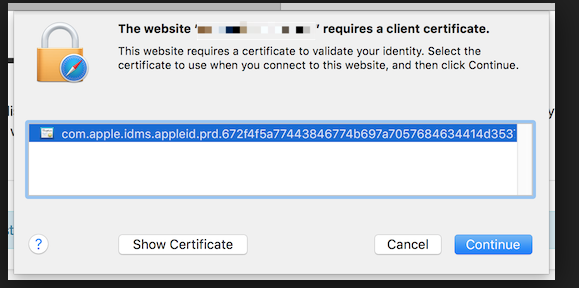
Same issue here. After click button 'Continue', it starts loop. Close tab and wait minutes, or restart safari, it works fine. But minutes later, it popups to ask client key again.
Issue went away after delete the cert from keychain.
 addozhang
on 27 Jun 2018
addozhang
on 27 Jun 2018
Rotten issues close after 30d of inactivity.
Reopen the issue by commenting /reopen.
Mark the issue as fresh by commenting /remove-lifecycle rotten.
Exclude this issue from closing again by commenting /lifecycle frozen.
/close
openshift-bot
on 27 Jul 2018
Related issues
 deanpeterson
·
59Comments
deanpeterson
·
59Comments
 jeremyeder
·
59Comments
jeremyeder
·
59Comments
 cello86
·
44Comments
cello86
·
44Comments
 gbaufake
·
46Comments
gbaufake
·
46Comments
 clcollins
·
48Comments
clcollins
·
48Comments
Most helpful comment
I tried various things such as accepting the certs permanently, did not help either.