Organizr: Tautulli Widget not showing posters?
Organizr Version: V 1.x
Branch: Master/Develop
WebServer: Nginx/Apache
Operating System: Windows/MacOS/Ubuntu
Organizr version 2.0.650 Dev (container)
Problem Description:
It's pulling in all of the correct text info, but the images for the posters are broken.
Looking in the console, their URL looks like this:
https://my.domain/plugins/images/cache/102785-list.jpg
does that look right?
 YouveGotMeowxy
All 11 comments
You provided zero information. You say you're using v1.x and, if that is the case, it is no longer supported and has not been for a while now. The template is there for you to provide information and you didn't update any of it. Please provide the requested information, any errors/warnings found in the browser console or logs, etc. so that we can try and help you.
 tronyx
on 17 Jul 2020
tronyx
on 17 Jul 2020
You provided zero information. You say you're using v1.x and, if that is the case, it is no longer supported and has not been for a while now. The template is there for you to provide information and you didn't update any of it. Please provide the requested information, any errors/warnings found in the browser console or logs, etc. so that we can try and help you.
You were too fast with the scolding. ;)
I created the post and accidentally hit the button. I immediately clicked the Edit link and started filling it in when I saw your reply.
YouveGotMeowxy
on 17 Jul 2020
Ah, got'cha. My bad. As you can guess, we get a lot of posts like that.
Anyway, yes, those are the correct image URLs. If the images are not loading have you tried another browser or incognito/private mode? Also, you can try removing everything from inside that directory to force it to regen the image cache.
tronyx
on 17 Jul 2020
also check file permissions
 causefx
on 17 Jul 2020
causefx
on 17 Jul 2020
If the images are not loading have you tried another browser or incognito/private mode? Also, you can try removing everything from inside that directory to force it to regen the image cache.
@christronyxyocum ty. I just tried both. I deleted all files in that cache folder, as well as trying with Chrome, Edge, and Opera, and they're still all broken.
@causefx Which file permissions should I check, and what should they set to? (I'm not super educated in this stuff, lol.)
YouveGotMeowxy
on 17 Jul 2020
Are you using the internal (ip:port) or external address for the Tautulli connection?
 HalianElf
on 21 Jul 2020
HalianElf
on 21 Jul 2020
Edit: Disregard, I think the API errors I was seeing were caused because I was using https://www.example.com/api/v2 as the connection URL instead of https://www.example.com
I'm seeing the same issue. The Tautulli widget is working for me, but some posters are not loading. Checking the Tautulli logs, I'm seeing a number of API errors. Is this related?
Timestamp | Level | Message
-- | -- | --
2020-07-23 07:49:35 | DEBUG | Tautulli APIv2 :: Parameter apikey is required.
2020-07-23 07:49:35 | DEBUG | Tautulli APIv2 :: API called with kwargs: {'img': '/library/metadata/2082/art/1595040754', 'rating_key': '2082', 'width': '400', 'height': '600'}
 ksufinger
on 23 Jul 2020
ksufinger
on 23 Jul 2020
If you are using Organizr ServerAuth to authenticate requests to Tautulli, then you may need to specify an API URL in the Organizr Tautulli settings that is not restricted by ServerAuth. This was my issue. I had made an exception for /api in my proxy settings, but the module also needs access to other Tautulli URL paths.
ksufinger
on 23 Jul 2020
Yup, that's exactly why I asked what I did. The images are pulled from <tautulli url>/pms_image_proxy
HalianElf
on 23 Jul 2020
I see another minor issue when an item is deleted; it'll also show a broken image icon: (i.e. after watching that fight in the #1 spot I deleted it from the server, but Tautulli still shows it's info anyway)
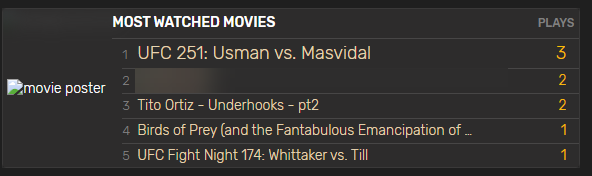
Is there any way to add logic to detect a deleted media file, and if so add some sort of generic icon in it's place? It'd give a more polished appearance.
 STaRDoGG
on 6 Aug 2020
STaRDoGG
on 6 Aug 2020
This issue has been automatically marked as stale because it has not had recent activity. It will be closed if no further activity occurs.
![github-actions[bot] picture](https://avatars.githubusercontent.com/in/15368?v=4&s=40) github-actions[bot]
on 23 Jan 2021
github-actions[bot]
on 23 Jan 2021
Related issues
 fana13
·
3Comments
fana13
·
3Comments
 jaydee99
·
6Comments
jaydee99
·
6Comments
 romquenin
·
3Comments
romquenin
·
3Comments
 roblandry
·
5Comments
roblandry
·
5Comments
 deandmx
·
5Comments
deandmx
·
5Comments
Most helpful comment
Are you using the internal (ip:port) or external address for the Tautulli connection?