Organizr Version: Docker organizrtools/organizr-v2:latest
Branch: N/A
WebServer: Traefik + traefik-forward-auth
Operating System: Ubuntu
Problem Description:
I'm using Organizr behind Traefik with Google Oauth through the following component: https://github.com/thomseddon/traefik-forward-auth
It works well, and I'm able to securize access to all services behind Traefik, including Organizr.
The only thing is that I can't use this authentication result to login directly to Organizr.
For some tools, disabling auth would be enough, but it would be great if I could use Google Oauth email to login automatically on corresponding Organizr users.
As explained here, Traefik is able to send the authenticated user through the X-Forwarded-User header (or any header, it's customizable), so I'd like to know if it would be possible for Organizr to use this kind of header to avoid me to login twice ?
If not, is it possible to completely disable Organizr auth ? (removing any user customization possibility, of course)
Thanks !
 gdlx
gdlx
All 21 comments
Any news ?
gdlx
on 1 Aug 2019
I can add an option to check for a header based of a whitelist but I really need to sit down and think about this as isnt super secure.
 causefx
on 1 Aug 2019
causefx
on 1 Aug 2019
Yeah, it may seem unsecure at first, but it's how SSO works and it is secure with a whitelist checking the request comes from the local network (or the reverse proxy IP where the header is supposed to be set if you want to be accurate).
Here is how Grafana implements it: https://grafana.com/docs/auth/auth-proxy/
I'm using it with the following config:
````ini
[auth.proxy]
enabled = true
header_name = X-Forwarded-User
header_property = email
auto_sign_up = true
Whitelist Docker network range:
whitelist = 172.16.0.0/12
````
I'm also using the following Grafana options to make things more seamless:
````ini
[auth]
This makes the auth proxy the only possible way to login
disable_login_form = true
It's also impossible to logout (which seems logical, as it's impossible to
login another way...)
disable_signout_menu = true
[security]
That way my owner account is automatically created and I'm directly logged
as admin after deploying the container for the first time (then I'd be able
to grant access to further users)
admin_user = [email protected]
````
I honestly think this may be a killer feature for an app like Organizr, which gives access to multiple apps. Proof is you already worked on SSO features, but they're restricted to media center apps, where Google Oauth (or any other auth proxy) is more universal.
I wish I could provide a PR, but I didn't do PHP for 10+ years (Ruby guy here 😉)
gdlx
on 1 Aug 2019
Please try the dev branch to see if this works.
causefx
on 2 Aug 2019
Please try the dev branch to see if this works.
Yeah but, as I'm using the Docker version, it may not be that simple.
I'll try to build the image, but I may need a little more time...
gdlx
on 2 Aug 2019
just change the tag to develop.
causefx
on 2 Aug 2019
check the page for the appropriate develop tag.
causefx
on 2 Aug 2019
Ok, I didn't understand the container was updating itself from Git, so I was looking for a tag from today 😄
Well I've tried and...it didn't work.
I checked if the header is correctly sent by installing tcpdump in the container and here is the headers I receive on the root request:
GET / HTTP/1.1
Host: #############.com
User-Agent: Mozilla/5.0 (Windows NT 10.0; Win64; x64) AppleWebKit/537.36 (KHTML, like Gecko) Chrome/75.0.3770.102 Safari/537.36 Vivaldi/2.6.1566.44
Accept: text/html,application/xhtml+xml,application/xml;q=0.9,image/webp,image/apng,*/*;q=0.8,application/signed-exchange;v=b3
Accept-Encoding: gzip, deflate, br
Accept-Language: fr-FR,fr;q=0.9,en-US;q=0.8,en;q=0.7
Cache-Control: max-age=0
Cookie: _forward_auth=T5hd9C-106o6yWOs-XcUcoQOYszHnVrz9Wge5ZLhM9M=|1564821148|##################@gmail.com; organizrLanguage=fr
Dnt: 1
Upgrade-Insecure-Requests: 1
X-Forwarded-For: 192.168.1.254
X-Forwarded-Host: #############.com
X-Forwarded-Port: 443
X-Forwarded-Proto: https
X-Forwarded-Server: 5d279bfce9d7
X-Forwarded-User: ##################@gmail.com
X-Real-Ip: 192.168.1.254
The X-Forwarded-User address is the same than the one provided by the _forward_auth cookie provided by Google.
It is of course the same than my Organizr user:
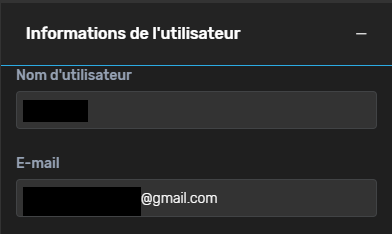
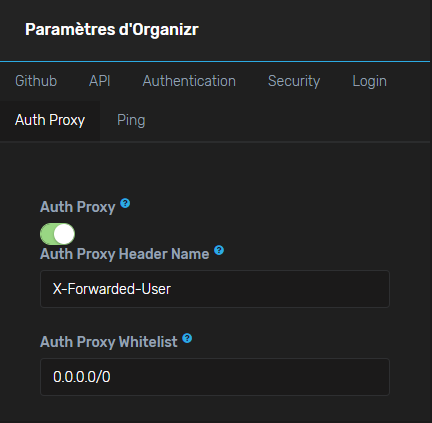
Here is my Auth Proxy config. I've set the whitelist as 0.0.0.0/0 to bypass this as a cause, but it doesn't work neither with 172.16.0.0/12 where the request actually comes from.
It would be nice if I could actually log the IP range you're reading for the whitelist, and the $username and $authProxy values
gdlx
on 2 Aug 2019
i’ll add the up to log in one second. driving home.
causefx
on 3 Aug 2019
please try restarting the container now or updating in settings UI
causefx
on 3 Aug 2019
~In which log file am I supposed to find it ? I only see nginx acces & error and PHP error logs in the container's /config/log~
I just found them in the UI.
gdlx
on 3 Aug 2019
Here is the log:
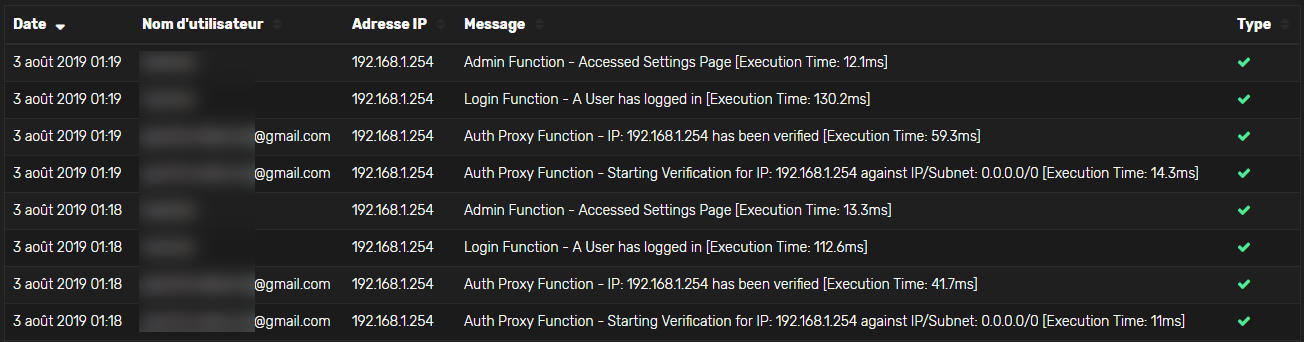
A strange thing is that I only get the Auth Proxy log once I actually login manually after I refreshed the login page many times. I should have had as many Auth Proxy logs as refreshs.
It's as if the Auth Proxy info is parsed when logging in, not when accessing the app.
So I've just made a simple check: I've tried to login with wrong credentials and...it worked ! I've been logged with my correct user.
That means the check correctly works, but the authentication process is done only when submitting the login form. It should be made when accessign the app from any page.
gdlx
on 3 Aug 2019
One last thing: The whitelist seems to be checked over the X-Forwarded-For IP address, which is not what we want, because it's supposed to ensure the request went through the local reverse proxy (which in my case is 172.18.0.5, 192.168.1.254 is my local router because I tried in local, but I get a public address when trying from my smartphone).
That means it works because I've set 0.0.0.0/0 in the whitelist, but it wouldn't with the real expected network.
gdlx
on 3 Aug 2019
the proxy should be REMOTE_ADDR correct?
causefx
on 5 Aug 2019
Try this latest commit
causefx
on 5 Aug 2019
The IP check works now, even if the success/fail log still displays the X-Forwarded IP:

But I still have to submit the login page (any credential working) to be actually authenticated.
gdlx
on 5 Aug 2019
did you happen to clear js cache? it should auto login if no user is logged in
causefx
on 5 Aug 2019
did you happen to clear js cache? it should auto login if no user is logged in
~I just tried from a private browser session and I still have to submit the login form with any fake credentials (meaning X-Forwarded-User is correctly read).~
I forgotten to update the container. I just tried again and the login form appears briefly before logging me automatically 👍
gdlx
on 6 Aug 2019
Should I open a new Issue for the login not putting me through automatically? I have to put in my user name and press enter for the login to work.
 PhyberApex
on 24 Jul 2020
PhyberApex
on 24 Jul 2020
@gdlx Did you ever get this working? If so, could you share what you had to do in Organizr and/or what Traefik labels?
 dphildebrandt
on 28 Jul 2020
dphildebrandt
on 28 Jul 2020
I don't use Organizr anymore but it used to work. Just the login page was still appearing and sometimes I had to reload the page to be logged.
gdlx
on 30 Jul 2020
Related issues
 mishac
·
4Comments
mishac
·
4Comments
 roblandry
·
5Comments
roblandry
·
5Comments
 pomkos
·
5Comments
pomkos
·
5Comments
 bbviking
·
3Comments
bbviking
·
3Comments
 Cookie-Monster-Coder
·
5Comments
Cookie-Monster-Coder
·
5Comments
Most helpful comment
~I just tried from a private browser session and I still have to submit the login form with any fake credentials (meaning X-Forwarded-User is correctly read).~
I forgotten to update the container. I just tried again and the login form appears briefly before logging me automatically 👍