Organizr-v2 defaults to setting page instead of homepage
Organizr Version: v2.0.49, Docker container: organizrtools/organizr-v2:latest
Branch: v2-master
WebSever: nginx docker container- jwilder/nginx-proxy:alpine
Operating System: Linux
Problem Description:
Not sure if this is a misconfiguration on my end or a bug, but whenever I login to Organizr it brings me to the settings page instead of the Homepage which I have enabled. I see no options to select which page to display at login, unless I'm missing something...
Reproduction Steps:
Just login. This has been happening since the beta.
Errors on screen? If so paste here:
N/A
 brando56894
All 9 comments
screenshot your tabs page so I may see please
 causefx
on 13 Mar 2019
causefx
on 13 Mar 2019
There is a default setting. https://img.roxedus.net/chrome-2019-03-13_22-59-23.png
 Roxedus
on 13 Mar 2019
Roxedus
on 13 Mar 2019
Damn you guys are quick! Also thanks @si0972 that did it, How did I not notice this when setting up my tabs? Now I feel dumb hahaha
One last question, is there a way to make the calendar only show the current week by default instead of the whole month?
brando56894
on 13 Mar 2019
Roxedus
on 13 Mar 2019
Yep, just saw it while waiting for an answer. I must be blind!
brando56894
on 13 Mar 2019
Having the same problem. Solutions which are links to pictures that are no longer available are... bad. Can the solution please be posted in a way that is still viewable a few months later?
 teotikalki
on 30 Nov 2019
teotikalki
on 30 Nov 2019
@teotikalki Here
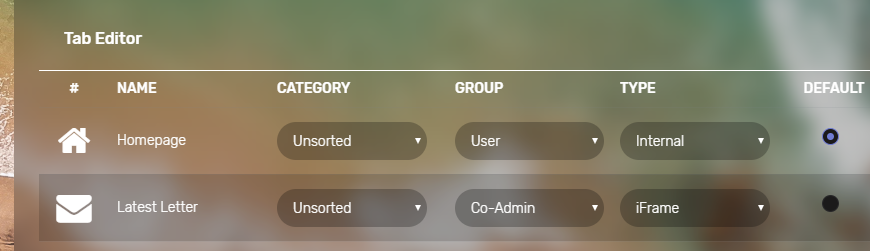
Roxedus
on 1 Dec 2019
@Roxedus Thanks. I guess I was hoping to see the popup part? That part I had set.
Related question maybe: How do I get the house icon? It's not available when I make the homepage tab.
I had read that the tab url should be 'homepage.php'. Is that correct? Is there a local url? What you're showing looks to be part of what's currently giving me a blank page.
-> Question: SHOULD anything be on this page by default? I don't use Plex or any Mono (cr)App, so the tutorials I've found haven't been relevant. I'd love to see something like KODI recently added, but for proof-of-concept I was just expecting to see 'home' on a page or something.
teotikalki
on 4 Dec 2019
Please open a separate issue, our join our discord server
Roxedus
on 4 Dec 2019
Related issues
 pomkos
·
5Comments
pomkos
·
5Comments
 jaydee99
·
6Comments
jaydee99
·
6Comments
 deandmx
·
5Comments
deandmx
·
5Comments
 STaRDoGG
·
4Comments
STaRDoGG
·
4Comments
 roblandry
·
5Comments
roblandry
·
5Comments