Organizr: [v2] Homepage-Item: JDownloader
Organizr Version: 2.0.235
Branch: Develop
WebSever: Nginx
Operating System: Docker
Please add JDownloader as a homepage item
Request Description:
Please add "JDownloader" as another item to the Organizr homepage that will work seperately and within the Combined Downloader.
Update: see https://github.com/causefx/Organizr/pull/1206
I have implemented an API that serves all relevant info about JDownloader's downloads.
https://pypi.org/project/myjd-api/
Proposed Icon:
https://upload.wikimedia.org/wikipedia/commons/f/f7/Jdownloader.png
I will very gladly help you understand the above json.
 rix1337
All 10 comments
this is awesome. i will test this
 causefx
on 28 Oct 2018
causefx
on 28 Oct 2018
do you have a test instance i can hit the API with?
causefx
on 7 Nov 2018
I'll build a standalone version.
rix1337
on 7 Nov 2018
sounds good
causefx
on 7 Nov 2018
Can't give you an eta. This shouldn't take long. Thanks for staying interested 😜
rix1337
on 7 Nov 2018
haha no problem!
causefx
on 7 Nov 2018
There you go:
https://github.com/rix1337/MyJD-API
A simple pip install myjd-api should do.
You then run the script from your shell with
myjd_api
rix1337
on 7 Nov 2018
Hi @causefx
I have looked at your very clean code again and managed to integrate support for my myjd_api package.
You need python and then pip -I install myjd-api (v.0.0.1 was broken -I will force a reinstall and upgrade to 0.0.2). Launch your JDownloader and connect it to the MyJDownloader services.
Running myjd_api from your terminal will then ask for your my.jdownloader.org credentials and output the URL at which it supplies all status info on the connected JDownloader.
rix1337
on 27 Jun 2019
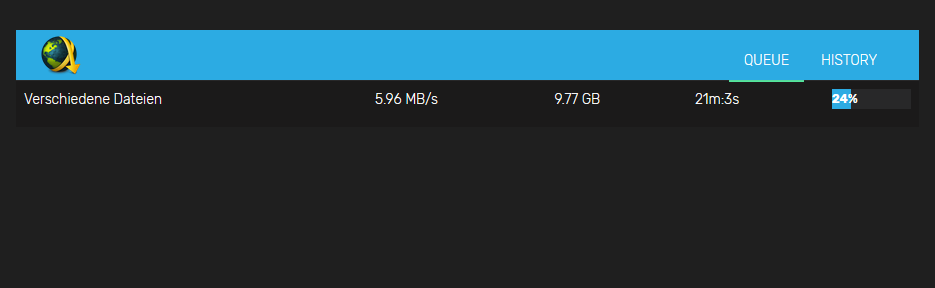
Feature complete:
rix1337
on 27 Jun 2019
Thanks for merging. Can't wait for the next update.
rix1337
on 27 Jun 2019
Related issues
 CBers
·
4Comments
CBers
·
4Comments
 Cookie-Monster-Coder
·
5Comments
Cookie-Monster-Coder
·
5Comments
 xavier84
·
5Comments
xavier84
·
5Comments
 jaydee99
·
6Comments
jaydee99
·
6Comments
 roblandry
·
5Comments
roblandry
·
5Comments
Most helpful comment
Feature complete:
