Orchardcore: can't select Content Type page
I've created 2 custom content type, called Pages and Devices:
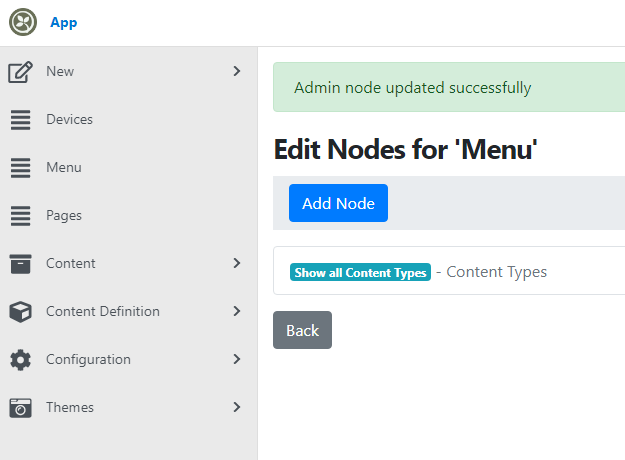
But when I click on Pages (or Devices), it redirect to Content -> Content Items, not "staying" on Pages (or Devices).
i.e. here I clicked on Pages:
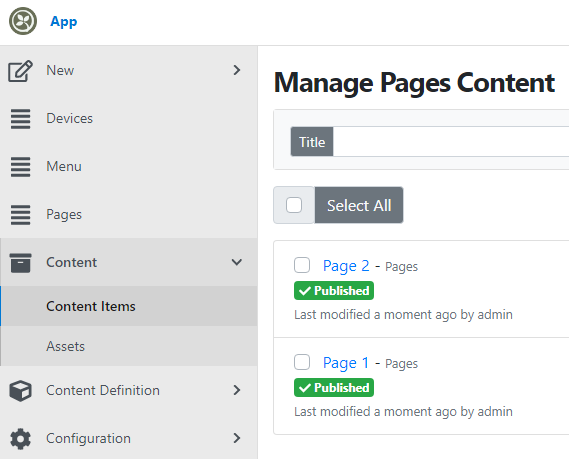
But the menu item "Pages" its not highlighted.... Content -> Content Items is.
I remember I used to do this in the past...
 Nowhk
Nowhk
All 6 comments
It seems it works if you place the menu item "under" the Content Type. I think that's a bug :)
Nowhk
on 25 Apr 2020
Can you let us know which version you are on? I believe this was resolved after RC1
 deanmarcussen
on 25 Apr 2020
deanmarcussen
on 25 Apr 2020
Are you able to reproduce? Nice.
Not sure which version.
I dotnet new occms from template, added yesterday using dotnet new -i OrchardCore.ProjectTemplates::1.0.0-rc1-*
It helps? Or let me know how to catch the version ;)
Nowhk
on 26 Apr 2020
Can you try with the myget dev feed?
I checked, it is resolved there. You should see in your url a query string param ?admin=88337225
/Admin/Contents/ContentItems/467h0xrtddg0ts9757aaykm1m3/Display?admin=88337225
Which is how it has been managed.
The myget feed is available with dotnet new -i OrchardCore.ProjectTemplates::1.0.0-rc1-* --nuget-source https://www.myget.org/F/orchardcore-preview/api/v3/index.json
Or see the docs for a more complete example https://docs.orchardcore.net/en/dev/docs/getting-started/templates/
deanmarcussen
on 26 Apr 2020
Can't try now. I'll try in the future with a new version, too see if this has been fixed. Thanks
Nowhk
on 27 Apr 2020
Please reopen if you can repro it with the dev feed
deanmarcussen
on 27 Apr 2020
Related issues
 hishamco
·
3Comments
hishamco
·
3Comments
 aghili371
·
3Comments
aghili371
·
3Comments
 khoshroomahdi
·
4Comments
khoshroomahdi
·
4Comments
 sebastienros
·
4Comments
sebastienros
·
4Comments
 randaratceridian
·
3Comments
randaratceridian
·
3Comments
Most helpful comment
Can you let us know which version you are on? I believe this was resolved after RC1