Orchardcore: In admin theme, changing Location of buttons using placement.json shows lots of buttons in UI
In Admin theme,
When "Actions" zone is added in Layout.cshtml as following
```
And use `placement.json` as below

**placement.json**
{
  "Content_PublishButton": [
    {
      "place": "/Actions:5"
    }
],
"Content_SaveDraftButton": [
{
"place": "/Actions:6"
}
],
"ContentPreview_Button": [
{
"place": "/Actions:6"
}
]
}
```
Edit Content shows lots of buttons in UI. Publish, Save Draft and Preview button would be seen only once.
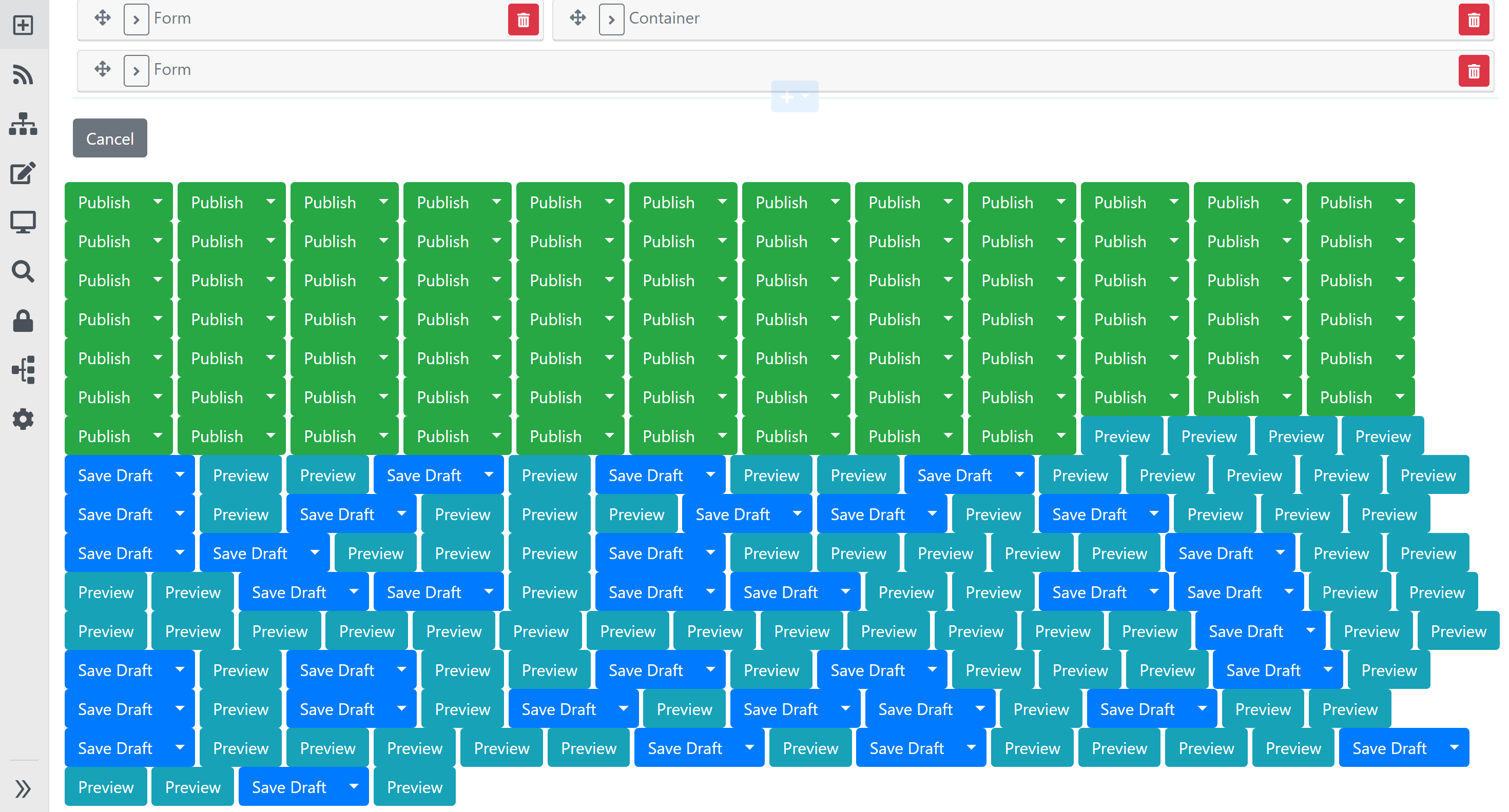
 ns8482e
All 18 comments
OMG what's that?!!
 hishamco
on 28 Dec 2019
hishamco
on 28 Dec 2019
ContentsDriver that responsible for creating these button shapes is creating shapes for every widgets.
ns8482e
on 28 Dec 2019
Wow that's a strange one 😄
 Skrypt
on 28 Dec 2019
Skrypt
on 28 Dec 2019
Your placement file is actually resetting the rule that hides these for widgets. Is there a way to filter by stereotype in the placement file, such that your new rules could just apply to "Content" ?
 sebastienros
on 2 Jan 2020
sebastienros
on 2 Jan 2020
These buttons are placed by ContentsDriver while Rendering a mock widgets. Display of mock widget itself is not rendered but if a child shape (i.e. Actions ) is placed on layout zone using placement then its visible regardless of display of that child shape (i..e. mock widget )
ns8482e
on 10 Jan 2020
such that your new rules could just apply to "Content"
I tried to differentiate between "Content" and "Widget" by trying to add IsPrimaryContent property in IUpdateModel but due to #5253, It forced me to define that property in every AdminController
ns8482e
on 10 Jan 2020
There could be a stereotype constraint in the placement file, we had that in O1.
sebastienros
on 23 Jan 2020
There could be a
stereotypeconstraint in the placement file, we had that in O1.
At first, the action button shapes should only be generated for primary content item being edited not for mock widgets
ns8482e
on 24 Jan 2020
Would the custom resource registration suggestion I made in the other PR solve this issue too?
sebastienros
on 20 Feb 2020
This issue is due to two bugs - one bug is fixed in PR #5499 and another is for resource registration fixed by PR #5507
ns8482e
on 21 Feb 2020
Coming back on this issue, why are you doing this:
"Content_PublishButton": [
    {
      "place": "/Actions:5"
    }
Or why do you have to do it. The end-result you are seeing is totally normal based on this rule. If it as just a test, and you don't really have a use case then I would just ignore it. If there is an actual use case, like changing the position on the Publish/Save buttons, we might just need a way to isolate the buttons for a specific element in this page. Like add a predicate that would limit the placement rule to being part of the main content being edited. Or have some sort of IsContained but at this level, not in the updater.
sebastienros
on 7 May 2020
I am creating extensible toolbar and properties residing at specific zone of my sub layout, where buttons/properties can be injected by different child widgets
ns8482e
on 7 May 2020
But every time any contained item editor runs it creates its own button shapes that I don’t want
ns8482e
on 7 May 2020
I am creating extensible toolbar and properties residing at specific zone of my sub layout, where buttons/properties can be injected by different child widgets
The way the content editor was designed was not to support that scenario. Everytime an editor is created, a publish button is created in the actions zone. That's by design.
We used this to make Widgets edition simple, just having to not render the Actions section in the Widget edit template. Why not use a custom Widget template in your own admin, or in your own module, such that your own widgets could target this zone?
sebastienros
on 7 May 2020
Issue is because there is currently no way to differentiate between Contained and Primary content item. Initially I thought its only related to BuildEditorin admin. But its same issue at frontend too #5700 and PR #5904
ns8482e
on 7 May 2020
Like add a predicate that would limit the placement rule to being part of the main content being edited. Or have some sort of
IsContainedbut at this level, not in the updater.
One suggestion that I made there https://github.com/OrchardCMS/OrchardCore/pull/5904#issuecomment-616937879 to have Contained property on ShapeMetata.
ns8482e
on 7 May 2020
If it as just a test, and you don't really have a use case then I would just ignore it.
@sebastienros I am using source code (not nuget/myget) and - I already using solution provided in PR #5499 and #5507 in my code hence fixing this on orchard core codebase is no longer priority for me. In your opinion if this is by design, I am happy to close this issue and related PRs.
ns8482e
on 8 May 2020
Closing this with note that following is not supported and not recommended to target Layout zone in Admin Edit.
"Content_PublishButton": [
{
"place": "/Actions:5"
}
Related issues
 AmrTealeb
·
34Comments
AmrTealeb
·
34Comments
 urbanit
·
40Comments
urbanit
·
40Comments
 stevetayloruk
·
30Comments
stevetayloruk
·
30Comments
 mattcrossmarc
·
31Comments
mattcrossmarc
·
31Comments
 dodyg
·
76Comments
dodyg
·
76Comments
Most helpful comment
Wow that's a strange one 😄